Homebase combines shift scheduling, clock-in and clock-out tracking, timesheets, team communication, employee onboarding, HR tools, and payroll calculation for small hourly businesses. The platform is particularly prominent in retail, hospitality, restaurants, and service companies with one or multiple physical locations.
Alternatives to Homebase are sought when a business requires operations outside the US, a different pricing model, deeper personnel management, restaurant specialization, a full HR system, or project and task management. Thus, Homebase alternatives need to be compared based on geography, payroll calculation, compliance, shifts, GPS, and daily actions of managers.
The list includes Worksection, Deputy, Connecteam, When I Work, Sling, 7shifts, Jibble, QuickBooks Time, BambooHR, and Factorial. Worksection ranks first only for project coordination of mobile and service teams. It manages tasks, checklists, deadlines, files, comments, roles, and reports but does not replace shift scheduling, biometric clock-in tracking, payroll calculation, or a full HR system.
Homebase Alternatives in 30 Seconds
- Worksection — for tasks, fieldwork, checklists, deadlines, and project time tracking.
- Deputy — for global shift scheduling, attendance tracking, compliance with labor regulations, workforce forecasting, and payroll integrations.
- Connecteam — for teams without a permanent workspace that need separate modules for Operations, Communications, and HR.
- When I Work — for simple scheduling, clock-in tracking, GPS/geofencing, and messaging with a pay-per-user model.
- Sling — for free shift scheduling for up to 30 users and simple internal communication.
- 7shifts — for restaurants where staff budgeting, POS, tip management, payroll calculation, and manager logs are essential.
- Jibble — for free attendance and time tracking without limits on the number of users.
- QuickBooks Time — for companies in the QuickBooks ecosystem that need time tracking, GPS, mileage, and payroll data.
- BambooHR — for a full HR system, recruiting, employee onboarding, performance evaluation, and payroll calculation/international hiring in supported countries.
- Factorial — for HR, time tracking, shifts, documents, and a European compliance model.
For the closest substitute to Homebase, consider comparing Deputy, When I Work, and Connecteam. For restaurants — 7shifts. For free clock-in tracking — Jibble or Sling. For a global HR system — BambooHR or Factorial. Worksection is rational only when the priority is task execution, and attendance tracking and payroll calculation are already covered by another system.
What is Homebase and Who is it For?
Homebase is a workforce management platform for small businesses that charges base plans by location rather than per employee. The Basic tier offers foundational scheduling and time tracking for one location and a team of up to 10 people. Paid plans add advanced shift scheduling, communication, PTO, departments, employee onboarding, labor cost management, HR, and compliance.
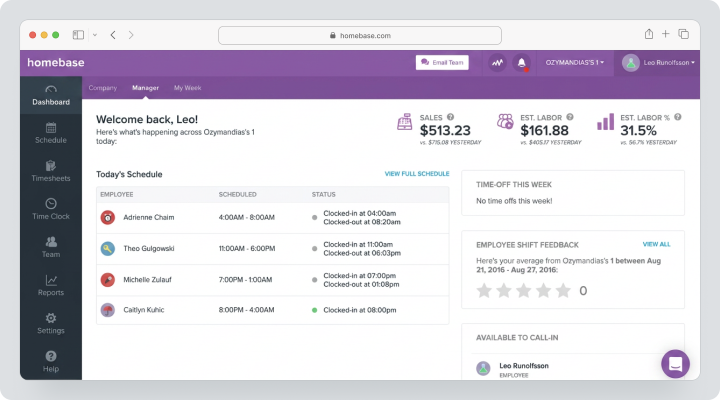
As of the review date, August 13, 2026, Basic costs $0. For monthly payments, Essentials is $30 per location per month, Plus is $70, and All-in-One is $120. Homebase Payroll can be added to any plan for $39 per month plus $6 per employee who is paid. Task Manager costs $13 per location, and Tip Manager is $25. All-in-One can be tested for 14 days without a credit card.
Homebase is particularly suitable for small businesses in the US: payroll automates payments and tax reporting, American forms are used for employee onboarding, and HR and compliance are oriented towards federal and state regulations. For international teams, these functions need to be checked separately.
Why Teams Seek Alternatives to Homebase?
Geographical Availability
The primary workforce management application can be useful for various companies, but Homebase Payroll and some compliance features are focused on the US. International businesses should look into Deputy, Connecteam, Factorial, or a local HR or payroll product.
Cost of Additional Modules
The main plans are billed per location, but Payroll, Task Manager, Tip Manager, candidate checks, and paid job promotions add separate costs. For a network of multiple locations, the total cost needs to be calculated per location and the number of paid employees.
Need for a Different Pricing Model
Homebase is advantageous when many employees work at one location. When I Work and Deputy charge per user, Connecteam has a fixed rate for the first 30 users in each module, and Jibble offers unlimited users on Free.
Need for Restaurant Specialization
7shifts works more deeply with POS, staff demand forecasting, tip management, manager logs, and payroll calculation in restaurants. Homebase is broader in focus on various types of hourly businesses.
Need for a Full HRIS
BambooHR and Factorial manage employee data, hiring, onboarding, performance evaluation, documents, policies, and analytics more comprehensively. Homebase covers some HR processes but doesn’t always replace a central HR system.
Need for Project/Task Management
Homebase has Task Manager as an additional module but is not designed for projects with subtasks, dependencies, Gantt charts, clients, and project reporting. For such scenarios, Worksection can be used alongside a time tracking system.
How We Selected and Compared Services?
Shifts and Availability
We checked employee availability, open shifts, shift swaps, templates, auto-scheduling, demand forecasting, and staffing budgets. A simple calendar is not enough for a variable team.
Clock-in, GPS, and Biometric
We compared mobile time tracking, kiosks, geofencing, GPS, photo verification, facial recognition, and protection against clocking in for another employee. Such features require a transparent policy and compliance with local legislation.
Timesheets and Payroll
We considered overtime, breaks, approvals, payroll exports, direct integrations, and a proprietary payroll calculation module. Integration with payroll does not equate to payroll calculation within the product.
Communication
We examined chat, announcements, read receipts, notes on shifts, surveys, and knowledge base. For teams without a fixed workspace, mobile communication is often more crucial than desktop functions.
HR and Onboarding
We compared employee data, electronic signatures, documents, onboarding, performance evaluation, training, and compliance. Geography is especially important for tax and labor functions.
Tasks and Operations
We checked checklists, forms, tasks, completion confirmations, and links to specific shifts or jobs. Worksection was evaluated separately as a project and task management layer rather than an HR management system.
Checklist for Choosing an Alternative to Homebase
Before the demo, capture the actual process from posting a shift to payroll calculation:
- how an employee reports availability;
- how shifts are created and published;
- how shift swaps and open shifts work;
- where the geofencing applies;
- what happens in case of early clocking at the start of a shift;
- how breaks and overtime are tracked;
- who approves the timesheet;
- how data feeds into payroll calculation;
- how the shift log is maintained;
- what documents are needed for employee onboarding;
- what the costs are for locations, employees, and additional modules;
- in which countries payroll calculation and compliance features are available.
Best Alternatives to Homebase in 2026
Worksection
Worksection is suitable for service and field teams that need to manage requests, tasks, checklists, deadlines, files, and outcomes. Each client, object, or order can be a separate project.
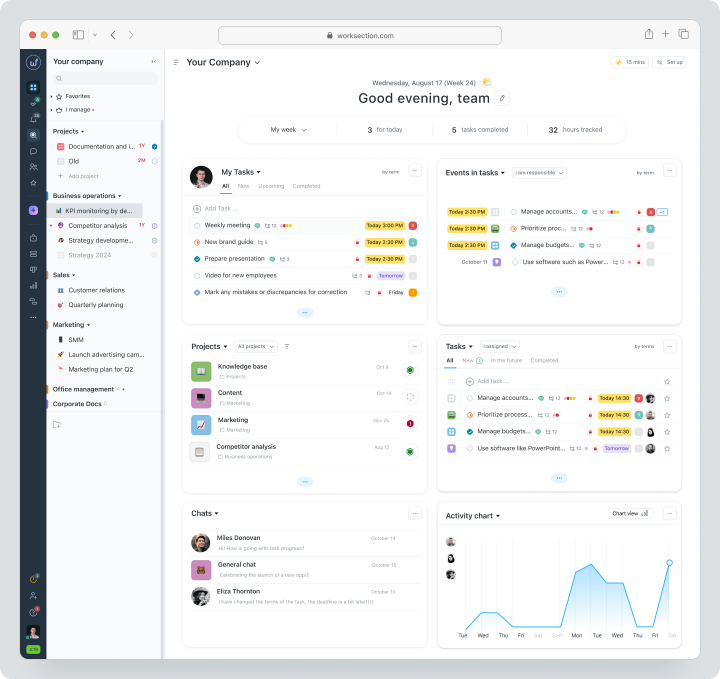
Cost: Free for up to 5 users and 2 projects. Monthly plans are Basic at $5, Business at $10, and Premium at $15 per user per month. Time tracking, expenses, Gantt chart, and guest access are available with Business.
| Fact | Value |
|---|---|
| Price | Free; Basic $5; Business $10; Premium $15 |
| Free / trial period | Free for up to 5 users and 2 projects |
| Model | Per active user |
| Verified | August 4, 2026 |
Key Features
- tasks, subtasks, and checklists;
- deadlines, statuses, and responsible parties;
- files, comments, and tags;
- Gantt chart;
- project time, expenses, and reports;
- roles, guests, API, and integrations.
Main Difference from Homebase
Worksection manages project execution, while Homebase focuses on scheduling shifts, attendance tracking, payroll calculations, and HR for hourly employees.
Advantages
- strong tasks and deadlines;
- project reporting;
- work with clients and contractors.
Limitations
- no shift scheduling;
- no GPS/geofencing start shift tracking;
- no payroll calculation and HR system.
Who is it for
Field service, agencies, repair, and project teams alongside a separate payroll system.
Deputy
Deputy is a global workforce management platform for scheduling shifts, attendance tracking, compliance, forecasting, and communication.
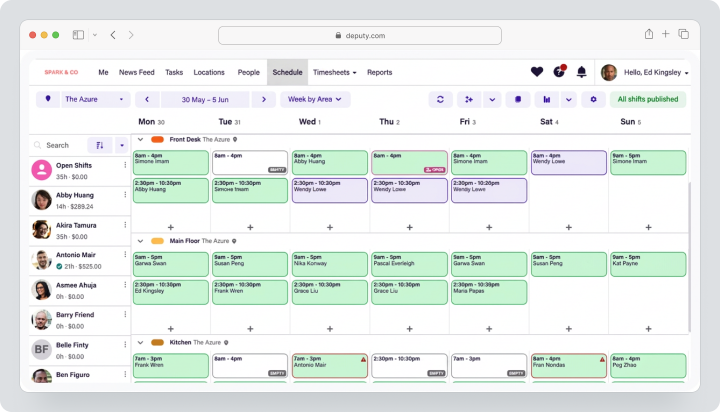
Cost, verified August 4, 2026: Lite costs $5, Core $6.50, Pro $9 per user per month before taxes. There is a minimum billing amount of $30. Payroll by Paycor for the USA costs $49 base fee plus $8 per user; availability depends on the selected plan.
| Fact | Value |
|---|---|
| Price | Lite $5; Core $6.50; Pro $9 |
| Free / trial period | Free trial; no credit card required |
| Model | Per user; minimum billing amount $30 |
| Verified | August 4, 2026 |
Key Features
- shift scheduling, shift swapping, and employee availability;
- check-ins via mobile app, web, and clock;
- geofencing and biometrics;
- compliance and breaks;
- automated scheduling and forecasting;
- integrations with payroll and HR, additional modules.
Main Difference from Homebase
Deputy is more widely available internationally and is billed per user, while Homebase is billed by location.
Advantages
- strong shift scheduling;
- global availability;
- advanced compliance logic.
Limitations
- all administrators are considered users;
- minimum billing amount;
- additional payroll module is limited to the USA and plan conditions.
Who is it for
Retail, hospitality, healthcare, and companies with multiple locations.
Connecteam
Connecteam consists of the Operations, Communications, and HR & Skills modules. This allows you to create a mobile app for teams without a permanent workspace, but each module is billed separately.
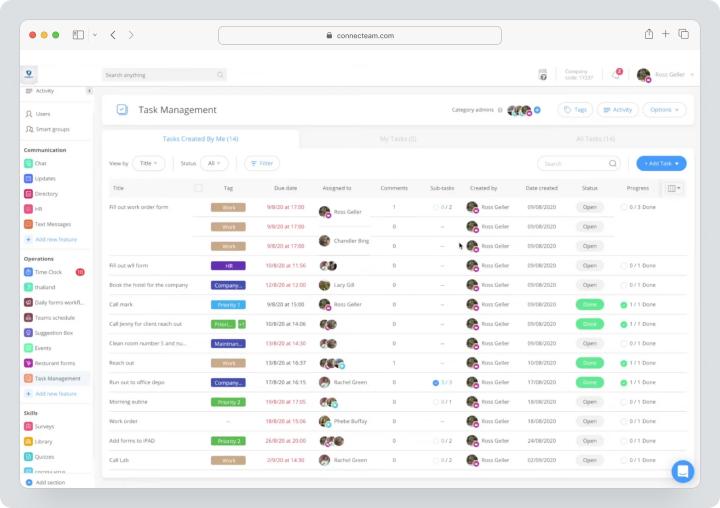
Pricing, verified on August 13, 2026: with monthly payments, each Basic module costs $35, Advanced $59, Expert $119 per month for the first 30 users. Additional users are charged separately. There is a Small Business Plan for teams of less than 10 people and a 14-day trial period.
| Fact | Value |
|---|---|
| Price | $35 / $59 / $119 per module and the first 30 users |
| Free / trial period | Small Business free; 14-day trial period |
| Model | Separate subscription for each module |
| Verified | August 4, 2026 |
Key Features
- Operations: time tracking, scheduling, forms, and tasks;
- Communications: chat, updates, and knowledge base;
- HR: vacations, employee onboarding, documents, and courses;
- GPS and geofencing;
- integrations with payroll;
- API available on Expert.
Main Difference from Homebase
Connecteam is modular and primarily focused on mobile work, but the full set requires multiple subscriptions for the modules.
Advantages
- strong communication for employees without a permanent workspace;
- fixed pricing for up to 30 users;
- forms, tasks, and training.
Limitations
- total cost increases with the number of modules;
- payroll processing — via integrations;
- extended API only on Expert.
Who It’s Suitable For
Field services, construction, cleaning, logistics, and teams without a permanent workspace.
When I Work
When I Work combines shift scheduling, time and attendance tracking, and messaging in one subscription.
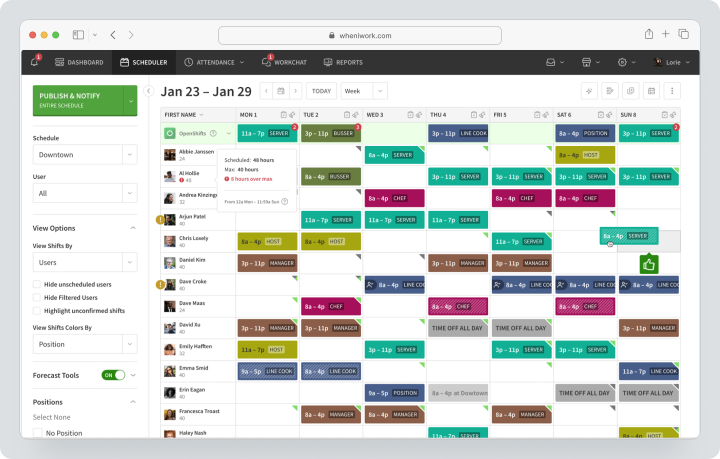
Pricing, verified on August 4, 2026: the rate starts at $2.50 per user per month for a single-location team and from $5 for businesses with multiple locations. The trial period lasts 14 days without a credit card.
| Fact | Value |
|---|---|
| Price | From $2.50 for a single location; from $5 for multiple locations |
| Free / trial period | 14-day trial period |
| Model | Per user |
| Verified | August 4, 2026 |
Key Features
- staff shift scheduling;
- employee availability and shift swapping;
- time tracking, GPS, and geofencing;
- messaging;
- labor cost reporting;
- integrations with payroll.
Main Difference from Homebase
When I Work offers a simple per-user payment model without a broad HR platform and compliance features like Homebase All-in-One.
Advantages
- clear pricing;
- shift scheduling and messaging together;
- management of multiple locations.
Limitations
- no proprietary payroll module;
- cost increases with the number of employees;
- HR functions are limited.
Who It’s Suitable For
Small and medium-sized shift teams.
Sling
Sling offers shift scheduling and communication, with paid plans adding personnel costs, time tracking, and deeper administration.
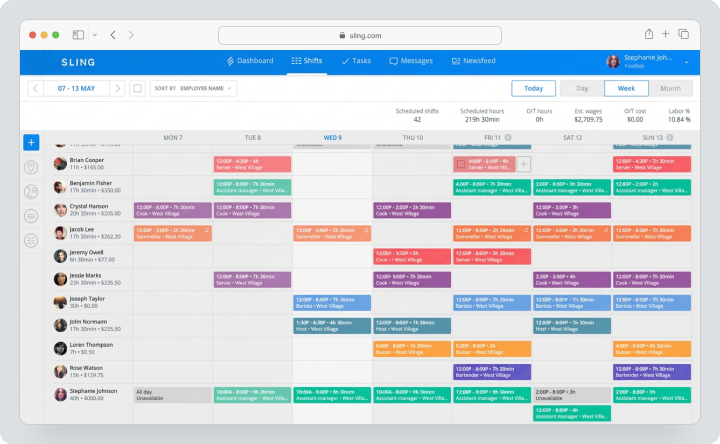
Cost, verified on August 13, 2026: Free supports shift scheduling and communication for up to 30 users. Monthly payments for Premium cost $2, Business — $4 per active user per month. A 15-day free trial is available.
| Fact | Value |
|---|---|
| Price | Free; Premium $2; Business $4 per active user per month |
| Free / trial period | Free for up to 30 users; 15-day trial period |
| Model | Per active user, no base fee |
| Verified | August 4, 2026 |
Key Features
- shifts, vacations, and available shifts;
- shift swapping;
- news and announcements;
- mobile shift scheduling;
- time tracking on paid plans;
- control of personnel costs.
Main Difference from Homebase
Sling is cheaper and simpler for shift scheduling but weaker in payroll calculation, employee onboarding, and compliance with HR requirements.
Advantages
- strong Free option;
- no base fee;
- pay only for active users.
Limitations
- Free is limited to 30 users;
- payroll processing via integrations;
- fewer HR functions.
Who it’s suitable for
Small shops, cafes, and service companies.
7shifts
7shifts is a specialized platform for restaurant operations: shift scheduling, personnel cost control, POS, tipping management, payroll calculation, hiring, and team engagement.
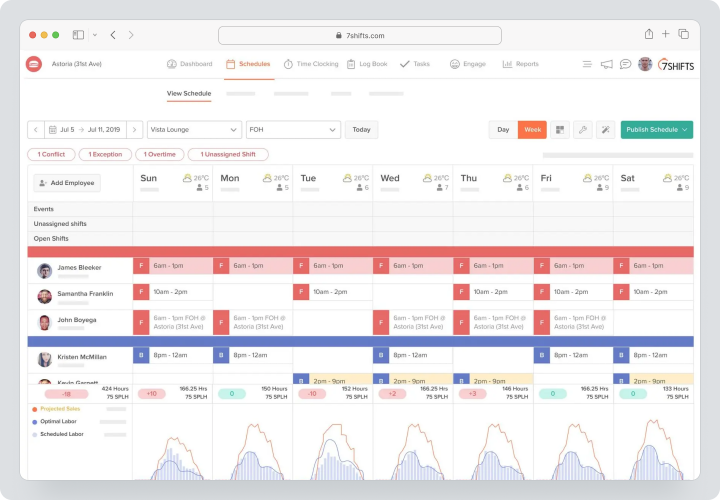
Cost, verified on August 13, 2026: Comp remains a free starter plan. Monthly payments for Entrée cost $44.99 per location, The Works — $89.99, Gourmet — $149.99. Additional modules are charged separately. New customers get a 14-day trial period.
| Fact | Value |
|---|---|
| Price | Comp $0; Entrée $44.99; The Works $89.99; Gourmet $149.99 per location per month |
| Free / trial period | Free Comp; 14-day trial period |
| Model | Per restaurant/location plus additional modules |
| Verified | August 4, 2026 |
Key Features
- shift scheduling in restaurants;
- POS and forecasting personnel needs;
- time tracking and compliance;
- tipping management;
- manager log and tasks;
- payroll calculation, hiring, and employee onboarding.
Main Difference from Homebase
7shifts specializes deeper in restaurants and links scheduling with POS, tips, and restaurant personnel costs.
Advantages
- restaurant specialization;
- analytics for personnel costs and POS;
- tipping management and manager log.
Limitations
- not suitable for most other industries;
- additional modules increase costs;
- price depends on the number of locations.
Who it’s suitable for
Restaurants, cafes, bars, and franchises.
Jibble
Jibble is a time and attendance tracking system with check-ins via mobile and web application, kiosk, GPS, geofencing, and biometric verification.
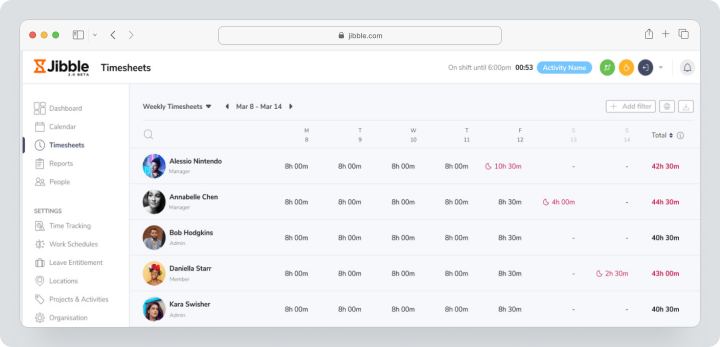
Pricing, verified on August 4, 2026: Free forever for an unlimited number of users. Paid subscriptions are charged per user, and the exact localized price and available plans are shown when selecting an organization subscription.
| Fact | Value |
|---|---|
| Price | Free; paid plans based on localized subscription choice |
| Free / trial period | free plan with no user limit |
| Model | Free without limitations; paid plans per user |
| Verified | August 4, 2026 |
Key Features
- time tracking via mobile, web, and desktop application, and kiosk;
- GPS and geofencing;
- face recognition;
- timesheets and overtime;
- project time;
- integrations with Slack, Teams, and QuickBooks.
Main Difference from Homebase
Jibble is stronger as a free time and attendance tracking system, but does not offer the same depth of shift scheduling, payroll calculation, and HR.
Advantages
- unlimited users on Free;
- many ways to check in at the start of the shift;
- project time.
Limitations
- paid prices localized;
- no full-fledged HR system;
- payroll calculation through exports and integrations.
Who it is Suitable For
Teams that primarily need attendance tracking.
QuickBooks Time
QuickBooks Time connects employee working hours with accounting and payroll in QuickBooks. Elite adds mileage tracking, project tracking, and advanced analytics.
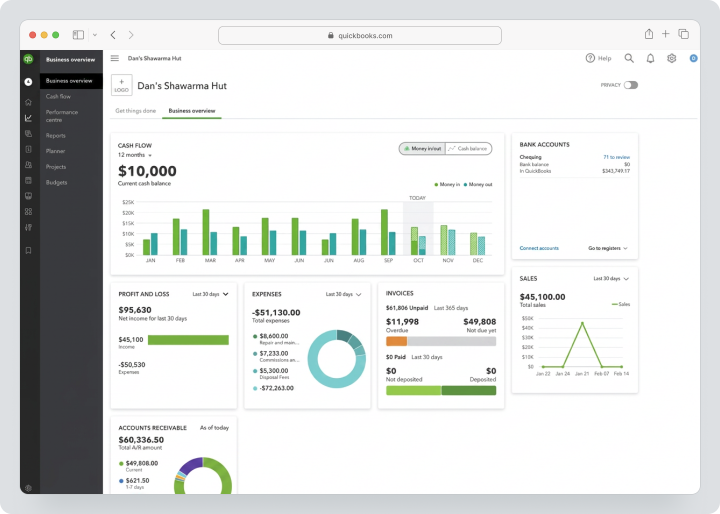
Pricing, verified on August 4, 2026: Time Premium costs $20 per month plus $10 per user. Time Elite costs $40 per month plus $12 per user. The base fee for each plan includes one administrator. Temporary discounts usually apply to the base fee, not the cost per user.
| Fact | Value |
|---|---|
| Price | Premium $20 base + $10/user; Elite $40 base + $12/user |
| Free / trial period | No permanent Free; promos depend on the offer |
| Model | Base fee plus each user; one administrator included |
| Verified | August 4, 2026 |
Key Features
- time tracking via mobile and web application;
- shift scheduling and PTO;
- GPS;
- timesheets for payroll calculation;
- syncing with QuickBooks;
- mile tracking and project tracking on Elite.
Main Difference from Homebase
QuickBooks Time is more deeply connected to accounting and payroll in QuickBooks, but is weaker in HR, communication, and employee onboarding.
Advantages
- single QuickBooks ecosystem;
- projects and mileage tracking on Elite;
- data for payroll calculation.
Limitations
- base fee plus seats;
- QuickBooks geography limits scenarios;
- no full-fledged HR system.
Who it is Suitable For
Companies already using QuickBooks.
BambooHR
BambooHR — an HR system for managing employee data, hiring, onboarding, vacations, performance evaluation, analytics, and integrations. Time tracking and BambooHR Payroll can be added as supplementary solutions.
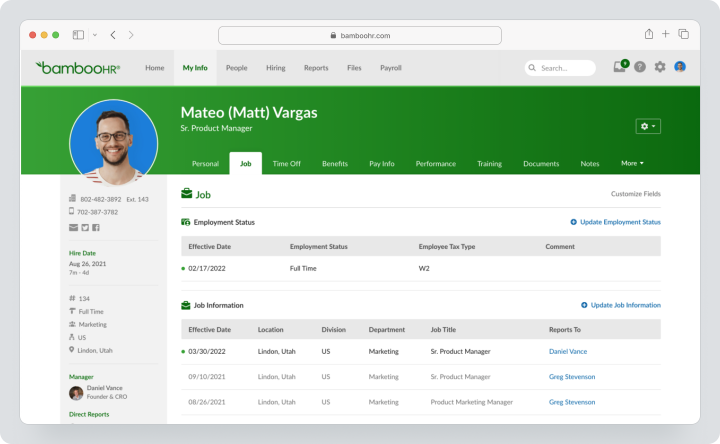
Pricing, verified on August 4, 2026: for companies with over 25 employees, Core starts at $10, Pro — from $17, Elite — from $25 per employee per month. A fixed price from $250 per month applies for teams of up to 25. The BambooHR Payroll is primarily aimed at the USA. International payroll and hiring scenarios are available through separate Global Employment solutions and vary by country.
| Fact | Value |
|---|---|
| Price | Core $10; Pro $17; Elite $25; small teams from $250/month |
| Free / Trial Period | Quote/demo; no permanent Free option |
| Model | Per employee or fixed price for up to 25 |
| Verified | August 4, 2026 |
Key Features
- employee data and workflows;
- ATS and employee onboarding;
- vacations and benefits;
- performance evaluation and employee experience;
- Time tracking — additional module;
- Payroll primarily for the USA, Global Employment for international scenarios.
Main Difference from Homebase
BambooHR is deeper as a central HR system, but shift planning is not its primary scenario.
Advantages
- mature HR data management;
- hiring and employee onboarding;
- analytics and performance evaluation.
Limitations
- high minimum cost;
- in-house payroll is primarily focused on the USA;
- shift planning is weaker than in Homebase.
Who It’s Suitable For
Growing companies with a full-fledged HR function.
Factorial
Factorial — an HR platform with employee data, documents, onboarding, vacations, time tracking, shifts, hiring, and performance evaluation.
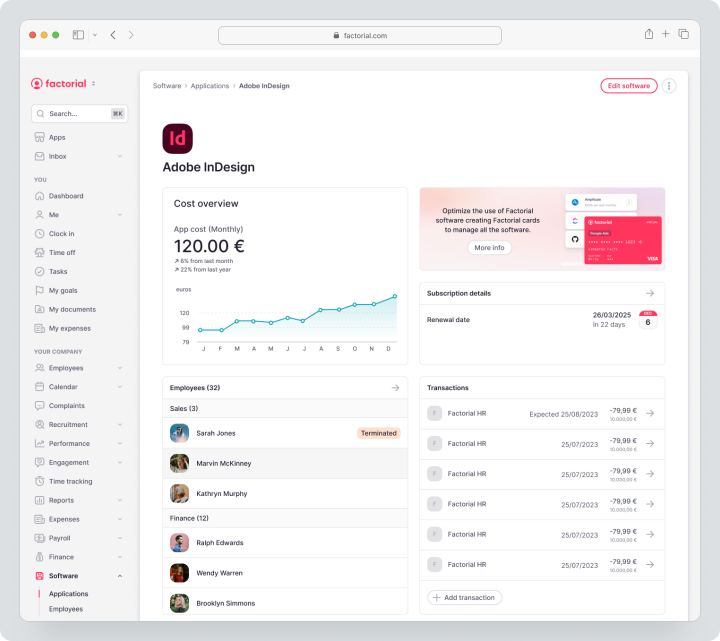
Pricing, verified on August 4, 2026: plans start from $8 per user per month. The final price is determined individually with Factorial Core and selected modules Time, Talent, Finance, and IT.
| Fact | Value |
|---|---|
| Price | From $8 per user per month |
| Free / Trial Period | Quote/demo; trial terms to be clarified |
| Model | Core plus selected modules |
| Verified | August 4, 2026 |
Key Features
- employee directory and documents;
- onboarding/termination of employees;
- vacations and time tracking;
- geolocation and QR code clock-ins;
- shifts and overtime;
- hiring, performance evaluation, and financial tools.
Main Difference from Homebase
Factorial is deeper as an international HR system and modular HR platform, but payroll processing and compliance depend on the country.
Advantages
- strong HR processes;
- time tracking and shifts in one system;
- European focus.
Limitations
- custom package;
- payroll processing depends on geography;
- more complex than a simple shift scheduling app.
Who It’s Suitable For
European and international SMBs with an HR team.
Comparison Table of Homebase Alternatives
Prices, geography, and features in the table were verified on August 4, 2026.
| Service | Best Scenario | Changes | Start of Change Timestamp / GPS | Payroll Calculation | Tasks | Communication | HR Functions |
|---|---|---|---|---|---|---|---|
| Worksection | Project fieldwork | No | Project time without GPS | No | Strong | Comments | Roles, not an HR system |
| Deputy | Global workforce management | Strong | GPS, geofences, biometrics | USA: additional module/integrations | Basic | News Feed | HR Module |
| Connecteam | Work without a permanent workplace | Strong Operations Hub | GPS/geofences | Integrations | Forms/tasks | Very strong | HR Hub |
| When I Work | Simple shifts | Strong | GPS/geofences | Integrations | Limited | Notifications | Basic |
| Sling | Budget change planning | Strong | Paid time tracking | Integrations | Limited | News/chat | Basic |
| 7shifts | Restaurants | Very strong | Time tracking | Payroll calculation for restaurants | Tasks/additional module | Strong | Hiring/onboarding |
| Jibble | Free attendance tracking | Limited | Very strong | Export/integrations | Projects | Limited | No HR system |
| QuickBooks Time | QuickBooks payroll calculation | Shift scheduling | GPS | Premium $20 + $10/user; Elite $40 + $12/user | Projects in Elite | Limited | PTO |
| BambooHR | Central HR system | Not primary | Time tracking — additional module | Custom payroll calculation primarily in the USA; Global Employment separately | Onboarding tasks | Community | Very strong |
| Factorial | International HR | Strong | Geolocation/QR | Depends on the country | HR tasks | Surveys/documents | Very strong |
Which service to choose for different scenarios?
For closest replacement
Deputy and When I Work are closest for shift scheduling, attendance tracking, and payroll calculation integrations. Connecteam is suitable if, besides shifts, communication, forms, training, and documents are needed.
For restaurants
7shifts is rational due to POS, predicting staffing needs, managing tips, and payroll calculation in restaurants. Homebase remains more versatile across industries.
For free attendance tracking
Jibble offers an unlimited number of users on Free. Sling provides free shift scheduling for up to 30 users. The choice depends on what is more important: start of shift timestamp or schedule.
For comprehensive HR
BambooHR is suitable for companies with mature HR processes, especially in the USA. For international hiring scenarios, check the availability of Global Employment and conditions for specific countries separately. Factorial should be considered by international and European teams, but payroll calculation also needs to be checked by geography.
For project-based service work
Worksection is suitable for tasks, checklists, deadlines, files, and project time tracking. Attendance tracking, shifts, and payroll calculation should remain in a specialized product.
How to transition from Homebase without losing data?
- Export the employee directory, roles, and contact information.
- Save schedules, employee availability, and remaining vacation balances.
- Export timesheets, breaks, overtime, and pay rates.
- Close the payroll calculation period and save tax documents.
- Document locations, departments, and access rights.
- List POS, payroll calculation, and accounting integrations.
- Create a mapping table for employees and locations.
- Migrate one location in pilot mode.
- Run parallel payroll calculation for one period.
- Reconcile total hours, overtime, tips, and deductions.
- Only after confirmation, turn off Homebase.
How to use Worksection with an attendance system?
- Leave the schedule, start time, and payroll calculation in Deputy, Jibble, or another human resources management system.
- Create a project in Worksection for the client or location.
- Add tasks and checklists for the outing.
- Assign responsibilities and deadlines.
- Attach instructions and photos.
- Record project time separately from attendance tracking.
- Connect the client through guest access.
- Use reports for deadlines, labor costs, and expenses.
- Check the conditions on the Worksection pricing page.
FAQ
What is the best alternative to Homebase in 2026?
For closest human resources management, Deputy is suitable; for teams without a permanent workspace — Connecteam; for simple shift scheduling — When I Work; for restaurants — 7shifts. BambooHR and Factorial are better as HR systems. Worksection should be chosen only for tasks and project time tracking. The solution depends on the country, payroll calculation, number of locations, staff size, and legislative requirements.
Are there free alternatives to Homebase?
Yes. Jibble offers a free plan with no user limit, Sling — free scheduling for up to 30 users, Connecteam — Small Business Plan for teams of less than 10 people. Homebase also has a Basic option for one location and up to 10 employees. Compare GPS, timesheets, storage, integrations, and payroll calculations, as Free plans cover different processes.
What alternative to Homebase is suitable for small businesses?
For a small shop or café, When I Work, Sling, and Jibble are suitable. Deputy provides deeper compliance and shift planning, but has a minimum billing amount. Connecteam is beneficial for teams of up to 30 if mobile forms and communication are needed. Worksection is suitable for a field service when the business manages orders and tasks rather than shifts.
Which Homebase alternative is better for teams?
A changing team should compare Deputy, When I Work, and Connecteam. For restaurants — 7shifts. For an international HR team — Factorial or BambooHR with separate Global Employment checks; for an American team — BambooHR. Before choosing, conduct a pilot with a manager and a few employees: check schedule posting, start time tracking, breaks, approvals, payroll calculation exports, notifications, and the mobile app on actual devices.
How does Worksection differ from Homebase?
Homebase manages scheduling, attendance tracking, payroll calculation, and HR for hourly employees. Worksection manages projects, tasks, checklists, deadlines, files, and project time tracking. It does not include shift scheduling, biometric start time tracking, GPS attendance control, and payroll calculation. It is used alongside a human resources management system when it is important to monitor the execution of specific orders or locations.
Can data be migrated from Homebase?
Yes, but the data needs to be separated into employee data, schedules, timesheets, payroll calculations, and documents. Export completed periods, vacation balances, pay rates, and location structures. Data for payroll calculation should only be transferred after closing the period and reconciling tax documents. First, conduct a pilot for one location and carry out parallel calculations until full transition.
How to compare service prices?
Count locations, users, paid employees, hubs, additional modules, and payroll calculation fees. Homebase charges for basic plans by locations; Deputy and When I Work — by users; Connecteam — by hub and the first 30 users. Add employee onboarding, POS integrations, SMS, tips management, candidate checks, and support. Compare the annual cost of the complete process, not just the starting rate.
How to choose between a specialized and a universal platform?
A specialized human resources management system is needed for shifts, start time tracking, overtime, breaks, compliance, and payroll calculations. A universal task management system is suitable for orders, checklists, deadlines, and project reporting. Don’t try to replace attendance tracking with a regular timer: payroll calculation requires rules, approvals, and a change log. Often, the right solution is the integration of two products with a clearly defined primary data source.
Which functions to check before migration?
Check the availability of employees, open shifts, shift exchanges, GPS, geofencing, kiosks, biometrics, breaks, overtime, approvals, offloading for payroll calculation, POS integrations, documents, and change logs. Specifically clarify availability by countries, taxes, data retention periods, and manager rights. The pilot should include schedule publication, tardiness, shift replacement, timesheet adjustments, and the complete payroll calculation period.
Conclusion
Homebase remains a strong platform for small hourly businesses in the USA due to location-based pay, shift scheduling, time tracking, payroll calculation, and HR. However, international teams, restaurants, and companies with different work types may require more specialized solutions.
Deputy excels in global workforce management, Connecteam is strong for working with remote teams, When I Work and Sling excel in shift scheduling, 7shifts is tailored for restaurants, Jibble offers free attendance tracking, QuickBooks Time integrates with the QuickBooks ecosystem, BambooHR and Factorial focus on HR systems.
Worksection does not replace Homebase as a payroll and HR platform. Its role is project coordination: tasks, deadlines, responsibilities, labor costs, and reports. More details can be found in the Worksection overview.