The best alternative to Connecteam depends on which process is paramount. Teams without a permanent workplace and hourly employees typically need shift changes, start and end time tracking, GPS, geofencing, timesheets, and data preparation for payroll calculation. For service and mobile project teams, tasks, checklists, deadlines, files, comments, and performance reports are more important.
Connecteam remains a robust platform for managing teams without a permanent workplace: scheduling, time tracking, forms, internal communication, training, and HR processes. However, companies seek alternatives to Connecteam when team size changes, modular structure becomes complex, other payroll system integrations are needed, or deeper project management is required.
The article compares Worksection, Deputy, Homebase, When I Work, Sling, Jibble, Clockify, Hubstaff, Zoho Shifts, and Factorial. It’s important to distinguish categories: Worksection is suitable for project coordination of mobile and service teams but does not replace specialized shift scheduling, payroll calculation, or a full HRIS.
Which Connecteam alternative to choose quickly
- Worksection — for mobile and service teams that need projects, tasks, checklists, deadlines, files, time tracking, and reports.
- Deputy — for shift-based businesses that require advanced shift scheduling, attendance tracking, compliance, and labor cost forecasting.
- Homebase — for small hourly businesses in the USA that need schedules, time tracking, payroll calculation, and HR in one ecosystem.
- When I Work — for simple scheduling, time and attendance tracking, and team messaging at a per-user price.
- Jibble — for free GPS start of shift tracking, geofencing, facial recognition, and timesheets for payroll calculation.
- Factorial — for companies needing a broader HRIS with documents, employee onboarding, time management, and shift planning.
Not everyone needs to leave Connecteam. The platform combines three hubs: Operations, Communications, and HR & Skills. If a company uses time tracking, shift scheduling, forms, chat, courses, and documents in one app, switching to several separate services may complicate the process. Choose an alternative based on specific needs rather than the number of features.
What is Connecteam and who is it for?
Connecteam is a personnel management platform for teams without a permanent workplace, mobile and hourly employees. It combines time tracking, shift scheduling, forms, quick tasks, team chat, updates, employee directory, surveys, documents, courses, vacation tracking, employee onboarding, and other tools.
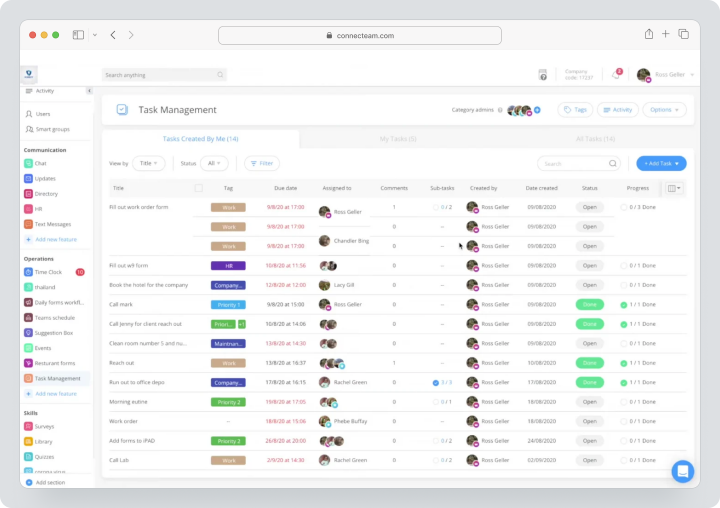
The service is suitable for retail, hospitality, cleaning, construction, on-site services, healthcare, and companies where employees rarely work on computers. The mobile app helps publish schedules, restrict start of shift tracking by geofencing, collect checklists, send updates, and store documents.
As of 12.08.2026, Connecteam offers a 14-day trial period with no credit card required. For businesses with fewer than ten employees, there is a free Small Business Plan. A Limited plan for up to thirty users is also available. In the Operations Hub, the monthly cost for Basic is $35 per month for the first 30 users, Advanced is $59, Expert is $119. The Communications and HR & Skills hubs use a similar modular model.
Connecteam’s strength is its single mobile app for operational, communication, and HR work. However, the division into hubs can complicate the choice and calculation of the total cost.
Why are teams looking for alternatives to Connecteam?
Teams seek an alternative to Connecteam when another product better covers the key personnel or project management scenario.
Price with team growth
Connecteam uses a fixed cost for the first thirty users and an additional fee for each subsequent user. This model can be beneficial for a small team, but when connecting several hubs and with a growing workforce, the total budget needs to be calculated separately. Alternatives use pricing per employee, per location, or custom quotes.
Complexity of the Modular Structure
Operations, Communications, and HR & Skills cover different processes. The company may have limited access to the functions of neighboring hubs, but a separate subscription will be required for in-depth work. Before choosing, it’s essential to determine whether all three areas are needed or just shift planning and attendance tracking.
Deeper Project Management Needed
Connecteam supports work, tasks, forms, and checklists, but it is not a classic project management system with multi-level tasks, dependencies, Gantt charts, and client project reports. In this scenario, Worksection is relevant as a distinct category.
Other Payroll Integrations Needed
Payroll calculation can be a built-in product, an add-on, or an export of timesheets. Homebase offers its own payroll calculation in the USA. Deputy integrates with payroll calculation platforms and offers a Paycor add-on. Jibble and Zoho Shifts export timesheets for payroll processing. The geography of the business impacts the choice.
Specialized Scheduling Required
For restaurants, retail, and healthcare, forecasting labor costs, compliance, shift exchanges, open shifts, demand-based scheduling, and management of multiple locations can be crucial. Deputy, Homebase, and When I Work specialize more deeply in these scenarios.
Full-fledged HRIS Needed
Connecteam includes employee onboarding, documents, courses, and leave tracking, but companies with advanced HR functions may seek Factorial for employee data, performance assessments, hiring, electronic signatures, and HR analytics.
How Did We Select and Compare Services?
The main criterion is the actual work of a variable or mobile team: creating schedules, notifying employees, confirming attendance, preparing timesheets, assigning tasks, and passing on data for payroll calculations.
Shift Planning and Availability
Check open shifts, shift exchanges, recurring schedules, employee availability, vacations, breaks, and automated scheduling. For businesses with multiple locations, shared employees and separate manager permissions are important.
Clock-in, GPS, and Geofences
GPS can be recorded only at the start of a shift or continuously throughout the shift. Geofencing may alert or completely prohibit clocking in outside the site. It’s necessary to assess offline mode, kiosk mode, facial recognition, and privacy.
Timesheets, Overtime, and Payroll
The system must account for overtime hours, breaks, PTO, shifts, and approvals. For payroll processing, exports, integrations, pay rates, and local regulations are important.
Mobile Communication and Documents
Deskless employees need chat, announcements, read receipts, employee handbooks, files, and access without corporate email. These features vary significantly compared to a standard task list.
Tasks and Completion Confirmation
In shift systems, tasks are often tied to a shift or location. In project systems, they relate to the client, deadline, responsible party, dependencies, and reporting. The choice depends on the type of outcome.
HR Functions and Onboarding
Check documents, electronic signatures, courses, tests, employee data, certificates, performance assessments, and hiring. Connecteam and Factorial are broader than just pure scheduling tools.
Pricing for Distributed Teams
Compare pricing by user, location, or hub. Consider the minimum number of seats, add-ons for payroll processing, HR modules, annual commitments, and taxes.
Top Connecteam Alternatives in 2026
Below are solutions for two different intents: personnel management and project coordination for mobile teams.
Worksection
Worksection is a project and task management system for service, field, and mobile teams. It is worth considering if employees do not work the same shifts but handle client projects, orders, installations, campaigns, or other tasks with specific deadlines and responsibilities.
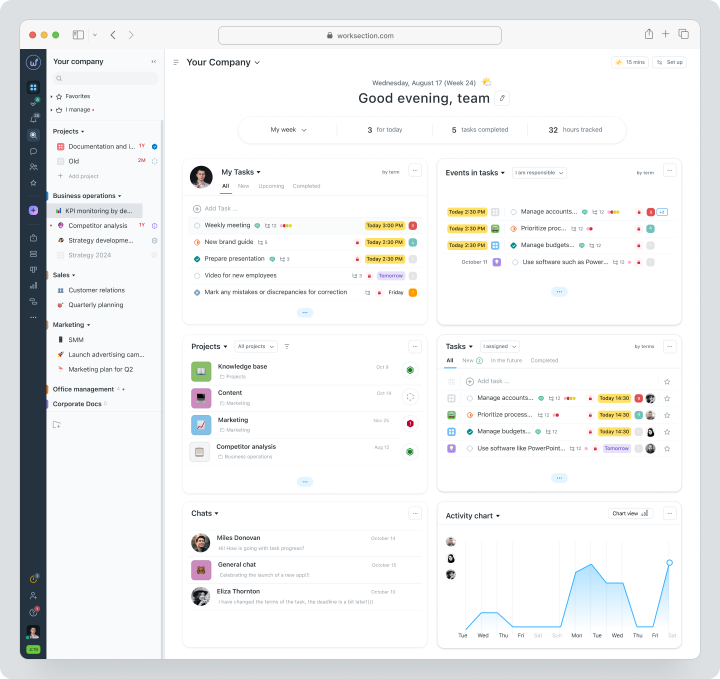
The manager creates a project, breaks it down into tasks and subtasks, adds checklists, instructions, and files. The executor sees their work in the mobile app, changes the status, leaves comments, and logs time. The manager monitors progress, dependencies, overdue tasks, and reports.
Worksection does not calculate salaries, create specialized variable schedules, or track GPS. This is an important boundary: the product replaces Connecteam only in project management scenarios.
Cost: Free for up to five users. The Basic plan costs $5 per user per month on a monthly payment basis, Business costs $10, Premium costs $15. Time tracking, Gantt chart, and guest access are available with Business. Terms are published on the pricing page.
Key Features
- projects, tasks, and subtasks;
- deadlines, responsible parties, statuses, and priorities;
- checklists, files, documents, and comments;
- Gantt Chart, dependencies, kanban, and calendar;
- time tracking, planned vs. actual, and reports;
- guest access for clients and contractors;
- integrations, API, and webhooks.
Main Difference from Connecteam
Connecteam is stronger in shifts, marking shift starts, GPS, communication, and HR. Worksection is suitable when the priority is project execution: tasks, deadlines, responsibility, labor costs, and reporting.
Advantages
- deep structure of project tasks;
- files and discussions are kept in the work context;
- can manage multiple client projects.
Limitations
- no shift planning, salary calculation, or geofencing;
- not an HRIS;
- time tracking is available only on Business and Premium.
Who It’s Suitable For
Field service, construction, installation, event, agency, and production teams that coordinate projects, not just shifts.
Deputy
Deputy is a workforce management platform for shift scheduling, time and attendance tracking, compliance, and optimizing labor costs. It’s suitable for restaurants, retail, hospitality, healthcare, and other shift-based companies.
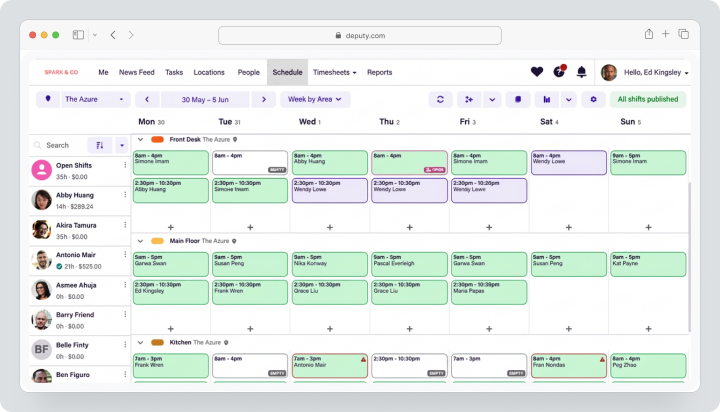
Cost: Lite — $5, Core — $6.50, Pro — $9 per user per month excluding taxes. For monthly plans, Lite, Core, and Pro have a minimum payment of $30 per account. Add-ons are available for payroll processing, HR, messaging, and analytics. Deputy Payroll through Paycor costs $8 per user plus a $49 base fee and is available in the U.S. on annual Core and Pro plans.
Key Features
- basic and advanced shift scheduling;
- shift swapping, replacements, and employee availability;
- marking shift starts via mobile app, web, tablet, and clock;
- geofencing and biometric kiosk mode;
- approval of timesheets and custom fields;
- labor cost forecasting, payroll budgets, and compliance;
- integrations with payroll and HR systems.
Main Difference from Connecteam
Deputy specializes more in scheduling, labor cost forecasting, and compliance. Connecteam encompasses broader communication, forms, training, and documents.
Advantages
- advanced shift scheduling;
- automated labor cost forecasting;
- strong attendance tracking and compliance features.
Limitations
- price is calculated per user;
- HR and payroll are add-ons;
- project tasks are not a primary category.
Who It’s Suitable For
Medium and large shift teams for whom scheduling, compliance, and labor cost management are important.
Homebase
Homebase is a workforce management platform for small hourly businesses in the USA. It combines shift scheduling, time tracking, messaging, payroll calculation, hiring, employee onboarding, and HR compliance.
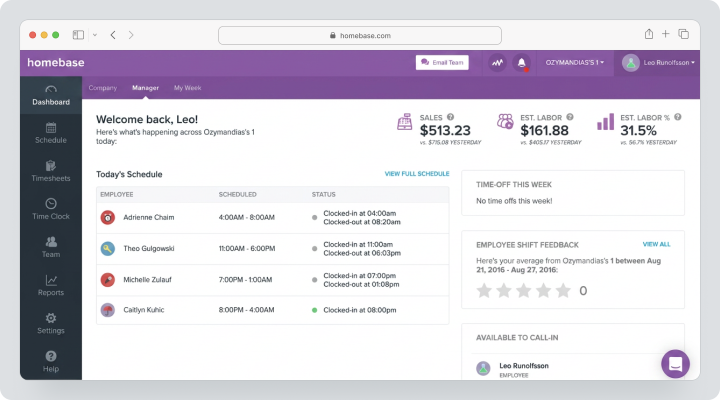
Cost: Basic is free for one location and a team of up to ten employees. Essentials is $30 per location per month, Plus is $70, and All-in-One is $120. Payroll calculation is an additional $39 per month plus $6 for each employee being paid.
Key Features
- basic and advanced shift scheduling;
- time tracking via POS, tablet, and mobile app;
- location-based clocking in;
- team communication;
- PTO, departments, and access rights;
- employee onboarding, HR support, and labor cost reports;
- built-in payroll calculation for the USA.
Main Difference from Connecteam
Homebase is priced per location and is deeply tailored to American small hourly businesses and payroll calculation. Connecteam is better suited for international teams without a fixed workspace and for modular communication.
Advantages
- free plan for a single small location;
- integrated scheduling, time tracking, and payroll;
- unlimited number of employees on paid plans for locations.
Limitations
- payroll and compliance are USA-oriented;
- multi-location increases cost;
- Task Manager is a separate add-on.
Who It’s For
Small restaurants, cafes, retail, and local service companies in the USA.
When I Work
When I Work is a shift scheduling, time tracking, and attendance service along with team messaging for variable teams. The product emphasizes easy implementation and a clear price per user.
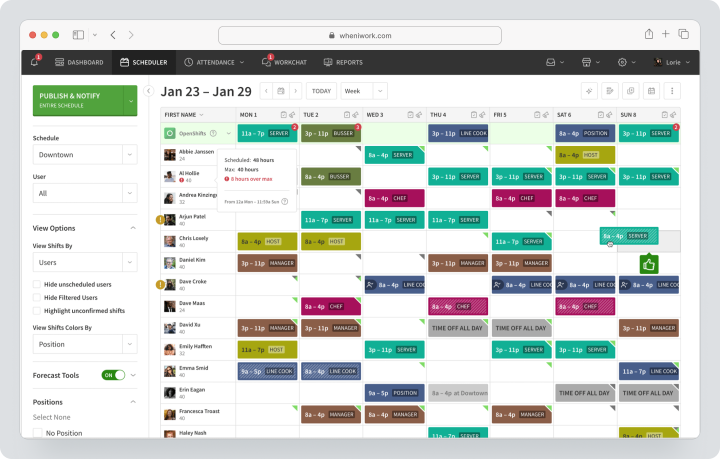
Cost: Essentials is $2.50 per user per month, Pro is $5, Premium is $8. Each plan includes shift scheduling, time and attendance tracking, as well as team messaging. A 14-day free trial is available without a credit card.
Key Features
- employee scheduling and open shifts;
- employee availability, time off, and shift swapping;
- mobile time tracking;
- GPS and geofencing;
- attendance tracking and labor cost reports;
- team messaging;
- integrations with payroll systems.
Main Difference from Connecteam
When I Work is simpler in structure and combines core HR management features in one plan. Connecteam offers broader communication modules, forms, and HR modules.
Advantages
- transparent starting price;
- quick setup;
- core tools are not divided into three hubs.
Limitations
- no full project management structure;
- advanced HR features and training are limited;
- multi-location costs more.
Who It’s For
SMBs that need scheduling, attendance tracking, and messaging without complicated modular architecture.
Sling
Sling is a scheduling and communication platform for restaurants, retail, hospitality, caregiving, and other hourly teams. The free plan allows for scheduling and team communication for up to thirty users.
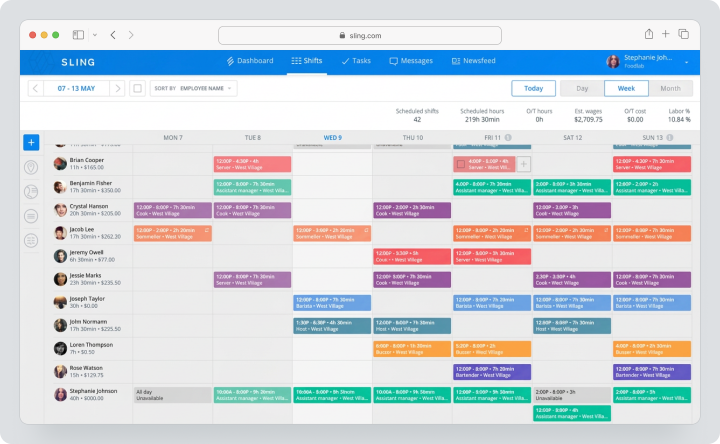
Cost: Free for up to 30 users. Premium on a monthly plan costs $2 per user, Business costs $4. There is a 15-day trial period.
Key Features
- shift scheduling, templates, and available shifts;
- time off, employee availability, and shift swapping;
- news, announcements, and messaging;
- mobile time tracking on Premium;
- labor costs, overtime, and budgeting;
- time card approval, reports, and PTO on Business;
- tasks in shifts and checklists.
Main Difference from Connecteam
Sling is cheaper and simpler for scheduling shifts and communication. Connecteam is significantly broader in forms, knowledge base, training, and HR.
Advantages
- free scheduling for up to thirty users;
- low cost of paid plans;
- tasks can be linked to shifts.
Limitations
- mobile time tracking requires Premium;
- advanced HR is lacking;
- payroll calculation is done through reports and integrations.
Who It’s Suitable For
Small remote teams that need an accessible schedule and communication with employees.
Jibble
Jibble is a time and attendance tracking platform with GPS, geofencing, facial recognition, kiosk mode, and timesheets for payroll calculation. The free plan supports an unlimited number of users.
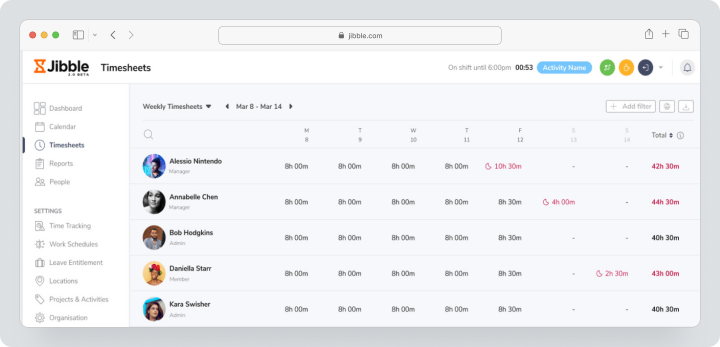
Cost: Free, available without a limit on the number of users and includes shift start tracking via mobile app and web, basic timesheets, and integrations. The official public page confirms GPS tracking, geofencing, facial recognition, kiosk mode, and XLS/CSV export, but current names and prices of paid plans are not displayed on the open pricing page. They need to be checked in the account or proposal for a specific market.
Key Features
- shift start and end tracking via mobile app and kiosk mode;
- GPS and geofencing tracking;
- facial recognition and prevention of clocking in for another employee;
- schedules, breaks, and overtime rules;
- leave and time off management;
- Excel/CSV export for payroll calculation;
- integrations with Xero and other payroll systems.
Main Difference from Connecteam
Jibble is more focused on free attendance tracking and location-verified time tracking. Connecteam is broader in scheduling shifts, communication, forms, and training.
Advantages
- free plan with no limit on the number of users;
- GPS and facial recognition included;
- convenient export for payroll calculation.
Limitations
- advanced management depends on a paid plan;
- communication and HR functionalities are weaker than in Connecteam;
- not a client project management system.
Who It’s Suitable For
Construction, manufacturing, logistics, and mobile teams that need accessible attendance tracking.
Clockify
Clockify is a time tracker and timesheet system for tracking hours by projects, tasks, and clients. In 2026, the free plan is designed for up to five users.
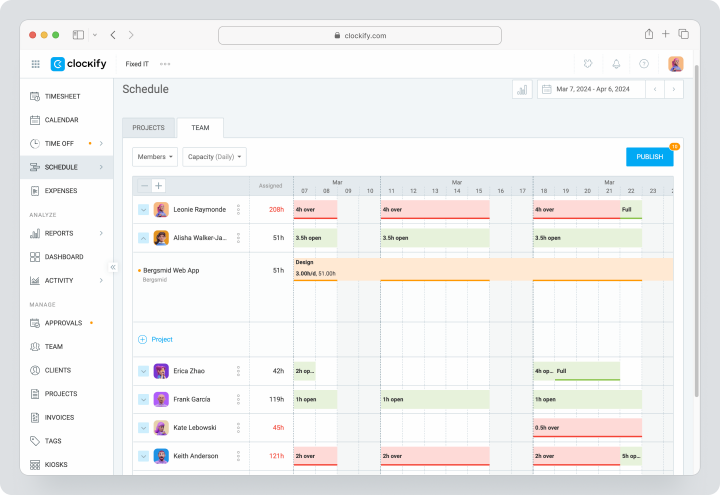
Cost: Free for up to five users. Monthly pricing for Basic is $6.99, Standard — $9.99, Pro — $14.99, Enterprise — $15.99 per user per month. Different terms apply for employees using only kiosk mode. There is a seven-day Pro trial period.
Key Features
- timer, timesheet, and calendar;
- desktop and mobile applications and kiosk mode;
- projects, tasks, and rates for billable time;
- locations, shift scheduling, and time off tracking on paid plans;
- approvals, invoicing, and expenses;
- reports and API; export and rates for billable time available from Basic, while invoicing and approvals are available from Standard.
Main Difference from Connecteam
Clockify is stronger in project time tracking and hour reporting. Connecteam is deeper in shifts, communication, forms, and employee onboarding.
Advantages
- familiar time tracker logic;
- time can be tracked by projects and clients;
- kiosk mode spots cost less than full user seats.
Limitations
- free plan is limited to five users;
- HR management features are distributed across plans;
- there is no full mobile platform for communication.
Who It’s For
Small service companies for whom hours on projects are more important than HR and internal communication.
Hubstaff
Hubstaff is a personnel management and time tracking system for remote and field teams. It combines screenshots, activity analysis, GPS, routes, geofences, schedules, payroll calculations, and project budgets.
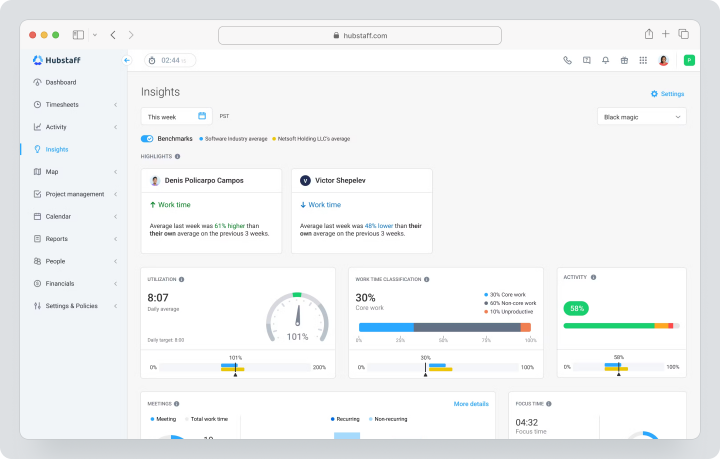
Cost: on a monthly payment basis, Starter costs $7, Grow — $9, Team — $12 per user per month. Enterprise is listed on the official page from $25 per user per month with an annual contract. At least two users are required.
Key Features
- timer and automatic timesheets;
- screenshots, activity levels, and app and website usage;
- GPS tracking, routes, and geofences;
- schedules, vacations, and attendance tracking;
- payroll calculations, invoices, and payments;
- project budgets, expenses, and work orders.
Main Difference from Connecteam
Hubstaff is deeper in productivity monitoring, GPS routes, and payroll processes. Connecteam is stronger in team communication, forms, training, and corporate content.
Advantages
- suitable for remote and field employees;
- detailed visibility of locations;
- time can be used for payroll calculations and billing.
Limitations
- monitoring requires a transparent policy;
- at least two seats;
- HR and training features are limited.
Who It’s For
Field services, outsourcing, construction, and distributed teams for whom activity and location tracking is important.
Zoho Shifts
Zoho Shifts is an employee shift planning and time tracking service within the Zoho ecosystem. The free plan supports up to 25 users and basic shift scheduling.
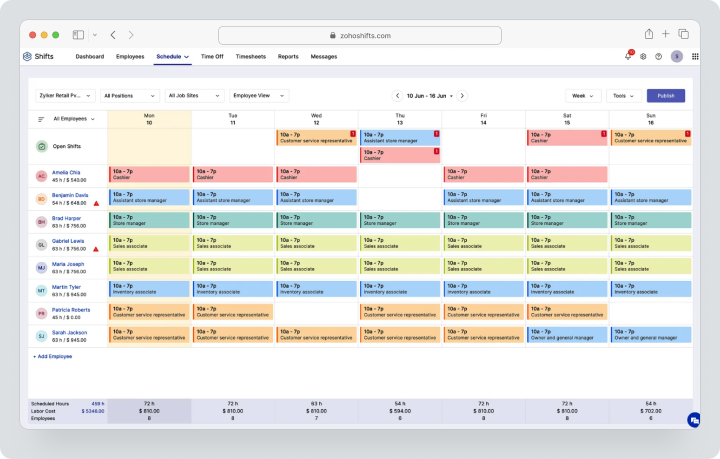
Cost: Free for up to 25 users. Basic starts at $1 per user per month and requires at least ten users. Standard adds time tracking, GPS, geofences, and data export for payroll calculations; pricing is displayed based on the selected currency and payment period. A 30-day trial is available.
Key Features
- basic and advanced shift scheduling;
- multiple locations and team messaging;
- open shifts, shift swapping, and recurring shifts;
- start of shift marking via mobile app and kiosk mode on Standard;
- GPS tagging and geofences;
- overtime rules and export for payroll calculations;
- REST API available on Basic and up.
Main Difference from Connecteam
Zoho Shifts is simpler and more cost-effective for shift planning, especially within Zoho. Connecteam is broader in communication, forms, training, and HR.
Advantages
- free plan for up to 25 users;
- low starting price;
- integration with the Zoho ecosystem.
Limitations
- at least ten users on paid plans;
- time tracking available only on Standard;
- HR functions require other Zoho products.
Who It’s For
SMBs already using Zoho People, CRM, or other Zoho products.
Factorial
Factorial is an HRIS and human resource management platform for employee data, onboarding, documents, electronic signatures, time tracking, shifts, hiring, performance evaluation, and expenses.
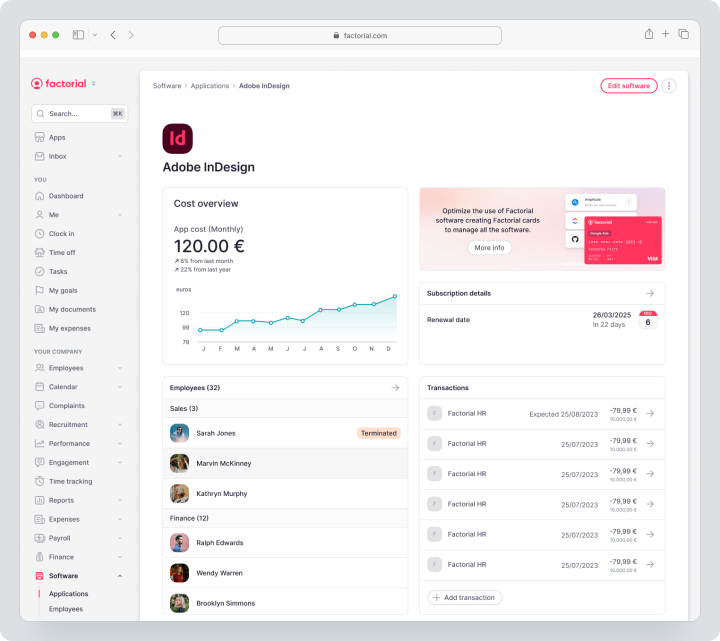
Cost: offers start at approximately $8 per user per month. The final price is determined individually with Factorial Core and selected modules.
Key Features
- employee directory and onboarding/offboarding;
- documents, electronic signature, and payroll;
- vacations and time tracking;
- geolocation, start of shift marking via QR, and overtime;
- automated, bulk, and rotating shifts;
- hiring, performance evaluation, and training;
- expenses, purchases, and project time.
Main Difference from Connecteam
Factorial is deeper in HRIS, working with employee data, performance evaluation, and hiring. Connecteam is more focused on mobile work for employees without a permanent workplace, communication, and operational forms.
Advantages
- Wide HR contour;
- Modular configuration;
- Change management and time tracking linked to employee data.
Limitations
- No simple public fixed pricing;
- Implementation requires an HR project;
- May be excessive for small businesses.
Who it’s Suitable for
For growing companies that need an HRIS, not just shift planning and check-in at the start of shifts.
Comparison Table of Connecteam Alternatives
Data on prices and features verified on 12.08.2026. Costs depend on region, taxes, number of users, locations, hubs, and add-ons.
| Service | Best Scenario | Shifts | Check-in Start of Shift / GPS | Payroll Calculation | Tasks | Communication | HR Functions |
|---|---|---|---|---|---|---|---|
| Worksection | Projects for mobile and service teams | No specialization | Timer without GPS | No | Strong project tasks | Comments and chat | No HRIS |
| Deputy | Advanced shift planning | Strong | Geo-fencing, biometrics | Integrations and add-ons | Tasks in shifts | Notifications | HR add-ons |
| Homebase | Small hourly business in the US | Strong | Location-based check-in | Built-in add-on | Task Manager add-on | Strong | Compliance and adaptation |
| When I Work | Simple shift planning + attendance tracking | Strong | GPS/geo-fencing | Integrations | Basic | Notifications included | Limited |
| Sling | Affordable shift planning | Strong | From Premium | Reports for payroll calculation | Tasks in shifts | Strong | Documents on higher plans |
| Jibble | Free attendance tracking | Schedules | GPS, geo-fencing, facial recognition | Export/integrations | Actions | Limited | Basic leave tracking |
| Clockify | Project time | Shift planning on paid plans | Locations/kiosk on paid plans | Export/invoicing | Projects/tasks | No shared feed | Leaves on paid plans |
| Hubstaff | Management of field and remote teams | Yes | GPS/routes/geo-fencing | Payroll calculation | Projects/work orders | Limited | Leaves |
| Zoho Shifts | Shift planning within Zoho | Strong | Standard | Export for payroll calculation | Shift orientation | Notifications | Through the Zoho ecosystem |
| Factorial | Full-fledged HRIS | Strong | Geolocation/QR | Payroll sheets/integrations | Project time | Employee portal | Strong |
Which service to choose for different scenarios?
For project coordination of a mobile team
Choose Worksection if employees are executing client projects, orders, and tasks with deadlines. It connects tasks, checklists, files, comments, time, and reports but does not replace shifts and payroll calculation.
For the closest alternative to Connecteam
Deputy will suit companies for which shift planning, attendance tracking, and labor cost forecasting are important. When I Work is simpler in structure. Homebase is particularly convenient for small hourly businesses in the US.
For a free or low-cost start
Jibble provides free GPS attendance tracking with no user limit. Sling supports free shift planning for up to 30 users. Zoho Shifts — up to 25. It’s necessary to compare which features of the free plan are truly needed.
For field tracking
Hubstaff is suitable if routes, GPS, screenshots, and payroll calculation are needed. Jibble is ideal if verified location-based check-in and timesheets without computer monitoring are sufficient.
For HRIS
Factorial is rational when a company wants to have employee data, electronic signatures, hiring, performance evaluation, and time management. Connecteam may be simpler for communicating with mobile employees and operational processes.
How to transition to a new platform without data loss?
- Inventory users, locations, schedules, jobs, forms, tasks, documents, and integrations.
- Separate the data into Operations, Communications, and HR & Skills.
- Save employees, roles, teams, time records, shifts, PTO, and compliance for payroll calculation.
- Check the export formats and APIs for each hub in use.
- Create a pilot for one location or team.
- Map schedules, jobs, time tracking, forms, and tasks to the new system.
- Set up GPS, geofencing, breaks, overtime, and pay periods.
- Test shift start marking in the mobile app, kiosk mode, and offline.
- Train managers and employees on real shifts.
- Run a parallel payroll period before shutting down Connecteam.
If the company is transitioning to Worksection, data related to projects needs to be transferred: clients, projects, tasks, files, checklists, and responsible parties. Change history, GPS, and payroll calculation should be kept in a separate human resources management system or archive.
How to organize mobile project work in Worksection?
- Create a project for the client, object, or order.
- Break the outcome into tasks, subtasks, and checklists.
- Add instructions, documents, photos, and files.
- Assign responsible parties, deadlines, priorities, and dependencies.
- Executives update statuses and comment on work via the mobile app.
- Actual hours are recorded in tasks.
- The manager controls the schedule on the Gantt chart and analyzes reports.
- The client or contractor gets guest access only to the necessary information.
This process is suitable for performing service work but is not designed for creating shifts, geofences, or payroll calculations.
FAQ
What is the best alternative to Connecteam in 2026?
There is no single winner. Deputy is suitable for advanced shift scheduling, Homebase — for small hourly businesses in the US, Jibble — for free GPS attendance tracking, Factorial — for HRIS. Worksection is rational if mobile client projects need to be managed instead of shifts.
Are there free alternatives to Connecteam?
Yes. Jibble is free for an unlimited number of users, Sling supports free shift scheduling for up to 30 users, Zoho Shifts — up to 25, Homebase — one location for up to 10 employees. Connecteam also has Small Business and Limited plans. Specific limitations should be compared.
Which alternative to Connecteam is suitable for small businesses?
For a small shift-based business, Homebase, When I Work, Sling, and Jibble are suitable. For a service company with orders and tasks, Worksection should be considered. The choice depends on what is more important: scheduling and attendance tracking or controlling project outcomes.
Which Connecteam replacement is better for teams?
Teams without a permanent workplace need a convenient mobile interface, shift scheduling, GPS, and communication. Deputy and When I Work are suitable for staff management, Factorial — for HR, Hubstaff — for fieldwork control. Worksection is suitable for project teams with deadlines, files, and reports.
How does Worksection differ from Connecteam?
Connecteam manages employees without a permanent workplace: shifts, start time marking, GPS, communication, forms, and HR. Worksection manages projects: tasks, subtasks, deadlines, Gantt charts, time, files, and reports. It doesn’t calculate payroll and does not create specialized shifts.
Can data be transferred from Connecteam?
Yes, but migration depends on the hubs used. Employees, schedules, time records, forms, documents, and HR data must be exported separately. For payroll calculation, it is important to conduct a parallel calculation for one period and check overtime hours, breaks, and rates.
How to compare workforce service prices?
Determine the model: per user, location, or hub. Add payroll calculations, HR, messaging, API, employee onboarding, and taxes. Connecteam can be beneficial for up to 30 users, Homebase — for large teams at a single location, Jibble — for basic free attendance tracking.
How to choose between workforce and project management?
Personnel management is needed for shifts, attendance tracking, GPS, overtime, and payroll calculations. Project management is for tasks, deadlines, dependencies, and client outcomes. Companies with both processes often require integration of the two systems rather than trying to replace them with one.
What features to check before migration?
Check schedules, staff availability, shift exchange, methods of marking the start of a shift, GPS, geofences, kiosk mode, breaks, overtime, approvals, export for payroll calculations, messaging, documents, tasks, API, and offline mode. For project teams, separately assess subtasks, Gantt charts, files, and reports.
Conclusion
Connecteam remains a strong universal platform for deskless teams. However, the best alternative depends on the core process.
Deputy is suitable for complex schedules and labor optimization. Homebase — for small American hourly companies. When I Work — for simple shift planning and attendance tracking. Sling — for a cost-effective launch. Jibble — for free GPS time tracking. Hubstaff — for remote work monitoring. Zoho Shifts — for the Zoho ecosystem. Factorial — for HRIS.
Worksection occupies a unique place. It is not a replacement for payroll calculations and shift management, but it suits mobile and service teams that need to manage projects, tasks, checklists, deadlines, files, time, and reports.
Before transitioning, test two or three products in one location or crew. Fully check the working shift: schedule publication, marking the start of a shift, task completion, time tracking, export for payroll calculations, and communication.
For project coordination of a mobile team, explore the overview of Worksection and current rates.