
Everything has its price. However, sometimes determining it can be quite difficult. For instance, this is the case when you need to evaluate a non-standard, creative and/or unexpectedly costly task.
How much does such work cost for the client? And for the executing team? To answer these questions, the business needs to figure out how to calculate the internal rate.
What is a rate in work?
The concept of a rate in work can be explained as the cost of a specialist’s labor per unit of time. Most often rates are measured in hours, but at the company’s discretion, a rate can be set per day, week, or other period of time.

Rates in work are convenient for evaluating the cost of a service or project, as well as for assessing revenues. If you know how much each employee earns per hour, you can easily calculate the earnings for the entire time the team spends on the project.
When we have clarified that a rate is essentially a “price” for a specialist, it becomes clear that rates in work vary significantly depending on many factors:
- Field of activity. Rates for specialists of different professions usually differ. For example, the rate for a financial analyst is higher than for a secretary.
- Level of qualification. Even within one profession, qualification affects the rate, meaning the rate for a senior programmer is higher than for a junior programmer.
- Geography. In different countries and regions, rates often differ: rates in IT in the USA are usually higher than in Ukraine, and in the capital — higher than in the regions.

However, there are cases when just rates are not enough to calculate the cost of work. Recently, while discussing types of contracts, we mentioned examples of projects where fixed payment is impossible.
Therefore, it is necessary to additionally calculate which specific specialists will be involved in the work processes and how much time they will need. Additionally, overhead costs are included in this.
What are overheads?
Overheads (overhead costs) — are the expenses of executors, without which they simply cannot operate. That is, overheads = indirect costs. For example, office rent, utilities in the office, subscriptions to work software, etc.

Thus, overheads are mandatory expenses that cannot be excluded, and therefore must be taken into account in the price of a product or service to avoid losses.
In addition to overheads, employee salaries are also essential. That is, the cost of one hour of work for each specialist involved in the project multiplied by the number of hours spent.
How to calculate the internal rate?
If you add the team’s salary and overheads — you get the internal rate, i.e. mandatory internal costs of the executor. Accordingly, to calculate the executor’s profit, you need to subtract the internal rate from the total payment amount.

Accordingly, with this formula, you can calculate all its components:
- Project payment minus profit = internal rate.
- Internal rate + desired profit = project cost that can be given to the client.

Can overheads change?
If indirect costs change — overheads also change.
For example, if office rent or utilities increase, this will lead to an increase in overheads.
What else can cause changes in overheads?
- Changes in production or sales volumes, since the company will need to increase staff.
- Changes in resource prices, since the cost of raw materials is included in indirect costs.
- Changes in technology, if the company invests in new technologies and needs to pay for staff training and equipment maintenance.
- Changes in regulation: new taxes or regulatory requirements, etc.
The company’s internal rate will also change with the updated overheads taken into account.
How does Worksection help control the internal rate?
Worksection tools help track costs and account for overheads through tools for:
Tracking time and billable hours.
Worksection allows tracking the time spent on each task and subtask.Considering the hourly rate of each employee, the timer calculates the cost of their work on the project. This data can be used to create an invoice for the client or for payroll calculation.

This feature helps accurately measure team efficiency, wisely allocate time, effectively manage project budgets, and bill clients.
Budget tracking and financial reporting
By tracking project expenses and comparing them with the budget, you can control costs and prevent overruns.
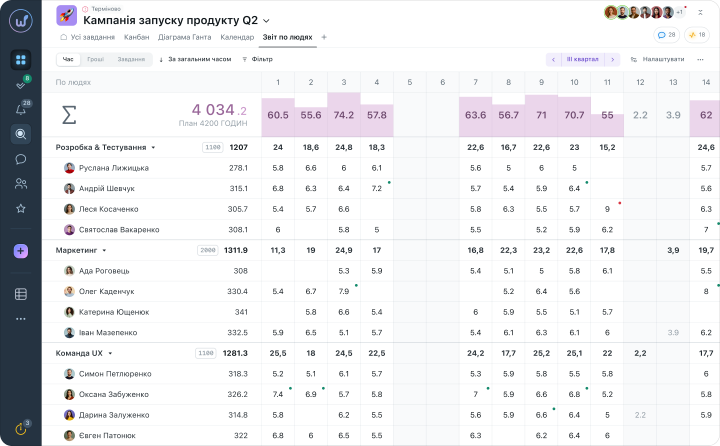
Worksection reporting tools provide insights into the financial aspects of projects and help make informed decisions.
Worksection Integrations
Integration capabilities with other tools: CRM systems, Google Docs, Sheets, Slack, Telegram, etc., ensure seamless data transfer and centralized management.
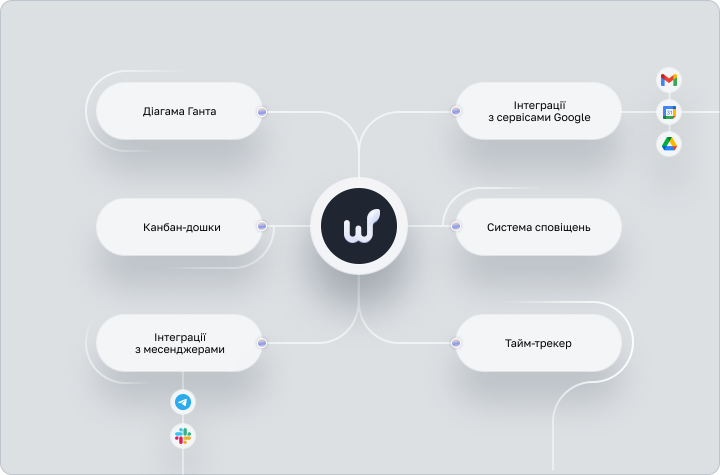
There is also an open API, which allows exchanging data with Worksection. Integrations synchronize processes and reduce the need for manual updates and data entry, thereby minimizing the risk of errors due to human factors.
These and many other features make Worksection an optimal solution for accounting rates in IT and all other industries. For all types of digital companies, consulting, law firms, freelancers, and anyone who works on an hourly basis, Worksection is just an ideal team collaboration management system at all stages.