The best alternative to Teamwork.com depends on how the team earns and organizes client work. Some companies need a close replacement with budgets, workload, time tracking, and profitability. For others, a simpler project management system is more important, where tasks, deadlines, responsibilities, Gantt charts, and reports do not require complex setup.
Teamwork.com remains a strong product for managing client work in agencies and professional services companies. The service combines projects, tasks, time, budgets, workload, client access, and financial control. However, teams look for alternatives to Teamwork.com when they want to change the pricing model, simplify implementation, get a different reporting logic, or reduce the number of configurations.
This article compares Worksection, Productive, Scoro, ClickUp, Asana, Wrike, Monday.com, Basecamp, Zoho Projects, and Kantata. Each service is evaluated against the same criteria: tasks, Gantt chart, time, reporting, guest access, implementation, limitations, and cost.
Which alternative to Teamwork.com to choose quickly
- Worksection — for teams that prioritize tasks, deadlines, Gantt charts, time tracking, guest access, and project reports without complex PSA architecture.
- Productive — for agencies and consultancies needing budgets, resource planning, profitability, and operational analytics.
- Scoro — for professional services where it is necessary to link sales, projects, resources, finances, and management reporting.
- ClickUp — for teams that require extensive customization, documents, automation, and multiple views within one workspace.
- Wrike — for managed processes, corporate control, resources, and complex reporting.
- Asana — for cross-functional management of tasks, goals, portfolios, and dependencies.
- monday.com — for visual boards and process customization via columns, reporting dashboards, and automation.
- Basecamp — for straightforward communication, files, to-do lists, calendars, and client management.
- Zoho Projects — for teams in the Zoho ecosystem that need Gantt charts, time tracking, budgets, and integrations.
- Kantata — for mature companies in the professional services sector with a focus on resources, forecasting, and project economics.
Not everyone needs to leave Teamwork.com. If the team is already using budgets, rates for billable hours, workload, profitability, client projects, and integrations with CRM or accounting, migrating may end up being more expensive than maintaining the current system. Comparing alternatives makes sense only when the actual process is noticeably simpler or, conversely, more complex than the current configuration of Teamwork.com.
What is Teamwork.com and who is it for?
Teamwork.com is a platform for managing client work, agency projects, and professional services. It integrates tasks, lists, boards, Gantt charts, time tracking, budgets, team workload, client access, rates, invoices, and reports. The service is suitable for agencies, consultancies, studios, IT services, and other companies that sell team work and want to see not just task statuses but also the financial results of a project.
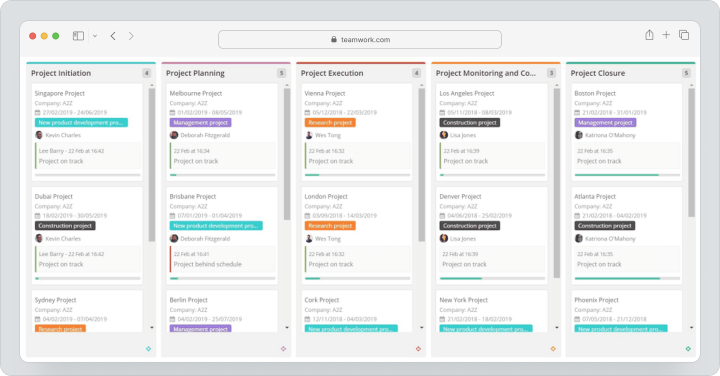
As of 08/12/2026, Teamwork.com offers a free plan for up to 5 users and 5 projects. For Basics, the cost is $13.99 per user per month for monthly billing, and for Accelerate — $29.99 per user per month. Both plans include a 14-day free trial with no credit card required. Optimize and Enterprise are priced individually. Paid plans offer advanced budgeting, time-based invoicing, resource planning, automation, profitability analytics, and corporate features.
The strong point of Teamwork.com is the connection between project execution with clients and the service economy. However, if the team does not need complex budgets, rates, and forecasts, part of the product may be excessive.
Why are teams looking for alternatives to Teamwork.com?
Teams seek a replacement for Teamwork.com not because the service poorly fulfills its category. The reason is usually a mismatch between the functional depth of the product and the actual working method of the company.
Pricing Model
Cost should be considered not just based on the base rate. The final budget is influenced by the number of employees, plan level, additional solutions, implementation, support, and integrations. For a small team that only needs tasks, time tracking, and reports, a specialized customer work management platform may turn out to be more expensive than a simpler PM system.
Configuration Complexity
Teamwork.com allows you to set up projects, financial parameters, roles, rates, budgets, and automations. For an agency with an operations manager, this is an advantage. For a team without a system owner, a large number of settings can slow down the launch and complicate uniform work rules.
Need for Simpler Time Tracking
Some companies require detailed billing and multiple rate types. Others find it sufficient to start a timer on a task, compare planned vs. actual, and generate a report for a person or project. In the latter scenario, it’s worth looking for solutions that provide a shorter path from task to report.
Different Reporting Logic
Teamwork.com is focused on customer work and financial control. If a manager prioritizes deadlines, workload, progress, and labor costs over margin and revenue forecasting, simpler reporting may be more convenient.
Different Client Access Model
Agencies connect clients in various ways. Some require full client users, separate rights, and financial transparency. Others find guest access to a specific project, tasks, files, and comments sufficient. Before migration, it’s important to check not only for the presence of guests but also what the client actually sees.
Changing Requirements as You Grow
A small team might start with simple tasks and time tracking, then later add budgets and resource planning. There can also be the opposite situation: a company implements a complex PSA system but only uses a small portion of its features. The alternative must fit the current process, not the anticipated one.
How Did We Choose and Compare Services?
Services were compared based on workflows rather than the number of items on pricing pages. The main question is how easy it is for a team to create a project, break down work, assign people, monitor deadlines, track time, connect clients, and generate reports.
Tasks, Subtasks, and Dependencies
Complex projects require subtasks, statuses, responsible parties, priorities, and links between tasks. A simple board works for short processes, but agency projects often need more structure.
Gantt Chart, Calendar, and Other Views
A manager needs an overall schedule, an executor needs a task list, a team needs a Kanban view, and a leader needs a portfolio overview. It’s important to check what views are available on the required plan and whether dependencies are maintained during transfers.
Time Tracking, Budgets, and Reporting
For customer work management, the critical connection between the task, time spent, and budget is vital. However, the depth may vary: from a basic timer to rates, revenue tracking, and profitability forecasting.
Roles, Guest Access, and Clients
It’s essential to check if clients are considered paid seats, whether project limitations can be imposed, if financial data can be hidden, and if only tasks, comments, and files are left visible to the client.
Automation, Integrations, and APIs
Automation is useful for repetitive projects, incoming requests, and status changes. APIs and integrations are important if the system needs to work with CRM, accounting, chats, calendars, or BI.
Ease of Implementation
A service may be functional but require a dedicated administrator. For a small team, the speed of launch and clarity of the interface are often more important than the maximum number of configurations.
Total Cost of Ownership
Compare pricing, minimum number of seats, payment terms, add-ons, implementation, and team time for system support.
Best Alternatives to Teamwork.com in 2026
Below are 10 solutions for various work models: from straightforward project execution to deep PSA analytics.
Worksection
Worksection is a project and task management system for teams that value deadlines, accountability, workloads, and transparent reporting. Compared to Teamwork.com, the service focuses less on the complex financial architecture of professional services and more on the daily execution of projects.
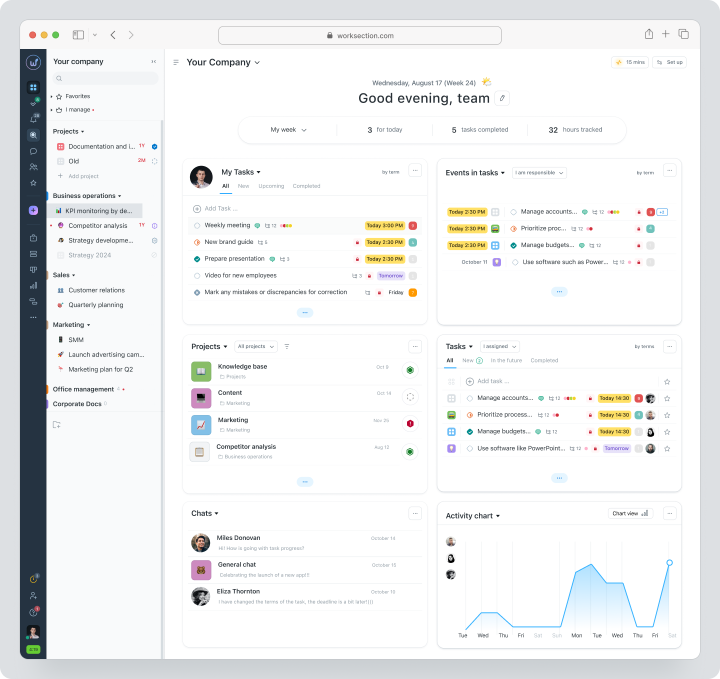
The team creates a project, adds tasks and two levels of subtasks, assigns responsibilities, deadlines, priorities, statuses, and tags. Work can be viewed in a list, calendar, Kanban board, or on a Gantt chart. The task card stores comments, files, checklists, planned time, and actual costs.
Pricing: there is a free plan for up to 5 users. The Basic plan costs $5 per user per month with monthly billing, Business costs $10, Premium costs $15. Current terms are available on the Worksection pricing page.
Key Features
- project, task, and subtask management;
- dependencies, deadlines, responsibilities, and statuses;
- Kanban, calendar, and Gantt chart;
- time tracking in tasks, planned vs actual, and financial metrics;
- reports by people, tasks, and projects;
- guest access and flexible permissions for clients and contractors;
- integrations, API, and webhooks.
Main Difference from Teamwork.com
Teamwork.com more deeply connects client work management with commercial rates, billing, and profitability. Worksection should be considered when the priority is managed execution: tasks, deadlines, responsibilities, time, and reporting without complex PSA setup.
Advantages
- clear transition from tasks to Gantt chart, time, and reports;
- convenient structure for client and service projects;
- faster setup for teams without a dedicated administrator.
Limitations
- does not replace the deep PSA analytics of Teamwork.com, Productive, or Kantata;
- for complex revenue recognition models, a separate financial system may be needed;
- project structure and permissions need consideration before mass migration.
Who It’s Suitable For
Agencies, marketing and production teams, consulting, construction, and operations departments that need tasks, Gantt charts, a time tracker, and reports in one space.
Productive
Productive is a platform for agencies and professional services that brings together projects, resources, budgets, time, expenses, forecasts, and profitability. It is one of the closest alternatives to Teamwork.com based on the primary business scenario.
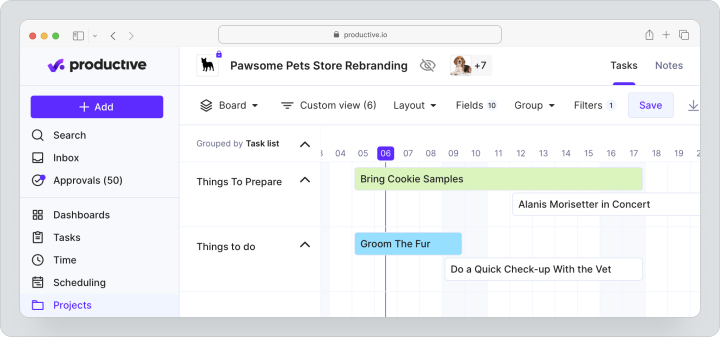
The service is suitable for companies that want to see each client project as a separate financial entity: plan people, create budgets, track billable time, expenses, margins, and future workload. Customer users do not count as paid spots, and at least three paid spots are required for a new subscription.
Pricing: a 14-day trial is available. With monthly billing, Essential costs $12, Professional costs $29 per user per month. Ultimate pricing is calculated individually.
Key Features
- projects, tasks, documents, and Gantt chart;
- resource planning and team load;
- budgets, rates, expenses, and profitability;
- time tracking and time approval;
- financial and operational reports;
- API, integrations, and automations.
Main Difference from Teamwork.com
Productive focuses more on a single operational system for an agency: from deal and budget to resources, revenue, and forecasting.
Advantages
- deep connection between resources, time, and profitability;
- convenient for agencies, consulting, and IT services;
- clients do not occupy paid spots.
Limitations
- excessive for teams without complex project economics;
- requires discipline in rates, budgets, and time tracking;
- advanced reports and rate tables are not available on the basic plan.
Who It’s For
Agencies and professional service companies looking for a close logical alternative to Teamwork.com with a strong financial framework.
Scoro
Scoro is a professional services automation platform for managing clients, sales, projects, resources, finances, and business analytics. It is suitable for companies that need not only a task management system but also an overall operational framework.
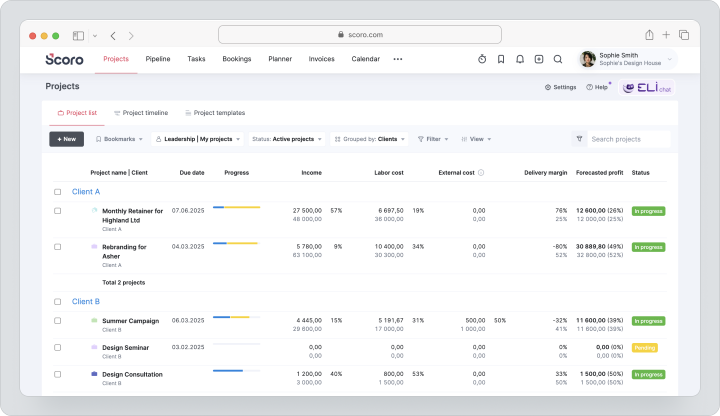
In Scoro, you can create proposals, convert them into projects, plan resources, track time, compare estimates with actuals, send invoices, and analyze profitability. The service is aimed at creative teams and professional service companies.
Cost: a fully functional 14-day trial is available without a credit card. Monthly pricing is $23.90 for Core, $38.90 for Growth, and $59.90 for Performance per user per month. Enterprise pricing is customized. The minimum number of seats is five. Self-implementation is available for teams of up to 15 people, while larger companies are offered consulting packages.
Key Features
- CRM, commercial proposals, and project management;
- resource planning and utilization;
- time tracking, budgets, and expense management;
- invoices, financial documents, and price lists;
- dashboards, reports, and forecasting;
- API and integration catalog.
Main Difference from Teamwork.com
Scoro integrates sales, projects, and financial documents more broadly in a single PSA system. Teamwork.com may be simpler for teams that do not need a complete business framework.
Benefits
- a single system from commercial proposal to report;
- strong financial analytics;
- well-suited for mature professional service processes.
Limitations
- at least five paid seats;
- implementation requires process setup and training;
- price and implementation depend on team size.
Who It’s For
Consulting firms, agencies, architectural and other professional service companies that need CRM, project execution, and finance in one product.
ClickUp
ClickUp is a versatile workspace with tasks, documents, chats, forms, dashboards, Gantt charts, goals, time tracking, and automation. Teams that need maximum flexibility and the ability to bring various processes into one space choose it.
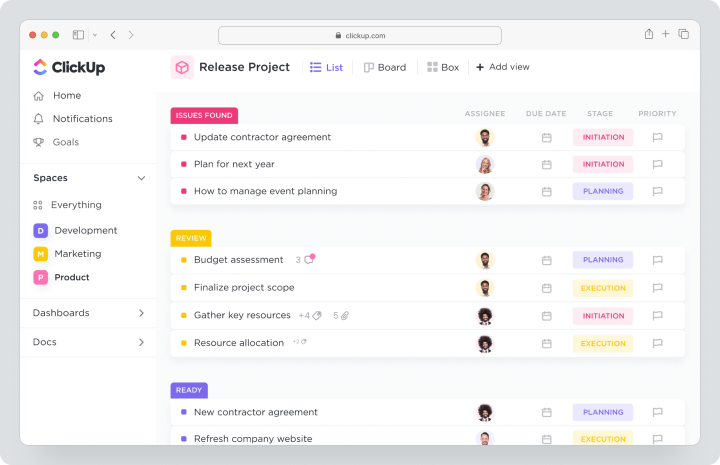
Cost: Free is available for free. Monthly pricing for Unlimited is $10 per user, and Business is $19. AI features are billed separately depending on the chosen AI plan and credits.
Key Features
- tasks, subtasks, dependencies, and custom fields;
- list, board, calendar, timeline, and Gantt chart;
- documents, forms, dashboards, and goals;
- built-in time tracking and resource management;
- automations, webhooks, and integrations;
- guests with managed permissions.
Main Difference from Teamwork.com
ClickUp is more versatile and flexible as a workspace builder, but less specialized in agency finances and client work profitability.
Benefits
- many features at a single price;
- flexible customization for different departments;
- built-in documents and communications.
Limitations
- without standards, the workspace becomes overloaded quickly;
- someone needs to be responsible for the architecture;
- the financial logic of professional services is weaker than in Teamwork.com.
Who It’s For
Teams that value customization and a single workspace but do not need a deep PSA system.
Asana
Asana is a platform for cross-functional task, project, goal, and portfolio management. It is suitable for marketing, product, and operations teams where coordination between departments is important.
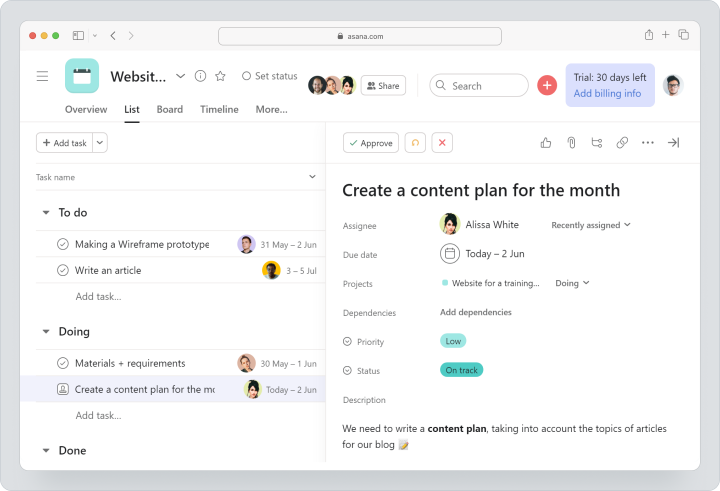
Cost: there is a free Personal plan. The monthly fee for Starter is $13.49 per user, and Advanced is $30.49. Advanced includes portfolios, goals, team uploads, and other multi-directional management features.
Key Features
- tasks, subtasks, and dependencies;
- list, board, calendar, timeline, and Gantt chart;
- forms, rules, and custom fields;
- dashboards, portfolios, and goals;
- team uploads and approvals;
- integrations with corporate systems.
Main Difference from Teamwork.com
Asana is stronger in coordinating cross-functional work and goals. Teamwork.com is deeper in client budgets, time tracking, and profitability.
Advantages
- clear logic of tasks and dependencies;
- strong portfolios and goals;
- user-friendly for inter-departmental work.
Limitations
- financial functions are not its main specialization;
- important capabilities are distributed across plans;
- service teams may need a separate system for invoicing.
Who It’s Suitable For
Marketing, product, and operations teams that need to replace Teamwork.com with a more versatile coordination system.
Wrike
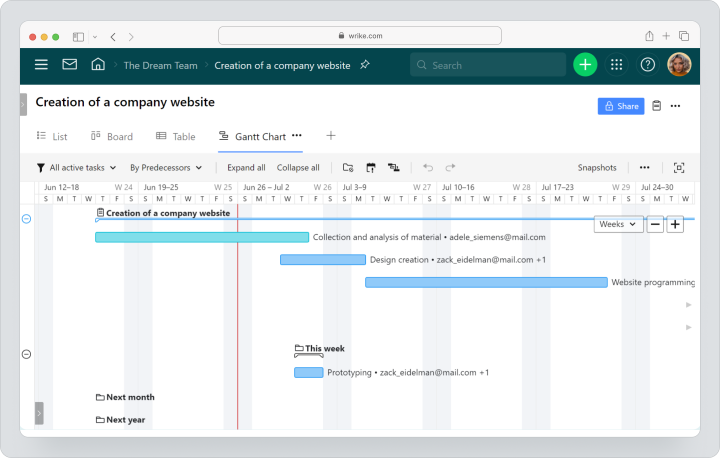
Wrike is a work management platform for complex processes, approvals, project portfolios, and corporate reporting. Free is available for free. Team is priced at $10, Business at $25 per user per month. Pinnacle and Apex are priced individually.
Key Features
- projects, tasks, board, table, and Gantt chart;
- dashboards and request forms;
- workflows and approvals;
- resource planning and time tracking on higher plans;
- budgets and advanced BI analytics in Pinnacle;
- corporate integrations and security.
Main Difference from Teamwork.com
Wrike is more focused on corporate work management and complex cross-functional workflows. Teamwork.com is deeper in client work and agency economy.
Advantages
- strong approval processes;
- scalable for large teams;
- advanced dashboards and corporate features.
Limitations
- time tracking and financial depth depend on the plan;
- subscriptions are sold in groups of seats;
- for teams of 20 or more users, implementation with support is recommended.
Who It’s Suitable For
Large agencies and corporate teams for whom corporate-level management, approvals, and complex roles are important.
Monday.com
Monday.com is a visual work management platform with boards, columns, templates, dashboards, and automations. It is suitable for teams that want to assemble processes independently without a rigid product structure.
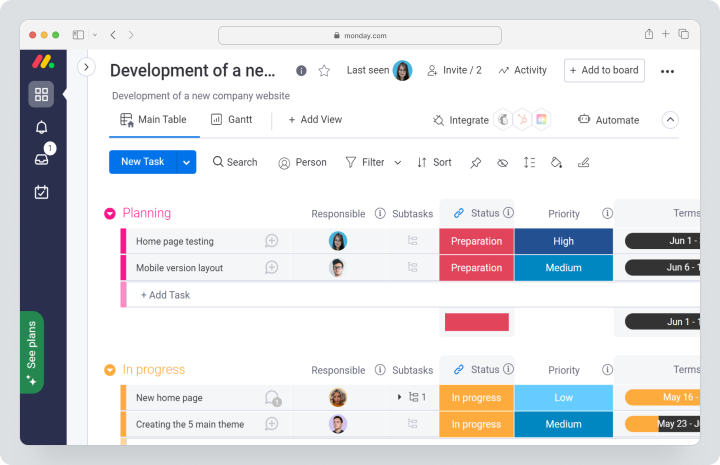
Cost: Free for up to 2 seats. The monthly payment for Basic is $12, Standard is $14, Pro is $24 per seat per month. Payment is calculated in seat packages, with a minimum paid size usually starting from three users.
Key Features
- visual boards and different views;
- timeline, Gantt chart, and dashboards on relevant plans;
- forms, automations, and integrations;
- templates for different departments;
- guest access and time tracking depending on the plan;
- AI credits for individual functions.
Main Difference from Teamwork.com
Monday.com is a visual process builder. Teamwork.com offers a more ready-made model for client projects, time, budgets, and profitability.
Advantages
- quick launch of visual workflows;
- many templates;
- easy for cross-functional processes.
Limitations
- complex boards require architecture;
- cost depends on the package of seats and features;
- financial indicators need to be adjusted or supplemented with integrations.
Suitable for
Marketing, operational, and service teams for whom flexible visual processes are important.
Basecamp
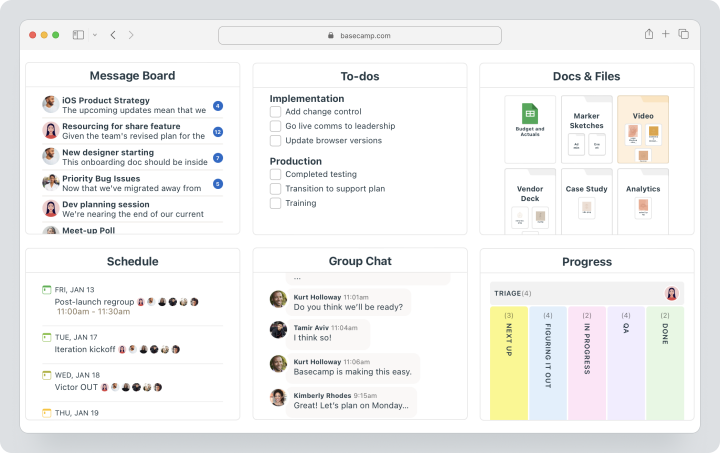
Basecamp is a simple environment for projects, asynchronous communication, task lists, files, schedules, and team discussions. The free account allows you to manage one project with up to 20 users. Pro costs $15 per employee per month with monthly billing, clients and temporary contractors are not charged. Pro Unlimited costs $299 per month with annual billing for the entire organization.
Key Features
- task lists and Card Tables;
- Message Boards, Campfire, and Pings;
- schedule, Docs & Files;
- Automatic Check-ins and reports;
- free client connections;
- time tracking as an add-on or part of Pro Unlimited.
Main Difference from Teamwork.com
Basecamp is significantly simpler and focuses on calm communication. It has less depth for budgets, resources, and profitability.
Advantages
- low entry threshold;
- strong asynchronous communication;
- fixed pricing can be beneficial for large teams.
Limitations
- no deep PSA analytics;
- Gantt charts and complex dependencies are not the main logic;
- financial control is limited.
Suitable for
Small and medium teams for whom simplicity and context are more important than detailed project economics.
Zoho Projects
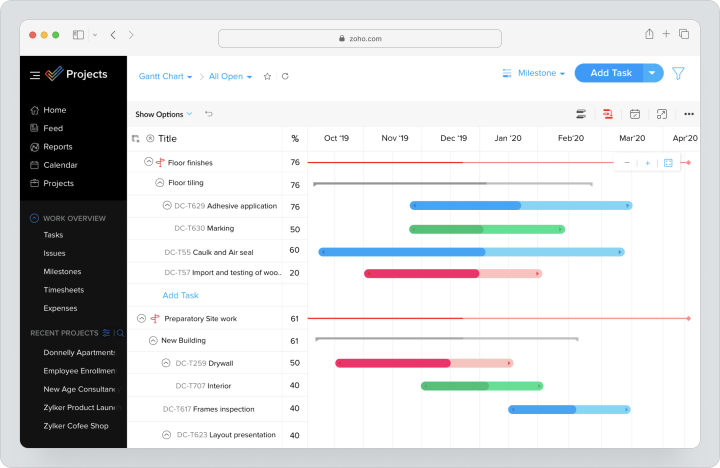
Zoho Projects is a project management system within the Zoho ecosystem. There is a Free plan for up to 5 users and 3 projects, as well as Premium, Enterprise, and Ultimate plans. Paid plans offer monthly billing, and the exact price depends on the region and is displayed on the checkout page; a 15-day trial period is available without a credit card.
Key Features
- projects, tasks, subtasks, and dependencies;
- Gantt charts, team loading, and reports;
- time tracking, timesheets, and approvals;
- b budgets and EVM;
- workflow actions and custom modules;
- integrations with Zoho CRM, Books, Desk, and other products.
Main Difference from Teamwork.com
Zoho Projects is especially advantageous for companies within the Zoho ecosystem. Teamwork.com offers a more comprehensive model for managing client work without mandatory ties to other products.
Advantages
- strong integrations with Zoho;
- time tracking and budgets;
- free plan for piloting.
Limitations
- some features are only available on higher plans;
- the interface may require adaptation;
- full value is revealed within the Zoho ecosystem.
Suitable for
SMBs and service companies already using Zoho CRM, Books, or Desk.
Kantata
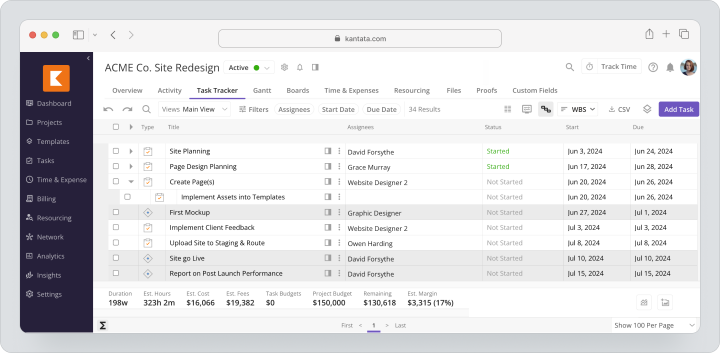
Kantata is an AI-based PSA platform for professional services companies. It focuses on resource planning, project economics, forecasting, resource loading, and management analytics.
Cost: there is no public fixed price. The tariff is selected individually based on the size of the company, goals, and working model.
Key Features
- resource planning and skill-based staffing;
- project budgets, revenue, and margins;
- plan vs. actual comparison;
- forecasting and business analytics;
- dashboards and financial accounting for projects;
- integrations and ready connectors.
Main Difference from Teamwork.com
Kantata is more deeply focused on mature PSA processes and service economics management at the portfolio level. Teamwork.com is generally simpler for an average agency.
Advantages
- strong resource and financial planning;
- suited for large professional services companies;
- deep profitability and forecasting analytics.
Limitations
- no transparent public pricing;
- implementation requires mature processes;
- excessive for small teams.
Who it’s suitable for
Medium and large consulting, IT service companies, and professional service firms with developed operational capabilities.
Comparison Table of Alternatives to Teamwork.com
Data on pricing and features verified on 12.08.2026. The final cost may depend on the region, payment period, number of seats, implementation, and add-ons.
| Service | Best Scenario | Tasks and Subtasks | Gantt / Timeline | Time Tracking | Reports | Guest Access | Pricing Model |
|---|---|---|---|---|---|---|---|
| Worksection | Managed execution of client projects | Yes | Yes | Built-in | Projects, people, time, and costs | Yes | Free; $5 / $10 / $15 for monthly payment |
| Productive | Agencies with budgets and profitability | Yes | Yes | Built-in | Financial and resource | Clients without paid seats | Essential $12, Professional $29 for monthly payment |
| Scoro | PSA from sales to finance | Yes | Yes | Built-in | Operational and financial | Depends on role | Core $23.90, Growth $38.90, Performance $59.90 for monthly payment; minimum 5 seats |
| ClickUp | Customizable universal workspace | Yes | Yes | On Unlimited | Dashboards and team uploads | Yes, with rights | Free; Unlimited $10, Business $19 for monthly payment |
| Asana | Cross-functional projects and portfolios | Yes | Yes | Depends on plan | Dashboards, goals, portfolios | Yes | Free; Starter $13.49, Advanced $30.49 for monthly payment |
| Wrike | Enterprise workflows and approvals | Yes | Yes | On higher plans | Dashboards and BI | Yes, by roles | Free; $10 / $25 listed for annual subscription; separate monthly price not published |
| Monday.com | Visual processes | Yes | Depends on plan | Depends on plan | Dashboards | Depends on plan | Free; Basic $12, Standard $14, Pro $24 for monthly payment |
| Basecamp | Simple communication and projects | Basic | No classic Gantt | Add-on for time tracking | Basic reports | Clients for free | Free; Pro $15 for monthly payment; Pro Unlimited $299/month for annual payment |
| Zoho Projects | Projects within Zoho | Yes | Yes | On paid plans | Projects, team uploads, portfolio | Read-only on higher plans | Free; monthly price depends on the region |
| Kantata | Enterprise PSA and resources | Yes | Yes | Built-in | Financial, resource, forecast | Depends on configuration | Custom calculation |
Which service to choose for different scenarios?
For tasks, deadlines, and project reporting
Choose Worksection if the team wants to quickly move to an understandable model: project, task, responsible persons, Gantt chart, time, and report. It’s a rational option when a complex PSA-financial architecture is not the main requirement.
For a close alternative to Teamwork.com
Compare Productive and Scoro. Productive is particularly strong in agency budgets, resources, and profitability. Scoro is suitable if you need to link CRM, commercial proposals, projects, and finance.
For flexible customization
Choose ClickUp or Monday.com. ClickUp offers more modules and types of work, while Monday.com provides a visual process builder. In both cases, you need to define workspace standards in advance.
For corporate scenarios
Wrike and Kantata are suitable for companies that need complex roles, corporate governance, portfolios, resources, and in-depth analytics. Solutions should be made after a pilot and a total cost of ownership calculation.
For simple onboarding
Basecamp is suitable for teams where communication, files, task lists, and client context are important without a complex structure. Worksection will fit if, along with simplicity, you need a Gantt chart, time, and reports.
How to Transition to a New Platform Without Losing Data?
The transition from Teamwork.com should start with an audit, not with mass export.
- Compile a list of active projects, clients, users, roles, rates, budgets, and integrations.
- Separate working data from archives.
- Remove duplicates, outdated tasks, and old templates.
- Check the export formats, APIs, and limitations of the target system.
- Choose one representative project with tasks, time, files, and client access.
- Match projects, task lists, tasks, subtasks, statuses, labels, milestones, time records, and users.
- Setup roles, permissions, templates, and notifications.
- Check reports and financial indicators after migration.
- Train process owners on a real project.
- Run a parallel period and only then turn off the old system.
The main mistake is to transfer the old structure without verification. If the new platform is simpler, it’s better to restructure the process rather than copying all fields and statuses from Teamwork.com.
How Does Client Work Management Look in Worksection?
The workflow in Worksection is built around execution:
- A project is created for the client, contract, or specific outcome.
- Work is broken down into tasks, subtasks, and checklists.
- Responsibilities, deadlines, priorities, and dependencies are assigned.
- The client or contractor connects via guest access with limited permissions.
- The team records time directly in the tasks.
- The manager compares plans and facts, controls deadlines on the Gantt chart, and analyzes reports.
- Files, solutions, and discussions remain within the project.
This approach suits companies that need to see who is doing the work, when, how much time is spent, and where the project deviates from the plan. It does not replace all financial functions of Teamwork.com but shortens the path from tasks to management decisions.
FAQ
What is the best alternative to Teamwork.com in 2026?
There is no universal winner. Worksection is suitable for tasks, deadlines, time, and project reporting. Productive and Scoro are closer to Teamwork.com in terms of agency budgets and profitability. Wrike and Kantata should be considered for corporate and PSA scenarios. The choice depends on financial depth, team size, and implementation complexity.
Are there free alternatives to Teamwork.com?
Yes. There are free plans in Worksection, ClickUp, Asana, Wrike, Monday.com, Basecamp, and Zoho Projects. Limitations vary by the number of users, projects, storage, Gantt charts, time, and reports. The free plan is better for pilots than choosing only due to the absence of fees.
What alternative to Teamwork.com is suitable for small businesses?
For small businesses, Worksection often works well if client projects, tasks, deadlines, time, and reports are needed. Basecamp is convenient for simple communication. ClickUp is suitable for teams willing to set up their workspace independently. Before choosing, calculate costs for the actual number of employees and clients.
Which Teamwork.com replacement is better for agencies?
For agencies, compare Worksection, Productive, and Scoro. Worksection is simpler for project execution and time tracking. Productive links budgets, resources, and profitability more deeply. Scoro integrates CRM, projects, and financial documents. The solution depends on how complex the agency’s finances are.
How does Worksection differ from Teamwork.com?
Teamwork.com is stronger in managing client work, rates, invoices, and profitability. Worksection focuses on managed execution: tasks, subtasks, deadlines, dependencies, Gantt chart, time tracker, roles, and reports. It is suitable when the team needs project transparency without complex PSA configuration.
Can data be migrated from Teamwork.com?
Yes, but migration should be done through a pilot. First, check the export of projects, tasks, users, time, comments, and files. Then map fields to the new system, set up roles and reports, and only after verification, transfer the remaining projects.
How to compare service prices?
Compare total cost of ownership, not just the price of one seat. Consider the minimum number of seats, payment terms, clients and guests, add-ons, implementation, support, integrations, and admin time. For agencies, separately check if budgets, time approvals, and profitability are included.
How to choose between a specialized and a universal platform?
A specialized PSA platform is rational if financial analytics, resources, and profitability are at the core of the business. A universal PM service is better if the main issues are tasks, deadlines, communication, and reporting. The fewer specialized features are used, the more important the simplicity of implementation becomes.
What features to check before migration?
Check tasks, subtasks, dependencies, Gantt charts, time tracking, budgets, reports, guest access, roles, API, import, export, and integrations. Additionally, test one complete scenario: from project creation to reporting to the manager and client access.
Conclusion
Teamwork.com remains a strong platform for agencies and professional services that need client projects, time, budgets, resources, and profitability. However, the best alternative depends on which part of the system the team uses daily.
For clear project execution, consider Worksection. For deep agency economics — Productive or Scoro. For flexible workspaces — ClickUp or Monday.com. For cross-functional projects — Asana. For corporate workflows — Wrike. For simple communication — Basecamp. For a mature PSA model — Kantata.
Before transitioning, test 2 – 3 solutions on one client project. Check not only the feature list but also the actual work of the team: task management, time tracking, client access, reporting, and the cost of system support.
When tasks, deadlines, responsibilities, labor costs, and reporting are priorities, you can start with an overview of Worksection and check the appropriate tariff.