Procore — a comprehensive construction management platform for general contractors, developers, owners, and large project teams. It combines documents, RFIs, approval documents, quality and safety, financial management, cost estimates, and analytics, with pricing calculated individually based on annual construction volume.
But alternatives to Procore are sought not just for pricing. One company needs tighter integration with Autodesk BIM, another requires residential construction and a client portal, a third needs quick plans and punch lists on-site, strict CDE, or 360° documentation of actual conditions. For a small contractor, a full corporate suite may be excessive. Therefore, Procore analogs should be chosen based on core processes, scale, and data requirements.
The selection includes Worksection, Autodesk Forma Build, Buildertrend, Fieldwire, Oracle Aconex, Trimble ProjectSight, CMiC, Contractor Foreman, PlanRadar, and OpenSpace. Worksection ranks first only as a simple PM layer for tasks, deadlines, responsibilities, files, Gantt charts, time tracking, and reports. It is not a substitute for BIM/CDE, a specialized drawing register, RFI/approval document system, or construction ERP.
Alternatives to Procore in 30 Seconds
- Worksection — for small construction and engineering teams that need tasks, scheduling, accountability, time tracking, and reporting without heavy implementation.
- Autodesk Forma Build — for companies in the Autodesk ecosystem that value models, documents, on-site work management, and cost management.
- Buildertrend — for home builders and remodeling companies with planning, estimates, client portals, and financial processes.
- Fieldwire — for plans, tasks, inspections, punch lists, and daily on-site coordination.
- Oracle Aconex — for large infrastructure projects requiring strict document control, workflows, and immutable change logs.
- Trimble ProjectSight — for contractors needing RFIs, approval documents, drawings, on-site work management, and connection to Trimble Construction One.
- CMiC — for general contractors needing a unified construction ERP with finance, project cost tracking, payroll, and project control.
- Contractor Foreman — for small and medium contractors with transparent package pricing and a large set of construction modules.
- PlanRadar — for field documentation based on punch lists, plans, reports, approvals, and free external participants.
- OpenSpace — for 360° documentation of the site, progress monitoring, visual analytics, and field processes based on images.
If a close corporate replacement is needed, compare Autodesk Forma Build, Oracle Aconex, Trimble ProjectSight, and CMiC. For residential construction, the sensible choice is Buildertrend. For on-site work scenarios — Fieldwire or PlanRadar. For visual documentation of the site — OpenSpace. For tasks and calendar execution without specialized construction modules — Worksection.
What is Procore and who is it for?
Procore is a single construction platform that integrates preconstruction, project execution, financial and resource management. The system supports drawings, RFIs, approval documents, punch lists, daily logs, quality and safety, budgets, contracts, project changes, estimates, and integrations.
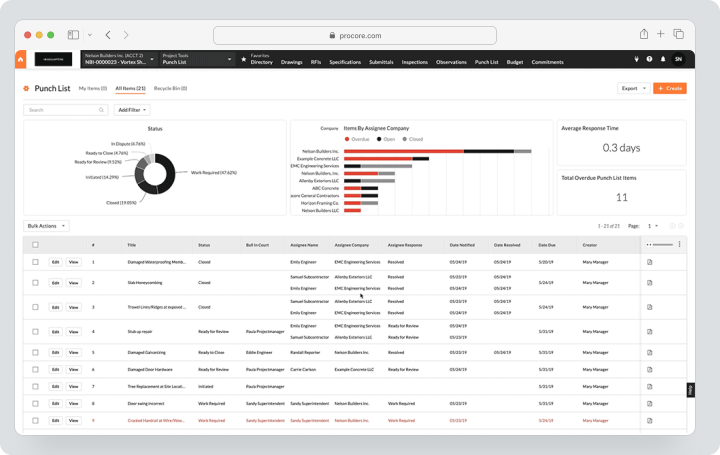
There is no public fixed price. Procore applies volume-based pricing tied to annual construction volume and selected products. The company emphasizes unlimited user access without a traditional license per seat. The calculation must also include implementation, data migration, training, and additional modules.
Procore is suitable for medium and large contractors with multiple participants, complex contracts, and high control requirements. Its strength lies in the platform’s breadth and single source of data. For a small firm, this same breadth can mean prolonged implementation and excessive functional scope.
Why are teams seeking alternatives to Procore?
Need a more predictable price
The individual model is convenient for large organizations but complicates quick self-calculation. Fieldwire, Contractor Foreman, and PlanRadar publish rates, while Worksection uses a clear per-seat pricing. When comparing, it’s important to consider not only the license but also implementation, training, data transfer, storage, support, and additional modules.
Overkill platform for SMBs
A small contractor may need tasks, calendar, photos, files, time tracking, and simple reports without complex financial architecture. In this case, Worksection, Contractor Foreman, or Fieldwire would be suitable.
A specialized scenario is needed
Buildertrend works more deeply with home builders, clients, and material selection. Aconex involves stringent CDE and document control. OpenSpace offers 360° capturing. A universal platform is not always the best for a narrow task.
The team already works in another ecosystem
Autodesk users may find it easier to link models, documents, and field processes in Forma. Trimble clients might use ProjectSight and Construction One. ERP-oriented general contractors may prefer CMiC.
Quick adoption by the field team is crucial
Field staff need plans with offline access, quick markup, photos, tasks, and checklists. Fieldwire and PlanRadar make this scenario the product’s core and may require less training.
Local requirements exist
The company must check data placement, language, taxes, contracts, electronic signatures, building standards, and support availability. A multinational product cannot be assumed to automatically comply with local document flow.
How did we select and compare services?
Drawings and documents
Versions, markup, hyperlinks, offline access, permissions, document distribution, and change logs were reviewed. A regular file attachment does not equal specialized drawing management.
RFIs, approval documents, and field reports
It is important whether the system can maintain a registry, responsible parties, deadlines, statuses, correspondence, and formal approvals. Worksection can store tasks and files but does not replace these specialized workflows.
Finance
Estimates, budgets, commitments, contracts, project changes, invoices, expenses by object, and ERP were evaluated. In Worksection, financial functions are limited to expenses and project reports.
BIM and CDE
Autodesk Forma, Aconex, PlanRadar, and OpenSpace work with models or construction data at varying depths. Having a 3D view does not mean full BIM coordination.
Field application
Considered were offline mode, plans, photos, mobile forms, checklists, issue resolutions, voice notes, and the speed of subcontractor training.
Price and licensing
Compared were the individual model, pay-per-user, package model, and volume-based pricing. Free external users can significantly change the total cost.
What to check during a construction platform demonstration?
The demonstration should replicate the real process of the company, not a generic marketing script. Prepare one set of drawings, RFI, approval document, change order, daily report, and a sample budget in advance. Ask the vendor to walk through these documents from creation to closure and show what actions the field employee, subcontractor, project manager, and financial specialist see.
Pay special attention to the following points:
- how the system identifies the current version of the drawing and alerts to outdated ones;
- whether it’s possible to work offline and what happens in case of a synchronization conflict;
- whether all responses, submissions, and changes are stored in the change log;
- how roles are structured among companies, projects, and individual folders;
- whether RFI, approval documents, and agreements can be customized without development;
- which cost codes, currencies, taxes, and storage rules are supported;
- whether API is included in the base price and if there are request limits;
- how documents are exported after contract completion;
- who is responsible for data transfer, onboarding, and training subcontractors;
- the cost of additional projects, storage, and models, as well as connecting external users.
Request a written matrix of “included in proposal / additional module / requires integration.” For platforms with custom pricing, this is more important than a marketing feature list: two clients of the same vendor may receive a different set of tools and different costs of ownership.
Best Procore alternatives in 2026
Worksection
Worksection is an overall project management system. In a construction company, it can serve as a lightweight execution layer: the object is treated as a project, stages are tasks and subtasks, employees and contractors receive deadlines, files, and responsibilities.
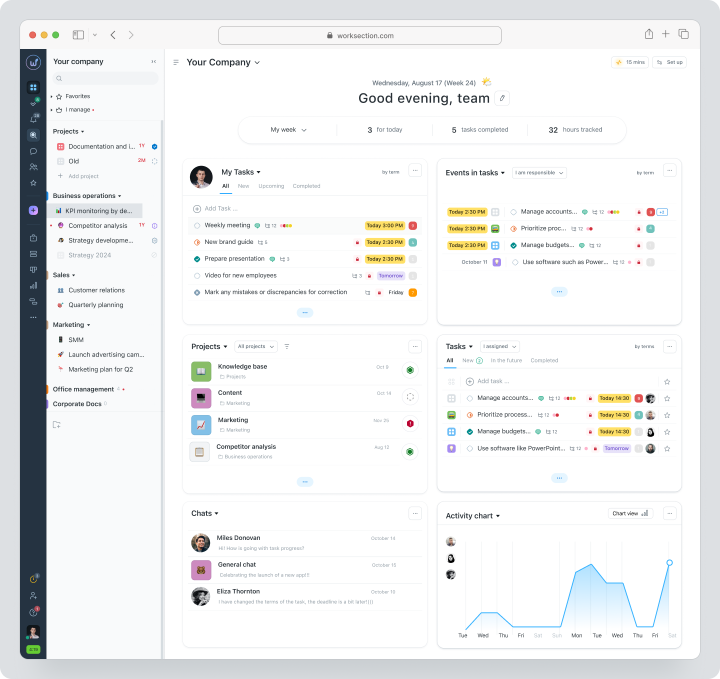
In Business, Gantt charts, dependencies, time tracking, expenses, and guest access are available. The manager monitors overdue tasks, planned vs. actual, and workload. However, Worksection does not handle BIM models, sheets, RFIs, approval document registers, contracts, or change orders as specialized construction entities.
Cost: Free for up to 5 users and 2 projects. For monthly payments, Basic costs $5 per user per month, Business — $10, Premium — $15.
Key features
- projects, tasks, subtasks, and checklists;
- responsibles, deadlines, statuses, and priorities;
- calendar, kanban, and Gantt chart;
- time, expenses, and reports;
- files and discussions;
- roles and guests;
- API and integrations.
Main distinction from Procore
Procore manages specialized construction workflows and finances. Worksection manages general task execution and deadlines without complicated implementation.
Advantages
- low cost;
- quick onboarding;
- convenient for small projects and internal teams.
Limitations
- no version control for drawings;
- no RFIs, approval documents, and construction finances;
- no BIM/CDE.
Who it’s suitable for
Small contractors, engineering firms, and support teams that need a simple PM.
Autodesk Forma Build
Autodesk Forma Build is the updated name of Autodesk Build in the Forma ecosystem. The product combines on-site work and project management, document management, approval documents, quality, safety, cost management, and project closure.
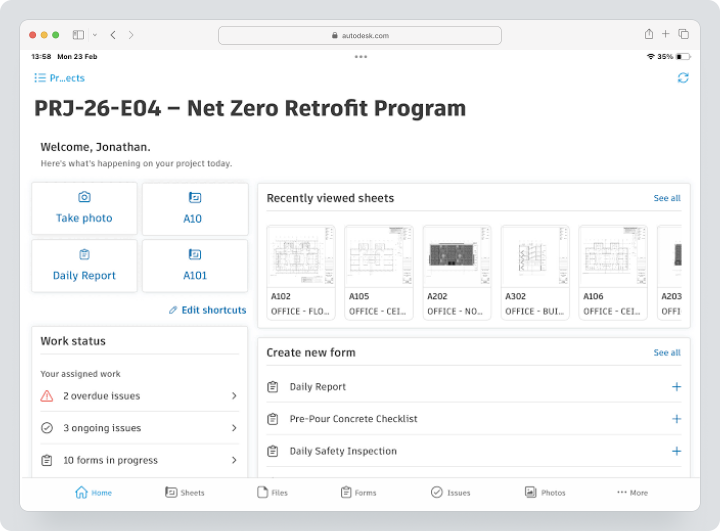
Cost: Autodesk utilizes modular and packaged offerings. A custom proposal is needed for Forma Build and Construction Operations; there is no publicly fixed price listed on the homepage.
Key features
- document and drawing management;
- RFIs and automated approval document logs;
- comments, forms, and field reports;
- quality, safety, and project closure;
- cost management;
- integration with design management and models.
Main Difference from Procore
Forma Build is particularly efficient when a company is already using Revit, Autodesk Docs, model coordination, and other Autodesk products.
Advantages
- strong design-to-build ecosystem;
- BIM and models;
- in-depth site work management.
Limitations
- custom pricing;
- maximum value requires several Autodesk modules;
- implementation can be complex.
Who It’s For
General contractors and project organizations within the Autodesk ecosystem.
Buildertrend
Buildertrend is a construction management system for home builders, remodeling companies, and contractors in residential construction. It combines scheduling, estimating, budgeting, material selection, client portal, project changes, and payments.
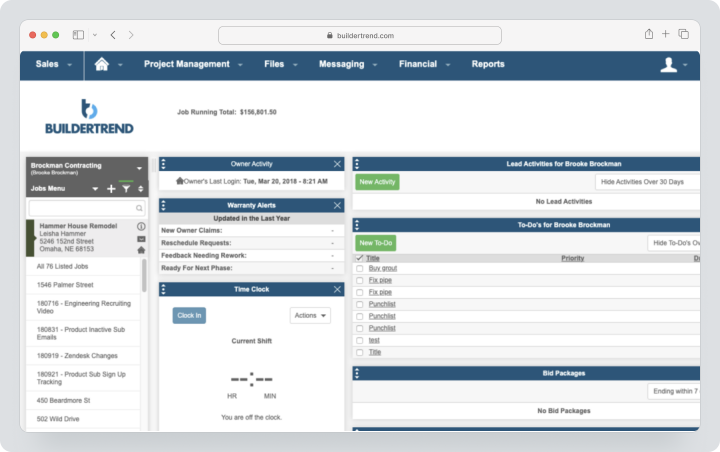
In 2026, pricing starts at $199 per month, with the final price varying after data submission.
Key Features
- estimating, budgeting, and purchase orders
- client portal
- material selection and order changes
- invoices, payments, and online billing (or: Bill Pay integration)
- daily logs and files
Main Difference from Procore
Buildertrend is better tailored for residential construction and communication with homeowners rather than large commercial/infrastructure projects.
Advantages
- strong client portal;
- financial processes for residential construction;
- clear logic for builders and contractors.
Limitations
- pricing is no longer a simple fixed amount;
- weaker for complex infrastructure;
- not an enterprise CDE.
Who It’s For
Home builders, remodeling companies, and design-build firms.
Fieldwire
Fieldwire is a platform for managing site work: plans, tasks, marking, inspections, and coordination.
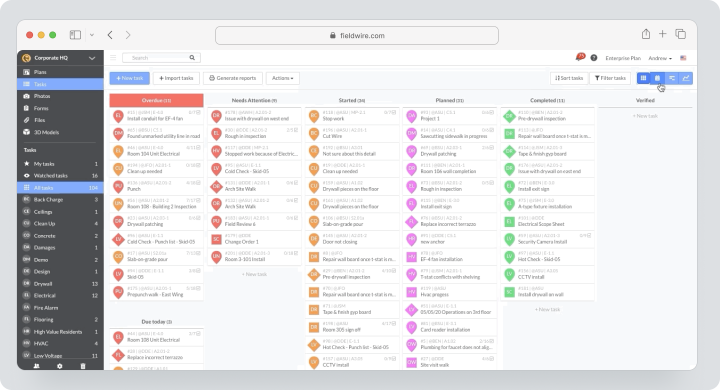
Cost: Basic is free for up to five users, three projects, and 100 sheets. The Pro plan costs $54 per month, Business $79, Business Plus $104 per user per month. RFI, approval documents, project changes, and Budget are included in Business Plus. Currency and taxes may vary by region.
Key Features
- plan viewing and version control;
- marking and hyperlinks;
- tasks, punch lists, and inspections;
- forms and reports;
- offline mobile access;
- RFI, approval documents, and project changes on higher plans;
- Budget module in Business Plus.
Main Difference from Procore
Fieldwire is simpler and focused on site work. It is implemented faster for daily coordination but does not offer such breadth of pre-project preparation and enterprise financial management.
Advantages
- user-friendly on-site;
- free start;
- strong drawing and task workflow tools.
Limitations
- advanced features are expensive;
- less deep portfolios and finances;
- pricing varies by region.
Who It’s For
Field teams, subcontractors, and mid-sized contractors.
Oracle Aconex
Oracle Aconex is a CDE and project control platform for large capital and infrastructure projects. It centralizes documents, correspondence, workflows, models, contracts, and changes.
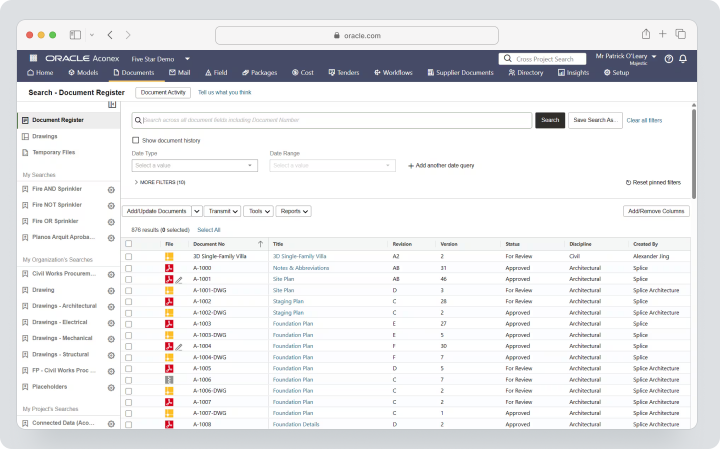
Cost: custom. There is no public self-service rate or permanent free plan; a commercial proposal is needed for the project.
Key Features
- strict document control
- cover letters and correspondence
- workflow automation
- RFI and approval documents
- model coordination
- contracts, costs, and changes
- traceability and audit.
Main Difference from Procore
Aconex is particularly strong in a neutral overall project CDE and consistent auditing across multiple organizations.
Advantages
- suitable for mega projects;
- strong change log;
- single environment for owners, EPCs, and contractors.
Limitations
- high complexity;
- individual pricing;
- requires process management and training.
Who it’s Suitable For
Infrastructure, industrial, and government projects.
Trimble ProjectSight
Trimble ProjectSight — construction project management for drawings, documents, RFIs, approval documents, on-site work management, and project control. The product can function as part of Trimble Construction One and integrate with Trimble’s financial systems.
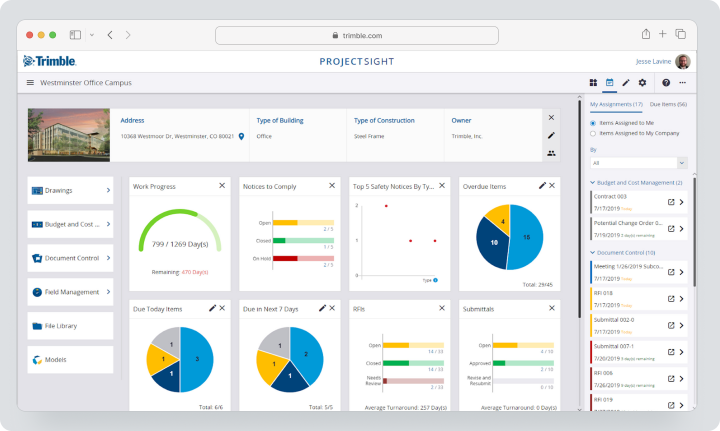
Cost: individual offer through Trimble or a partner. There is no publicly available fixed current price.
Key Features
- drawings and specifications;
- RFIs, approval documents, and correspondence;
- field reports and observations;
- document control;
- mobile access without the internet;
- flexible security settings;
- Trimble integrations.
Main Difference from Procore
ProjectSight is streamlined for organizations already using Viewpoint, Spectrum, Vista, or other Trimble solutions.
Advantages
- integration with Trimble Construction One;
- flexible access rights;
- strong document and site management capabilities.
Limitations
- opaque public pricing;
- full value depends on the ecosystem;
- implementation requires customization.
Who it’s Suitable For
Medium and large contractors in the Trimble stack.
CMiC
CMiC — a construction ERP that integrates finance, project management, workflows, analytics, and integrations. Unlike a standalone PM module, CMiC links projects to costs by assets, accounting, payroll, and corporate data.
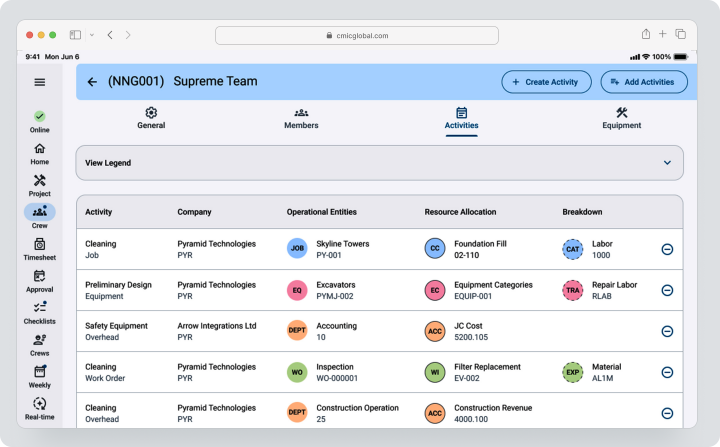
Cost: individual offer. The total depends on modules, users, implementation, data migration, training, and support.
Key Features
- construction finance;
- cost accounting by assets and forecasting;
- contracts and project changes;
- drawings and document management;
- project control;
- analytics;
- ERP integrations.
Main Difference from Procore
CMiC is more deeply focused on ERP and the internal financial and administrative processes of general contractors, while Procore is known for its connected platform from site to office.
Advantages
- a unified base for finance and project;
- strong cost accounting by assets;
- suitable for large general contractors.
Limitations
- complex implementation;
- individual pricing;
- overkill for SMBs.
Who it’s Suitable For
General contractors, road contractors, and large subcontractors who need an ERP.
Contractor Foreman
Contractor Foreman offers a construction management system for small to medium contractors: estimates, schedules, daily logs, work tasks, inspections, project changes, invoices, and equipment.
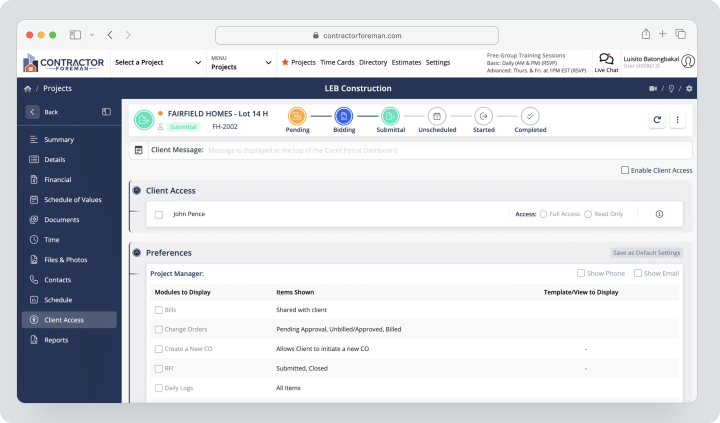
Cost: Contractor Foreman does not state a separate monthly subscription: payment is available quarterly or annually. Rates on the website are advertised from $49 per month, but that is a calculated price based on a longer payment period. All plans start with a 30-day trial. A 100-day money-back guarantee applies only if program conditions are met.
Key Features
- estimates and bid proposals;
- schedules and daily logs;
- change orders and purchase orders;
- work tasks and inspections;
- invoices and payments;
- client portal;
- unlimited number of projects.
Main Difference from Procore
Contractor Foreman offers a more accessible package for SMBs and fixed user limits instead of a volume-based enterprise contract.
Advantages
- transparent pricing;
- wide range of construction features;
- quick trial period.
Limitations
- interface and scalability are simpler than in enterprise systems;
- user package limits;
- not a BIM/CDE platform.
Who It’s Suitable For
Small general and specialized contractors.
PlanRadar
PlanRadar is a field documentation system based on comments, digital plans, mobile forms, and reports. External subcontractors and observers can be added for free.
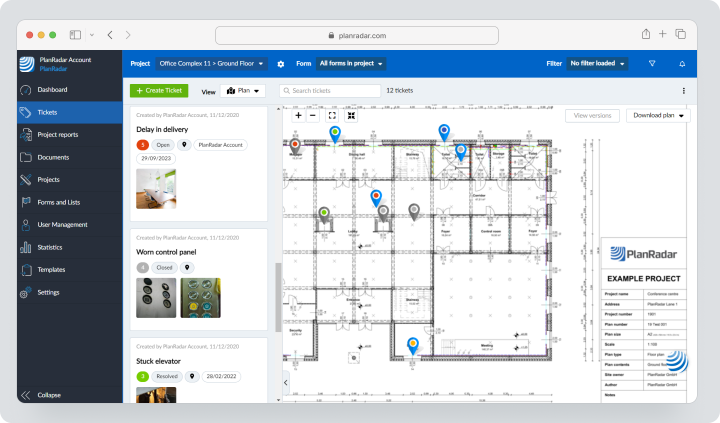
Cost: with monthly payment in the USA, Basic costs $35 per month for one user, Starter — $119, Pro — $179 per user; Enterprise is calculated individually. Trial period — 30 days without a card. Beginning from the second billing period, a 4% fee on the annual amount may apply.
Key Features
- comments on plans;
- photos, voice memos, and offline mode;
- reports and templates;
- approvals;
- document management;
- Gantt scheduling on Pro;
- BIM models;
- API and integrations without coding.
Main Difference from Procore
PlanRadar is easier to implement for field documentation, defects, and inspections, and external participants do not require a paid license.
Advantages
- convenient mobile work;
- free subcontractors;
- transparent rates and trial period.
Limitations
- plan/BIM restrictions based on rates;
- Pro is expensive;
- financial management is significantly narrower than in Procore.
Who It’s Suitable For
Inspectors, architects, owners, and contractors for whom comments and reports are important.
OpenSpace
OpenSpace is a visual analytics platform for 360° site documentation. A camera captures the route, images are automatically linked to the plan, and the team analyzes progress and conditions without constant site visits.
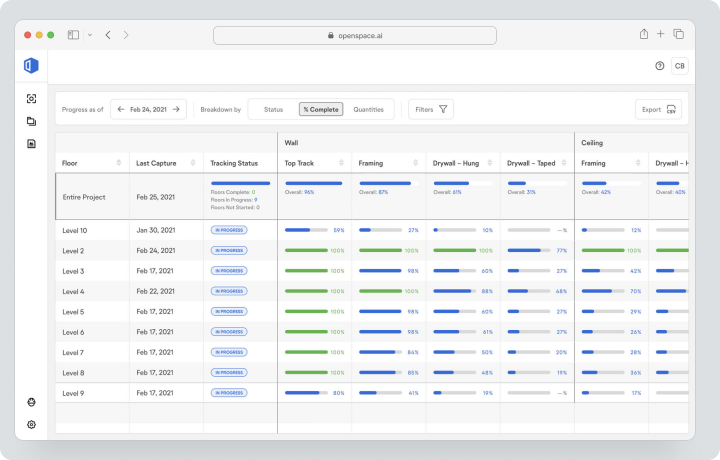
OpenSpace Field adds tasks based on images for QA/QC, issue resolution, inspections, and safety, and is included in Core and Enterprise subscriptions. BIM+ links visual documentation with a 3D model and connects as a separate add-on.
Cost: individual Core or Enterprise subscriptions are calculated based on annual construction volume, not by the number of users or projects. OpenSpace Track connects as an add-on; BIM+ is also priced separately.
Key Features
- 360° visual documentation;
- automatic linking to plans;
- progress control;
- visual comparison;
- BIM+ for 3D;
- OpenSpace Field for tasks and inspections in Core and Enterprise;
- integrations with the construction software stack.
Main Difference from Procore
OpenSpace does not attempt to replace a full construction ERP. Its specialization is visual documentation and analytics based on the actual site condition.
Advantages
- strong photo documentation;
- remote progress verification;
- reduction of disputes and repeated site visits.
Limitations
- individual pricing;
- requires a compatible camera and field process;
- does not replace budgets, contracts, and comprehensive project management.
Who It’s Suitable For
Large projects, owners, and contractors for whom evidence-based visual documentation is critical.
Comparative Table of Procore Alternatives
| Service | Best Scenario | Drawings | RFI / Submittals | Finance | Field Application | Planning | BIM / CDE |
|---|---|---|---|---|---|---|---|
| Worksection | Tasks and deadlines for SMB | Files, no version control | No special | Expenses and plan/fact | General mobile application | Gantt | No |
| Forma Build | Autodesk: from design to construction | Strong | Strong | Cost Management | Strong | Yes | Strong |
| Buildertrend | Residential construction | Documents | Limited process for residential construction | Strong for builders | Yes | Strong | No comprehensive CDE |
| Fieldwire | Site coordination | Strong | On older plans | Budget on Business Plus | Strong, offline | Limited | 2D/3D depending on the plan |
| Oracle Aconex | CDE for mega projects | Strong | Strong | Contracts/changes | Yes | Via platform | Strong CDE |
| ProjectSight | Contractors in the Trimble ecosystem | Strong | Strong | Through the Trimble ecosystem | Yes, offline | Yes | Models/documents |
| CMiC | Construction ERP | Yes | Yes | Very strong | Yes | Project control | Integrations |
| Contractor Foreman | Toolkit for SMB contractors | Files/plans | Basic | Estimates, invoices, changes | Yes | Yes | No |
| PlanRadar | Field notes and inspections | Strong | Approvals on Pro | Limited | Strong, offline | Gantt on Pro | BIM models |
| OpenSpace | 360° visual analytics | Attachment to plans | Field notes | No complete finance management | Specialization | Progress analytics | BIM+ |
How to Calculate Total Cost of Ownership?
The license is just one part of the budget. For corporate construction software, discovery, setup of directories, migration, training, integrations, and post-launch support are often required. If the vendor uses a custom proposal, request a breakdown for at least three years to see the continuation and growth of construction volume.
Include in the calculation:
- Base subscription and mandatory modules;
- Implementation, professional services, and training;
- Migration of projects, files, users, and financial history;
- Development of integrations with ERP, accounting, BIM, and identification management systems;
- Additional environments, storage, and API usage;
- Internal time of administrators and document control specialists;
- Support for field users and subcontractors;
- Cost of the parallel period;
- Archive access after contract completion.
Compare not the price of a single license, but the cost of one active project or a percentage of the annual construction volume. A more expensive system may be more beneficial if external participants are free and no third-party modules are needed. A cheap subscription becomes more expensive when the company separately purchases drawing management, accounting, e‑signature, reporting, and visual documentation.
For SMBs, it’s useful to create two options: a minimal stack for the next year and a target architecture for doubling the volume. This will show whether the platform needs a complete replacement after growth, or if it’s sufficient to upgrade to a higher plan and add extra modules.
One product or a bundle of several systems?
Not every company needs a monolithic platform. A general contractor can store drawings, RFIs, and approval documents in a specialized CDE, manage accounting in an ERP, document the site through OpenSpace, and handle everyday tasks in Worksection. Such a stack reduces redundancy but creates a risk of data duplication.
A unified platform is rational when processes are closely linked and the company is ready to invest in training. For example, changes to contracts should automatically reflect in budgets, forecasts, and reports. A bundle of separate services is suitable when each department already has a mature tool and only the weak link needs to be replaced.
Before choosing, identify the primary system for each type of data:
- CDE — for approved drawings, models, and official correspondence;
- construction ERP — for expense tracking by projects, obligations, invoices, and payroll calculations;
- field system — for inspections, resolving comments, photos, and daily reports;
- scheduler — for the main timeline and critical path;
- PM layer — for internal tasks, deadlines, and responsibilities;
- visual documentation — for visual recording of the actual state.
Integration should transfer identifiers and statuses, not create multiple independent copies of a single document. Otherwise, the team loses understanding of which version is official.
Which service to choose for different scenarios?
For the nearest enterprise replacement
Compare Autodesk Forma Build, Oracle Aconex, Trimble ProjectSight, and CMiC. Forma is stronger in Autodesk/BIM, Aconex — in CDE and change logs, CMiC — in ERP, ProjectSight — in the Trimble ecosystem.
For small and medium contractors
Contractor Foreman offers a specialized construction set at a public price. Fieldwire is suitable for site coordination. Worksection is only reasonable when specialized RFIs, drawings, and financial functions are not needed.
For residential construction
Buildertrend works more deeply with homeowners, material selection, estimates, schedules, and payments.
For an owner or developer
For the owner team, portfolio transparency, document control, approvals, and a proven decision history are important. Oracle Aconex is suitable for a strict inter-organizational CDE, Autodesk Forma — for projects with a strong project model, OpenSpace — for remote monitoring of actual progress. Check if the owner can obtain the complete archive independently of the general contractor.
For a specialized contractor
A small specialized contractor often prioritizes work tasks, estimates, schedules, photos, labor costs, and invoices over a complete enterprise CDE. Contractor Foreman or Fieldwire may be more practical. Worksection is suitable for internal planning of assembly teams if official construction documents are stored separately.
For an international infrastructure project
In such projects, critical inter-organizational access rights, an immutable change log, standardized document transfers, data placement requirements, and long-term storage are essential. Aconex, Forma, and large configurations of Trimble/CMiC need to be evaluated alongside legal, IT, and document control teams, not just by project management forces.
For inspections and defects
PlanRadar is convenient for documentation based on comments. Fieldwire is for plans and corrective actions. OpenSpace is for visually recording the actual state.
A practical pilot should be limited to one site and one team. Choose a project where there are active drawings, several RFIs, a weekly field report, and at least one change in the project. Record baseline metrics: document search time, response time to RFIs, number of duplicated files, report preparation speed, and number of overdue tasks. After four to six weeks, compare the results. This approach helps separate the real value of the system from the convenience of demonstration and make decisions based on workflow. The pilot must involve the office, site, document control, and at least one external contractor; otherwise, the conclusions will not reflect the actual inter-organizational load and will not reveal issues with roles, notifications, mobile work, and data quality.
How to switch from Procore without losing data?
- Create a register of companies, projects, users, and roles.
- List drawings, RFIs, approval documents, daily logs, contracts, budgets, changes, and attachments separately.
- Document legal retention and audit requirements.
- Determine which data should remain searchable and which can simply be archived.
- Check the official exports and APIs for each module being used.
- Clear duplicates without removing legally significant history.
- Create a mapping of statuses, fields, cost codes, and access rights.
- Migrate one completed and one active project.
- Verify versions of drawings, references, responses, dates, and attachments.
- Conduct a parallel run until the reporting period closes.
- Only after acceptance, disable editing in the old system.
How to use Worksection in a construction team?
- Create a project for the site or a specific work package.
- Divide it into stages, tasks, and subtasks.
- Assign executors, deadlines, priorities, and dependencies.
- Add approved files and links to the external CDE.
- Monitor the schedule on the Gantt chart.
- Connect the contractor or client via guest access.
- Track hours and expenses by tasks.
- Use reports for plan/fact, workload, and overdue tasks.
Meanwhile, drawings, BIM, RFIs, and approval documents should be kept in a specialized construction product, whereas links and executive tasks should be stored in Worksection.
FAQ
What is the best alternative to Procore in 2026?
For Autodesk teams, Forma Build is suitable; for a strict CDE, Oracle Aconex; for construction ERP, CMiC; for site work, Fieldwire or PlanRadar. There is no universal winner.
Are there free alternatives to Procore?
There is no complete free alternative to Procore. Fieldwire Basic is free for up to five users, and Worksection has a Free tier for general tasks, but neither solution replicates the full suite of Procore.
What alternative to Procore is suitable for small businesses?
Contractor Foreman offers the broadest specialized construction set at a transparent price. Fieldwire is good for field coordination, while Worksection is suitable for simple tasks and deadlines.
Which Procore replacement is better for large projects?
Oracle Aconex, Autodesk Forma Build, CMiC, and Trimble ProjectSight are designed for complex organizations and scale. The choice depends on CDE, BIM, ERP, and the existing ecosystem.
How does Worksection differ from Procore?
Worksection is a general PM system for tasks, deadlines, files, time, and reports. Procore is a specialized construction platform with drawings, RFIs, approval documents, safety, and financial management.
Can data be migrated from Procore?
Yes, through exports, reports, and APIs, but migration must be planned by modules. It is important to preserve the change log, relationships, responses, drawing versions, and financial history.
How to compare prices of construction platforms?
Consider licenses, construction volume, projects, external users, storage, modules, implementation, training, data migration, integrations, and renewals. It’s not correct to compare an individual proposal with a single price per seat.
How to choose between a specialized and a universal platform?
A specialized platform is necessary if RFIs, approval documents, drawings, contracts, and compliance are central processes. A universal PM system is suitable for simple sites or additional coordination.
What features should be checked before migration?
Check drawings, versions, RFIs, approval documents, field reports, offline working applications, rights, approvals, BIM, cost codes, contracts, project changes, exports, APIs, and data hosting requirements.
Conclusion
Procore remains a strong unified construction platform for organizations that need a wide single outline from pre-project preparation to finance and handover. However, specialized or simpler alternatives may better suit specific business models.
Autodesk Forma Build excels in Autodesk/BIM. Aconex — in CDE. CMiC — in ERP. ProjectSight — in the Trimble stack. Buildertrend — in residential construction. Fieldwire and PlanRadar — on-site. OpenSpace — in 360° visual analytics. Contractor Foreman — in the SMB segment.
Worksection does not replace these construction modules. It should be viewed as an accessible PM layer for tasks, deadlines, responsibilities, Gantt charts, time tracking, and reporting. For more details, see the Worksection overview and the pricing page.