Jibble combines clocking in and out, timesheets, GPS, geofencing, facial recognition, kiosk mode, PTO, and data preparation for payroll calculations. A free plan is available with no user limit, making the service particularly noticeable among solutions for hourly, field, and shift teams.
Companies look for alternatives to Jibble when they need deeper shift planning, local payroll integrations, HR and onboarding, communication for remote employees, project-based billing, or another level of activity control. Thus, alternatives to Jibble cannot be ranked without context. Homebase and Deputy manage shifts, Hubstaff tracks remote and field activity, and Worksection coordinates tasks and project time.
The selection includes Worksection, Clockify, Homebase, Deputy, Connecteam, When I Work, Hubstaff, QuickBooks Time, TimeCamp, and Buddy Punch. Worksection ranks first only for project coordination: tasks, checklists, deadlines, files, comments, roles, hours, and reports. The system does not replace biometric clock-in, payroll calculations, a full HRIS, compliance with attendance tracking requirements, or specialized shift planning.
Jibble Alternatives in 30 Seconds
- Worksection is suitable for mobile and service teams when tasks, deadlines, accountability, project time, and reports are important.
- Clockify offers affordable timesheets, kiosk mode, approvals, billing, attendance tracking, and optional GPS/screenshots.
- Homebase is ideal for small restaurants, retail, and hospitality with scheduling, timesheets, communication, HR, and payroll calculation add-ons.
- Deputy addresses shift scheduling, forecasting staffing needs, compliance, biometrics, and workforce management in more depth.
- Connecteam combines clocking in and out, shift planning, forms, tasks, chat, knowledge base, onboarding, and HR for remote employees.
- When I Work is suitable for shift-based companies needing a simple schedule, team messaging, clocking in and out, and payroll/POS integrations.
- Hubstaff is focused on remote and field teams with activity tracking, screenshots, GPS, project budgets, and payments.
- QuickBooks Time is rational for companies in the QuickBooks ecosystem needing GPS, shift scheduling, and direct integration with accounting/payroll.
- TimeCamp is suitable for project time tracking, billable hours, budgeting, and reporting with an available free plan.
- Buddy Punch offers clocking in and out, geofencing, webcam, break monitoring, shift scheduling, payroll integrations, and HR add-ons.
For the closest replacement for Jibble, compare Clockify and Buddy Punch. For shift planning, consider Deputy, Homebase, and When I Work. For remote employee management, look at Connecteam. For payroll calculation within the QuickBooks ecosystem, QuickBooks Time is convenient. Worksection is rational only when task execution is more important for the company than attendance tracking and compliance with payroll calculation requirements.
What is Jibble and who is it for?
Jibble is a time tracking and attendance platform for mobile, office, manufacturing, and field teams. Employees clock in through the app, browser, desktop program, Chrome extension, Slack, Microsoft Teams, or a shared kiosk. The system supports GPS, geofencing, facial recognition, selfie verification, NFC, and PIN, and offline records sync once connectivity is restored.
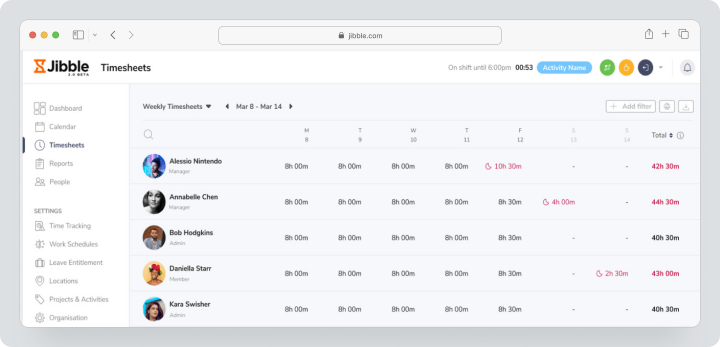
The manager receives timesheets, approvals, overtime, PTO, hours by projects, dashboards, and exports to XLS or CSV. Jibble also integrates with accounting, payroll, and communication products. The service focuses specifically on time and attendance tracking rather than attempting to become a full HR platform.
As of checking the Jibble terms on August 4, 2026, Free remains free forever for an unlimited number of users and includes clocking in via the web and mobile app, basic timesheets, and a range of integrations. For paid subscriptions, Jibble applies localized pricing. Public company pages use different plan names, so current names, costs, and the number of paid seats need to be confirmed when selecting a subscription for a specific organization.
Why are companies looking for alternatives to Jibble?
Deeper shift scheduling is required
Jibble supports work schedules, but Deputy, Homebase, and When I Work make shift planning a central function. They work more deeply with employee availability, open shifts, shift swapping, demand forecasting, staffing budgets, and multiple locations.
A local payroll ecosystem is needed
The set of payroll integrations depends on the country. Homebase and Deputy are deeply oriented toward the U.S., QuickBooks Time is linked to Intuit, while other companies may prefer products with a local partner or standard CSV export.
HR and onboarding are necessary
Jibble consciously focuses on time. Connecteam, Homebase, and Buddy Punch offer documents, onboarding, training, HR support, or task checklists. This can reduce the number of apps for teams without fixed workstations.
Project billing is important
Agencies require clients, rates for billable hours, project budgets, and profitability, not just attendance tracking. Clockify, TimeCamp, Hubstaff, and Worksection more deeply connect hours to project work.
Advanced monitoring is needed
Hubstaff tracks activity levels, apps, URLs, screenshots, and GPS. Clockify Pro also offers screenshots and GPS. These features provide more control but increase privacy risks and should not be enabled without informing employees.
Bundle pricing is needed instead of pay-per-user
Homebase counts payment by locations, Connecteam includes the first 30 users in a fixed price, while Worksection, Deputy, Hubstaff, and Buddy Punch use pay-per-seat or employee. For distributed teams, the pricing model can be more important than the starting amount.
How did we select and compare services?
Shift scheduling
Availability of employees, templates, open shifts, shift swapping, automated scheduling, forecasting, staffing budgets, and working with multiple locations were checked. Having a simple schedule does not equal full shift planning.
Clocking in, GPS, and verification
Considered were clocking in through a mobile app, web, and kiosk, PIN, QR, facial recognition, selfies, GPS tagging, location tracking, geofencing, and offline mode. The more data that’s collected, the more important transparency becomes.
Timesheets and payroll calculation
Comparisons included approvals, blocking periods, overtime, breaks, PTO, pay rates, rounding, export, and direct integrations. No time tracking service guarantees compliance with legislation without correctly setting up rules.
Operational tasks and communication
For teams without fixed workstations, forms, checklists, documents, announcements, chat, and confirmation of completion are essential. Here, Connecteam and Worksection cover a broader workflow than basic tracking of start and end times.
HR and Compliance
The onboarding process, employee documents, certifications, HR support, compliance with break rules, audit logs, and SSO were evaluated. HR functions are often sold as separate add-ons.
Cost for a Real Team
Payment models were compared based on users, location, base fees, and fixed prices. Payroll calculation, shift planning, GPS, and HR add-ons were considered separately.
Checklist for Choosing a Jibble Alternative
Prepare a single shift, an offsite location, a break rule, overtime, and export for payroll calculation before the demo. Let the employee check in, lose connection, change geofences, request PTO, and correct a missed check-in.
Check:
- whether the required schedule types are supported;
- how the check-in works without connectivity;
- whether GPS is recorded only during check-in or for the entire period;
- whether there’s face recognition, selfies, or PIN in kiosk mode;
- who can correct time records;
- whether an audit log is maintained;
- how breaks and overtime are calculated;
- which payroll and POS integrations are available in your country;
- whether task management, chat, and onboarding are included in the plan;
- the costs for all locations, users, and add-ons.
Best Jibble Alternatives in 2026
Worksection
Worksection helps coordinate mobile and service teams through projects, tasks, subtasks, and checklists. The manager assigns responsibility, deadlines, and priorities, attaches files, discusses outcomes, and receives performance reports.
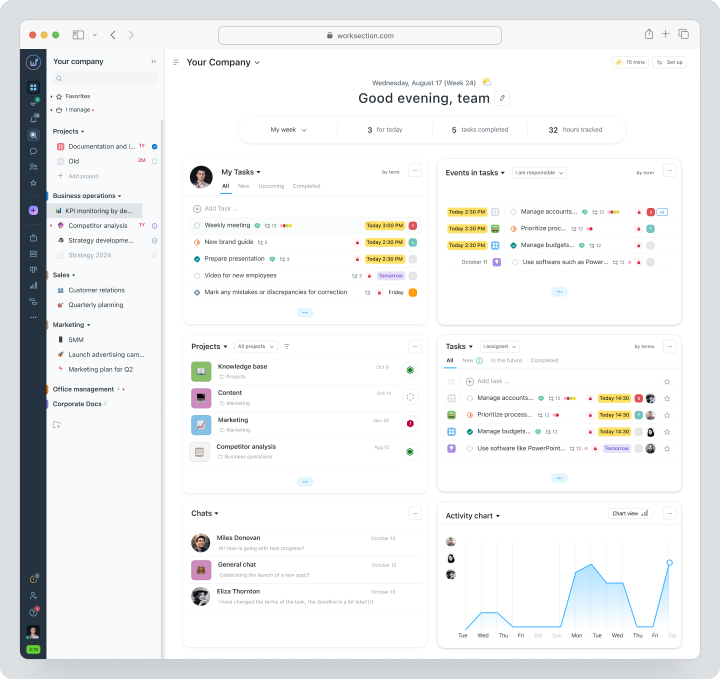
Time tracking is available in the context of tasks: an employee starts a timer or adds hours manually. This is project time tracking, not attendance tracking. Worksection does not verify faces, GPS, or presence in geofences and does not calculate payroll.
Cost: Free for up to 5 users and 2 projects. Basic plan costs $5, Business $10, Premium $15 per user per month. Timer, expenses, Gantt chart, and guest access are included in the Business plan.
| Fact | Value |
|---|---|
| Price | Free; Basic $5, Business $10, Premium $15 per monthly billing |
| Free / Trial Period | Permanent Free for up to 5 users |
| Model | Per active seat |
| Verified | August 4, 2026 |
Key Features
- task planner, subtasks, and checklists;
- deadlines, statuses, assignees, and priorities;
- files, comments, and chat;
- time tracking and expenses;
- Gantt chart, reports, and plan/fact;
- roles, permissions, guests, and integrations.
Main Difference from Jibble
Jibble confirms presence, time tracking, and check-ins. Worksection manages what the team has to accomplish and how much project time the task took.
Advantages
- strong tasks and outcome control;
- no biometric or GPS monitoring;
- suitable for client projects.
Limitations
- no shift scheduling;
- no payroll calculation and tracking of overtime requirements;
- no face recognition, kiosk mode, or geofences.
Who It’s Suitable For
Service, installation, marketing, and project teams where tasks and deadlines are crucial.
Clockify
Clockify combines a timer, timesheets, kiosk mode, approvals, attendance tracking, invoicing, and project reporting. Kiosk mode allows for a shared device, and limited licenses come at a separate reduced price.
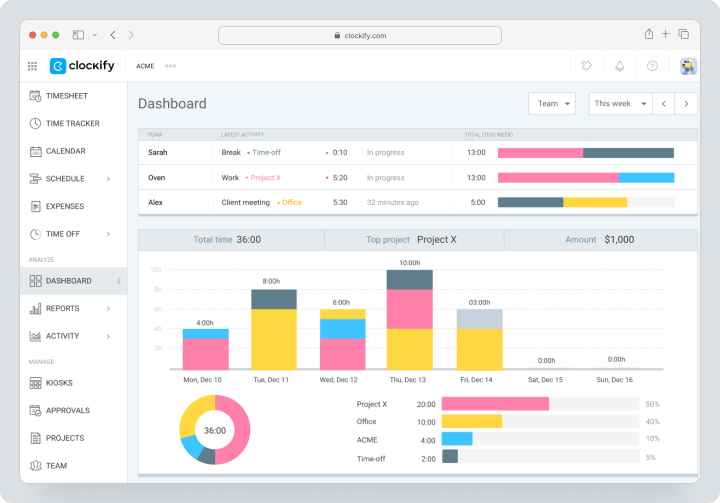
Pricing, verified on August 4, 2026: Monthly pricing for Basic is $6.99, Standard is $9.99, Pro is $14.99, and Enterprise is $15.99 per user per month. Free allows the owner to invite up to four people. The Pro trial lasts 7 days.
| Fact | Value |
|---|---|
| Price | $6.99 / $9.99 / $14.99 / $15.99 monthly |
| Free / trial period | Free for the owner and up to 4 invited; trial period lasts 7 days |
| Model | Per user; kiosk mode users are charged at a lower rate |
| Verified | August 4, 2026 |
Key Features
- timer, timesheets, and kiosk mode;
- approvals, attendance tracking, and overtime;
- breaks, vacations, and billing;
- shift scheduling and forecasting on Pro;
- GPS and screenshots on Pro;
- SSO, SCIM, and audit logs on Enterprise.
Main Difference from Jibble
Clockify handles project billing and profitability more extensively, but Jibble’s free attendance tracking configuration is more accessible for larger teams.
Advantages
- low paid rates;
- advanced reporting and invoicing;
- separate licenses for kiosk mode.
Limitations
- Free is limited to a small team;
- shift scheduling and GPS require Pro;
- there’s no equivalent free facial recognition.
Who It’s For
Service and project companies that need timesheets and billing.
Homebase
Homebase is designed for small hourly businesses: restaurants, retail, hospitality, and service points. The pricing is based on location, not per employee.
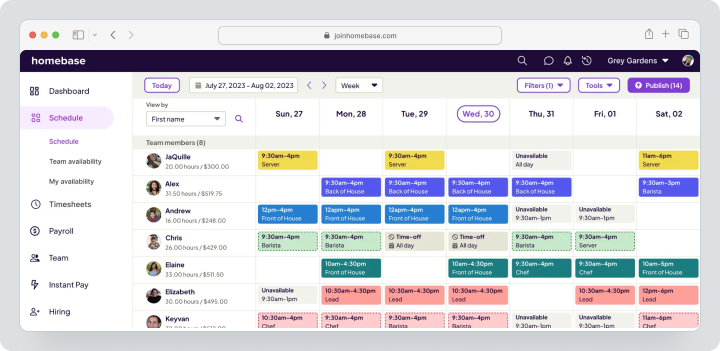
Pricing, verified on August 4, 2026: Basic is free for one location and a team of up to 10 people. Monthly pricing for Essentials is $30, Plus is $70, and All-in-One is $120 per location. Payroll is an additional $39 per month plus $6 for each employee receiving payment.
| Fact | Value |
|---|---|
| Price | Free; Essentials $30, Plus $70, All-in-One $120 per location monthly |
| Free / trial period | Free for up to 10 employees at 1 location; All-in-One trial period is 14 days without a credit card |
| Model | Per location; payroll is a separate add-on |
| Verified | August 4, 2026 |
Key Features
- shift scheduling and employee availability;
- mobile, tablet, and POS tracking of start and end times;
- team communication;
- PTO, performance metrics, and certifications;
- onboarding and compliance with HR requirements;
- payroll processing and Task Manager as add-ons.
Main Difference from Jibble
Homebase combines shift scheduling, HR, and payroll processing in the U.S. more thoroughly, while Jibble offers a more generous free time tracking option for an unlimited number of users.
Advantages
- package pricing per location;
- strong HR and payroll processing;
- free plan for small locations.
Limitations
- mainly oriented towards the U.S.;
- payroll processing is charged separately;
- multiple locations increase the cost.
Who It’s For
Restaurants, stores, salons, and local service businesses.
Deputy
Deputy — a workforce management platform for scheduling, time tracking, compliance, and optimizing labor resources. It supports shift planning rules, shift swapping, forecasting, and biometrics.
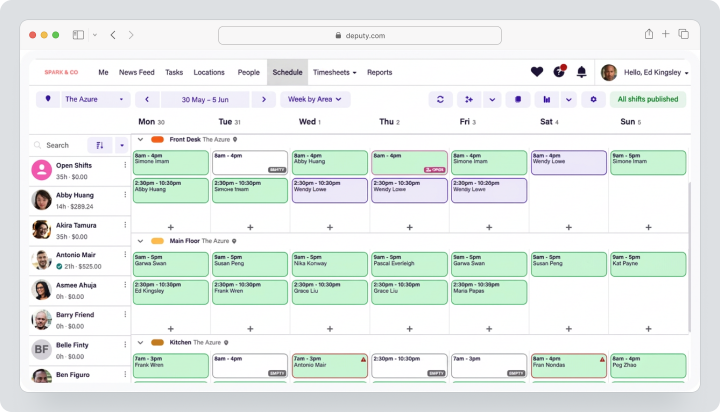
Pricing, verified August 4, 2026: Lite costs $5, Core — $6.50, Pro — $9 per user per month, excluding taxes. For monthly subscriptions, there is a minimum payment of $30 per account. The add-on for payroll calculation in the USA is $49 base fee plus $8 per user; HR — $2 per user.
| Fact | Value |
|---|---|
| Price | Lite $5, Core $6.50, Pro $9 per user |
| Free / trial period | Available free trial; add-ons can be tested for 30 days |
| Model | Per user plus selected add-ons |
| Verified | August 4, 2026 |
Key Features
- basic and advanced shift planning;
- geofencing and biometrics;
- automated timesheet approval;
- demand forecasting and workforce budgets;
- notifications and news feed;
- payroll, HR, and analytics add-ons.
Main Difference from Jibble
Deputy is stronger in automated scheduling, workforce demand forecasting, and compliance, but does not offer a permanent free plan with no user limit.
Advantages
- mature shift management;
- optimization of labor resources;
- many integrations with payroll and POS.
Limitations
- each administrator is considered a user;
- add-ons increase costs;
- local payroll functionalities depend on the country.
Who It’s Suitable For
Medium and large variable teams in retail, healthcare, and hospitality.
Connecteam
Connecteam combines Operations, Communications, and HR & Skills hubs for employees without a permanent workplace. The company can purchase only the needed hub or assemble a complete toolkit for mobile staff.
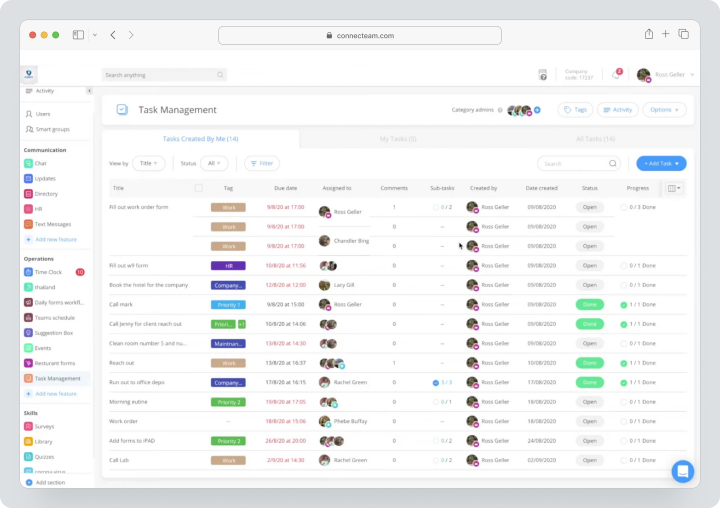
Pricing, verified August 4, 2026: Small Business Plan is free for teams with fewer than 10 employees. For monthly payments, plans for each hub for the first 30 users cost $35 for Basic, $59 for Advanced, and $119 for Expert. The trial lasts 14 days without a credit card.
| Fact | Value |
|---|---|
| Price | Basic $35, Advanced $59, Expert $119 per month for the first 30 users |
| Free / trial period | Free for small businesses; trial period 14 days |
| Model | Fixed price for up to 30 users per hub |
| Verified | August 4, 2026 |
Key Features
- tracking work start and end times, GPS, and geofencing;
- work shift scheduling and open shifts;
- forms, checklists, and quick tasks;
- chat, updates, and knowledge base;
- documents, courses, and onboarding;
- PTO, recognition of achievements, and HR processes.
Main Difference from Jibble
Connecteam is broader as a mobile operations and communication platform, but a full setup requires several hubs.
Advantages
- many features for employees without a permanent workplace;
- fixed price for up to 30 people;
- free plan for small businesses.
Limitations
- complex hub structure;
- advanced features are distributed among plans;
- payroll processing is done through integrations.
Who It’s Suitable For
Field services, construction, logistics, cleaning, and other companies with multiple locations.
When I Work
When I Work focuses on scheduling employee shifts, team messaging, and attendance tracking. The service supports multiple locations, open shifts, shift swapping, forecasting, and payroll/POS integrations.
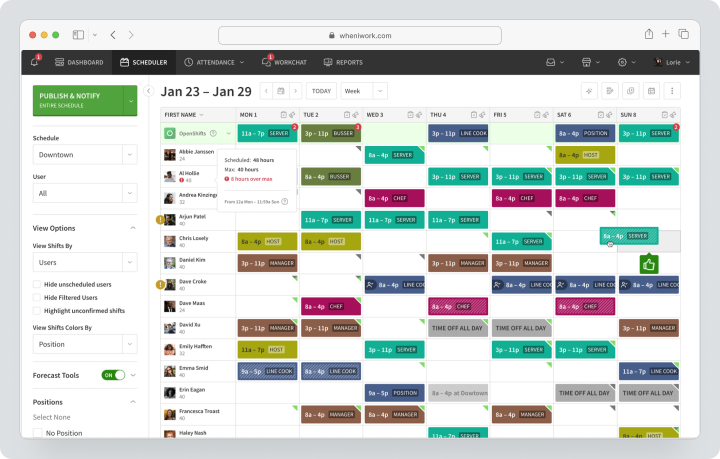
Pricing, verified on August 4, 2026: Essentials costs $2.50, Pro — $5, Premium — $8 per user per month. The trial period lasts 14 days and includes shift scheduling, time tracking, and messaging.
| Fact | Value |
|---|---|
| Price | $2.50 / $5 / $8 per user per month |
| Free / Trial Period | 14-day trial without a card |
| Model | Per user; levels based on scheduling complexity |
| Verified | August 4, 2026 |
Key Features
- multi-week and multi-location scheduling;
- employee availability, OpenShifts, and shift swapping;
- work start and end tracking, GPS, and geofencing;
- team messaging;
- overtime and compliance reporting;
- integrations with payroll and POS.
Main Difference from Jibble
When I Work builds a more in-depth schedule and communication, while Jibble wins with a free model and biometric verification.
Advantages
- low starting price;
- simple shift scheduling process;
- messaging included.
Limitations
- no permanent Free;
- API and SSO only on Premium;
- billing by projects is limited.
Who It’s Suitable For
Restaurants, retail, call centers, healthcare, and seasonal teams.
Hubstaff
Hubstaff combines time tracking, screenshots, activity levels, apps/URLs, GPS, geofencing, project budgets, invoicing, and payments. It is a deeper monitoring tool than Jibble.
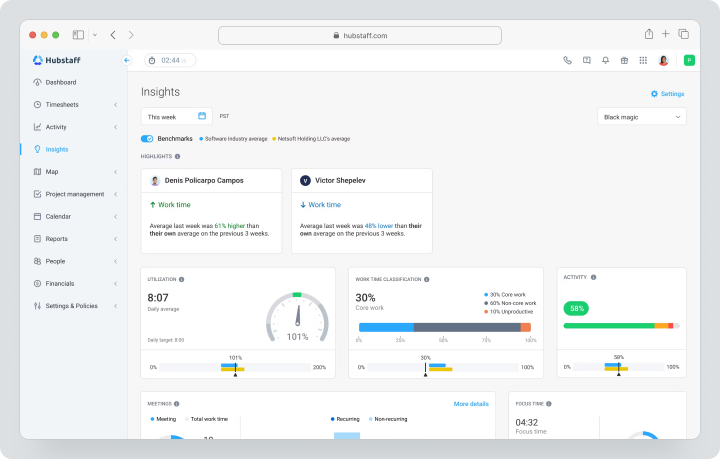
Pricing, verified on August 4, 2026: Starter costs $7, Grow — $9, Team — $12, Enterprise — $25 per seat per month on the current pricing page. For Starter, a minimum of two seats is required. The trial period lasts 14 days without a card.
| Fact | Value |
|---|---|
| Price | $7 / $9 / $12 / $25 per seat per month |
| Free / Trial Period | 14-day trial; 30-day money-back guarantee |
| Model | Per user, minimum of 2 seats; add-ons separately |
| Verified | August 4, 2026 |
Key Features
- time tracking and activity monitoring;
- screenshots, apps, and URLs;
- GPS, locations, and geofencing;
- project budgets and expenses;
- shift scheduling, attendance tracking, and PTO;
- invoicing, payments, and payroll integrations.
Main Difference from Jibble
Hubstaff measures computer activity and project economics more deeply, but Jibble is simpler for attendance tracking and free shift start check-ins.
Advantages
- remote and on-site monitoring;
- project budgets and payments;
- advanced analytics.
Limitations
- screenshot monitoring may reduce trust;
- minimum of two seats;
- GPS and advanced analytics may require add-ons.
Who It’s Suitable For
Remote agencies, outsourcing, and on-site teams with transparent monitoring policies.
QuickBooks Time
QuickBooks Time connects mobile time tracking for clocking in and out, GPS, shift scheduling, and integration with QuickBooks accounting and payroll. The product is primarily targeted at the US market.
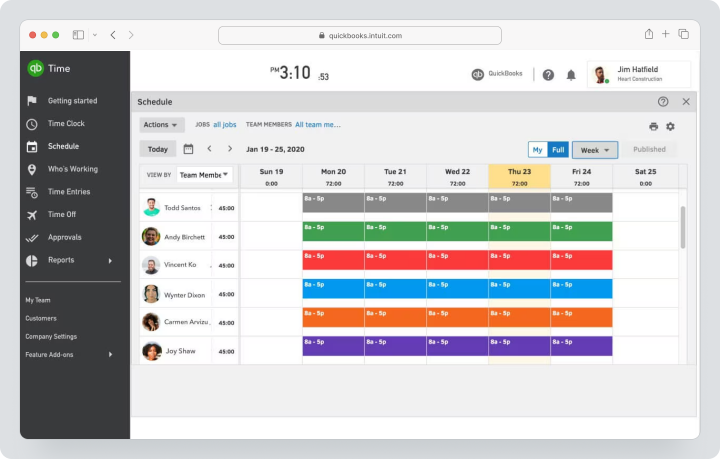
Price, verified August 4, 2026: the standard price for Time Premium is $20 base fee per month plus $10 per user. Time Elite costs $40 base fee plus $12 per user. The base fee includes one administrator. Temporary promotional conditions may apply on the official page, so the final cost should be checked before payment.
| Fact | Value |
|---|---|
| Price | Premium: $20 + $10 per user; Elite: $40 + $12 per user per month |
| Free / Trial period | No permanent Free; promotions and trial period depend on current offers |
| Model | Base fee plus per user; 1 administrator included |
| Verified | August 4, 2026 |
Key Features
- mobile and web time tracking for clocking in and out;
- employee shift scheduling, PTO, and approvals;
- payroll-ready reports;
- sync with QuickBooks accounting and payroll;
- tracking mileage, project tracking, and comparing estimates with actuals on Time Elite;
- project activity feed and time sheet signatures on Time Elite.
Main Difference from Jibble
QuickBooks Time offers closer integration with Intuit, but is significantly more expensive than the free Jibble and more reliant on the American accounting ecosystem.
Advantages
- seamless synchronization with QuickBooks;
- shift scheduling included;
- one administrator free of charge.
Limitations
- base fee plus charge for each employee;
- no permanent Free;
- some features are US-centric.
Who it’s for
Companies that already manage accounting or payroll in QuickBooks.
TimeCamp
TimeCamp is a time tracking project management system with manual and automatic tracking, rates for billable hours, budgets, attendance tracking, and reporting. Free supports an unlimited number of users and projects.
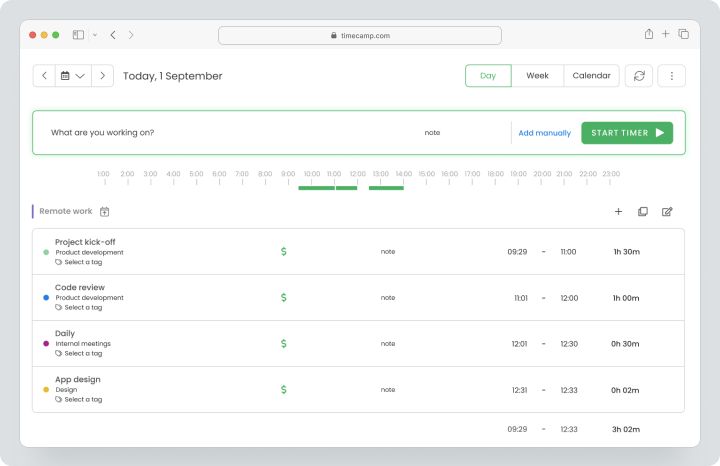
Price, verified August 4, 2026: For monthly payment, Starter costs $3.49, Premium — $4.99, Ultimate — $6.99 per user per month. Enterprise is customized individually.
| Fact | Value |
|---|---|
| Price | $3.49 / $4.99 / $6.99 monthly |
| Free / Trial period | Permanent Free; trial period available for paid features |
| Model | Per user; unlimited users on Free |
| Verified | August 4, 2026 |
Key Features
- manual and automatic tracking;
- projects, tasks, and rates for billable hours;
- invoicing and budgeting;
- attendance and leave tracking;
- reports on applications and websites on higher plans;
- integrations and export.
Main Difference from Jibble
TimeCamp offers a more comprehensive solution for project billing and automatic tracking on desktop, while Jibble is stronger in biometric attendance tracking and mobile verification.
Advantages
- unlimited users on Free;
- low price;
- strong billing.
Limitations
- shift scheduling is not a core feature;
- biometric kiosk is weaker than in Jibble;
- advanced analytics are paid.
Who it’s for
Freelancers, agencies, and service companies with client projects.
Buddy Punch
Buddy Punch offers tracking of employees’ clock-in and clock-out times with GPS, geofencing, QR, PIN in kiosk mode, webcam, break management, shift scheduling, and payroll integrations.
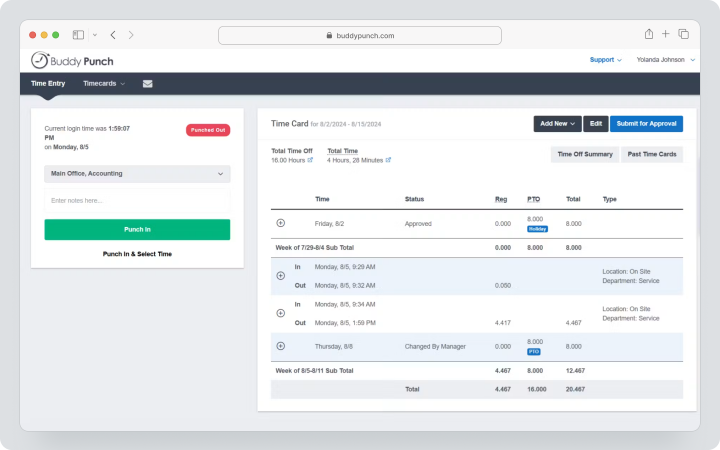
Cost, verified on August 4, 2026: Monthly, Starter costs $5.99, Pro — $7.99, Advanced — $13.99 per user per month plus a base fee of $19. The Payroll add-on costs $49 base fee plus $8 per user per month. The trial period lasts 14 days and does not require a credit card.
| Fact | Value |
|---|---|
| Price | $5.99 / $7.99 / $13.99 + $19 base fee monthly |
| Free / trial period | 14-day trial without a card; no permanent Free plan |
| Model | Base fee plus active employees; admins are free |
| Verified | August 4, 2026 |
Key Features
- mobile, web, and kiosk clock-ins;
- GPS, geofencing, and webcam;
- breaks, overtime, and PTO;
- shift scheduling on Pro;
- payroll integrations and add-ons;
- onboarding, tasks, SSO, and advanced reporting on higher tiers.
Main Difference from Jibble
Buddy Punch offers more control over break rules and paid add-ons for staff, while Jibble provides a strong free plan without user limits.
Advantages
- multiple verification methods;
- free admins;
- transparent pricing for add-ons.
Limitations
- base fee even for small teams;
- geofencing available starting from Pro;
- no permanent Free plan.
Who It’s Suitable For
Hourly teams that need break rules, payroll synchronization, and formal clock-in and clock-out tracking.
Comparison Table of Jibble Alternatives
Prices and features in the table verified on August 4, 2026.
| Service | Best Scenario | Shifts | Clock-in / GPS | Payroll | Tasks | Communication | HR Functions |
|---|---|---|---|---|---|---|---|
| Worksection | Task and project time | No specific | Timer without GPS | No | Strong | Comments and chat | Roles, vacations for Business |
| Clockify | Timesheets and billing | Pro | Kiosk mode, GPS on Pro | Integrations/export | Projects/tasks | Limited | Vacations, attendance tracking |
| Homebase | Small hourly business | Strong | Mobile/POS, location-based clock-in | Proprietary add-on | Task Manager add-on | Strong | Onboarding, HR support |
| Deputy | Staff shift scheduling | Very strong | Geofences, biometrics | Integrations/add-ons | Limited | News feed, notifications | HR add-ons |
| Connecteam | Mobile workforce | Strong | GPS, geofences, route tracking | Integrations | Forms, tasks, checklists | Very strong | Onboarding, documents, courses |
| When I Work | Simple shifts | Strong | GPS and geofences | Integrations | Limited | Strong | Basic compliance tools |
| Hubstaff | Remote and field monitoring | Team | GPS/geofences, screenshots | Payments/integrations | Add-ons with tasks/included | Limited | PTO, attendance tracking |
| QuickBooks Time | QuickBooks ecosystem | Yes | GPS and mobile clock-in | Strong QuickBooks synchronization | Projects and mileage on Elite | Limited | PTO |
| TimeCamp | Project billing | Not primary | Timer, automatic computer tracking | Export/integrations | Projects/tasks | Limited | Attendance/vacation tracking |
| Buddy Punch | Tracking clock-in/out requirements | Pro | GPS, geofences, webcam | Integrations/add-ons | Add-on with tasks | Limited | Add-on for onboarding |
Which service to choose for different scenarios?
For the Closest Jibble Replacement
Clockify is suitable for teams that need kiosk mode, project approval, and billing. Buddy Punch is closer for tracking employee clock-ins/outs, GPS, and verification. However, neither fully replicates Jibble’s free model without user limits.
For Shift Planning
Deputy offers the most comprehensive forecasting and staff management tools. Homebase is ideal for small locations in the US, When I Work for simple shift scheduling and communication. Connecteam is convenient when schedules need to be combined with forms, tasks, and a knowledge base.
For Field and Remote Monitoring
Hubstaff provides screenshots, activity data, and GPS. Connecteam tracks location only during clock-ins and adds operational tools for employees without a permanent workspace. Implementation must be transparent and comply with local regulations.
For Project Work
Worksection connects time with tasks, deadlines, and outcomes. TimeCamp and Clockify delve deeper into rates for billable hours and invoicing. These products do not replace attendance tracking and compliance requirements if payroll calculation depends on shift start tracking and geofencing.
For a Small Budget
Jibble maintains a strong position thanks to Free with no user limits. Homebase is free for one location with up to 10 employees, Connecteam for small businesses, TimeCamp for unlimited users, and Worksection for up to five participants.
How to Switch from Jibble Without Losing Data?
- Create a list of employees, groups, schedules, projects, activities, and locations.
- Export approved timesheets, attendance data, PTO, and payroll reports.
- Document the rules for overtime, breaks, rounding, and pay periods.
- Save geofences, kiosk mode settings, and role permissions.
- Remove inactive employees and duplicates.
- Create a pilot location or team in the new system.
- Import people and one closed pay period.
- Compare regular time, overtime, breaks, and PTO.
- Check the export for payroll calculation and audit logs.
- Run parallel clock-ins for one shift or week.
- After acceptance, save the Jibble archive and shut down the old process.
How to Use Worksection for a Mobile Service Team?
- Create a project for the client, object, or work route.
- Break the outcome into tasks and checklists.
- Assign a responsible person, deadline, and priority.
- Add instructions, files, and contact details.
- The employee records project hours within the task.
- The outcome is confirmed with a comment, status, or attachment.
- The manager checks deadlines and workloads.
- The client is connected through guest access.
- Compare planned vs. actual in reports.
- Current conditions are available on the Worksection pricing page.
For attendance tracking, payroll calculation, biometrics, and compliance with shift requirements, Jibble or another specialized system will be needed alongside Worksection.
FAQ
What is the Best Alternative to Jibble in 2026?
For clocking in and out and project billing, Clockify is suitable, Deputy for shift management and personnel management, Homebase for small hourly businesses, and Connecteam for employees without a permanent workspace. Buddy Punch is close for GPS and verification, while Worksection is needed only for tasks and project time. The choice depends on payroll calculation, geofences, shift planning, and team size.
Are There Free Alternatives to Jibble?
Yes. TimeCamp offers Free for an unlimited number of users and projects, Homebase is free for one location with up to 10 employees, Connecteam has a Small Business Plan, and Worksection is Free for up to five users. However, Jibble remains a rare combination of unlimited users, attendance tracking, GPS, and biometrics for free. Compare not only user limits but also available rules and export options.
What alternative to Jibble is suitable for small businesses?
Homebase is rational for a single small location in the USA, Connecteam is for teams without a permanent workplace with fewer than 10 people, TimeCamp is for project billing, Worksection is for tasks and deadlines. Buddy Punch and When I Work are suitable if the company is willing to pay for each employee. Before purchasing, calculate the base fee, locations, and payroll add-ons.
Which replacement for Jibble is better for teams?
For shift teams, compare Deputy, When I Work, and Homebase. For distributed field teams, Connecteam is suitable, for remote monitoring — Hubstaff, for project accounting — Clockify or TimeCamp. Worksection is useful if the team needs to manage tasks and checklists, but it does not track attendance. Conduct a pilot during a real shift and pay period.
How does Worksection differ from Jibble?
Jibble records the start time, attendance, GPS, geofences, facial recognition, overtime, and timesheets, ready for payroll calculation. Worksection manages projects, tasks, deadlines, files, comments, and project hours. It does not track employee attendance or calculate payroll. It is used for monitoring results, while Jibble is used for tracking working hours and attendance.
Can data be transferred from Jibble?
Yes, Jibble allows exporting reports and timesheets in XLS or CSV. Transfer employees, groups, projects, and closed pay periods, and set up overtime, breaks, rounding, PTO, and geofences manually in the new system. Before switching, compare one complete pay period and make sure that regular and overtime hours match.
How to compare service prices?
Calculate the total cost for the actual number of employees and locations. Add base fees, user charges, payroll processing, shift scheduling, GPS, HR, onboarding, and API add-ons. Homebase counts locations, Connecteam includes the first 30 users, Buddy Punch and QuickBooks Time use a base fee, while Deputy and Hubstaff charge for each user. A free plan may have functional limitations.
How to choose between a specialized and a universal platform?
A specialized HR management product is necessary if payroll depends on start time, shifts, breaks, overtime, GPS, and compliance. A universal PM system is suitable for tasks, deadlines, and coordinating outcomes. Often an effective combination is: Jibble or Deputy as the primary attendance tracking system, and Worksection for projects. Do not duplicate hours for payroll calculation in two systems without integration.
What features to check before migration?
Check the start time tracking via mobile app, web, and kiosk, offline mode, GPS, geofences, biometrics, breaks, overtime, PTO, approvals, audit log, export for payroll calculation, and role permissions. Test missed clock-ins, off-the-grid shifts, early start times, and manager adjustments separately. The comparison should cover the full pay period and real export for payroll calculation.
Conclusion
Jibble remains a strong solution for tracking working hours and attendance due to its free plan with no user limits, GPS, geofences, biometric verification, kiosk mode, and payroll-ready reports. However, companies may need deeper shift planning, HR, communication, or project management.
Clockify and TimeCamp are stronger in project billing. Homebase, Deputy, and When I Work excel in shifts. Connecteam combines work for employees without a permanent workplace, Hubstaff is for monitoring, QuickBooks Time is part of the Intuit ecosystem, and Buddy Punch is for time tracking with compliance.
Worksection does not replace Jibble in attendance tracking scenarios. It should be considered when a mobile or service team needs to manage tasks, deadlines, checklists, files, responsibilities, and project hours. More details can be found in the Worksection overview.