Solutions
worksection
beta
help
Can I store files on my own server? How to connect FTP storage?
Yes, you can. FTP storage is designed for this purpose. It is your own file server where all files of your account are stored.
This option is available on the Premium plan.
What it's for:
Worksection plans have certain limits on the disk space allocated for your account. By using your own file server, you remove all limits and can upload as many files as your server's hard drive allows. In addition, FTP storage will be useful for companies whose internal policy does not allow storing confidential files on third-party servers.
How it works:
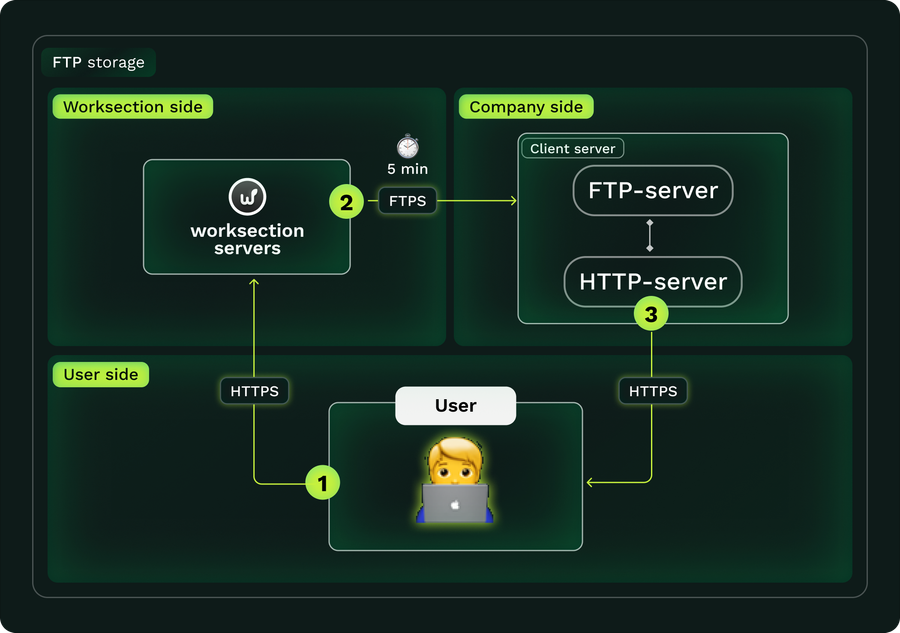
You upload files to the account just as you did before. Every half hour, Worksection connects to your server and moves all files to it.
If the FTP storage is unavailable or the file transfer to your server fails — the file remains on the Worksection server, and we will retry after some time.
Working with files stored on your FTP storage is no different from working with files stored on the Worksection server, except that the files are physically located on your server.
Please note! After files are moved to your server, they are deleted from our servers! You take responsibility for the security and reliability of file storage.
Storing files on Worksection servers is safer. The server cluster ensures file storage security through multiple redundancy across different cluster servers. Regular backup allows restoring data "accidentally" deleted by employees.
What you need:
You need your own server with FTP (FTPS) and HTTP (Apache, Nginx, IIS) services running, or a rented web hosting.
How confidentiality is ensured:
Files are uploaded via FTP with a password that is not known to your employees or third parties. The system automatically detects the ability to work via FTPS, which ensures secure data transfer to your server.
Downloads are done via HTTP without a password — Worksection generates links for downloading and viewing files (if the user has sufficient permissions for this action). A properly configured HTTP server does not allow listing the files on the server, and thanks to the unique folder structure, even knowing the file name, it is impossible to guess the download link.
How to connect:
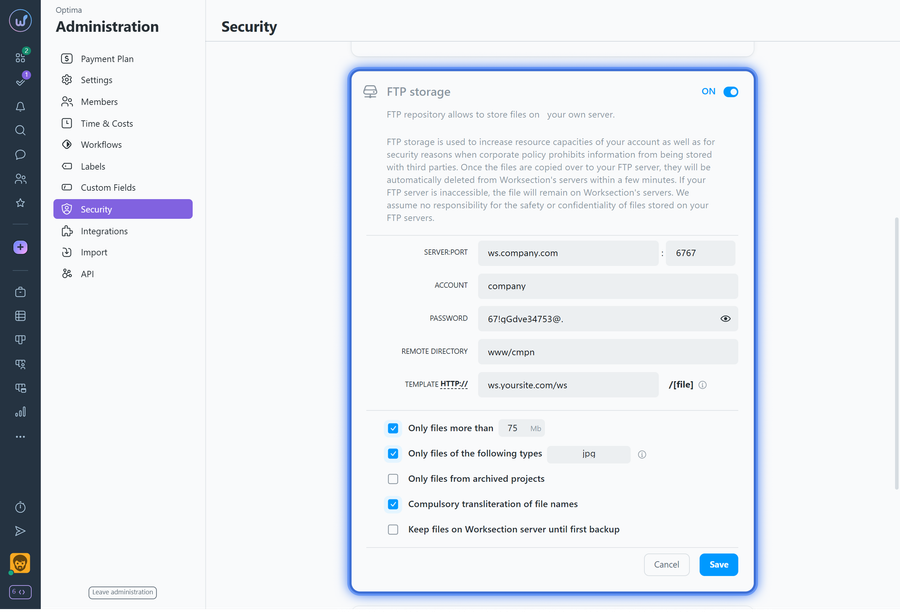
Go to the Administration > Security page. In the "FTP storage" block, enter the connection details for your server (its address, login and password, and working directory for uploads) and the link template for displaying files. Click "Save".
Leave your review
Did this article help you?
Glad we could help! What was helpful?
Sorry this didn't help. What went wrong?

