Teamly.com brings together tools for remote teams: workflows, tasks, real-time chat, screen recording, and time tracking. This set allows a small company to keep communication and work execution in one service, eliminating the need for a separate messenger and time tracker.
However, as the team grows, more mature reporting, Gantt charts, team workload, advanced integrations, client access, portfolio management, or a different balance between chat and project structure may be required. Therefore, it is necessary to compare Teamly alternatives based on specific scenarios rather than just the total number of features.
This review features Worksection, ClickUp, Asana, Monday.com, Basecamp, Wrike, Hubstaff, Notion, Slack, and Trello. Worksection ranks first as a managed project execution system. Slack is included as a strong communication alternative but is not considered a full-fledged PM system. Hubstaff covers time tracking and team performance analytics more deeply, while the other solutions vary in task, document, and reporting management levels.
Teamly Alternatives in 30 Seconds
- Worksection — for tasks, deadlines, dependencies, Gantt charts, time, finance, and client access.
- ClickUp — for a unified workspace with tasks, docs, chat, reporting dashboards, and automations.
- Asana — for cross-functional processes, goals, portfolios, and management reporting.
- Monday.com — for visually customizable processes and automations.
- Basecamp — for simple project coordination, clients, and communication.
- Wrike — for complex corporate work, resources, approvals, and analytics.
- Hubstaff — for time tracking, activity analytics, payroll calculation, and distributed employees.
- Notion — for documents, wikis, databases, and lightweight project management.
- Slack — for communication, external channels, and messaging automations.
- Trello — for simple Kanban boards and quick process initiation.
The closest alternative is likely to be found between ClickUp and a combination of Slack with a PM system. If the main scenario for Teamly was time tracking, compare Hubstaff. If the team wants to separate communication from managed execution, Worksection provides a clearer structure for projects, deadlines, and reports.
What is Teamly and Who is it Suitable For?
Teamly.com is a remote project management tool that combines real-time chat, workflows, screen recording, and employee time tracking. The team can create workflows, place tasks on boards, communicate, record screens, and track time all in one space.
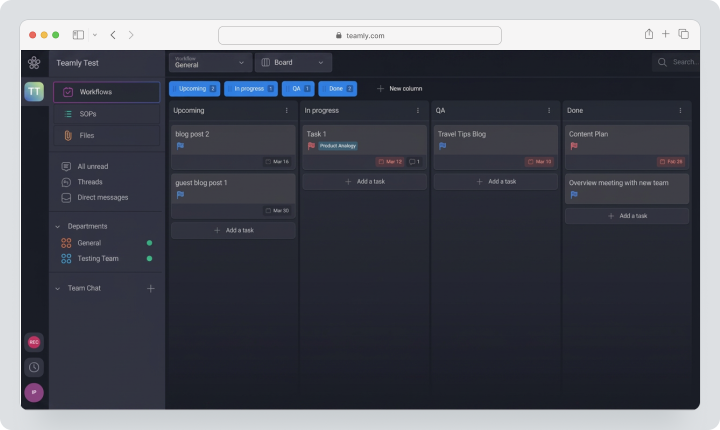
The service is designed for small distributed teams, agencies, and companies that need a compact set of tools without complex enterprise architecture. Teamly Business supports up to five users. Business+ Level One includes up to 15 users, while Level Two and above allow for an unlimited number of users.
As of 03.08.2026, the public pricing page shows Teamly Business at $27 per month with monthly billing. Business+ Level One costs $47 per month. The page also states a 14-day free trial.
It is important not to confuse Teamly Business with separate Teamly Capture. Capture is focused on screen recording and has its own plans.
Why are Teams Looking for Alternatives to Teamly?
Need for More Mature Reporting
Teamly covers basic workflows and time tracking, but large companies may need dashboards for portfolios, resource planning, team workload, approvals, custom fields, and complex analytical reports. Asana, Wrike, ClickUp, and Monday.com work more deeply at the management level.
Need for Gantt Charts and Dependencies
As projects multiply, Kanban boards no longer show the critical path and the impact of delays. Worksection, ClickUp, Asana, Monday.com, and Wrike offer timelines or Gantt charts at relevant pricing tiers.
Need for an Advanced Integration Ecosystem
The team may use CRM, cloud storage, calendars, accounting, support, and development tools. ClickUp, Asana, Monday.com, Slack, and Notion offer more ready-made integrations and advanced API scenarios.
Important Client Access
Agencies need to invite clients, show only their projects, receive comments and approvals without disclosing internal data. Worksection, Basecamp, and other PM systems offer clearer guest or client models.
Specialized Time Tracking Needed
If Teamly is used primarily for hour tracking, Hubstaff provides activity levels, screenshots, payroll calculation, attendance tracking, and team performance analytics. This is a separate category with more sensitive privacy and labor law issues.
A Different Communication Model is Required
Teamly combines chat with work. This is convenient for some teams, while others need a more powerful communication platform with channels, huddles, Slack Connect, applications, and search functionalities. In this case, Slack could replace chat, but a separate system will be needed for projects.
Changing Payment Model
Teamly sells plans in bundles with user limits. Competitors use per-user pricing, fixed costs per organization, or seat packages. The ultimate benefit depends on team size and the number of external participants.
How Did We Select and Compare Services?
Tasks and Project Structure
We checked tasks, sub-tasks, checklists, priorities, statuses, dependencies, recurring tasks, and templates.
Views
We compared kanban, list, calendar, timeline, Gantt, team load, and reporting panels. The presence of a view does not indicate the same depth of planning.
Communication
We evaluated comments, chat, channels, video calls, screen recording, notifications, and collaboration with external parties.
Time Tracking and Reports
We checked timers, timesheets, activity analytics, expenses, budgets, payroll calculation, and exports. Worksection links time with tasks and finances, while Hubstaff specializes in employee tracking.
Guests and Clients
It’s essential to differentiate between free users for viewing only, guests, clients, and paid participants. Some services offer free external access, while others charge guests as participants if limits are exceeded.
Import and Export
We examined CSV, API, bulk export, and the ability to transfer tasks, comments, files, and history. Teamly does not demonstrate a full universal migration mechanism on public pages, so a pilot is required.
Price
Prices based on monthly payment are used for comparison. For Teamly Business, it’s $27 per month, and for Business+ Level One — $47 per month. If the service does not publish a separate monthly price, this is stated outright. New registrations were closed at the time of review.
Best Alternatives to Teamly in 2026
Worksection
Worksection is a project, task, time, and finance management system. It does not attempt to replace a full-fledged corporate messenger but combines work and discussions within projects and tasks.
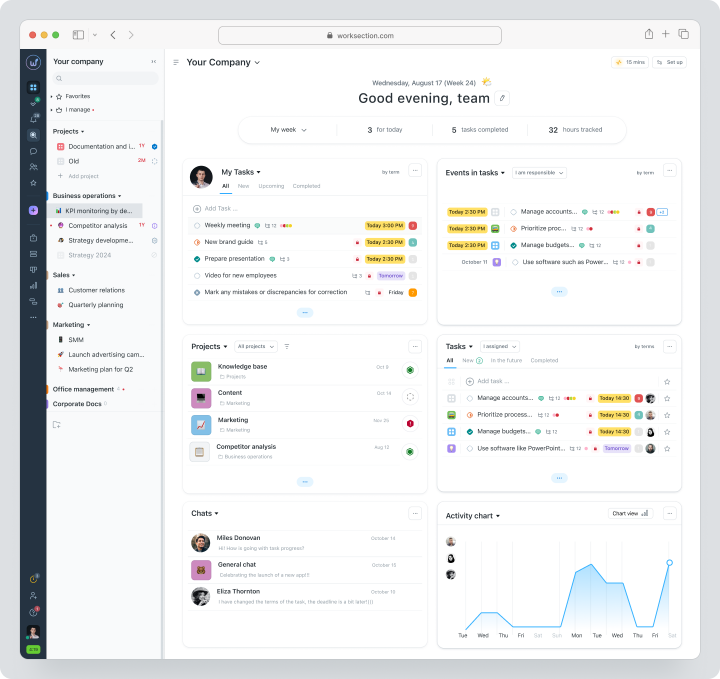
The team creates a project, breaks down the results into tasks and subtasks, assigns responsible persons, and deadlines. Comments and files stay alongside the work. Available on Business are Gantt charts, guest access, time tracking, finance, API, and automation by status.
Cost: Free for up to 5 users and 2 projects. Basic plan costs $5 per user per month, Business — $10, Premium — $15.
Key Features
- tasks, subtasks, and checklists;
- deadlines, statuses, priorities, and dependencies;
- kanban, calendar, and Gantt chart;
- time tracker, expenses, and plan/fact;
- reports by projects, tasks, and people;
- roles, read-only access, and guest access;
- API, webhooks, and integrations.
Main Difference from Teamly
Teamly combines chat, workflows, capture, and time tracking. Worksection manages project deadlines, dependencies, finances, client access, and reporting in greater depth.
Advantages
- clear project time tracking;
- guest access for clients;
- strong reporting at an affordable price.
Limitations
- there is no separate corporate messenger like Slack;
- there is no built-in screen recording;
- key PM features are available with Business.
Who it’s suitable for
Agencies, service, and project teams for whom outcome control is important.
ClickUp
ClickUp is the only workspace featuring Projects, Chat, Docs, Whiteboards, Calendar, Dashboards, time tracking, and Automations. It is closest to the idea of consolidating most tools for remote work.
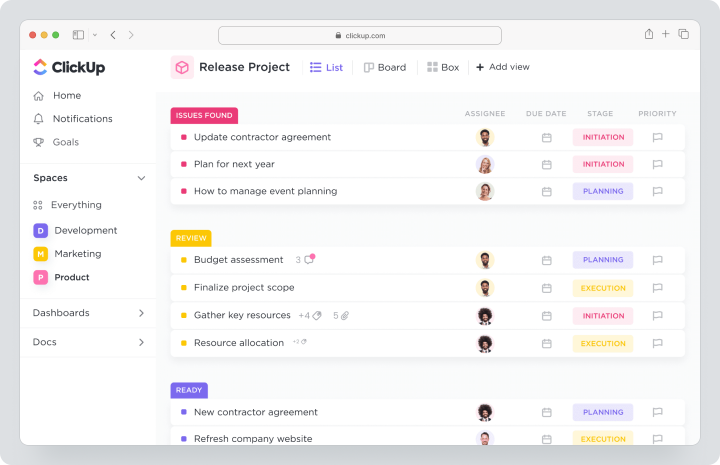
Pricing: Free Forever. The Unlimited plan costs $10 per user per month, Business — $19. AI features are billed separately depending on the chosen package.
Key features
- tasks, subtasks, and dependencies;
- over 15 views, including Gantt and team workload;
- Chat, Docs, and Whiteboards;
- reporting panels and goals;
- time tracking and estimates;
- automations, API, and integrations.
Main difference from Teamly
ClickUp offers a broader workspace and is more customizable, but requires more setup and training.
Advantages
- many modules in one product;
- advanced reporting panels;
- strong customization.
Limitations
- overloaded interface;
- AI is billed separately;
- guest seat rules depend on the plan.
Who it’s suitable for
Teams ready to customize a universal work platform.
Asana
Asana is a work management platform for cross-functional projects, goals, portfolios, and workflows. It emphasizes transparency of work between departments.
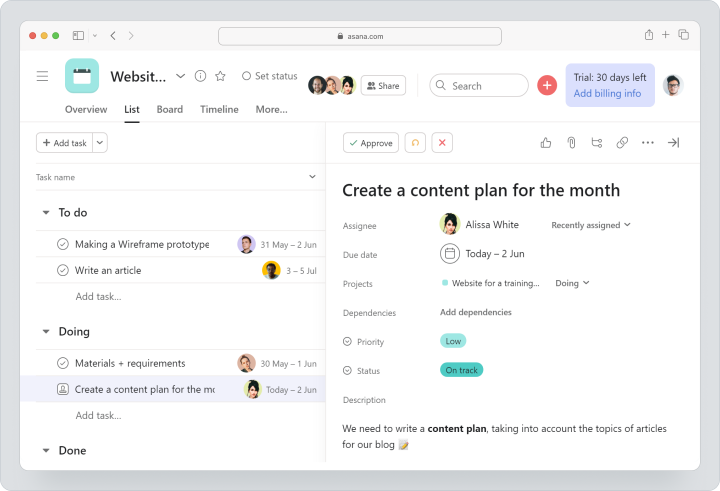
Pricing: Personal — free for a maximum of two users. The Starter plan costs $13.49 per user per month, Advanced — $30.49. Enterprise and Enterprise+ — customized.
Key features
- list, board, calendar, timeline, and Gantt chart;
- forms, rules, and custom fields;
- goals and project portfolios;
- team workload on advanced plans;
- approvals and reporting;
- integrations, API, and AI features.
Main difference from Teamly
Asana is stronger in scaling processes, portfolios, and management control, but does not offer the same built-in chat and screen recording.
Advantages
- mature work management model;
- strong goals and portfolios;
- convenient cross-functional workflows.
Limitations
- Free is only for two users;
- there is no built-in time tracker;
- Advanced is significantly more expensive.
Who it’s suitable for
Product, marketing, and operations organizations with multiple departments.
Monday.com
Monday.com is a visually customizable work management platform with boards, views, reporting panels, forms, and automations.
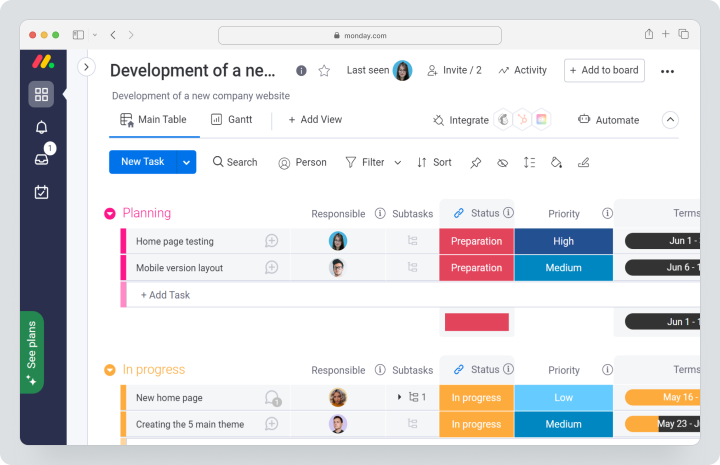
Pricing: Free for up to two users. The Basic plan costs $12, Standard — $14, Pro — $24 per seat per month. Enterprise — customized. Payment is done in seat packages: a minimum of three seats, then groups of five.
Key features
- boards, columns, and customizable workflows;
- timeline and Gantt chart with Standard;
- reporting panels;
- forms;
- automations and integrations;
- guests with Standard and higher according to plan terms.
Main difference from Teamly
Monday.com visually customizes processes and reporting panels more deeply. Teamly integrates chat, capture, and time tracking more straightforwardly.
Advantages
- flexible visual boards;
- many templates;
- strong automation.
Limitations
- package payment;
- time tracking is available with Pro;
- communication revolves around updates, not full chat.
Who it’s suitable for
Teams with visual processes that need customization without programming.
Basecamp
Basecamp is a simple project coordination system with messaging, boards, to-do lists, scheduling, documents, files, chat, and client access. Basecamp 5 will be available in 2026.
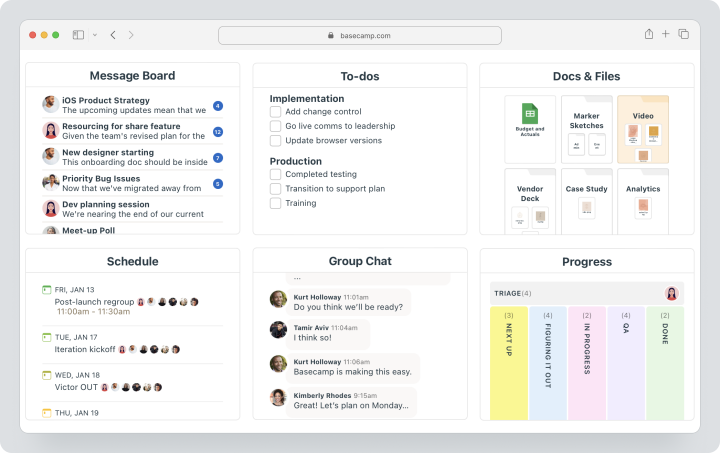
Cost: Free — one project, up to 20 users and 1 GB. Basecamp Pro — $15 per user per month with monthly billing and a 30-day trial. Pro Unlimited costs $299 per month only with annual billing for the entire organization; there is no separate monthly rate for it. The trial period is 60 days.
Key Features
- tasks and assignments;
- message boards and Campfire chat;
- scheduling;
- documents and files;
- client access;
- Hill Charts and automated check-ins;
- API and integrations.
Main Difference from Teamly
Basecamp offers more mature client and project communication but intentionally avoids complex Gantt charts, resources, and built-in time tracking.
Advantages
- simple interface;
- clients and contractors are not charged on Pro;
- affordable flat rate for large companies.
Limitations
- no native time tracking;
- limited dependencies and resource planning;
- less analytics.
Who It’s For
Agencies and small service teams that value simplicity.
Wrike
Wrike is an enterprise work management platform for complex projects, resources, approvals, and analytics.
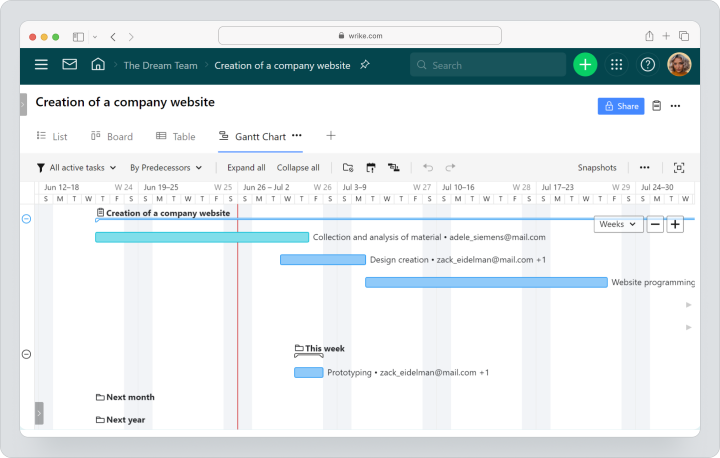
Cost: Free costs $0. Public prices are Team $10 and Business $25 per user per month. Pinnacle and Apex are priced individually.
Key Features
- tasks, subtasks, and dependencies;
- Gantt chart, calendar, and reporting dashboards;
- request forms;
- approvals and material reviews;
- team workload and resource management;
- time tracking on the Business plan;
- analytics and enterprise control.
Main Difference from Teamly
Wrike is deeper in management, resources, and complex reporting. Teamly is simpler for a small remote team.
Advantages
- developed resource management;
- approvals and material reviews;
- scaling for enterprise.
Limitations
- high price for Business;
- more complex implementation;
- chat is not a core module.
Who It’s For
Large marketing, PMO, professional services, and enterprise teams.
Hubstaff
Hubstaff is a specialized platform for time tracking, productivity analytics, attendance tracking, payroll, and managing distributed employees.
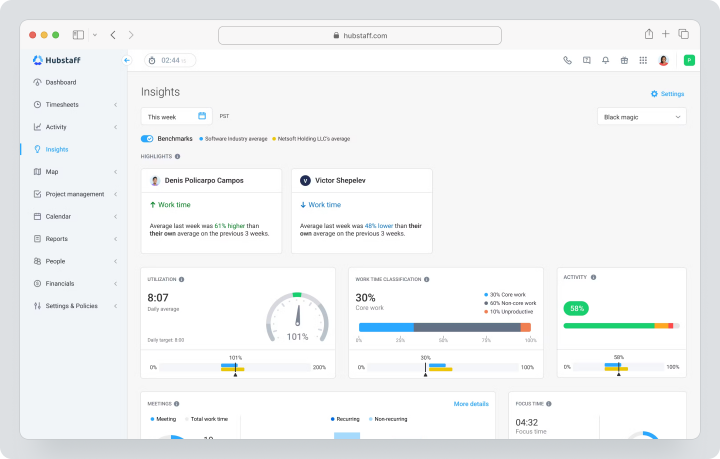
Cost: for monthly billing, Starter costs $7 per seat per month, Grow — $9. A 14-day trial with no credit card is available. The cost of higher plans needs to be checked during checkout.
Key Features
- desktop, web, and mobile time tracking;
- activity levels;
- optional screenshots;
- project budgets and rates;
- attendance and absence tracking;
- payroll and payments;
- reports and reporting dashboards.
Main Difference from Teamly
Hubstaff is significantly deeper in work time tracking and payroll calculations but does not replace full communication and complex project management.
Advantages
- detailed time tracking;
- payroll calculation process;
- expense and activity analytics.
Limitations
- at least two workstations;
- monitoring requires a transparent policy;
- tasks are secondary to time.
Who It’s For
Remote, on-site, and hourly teams where time is the basis for calculation.
Notion
Notion — a workspace for documents, wikis, databases, forms, and simple project management.
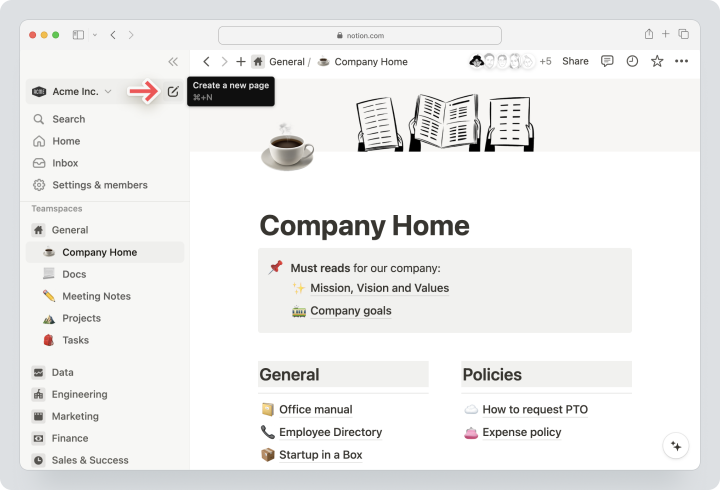
Cost: Free — $0. Monthly, Plus costs $12 per member, Business — $24. Enterprise — custom pricing.
Key Features
- documents and wikis;
- databases and relationships;
- board, calendar, and timeline;
- comments and mentions;
- forms and automation;
- Sites, API, and AI features;
- AI on Business and Enterprise plans.
Main Difference from Teamly
Notion is stronger in documents and knowledge, but weaker in native time tracking, screen recording, and real-time chat.
Advantages
- flexible databases;
- knowledge and projects in one workspace;
- a wide variety of templates.
Limitations
- no built-in time tracking;
- not a full-fledged messenger;
- requires oversight.
Who It’s Suitable For
Startups, product and content teams where documents are as important as tasks.
Slack
Slack — a communication platform with channels, huddles, canvases, lists, Workflow Builder, and integrations. It can replace Teamly chat but not all PM functionalities.
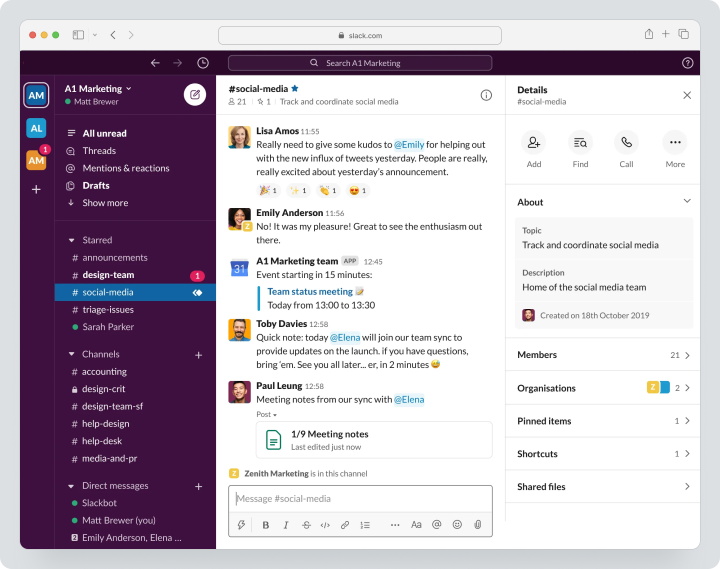
Cost: Free gives access to message history for the last 90 days, up to 10 apps, personal huddles, and one-on-one Slack Connect. Monthly, Pro costs $8.75 per active user in the US, Business+ — $18; the regional page may show the equivalent in euros.
Key Features
- public and private channels;
- direct messages and audio calls;
- canvases and lists;
- process builder;
- Slack Connect;
- AI summaries on paid plans;
- over 2600 integrations in the catalog.
Main Difference from Teamly
Slack is significantly deeper in communication and integrations, but tasks, Gantt charts, time, and reports usually require a separate PM tool.
Advantages
- strong team chat;
- external communication via Slack Connect;
- developed integration ecosystem.
Limitations
- Free retains search history for only 90 days;
- not a full PM system;
- cost increases with the number of active users.
Who It’s Suitable For
Teams ready to use the Slack + Worksection, Asana, or another PM tool combination.
Trello
Trello — a visual task manager with boards, lists, cards, checklists, and Butler automation. It’s suitable for simple processes and quick launches.
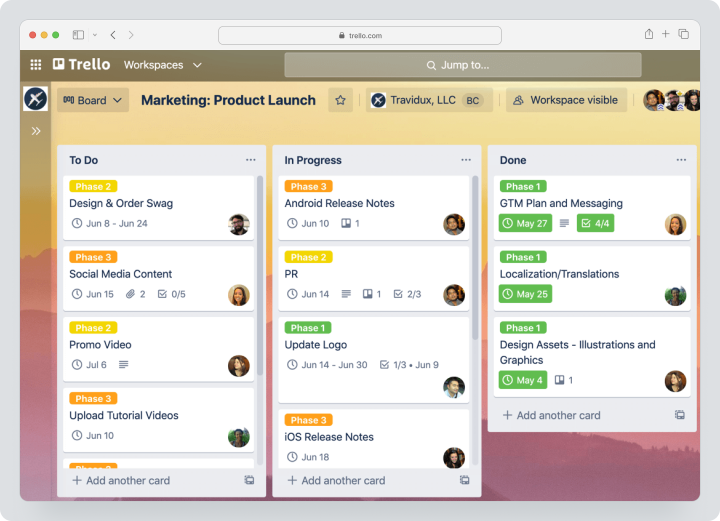
Cost: Free for up to 10 members in the workspace. Monthly, Standard costs $6 per user, Premium — $12.50. Enterprise is billed annually starting at $17.50 per user per month.
Key Features
- boards, lists, and cards;
- checklists and custom fields;
- card synchronization;
- planning and display modes on higher plans;
- Butler automation;
- Power-Ups and integrations;
- export per plan conditions.
Main Difference from Teamly
Trello is simpler and more focused on Kanban. Teamly additionally offers chat, video recording, and time tracking.
Advantages
- quick start;
- intuitive interface;
- accessible Standard.
Limitations
- no native time tracking;
- limited reporting;
- complex projects require Power-Ups or higher plans.
Who It’s Suitable For
Small teams with simple visual processes.
Comparative Table of Teamly Alternatives
| Service | Best Scenario | Tasks | Gantt / Timeline | Time Tracking | Chat | Reports | Pricing Model |
|---|---|---|---|---|---|---|---|
| Worksection | Client and project teams | Strong | Gantt with Business | Native with Business | Comments and chat in tasks | Strong | Per seat |
| ClickUp | All-in-one workspace | Strong | Yes | Native | ClickUp Chat | Strong | Per user + AI |
| Asana | Cross-team work management | Strong | From paid | Through integrations | Comments | Strong | Per user |
| Monday.com | Customizable processes | Strong | From Standard | From Pro | Updates | Dashboards | Seat buckets |
| Basecamp | Simple communication and clients | Basic | No classic Gantt | Through integrations | Campfire | Basic | Per user or fixed |
| Wrike | Enterprise and resources | Strong | Yes | From Business | Comments | Advanced | Per user |
| Hubstaff | Workforce time tracking | Has tasks | Limited | Specialized | No full chat | Time/activity reports | Per seat; minimum checked at checkout |
| Notion | Documents and databases | In databases | Timeline | Through integrations | Comments | Database views | Per participant |
| Slack | Communication and integrations | Lists | No | Through apps | Specialized | Activity/admin | Per active user |
| Trello | Simple kanban | Cards and checklists | Timeline on Premium | Through Power-Ups | Comments | Limited | Per user |
Which service to choose for different scenarios?
For managed project execution
Worksection is suitable if deadlines, dependencies, time tracking, finances, and client access are needed. ClickUp is efficient if the team wants a broader unified workspace.
For enterprise and complex reporting
Asana and Wrike are stronger in portfolios, goals, resources, and management reports. Monday.com is great for customizable operational processes.
For communication
Slack is deeper than Teamly as a corporate messenger. Basecamp integrates client communication and projects more simply. Both products may require additional time tracking.
For employee time tracking
Choose Hubstaff if the main value lies in hours, activity, attendance tracking, and payroll calculation. It is important to develop a transparent monitoring policy before implementation.
For a small budget
Trello Standard is available for simple kanban. Worksection Basic is affordable, but time and Gantt are available starting from Business. The package price for Teamly Business could have been beneficial for a team of up to five people, but as of 03.08.2026, the service is closed for new registrations.
How to switch from Teamly without losing data?
- Make a list of workspaces, workflows, tasks, users, chats, files, videos, and time tracking.
- Separate active and archived projects.
- Check available export options in your plan.
- Save important chats, screen recordings, and attachments separately.
- Map Teamly fields to tasks, statuses, and users in the new system.
- Run a pilot on one project.
- Check comments, files, deadlines, and assignees.
- Set up roles, guests, integrations, and notifications.
- Transfer time data separately if the target system does not support direct import.
- Use parallel mode until the reporting period ends.
Do not assume that chat, video captures, and time tracking history will transfer the same way as tasks. These categories need separate testing.
How to organize service work in Worksection?
- Create a project for the client or outcome.
- Break the work into tasks and subtasks.
- Add descriptions, files, and links.
- Assign responsible persons, deadlines, and priorities.
- Invite the client as a guest on Business.
- Link dependent tasks on the Gantt chart.
- Track time within tasks.
- Compare planned and actual.
- Use reports by projects, people, and expenses.
- Conduct communication about specific work in task comments.
FAQ
What is the best alternative to Teamly in 2026?
For project management, compare Worksection and ClickUp. For enterprise processes, Asana or Wrike are suitable, for visual workflows — Monday.com, for chat — Slack, for time tracking — Hubstaff. There is no single winner.
Are there free alternatives to Teamly?
Yes. Free plans are available from Worksection, ClickUp, Asana, Monday.com, Basecamp, Wrike, Notion, Slack, and Trello. Limitations concern users, projects, history storage, submissions, automation, and time tracking.
What alternative to Teamly is suitable for small businesses?
For an existing Teamly client, Teamly Business may be economical for teams of up to five people. A new client cannot register on 03.08.2026, as the service is temporarily closed to new users. Worksection is suitable for client projects, Trello — for simple Kanban, Basecamp — for communication, and ClickUp — as a universal workspace.
Which Teamly replacement is better for remote teams?
If communication is important, use Slack or Basecamp. If the priority is performance monitoring, use Worksection or ClickUp. For time and payroll calculations — Hubstaff. Often, the best setup consists of a messenger and a separate PM system.
How does Worksection differ from Teamly?
Teamly combines chat, workflows, screen recording, and time tracking. Worksection dives deeper into tasks, dependencies, Gantt charts, expenses, reports, and guest access. It does not replace a screen recorder or a full messaging service.
Can data be transferred from Teamly?
Some data can be transferred through available exports and manual imports, but public documentation does not guarantee universal migration of all chats, videos, permissions, and time entries. First, test one project.
How to compare the prices of services?
Compare the total for the actual number of users. Teamly uses tiered packages, Monday.com — seat packages, Basecamp offers a fixed price, Slack counts active users, while Worksection, ClickUp, and Asana count seats. Add AI, storage, and integrations.
How to choose between an embedded chat and a separate messenger?
An embedded chat is convenient when all communication is tied to tasks. Slack is more rational for a large number of channels, external organizations, and applications. With a separate messenger, set a rule: decisions and deadlines are recorded in the PM system.
What features to check before migration?
Check tasks, dependencies, chat, files, video capture, time tracking, reports, roles, guests, API, exports, and mobile apps. Test the most active project and the entire reporting period separately.
Conclusion
Teamly.com combines workflows, chat, video recording, and time tracking for small remote teams. But new clients also need to choose an available alternative, while existing ones must consider the risk of availability during long-term planning.
ClickUp is broader as a workspace. Asana and Wrike are deeper in management. Monday.com is visually more flexible. Basecamp is simpler for clients. Hubstaff specializes in time. Notion — in knowledge. Slack — in communication. Trello — in Kanban.
Worksection is suitable when managed execution becomes a priority: tasks, deadlines, dependencies, time, costs, guest access, and reports. To evaluate, you can explore Worksection capabilities and compare pricing.