RescueTime automatically tracks activity in apps and on websites, helping users see their habits, assess their concentration, and limit distracting resources. For personal productivity, this is a powerful scenario: the user doesn’t need to constantly start a timer and remember what they have been doing throughout the day.
However, alternatives to RescueTime are sought for various reasons. Some need projects, tasks, billable hours, and team timesheets. For others, local storage, the absence of screenshots, or full control over what data the manager receives are more important. Therefore, analogs of RescueTime cannot be evaluated by a single rating: analytics of personal productivity, project time tracking, and employee monitoring solve different tasks.
Included in the selection are Worksection, Rize, Timing, ActivityWatch, Toggl Track, Clockify, Memtime, Timely, ManicTime, and DeskTime. Worksection ranks first only in the project scenario: an employee consciously logs hours in tasks, while the manager compares plans, actuals, deadlines, and costs of work. The system does not analyze window titles, websites, keystrokes, or background applications.
Alternatives to RescueTime in 30 seconds
- Worksection — when you need to link time with tasks, deadlines, budgets, and project reporting.
- Rize — for the closest modern replacement with automatic tracking on the computer, concentration analytics, and AI categorization.
- Timing — for macOS users for whom automatic detailing of apps, documents, and projects is important.
- ActivityWatch — for free tracking of digital activity with open source and local storage.
- Toggl Track — for a fast manual timer, rates for billable time, and reports without mandatory monitoring of applications.
- Clockify — for affordable team tracking, timesheets, approvals, GPS, and optional screenshots.
- Memtime — for private automatic tracking on devices with subsequent time entry.
- Timely — for automatic tracking using AI and drafts of timesheets by projects.
- ManicTime — for cloud hosting or installation on your own server for automatic tracking with flexible privacy controls.
- DeskTime — for companies needing attendance tracking, productivity monitoring, applications, URLs, and screenshots.
For the closest personal productivity scenario, compare Rize, Timing, and ActivityWatch. For agencies or consultants, Toggl Track, Clockify, Memtime, or Timely are more rational. For project control without hidden monitoring, Worksection is suitable. DeskTime and some features of ManicTime fall under employee monitoring and require a transparent internal policy.
What is RescueTime and who is it for?
RescueTime is an automatic tracker of digital activity with concentration management features and a separate Timesheets module. The app records used programs and websites, determines downtime, creates a timeline, category and productivity reports, supports goals, notifications, and Focus Sessions.
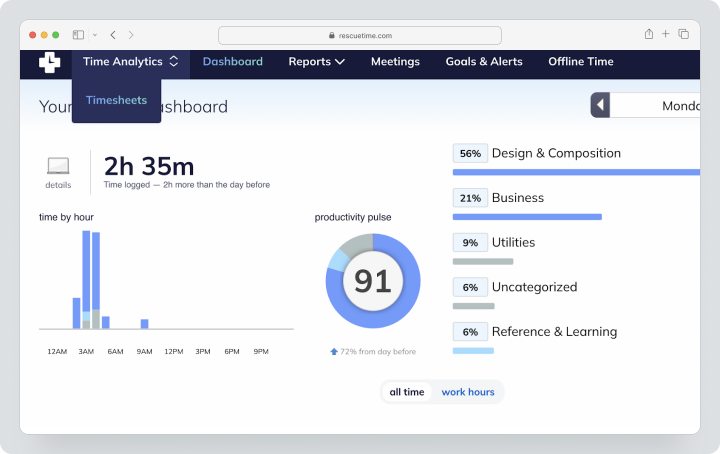
After the pricing update in 2026, the lineup was divided into Focus and Timesheets. With monthly payment, Solo Focus costs $9 per month, Solo+ with Timesheets — $15. Team Focus costs $12 per user, Team+ — $18. All paid plans have a 14-day trial period. Team+ adds shared clients, projects and tasks, roles, team calendars, and rates for billable time.
RescueTime is suitable for professionals who want to understand their own digital habits, protect their concentration, and automatically collect data without a manual timer. The team version is useful when companies need aggregate reports and timesheets, but not a full PM system.
Why are teams looking for alternatives to RescueTime?
A connection between time, tasks, and results is needed
Automatic recording of applications explains where the day went, but does not always show what results were obtained. For an agency, it is important to know how many hours were spent on a specific client, stage, and task, whether the work fits within budget, and why deadlines are shifting. For this purpose, Worksection, Toggl Track, Clockify, Memtime, or Timely are suitable.
Necessary Team Timesheets and Approvals
The manager may need approvals for timesheets, blocking periods, rates, labor costs, schedule reports, and exports for accounting. These processes are implemented more thoroughly in specialized team trackers.
Important Local Privacy
ActivityWatch stores data locally and is distributed with open-source code. Memtime also keeps an automatic history of activity on the device, while sending user-created time entries to the cloud. ManicTime offers both a cloud version and a self-hosted option. This model is suitable for companies with heightened data requirements.
A Manual Timer is Needed
Automatic tracking is not convenient for everyone. A lawyer, consultant, or freelancer may prefer to explicitly start a timer to record only billable work. Toggl Track and Clockify are particularly strong in this scenario.
A Different Level of Monitoring is Needed
RescueTime does not equate to traditional employee monitoring. DeskTime, Clockify Pro, and ManicTime can add monitoring of URLs and applications, screenshots, attendance tracking, or GPS. These features cannot be implemented discreetly: employees must understand what is being collected, for what purpose, how long it is stored, and who has access.
Deeper Focus Analytics Needed
Rize enhances automatic tracking with AI categorization, concentration metrics, break reminders, and profitability reports. Timing recognizes context more deeply on macOS, including documents, calls, and calendar events. The choice depends on whether personal reflection or financial reporting is needed.
How Did We Select and Compare Services?
Time Recording Method
We checked for a manual timer, automatic desktop tracking, calendar memory, offline time, and the ability to edit entries. Automatic activity and an approved timesheet are not the same thing.
Privacy
Local storage, screenshots, URLs, window titles, GPS, pause time, personal time, and the employee’s right to confirm an entry before passing it to the manager were considered.
Projects and Billing
For businesses, clients, projects, tasks, rates for billable time, budgets, labor costs, invoicing, and profitability are important. A tool for personal focus may not cover these functions — this is not a drawback, but a different category.
Team Management
We compared roles, approvals, blocking periods, attendance tracking, load management, schedule reports, and exports. It was separately evaluated whether the service serves as a voluntary time tracking tool or a means of activity control.
Platforms and Integrations
Considered were Windows, macOS, Linux, mobile, browser extensions, APIs, and ready connections to PM, CRM, accounting, and calendars.
Checklist for Choosing an Alternative to RescueTime
Before registering, define what outcome time tracking should deliver. For personal productivity, answers regarding focus, breaks, and distracting applications are sufficient. For an agency, clients, projects, rates, and confirmed billable hours are needed. For an operations team, attendance tracking, approvals, and exports for payroll calculations are more crucial.
Check the following questions:
- who sees the raw activity history and whether the employee can hide personal time
- whether the application takes screenshots, records URLs, document names, GPS, or just duration
- whether tracking can be stopped and a specific entry deleted
- who corrects the timesheet and whether an audit log is maintained
- whether projects, budgets, cost rates, and invoicing are available
- whether applications are available for Windows, macOS, Linux, and mobile devices
- whether data can be exported to CSV, PDF, or via API
- what the cost is not only for the license but also for administering the process.
For team monitoring, separately check the legislation of the country, labor contracts, and internal policies. The technical availability of a feature does not mean it is permissible to use it without notice and a clear business purpose.
Best Alternatives to RescueTime in 2026
Worksection
Worksection is a project management system where time is tracked within tasks and subtasks. It’s not an automatic analysis of programs or hidden employee monitoring. Users can start a timer or add hours manually, while managers can see them in the context of clients, outcomes, deadlines, and budgets.
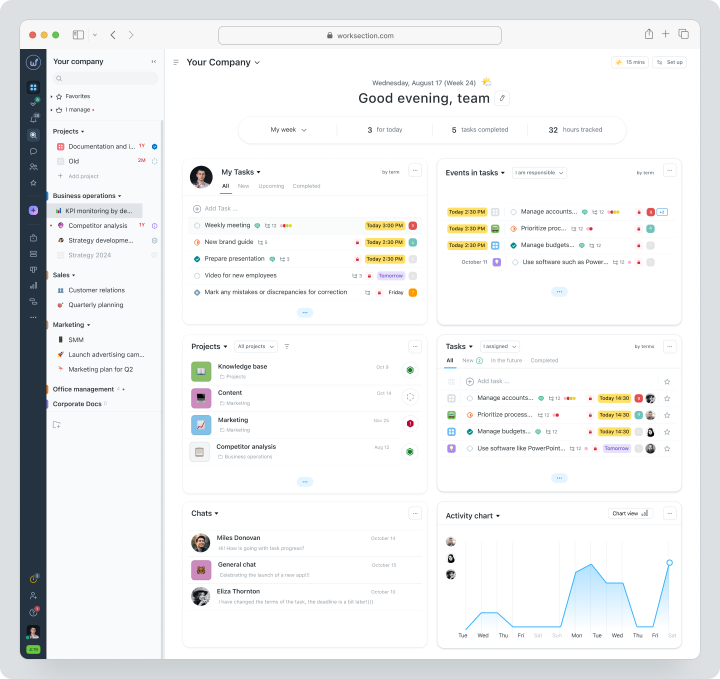
With Business, time tracking, expenses, Gantt chart, and guest access are available. Reports help compare planned and actual labor costs, check workload, and assess profitability.
Cost: Free for up to 5 users and 2 projects. The monthly fee for Basic is $5 per seat, Business is $10, Premium is $15.
Key features
- manual timer and adding time to tasks;
- projects, tasks, subtasks, and assignees;
- deadlines, dependencies, and Gantt chart;
- expenses, planned/actual and reports;
- roles and guest access;
- export, API, and integrations.
Main difference from RescueTime
RescueTime automatically analyzes digital activity. Worksection answers a different question: how much time the team invested in specific work and how it relates to deadlines, costs, and outcomes.
Advantages
- time is immediately linked to the task;
- there is no hidden site and application tracking;
- suitable for client projects and reporting.
Limitations
- no automatic activity history;
- does not analyze distractions and does not assess concentration;
- time tracking is available starting from Business.
Who it’s suitable for
Agencies, service, and project teams who want voluntary labor accounting without employee surveillance.
Rize
Rize automatically tracks the active window in Windows and macOS, identifies URLs in supported browsers, connects to Google Calendar, and categorizes work. The product develops concentration analytics, AI analytics, paid time tracking, and profitability for teams.
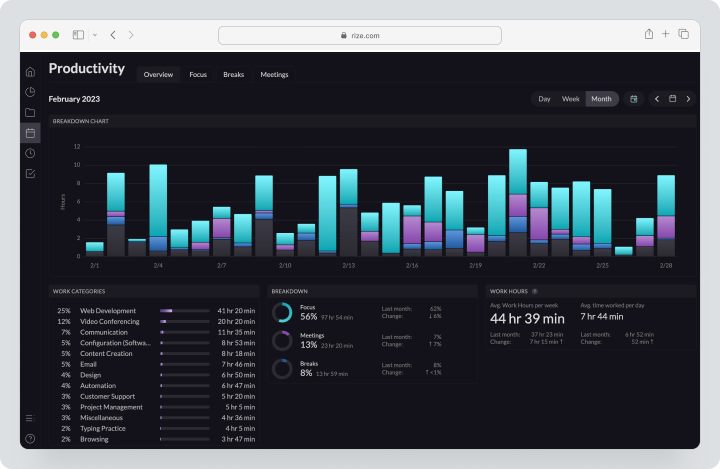
Cost: individual plans cost: Basis $12.99, Pro $28.99, Max — $49.99 per seat monthly. The trial period lasts 7 days.
Key features
- automatic desktop tracking;
- focus time, breaks, and distraction analysis;
- AI categorization;
- clients, projects, and billable hours;
- team dashboards and profitability;
- CSV/PDF export.
Main difference from RescueTime
Rize is closer to RescueTime in automatic analytics but links activity more strongly to projects, accounts, and profitability.
Advantages
- does not take screenshots or log keystrokes;
- modern AI categorization;
- the user confirms data before showing it to the manager.
Limitations
- there is no permanent free plan;
- Linux is not yet supported;
- the team plan is significantly more expensive than simple timers.
Who it’s suitable for
Consultants, agencies, and knowledge workers who want automatic tracking without screenshots.
Timing
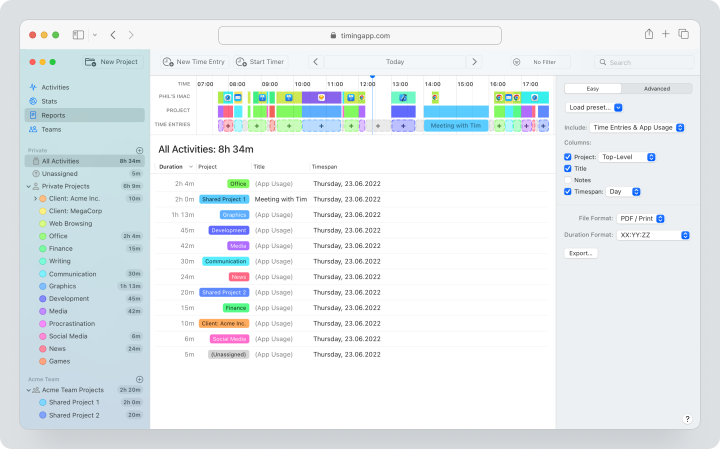
Timing is an automatic tracker for the Apple ecosystem. It recognizes applications, documents, websites, calls, calendar events, and helps attribute activity to projects.
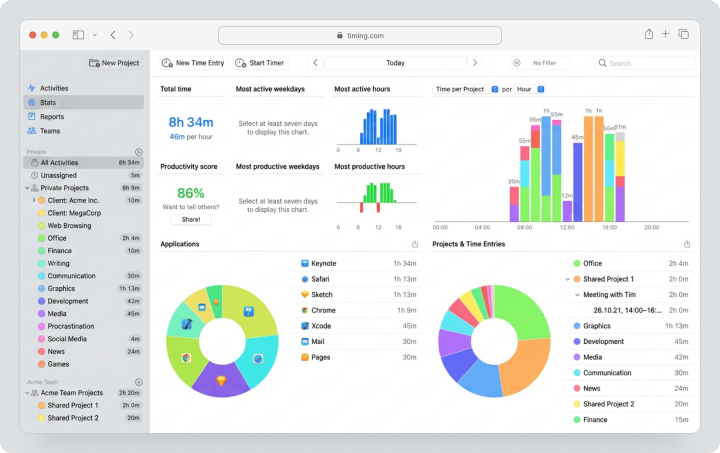
The lineup includes Professional for one Mac, Expert for two, and Connect for teams and AI workflows. With annual payment, Professional costs $9, Expert — $11, Connect — $16 per month. With monthly payment — $11, $14, and $20 respectively. A 30-day trial is available without a credit card; total amounts and taxes are displayed at checkout.
Key features
- automatic tracking on macOS;
- manual entries and payment status;
- calendar, calls, and activity import from iOS;
- projects, reports, and time rounding;
- ClickUp, Linear, Clio, and GrandTotal;
- API, Zapier, and MCP in Connect.
Main difference from RescueTime
Timing recognizes the work context deeper within macOS but is not designed for Windows teams.
Advantages
- detailed automatic memory;
- strong integrations for Mac users;
- team time sheets in Connect.
Limitations
- primary desktop platform — macOS;
- cost depends on edition and region;
- not a full-fledged PM system.
Who It’s Suitable For
Developers, designers, lawyers, and consultants who primarily work on Mac.
ActivityWatch
ActivityWatch is a free open-source tracker that stores data locally. The desktop client tracks the active application, window title, and AFK periods, while the browser extension adds websites.
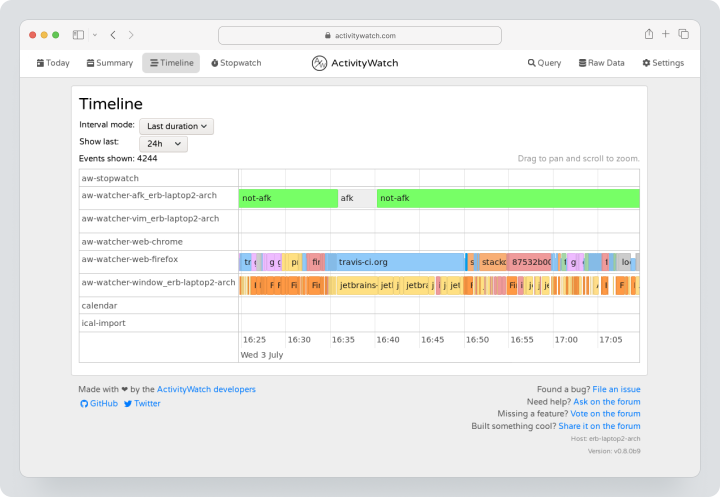
Cost: free and open-source. Costs only arise from self-hosting, custom development, or using third-party services.
Key Features
- local storage;
- applications, windows, and websites;
- AFK detection;
- categories, queries, and visualization;
- API and community watchers;
- Windows, macOS, and Linux.
Main Difference from RescueTime
ActivityWatch provides maximum control over data and code, but requires more manual setup and does not offer ready team account management.
Advantages
- free;
- with local storage;
- expandable open-source API.
Limitations
- no ready team time sheet management;
- no built-in invoicing;
- support depends on the community.
Who It’s Suitable For
Technical users and organizations for whom local storage is critical.
Toggl Track
Toggl Track is a fast manual timer with desktop, web, and mobile apps, calendar, reports, and project billing.
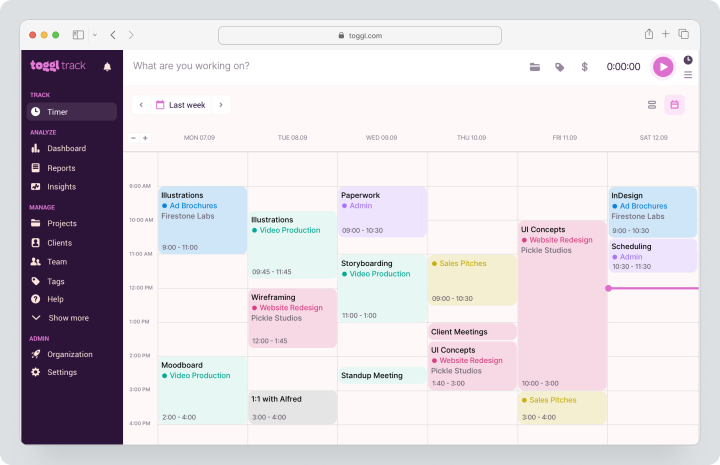
Cost: Free is available for a limited number of users. For Starter, the monthly price is $12. Premium costs $20 per license per month after the first year; Enterprise is priced individually. The trial period lasts for 30 days.
Key Features
- timer and manual entries;
- projects, tasks, and rates for billable time;
- estimates and notifications;
- performance, revenue, and profitability;
- approval and scheduled reports;
- Jira, Salesforce, QuickBooks, and API.
Main Difference from RescueTime
Toggl Track is built around conscious time tracking and financial reporting, rather than continuous evaluation of digital productivity.
Advantages
- very fast manual entry;
- strong billing;
- many integrations.
Limitations
- the user has to remember to start the timer;
- advanced profitability requires Premium;
- licenses are calculated based on the number of workstations in the organization
Who It’s Suitable For
Freelancers, agencies, lawyers, and professional services.
Clockify
Clockify combines a timer, timesheet, kiosk, projects, reports, invoicing, and workforce functions. After the update, Free supports up to five users, including the account owner, and allows for unlimited time tracking.
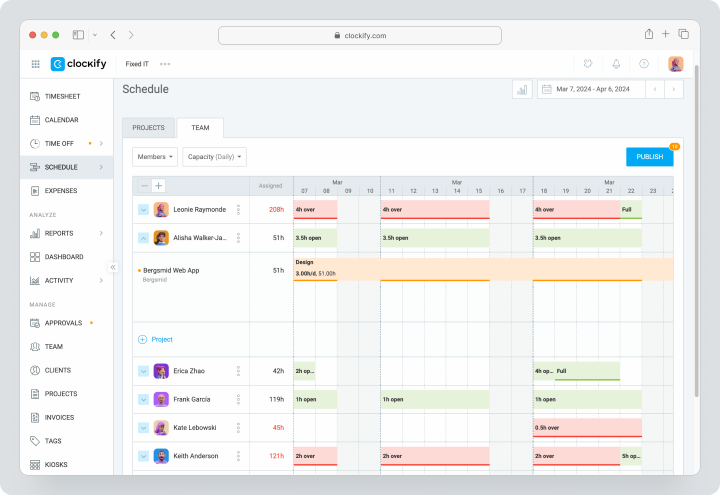
Cost: Free — $0. For monthly payment, Basic costs $6.99, Standard — $9.99, Pro — $14.99, Enterprise — $15.99 per user per month. The Pro trial period lasts 7 days.
Key Features
- timer, time sheets, and kiosk;
- approval, invoicing, and attendance tracking;
- budgets, forecasting, and profit;
- GPS, screenshots, and forced timer on the Pro plan;
- data storage regions and audit logs;
- API and integrations.
Main Difference from RescueTime
Clockify is stronger in team time sheets, billing, and control, but automatic analytics for personal productivity is not its core.
Advantages
- low entry price;
- many business functions;
- monitoring tools are added as needed.
Limitations
- Free is limited to five users;
- key features are tiered;
- screenshot and GPS require clear guidelines.
Who it’s suitable for
Small teams, service companies, and remote employees.
Memtime
Memtime automatically records applications and documents locally, while users convert their activity history into confirmed time entries. Automatic data is not synchronized between devices, which is part of the privacy model.
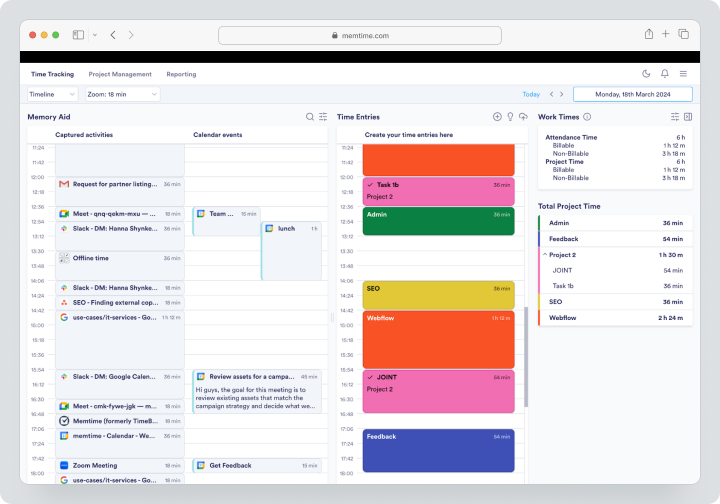
Cost: monthly Basic plan costs $18, Connect — $26, Premium — $35 per user per month. Trial period — 14 days without a card.
Key Features
- automatic offline tracking on desktop;
- local activity history;
- projects and tasks;
- calendar sync;
- reports and billability;
- 100+ integrations with Connect;
- SSO/SCIM and call systems on Premium.
Main Difference from RescueTime
Memtime focuses on recovering working hours and creating timesheets, rather than assessing personal productivity.
Advantages
- private local activity history;
- screencaptures not required;
- integrations with project systems.
Limitations
- high price;
- automatic data is not synchronized between devices;
- mobile functionality is limited to the project section.
Who it’s suitable for
Agencies and consultants needing accurate billable hours without surveillance.
Timely
Timely automatically captures work in applications and generates AI suggestions for timesheets. The user decides which memories to convert into entries.
Cost: monthly Starter plan costs $11 per user, Premium — $20, Unlimited — $28. Starter is limited to 20 projects and five users, Premium — 50 users, Unlimited has no user limit. Trial period lasts 14 days.
Key Features
- automatic Memory tracking;
- AI categorization;
- billable hours;
- projects, budgets, and costs;
- team assignment and scheduling;
- API and integrations.
Main Difference from RescueTime
Timely focuses on automating timesheets and project economics rather than just assessing focus and blocking distractions.
Advantages
- reduces manual timesheet filling;
- project status and budgets;
- team planning.
Limitations
- no permanent free plan;
- cost quickly rises for teams;
- utility depends on the quality of categorization.
Who it’s suitable for
Professional services and distributed teams with billable work.
ManicTime
ManicTime automatically records applications, websites, documents, and idle time. The service can be used in a cloud-hosted variant or installed on your own server, assign activities to projects, enable screenshots, and generate reports.
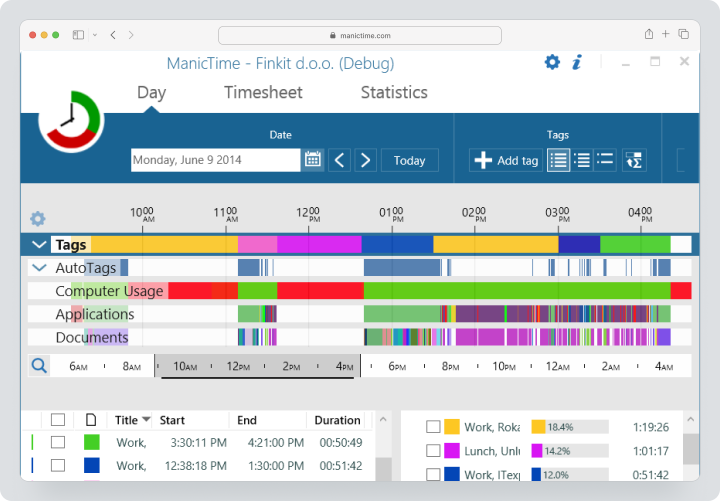
Cost: Cloud Standard costs $9 per user per month on a monthly basis and includes a 30-day trial period. A perpetual local license is also available for $87 with a year of updates; the last obtained version can be used without time limitation.
Key Features
- automatic activity tracking;
- tags, projects, and auto-tagging;
- screencaptures;
- reports, invoices, and attendance tracking;
- API and integrations;
- cloud or local solution;
- privacy settings.
Main Difference from RescueTime
ManicTime is deeper in deployment, self-hosting, and corporate control, while RescueTime is simpler for personal productivity.
Advantages
- choice of cloud/on-premise;
- Windows, macOS, and Linux;
- strong reports and integrations.
Limitations
- more settings;
- monitoring functions require clear management rules;
- part of the pricing depends on deployment.
Who It’s Suitable For
IT companies and organizations with data hosting requirements.
DeskTime
DeskTime is an automatic employee work tracking system that includes attendance tracking, URL and application monitoring, productivity calculation, project time tracking, changes, and screenshots.
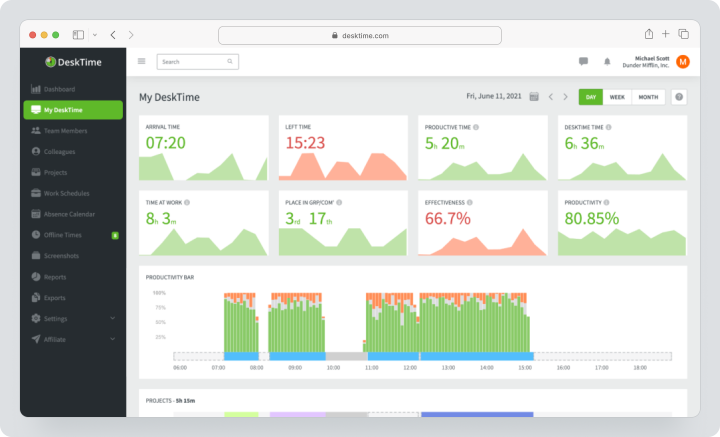
Cost: the monthly payment for Pro is $7, Premium is $10 per user per month excluding VAT. Enterprise for 200+ users is calculated individually.
Key Features
- automatic and manual tracking;
- attendance and break tracking;
- URL, apps, and document titles;
- projects and productivity;
- screenshots on Premium;
- shifts, absence calendar, and reports;
- API and integrations.
Main Difference from RescueTime
DeskTime is more focused on employee monitoring and personnel management. RescueTime is more oriented towards personal awareness and concentration habits.
Advantages
- automatic attendance tracking;
- reports for hybrid teams;
- shift and absence management.
Limitations
- high risk of distrust with non-transparent implementation;
- screenshots reveal screen content;
- does not replace project management.
Who It’s Suitable For
Companies that truly need attendance tracking and monitoring and are willing to establish a transparent policy.
Comparison Table of RescueTime Alternatives
| Service | Best Scenario | Manual Timer | Automatic Tracking | Projects / Tasks | Team Reports | Activity Monitoring | Billing / Budget |
|---|---|---|---|---|---|---|---|
| Worksection | Project labor accounting | Yes | No | Strong | Strong | No | Yes |
| Rize | Focus + automatic billing | Complements automatic tracking | Yes | Yes | Yes | Metadata without screenshots | Yes |
| Timing | Automatic tracking on Mac | Yes | Yes | Yes | In Connect | Applications and documents | Billing status |
| ActivityWatch | Local analytics | Limited | Yes | No | No | Local windows and sites | No |
| Toggl Track | Manual timer for billable time | Strong | Calendar prompts | Yes | Yes | No hidden monitoring | Strong |
| Clockify | Accessible timesheets | Strong | Through plan features | Yes | Yes | GPS/screenshots optional | Yes |
| Memtime | Private autotimesheets | After automatic tracking | Yes | Yes | Yes | Local activity history | Yes |
| Timely | Timesheets using AI | Editing | Yes | Yes | Yes | Private activity memory | Yes |
| ManicTime | Cloud/on-prem tracking | Yes | Yes | Yes | Yes | Flexible screenshots | Yes |
| DeskTime | Attendance tracking and monitoring | Yes | Yes | Project time tracking | Yes | URL/apps/screenshots | Partially |
Which service to choose for different scenarios?
For Personal Productivity
Rize is closest to modern RescueTime: it automatically tracks concentration, breaks, and digital activity. ActivityWatch is suitable for users who want a free solution with local data storage. Timing is rational for Mac.
For Project Accounting
Toggl Track is convenient with a quick timer, Clockify offers an accessible team model, Memtime and Timely provide automatic hour recovery. Worksection is needed when time must be part of a project with tasks, deadlines, and reports.
For Freelancers and Consultants
Toggl Track is convenient if the specialist is ready to start a timer and wants to quickly create reports for billable time. Memtime or Timely are better when users regularly forget about the manual timer. Rize is a good fit for those who need both concentration analytics and time allocation across clients.
For Agencies
It’s important for agencies to compare not only hours but also costs. Worksection links labor costs with tasks and deadlines, while Toggl Track and Clockify delve deeper into rates and agreements, and Rize and Timely reduce time wastage through automatic tracking. It’s best to conduct a pilot with one client on a fixed budget and one project with hourly pay.
For Employee Monitoring
DeskTime and individual features of ManicTime or Clockify provide screenshots, attendance tracking, data by URL and applications, and GPS. Use them only under a legally compliant and comprehensible policy for employees.
How to Transition from RescueTime Without Losing Data?
- Identify what needs to be saved: activity history, projects, clients, tasks, key events, and timesheets.
- Export available reports via API or CSV before canceling your subscription.
- Separate automatic activity from confirmed billable hours.
- Create a structure for clients and projects in the new system.
- Migrate one completed period and compare total hours.
- Check the time zone, inactive periods, rounded intervals, and rates.
- Set up access and storage rules for monitoring functions.
- Run the new tool in parallel for one to two weeks.
- Only after reconciliation should you close the old process.
How to Organize Time Tracking in Worksection?
- Create a project for the client or an internal initiative.
- Break down the work into tasks and subtasks.
- Assign responsibilities, deadlines, and planned hours.
- The employee starts the Worksection timer within the task or adds time manually.
- The manager compares planned and actuals.
- Add expenses and rates as needed.
- Check load, overdue items, and costs in the reports.
- Grant the client guest access without disclosing internal projects.
FAQ
What is the best alternative to RescueTime in 2026?
For automatic personal productivity analytics, start with Rize. Timing is suitable for Mac, ActivityWatch for local storage, and Toggl Track, Memtime, or Timely for tracking billable hours. Worksection is best for project scenarios.
Are there free analogues to RescueTime?
Yes. ActivityWatch is completely free and has open-source code. Free plans are also available for Worksection, Toggl Track, and Clockify, but their limits apply to users, projects, or features.
Which alternative to RescueTime is suitable for small businesses?
Clockify is good for budget-friendly timesheets, Toggl Track for simple billing, Worksection for projects with deadlines, and Rize for automatic tracking in agencies. The choice depends on whether a timer, automatic memory, or monitoring is needed.
What is the best substitute for RescueTime for teams?
For team timesheets, compare Clockify, Toggl Track, Memtime, and Timely. For tasks and plan/fact — Worksection. For attendance tracking and activity monitoring — DeskTime, but only with a transparent policy.
How is Worksection different from RescueTime?
RescueTime automatically analyzes the use of applications and websites. Worksection does not monitor the computer: the employee logs hours on specific tasks, and the manager assesses deadlines, costs, and project results.
Can data be transferred from RescueTime?
Yes, RescueTime supports API and export, but the target system may not accept raw activity history. It’s more practical to transfer confirmed projects, clients, and aggregated hours.
How to compare service prices?
Consider locations, payment periods, monitoring add-ons, screenshots, GPS, API, export, and administration costs. A cheap timer can end up being more expensive if timesheets need constant corrections.
How to choose between personal analytics and employee monitoring?
Personal productivity analytics helps individuals see their own habits. Employee monitoring provides managers with data on applications, URLs, attendance tracking, or screenshots. Before choosing, define the goal and minimally required data volume.
What features should be checked before migration?
Check for definitions of downtime, offline time, time zone, manual corrections, approvals, rates, budgets, export, API, computer and smartphone applications, privacy settings, and data deletion.
Conclusion
RescueTime remains a strong tool for automatic analysis of digital activity and concentration management. However, project accounting, billable hours, local storage, and privacy, as well as employee monitoring, require different products.
Rize and Timing are the closest in terms of automatic logic. ActivityWatch offers a local open-source option. Toggl Track and Clockify are suitable for manual timesheets. Memtime and Timely automate hour tracking. ManicTime provides flexible deployment, while DeskTime focuses on employee monitoring.
Worksection is rational when companies need to manage work rather than observe applications: tasks, deadlines, planned and actual hours, expenses, and reports. More details can be found in the Worksection overview and on the pricing page.