FlexiProject combines classic project planning, Gantt charts, budgets, risks, portfolios, and management reporting. This set is suitable for PMOs and organizations that require a formal project cycle.
However, FlexiProject alternatives may be more convenient if the team needs simpler onboarding, different depth of PPM, localization, agile processes, or a transparent pricing model.
This review collects FlexiProject analogs for various scenarios: Worksection, Microsoft Project, Smartsheet, Wrike, monday.com, ClickUp, GanttPRO, Planview, Jira, and Zoho Projects.
Each FlexiProject alternative is evaluated based on tasks, Gantt chart, resources, time, reports, and implementation complexity.
FlexiProject Alternatives in 30 Seconds
A quick selection helps to understand which products should be included in the pilot.
- For tasks, deadlines, time, and reports: Worksection.
- For classic planning in a desktop application: Microsoft Project.
- For spreadsheets, programs, and portfolio reporting dashboards: Smartsheet.
- For corporate work management: Wrike or Planview.
- For visual customization: monday.com or ClickUp.
- For strong focus on Gantt chart: GanttPRO.
- For development and agile: Jira.
- For accessible PM within the Zoho ecosystem: Zoho Projects.
What is FlexiProject and Who is it For?
FlexiProject is a project and portfolio management system with schedules, budgets, risks, products, plans, and reporting.
Users can work with task lists, Kanban, and Gantt charts, while managers handle portfolios, roadmaps, budgets, and management reports.
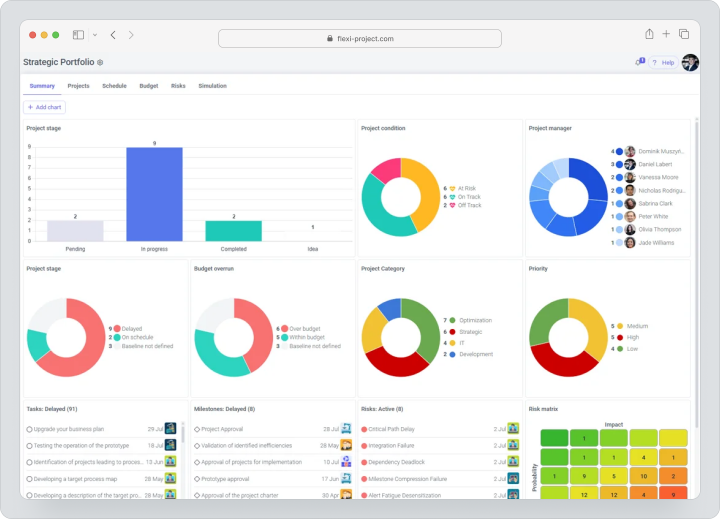
Licensing is divided into Free, Standard, and Full: the contractor can update tasks, while full project and portfolio creation is available to Full users.
FlexiProject is suitable for PMOs, construction, manufacturing, and corporate teams, for whom formal plans, agreements, risks, and deviation control are important. For small teams, this depth may be excessive.
FlexiProject Pricing: Free licenses are available at no cost and can be used by contractors with limited rights. With monthly payments, Standard costs €18 per user per month, Full — €54. Annual payment offers a 20% discount. The full set of features can be tested for 30 days.
Why Do Teams Seek FlexiProject Alternatives?
The reasons for switching are usually related to the process rather than a universal flaw of the product.
Different Depth of PPM Needed
One company needs just tasks, Gantt charts, and time, while another requires demand management, scenario planning, portfolio investments, and resource load planning.
FlexiProject operates between classic PM and PPM, thus, it is compared to both Worksection and GanttPRO as well as Planview.
Simpler Onboarding Needed
Formal projects, budgets, risks, and approvals are useful in PMOs but can slow down a small product or marketing team.
ClickUp, monday.com, Worksection, and Zoho Projects are easier to implement step by step.
Different Licensing Model Needed
FlexiProject allows combining Free, Standard, and Full. This is convenient, but Full is significantly more expensive than Standard.
Teams compare the cost to per-user payment models of Wrike, Smartsheet, ClickUp, and GanttPRO, as well as Microsoft packages.
Localization and Support Are Important
The interface, documents, currencies, time zones, and support must meet the country’s and internal requirements.
For international teams, it’s crucial to check the available languages and data hosting region.
Other Integrations Needed
FlexiProject integrates with Jira and has an API, but companies might be deeply connected with Microsoft 365, Atlassian, Zoho, or another stack.
In such cases, the ecosystem becomes more important than an individual function.
Agile or Hybrid Processes Are Needed
FlexiProject supports Kanban and classic planning. For Scrum, backlogs, releases, and development processes, Jira is usually deeper.
ClickUp and monday.com are convenient for hybrid processes, where different teams use different representations.
Changing the Approach to Resources
The PMO may require resource loading, role-based planning, resource utilization, and financial scenarios.
Planview and Wrike’s higher-tier plans provide deeper corporate resource management, while Worksection and GanttPRO are simpler for operational task distribution.
How Did We Choose and Compare Services?
Services were compared based on real actions: creating a project, building a schedule, assigning resources, collecting time, and generating reports.
Prices and features were verified on August 4, 2026, on official pages. Final terms should be reconfirmed before purchase.
Tasks and Dependencies
Subtasks, key milestones, dependencies, critical paths, baseline plans, and mass changes were reviewed.
Gantt Chart and Views
The Gantt chart, timeline, calendar, board, list, table, and portfolio roadmap were compared. The same view name does not imply the same depth of planning.
Time, Budgets, and Reporting
Timers, timesheets, expense rates, budgets, actual spend, plan/fact, and profitability were taken into account.
Resources and Workload
Resource loading, distribution, team workload, role-based planning, and assignment conflicts were examined.
Roles and External Participants
The licenses of performers, guests, view-only users, contractors, and administrators were compared.
Automation and Integrations
Rules, forms, workflows, APIs, webhooks, and ecosystem integrations were assessed.
Scalability and Administration
For large companies, SSO, auditing, data storage region, portfolios, templates, and centralized rights are important.
Total Cost of Ownership
The calculation includes licenses, minimum seat counts, implementation, training, migration, and support.
For Microsoft Project, local licenses and infrastructure need to be considered; for Planview, individual pricing and implementation services.
Checklist for Choosing an Alternative to FlexiProject
Check before the pilot:
- whether WBS, dates, and dependencies can be transferred;
- whether baseline plans and critical paths are supported;
- whether portfolios and roadmaps are available;
- how resource allocations and available resources are planned;
- whether time tracking is available;
- whether budgets and expense rates can be managed;
- what rights guests and view-only users have;
- how performers and PMs are licensed;
- what integrations the team needs;
- whether there is API and full export;
- how long implementation takes;
- what the annual cost is for the actual role composition.
Top Alternatives to FlexiProject in 2026
Prices and features were verified on the official pricing, product, and help pages. Links to the original sources are embedded in the names of the services.
Worksection ranks first as a managed execution system rather than a corporate PPM.
Worksection
Worksection is a system for managed project execution. It integrates projects, tasks, subtasks, deadlines, Gantt charts, time, expenses, and reports.
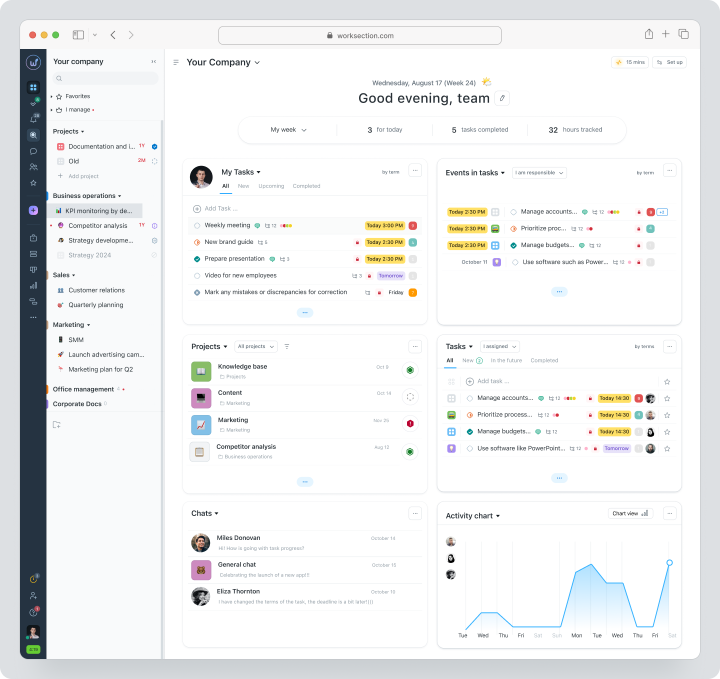
The system is suitable for teams needing a unified workflow without heavy PPM implementation.
Cost: Free for up to 5 users and 2 projects. With monthly payment, Basic costs $5, Business — $10, Premium — $15 per seat per month. Gantt chart, dependencies, guest access, time, and finance are available with Business.
| Fact | Value |
|---|---|
| Free plan / trial period | Permanent Free |
| Model | Per active seat |
| Main scenario | Managed project execution |
Key Features
- tasks and subtasks;
- Gantt chart and dependencies;
- time tracking and expenses;
- roles, rights, and guest access;
- project and team reports.
Main Difference from FlexiProject
FlexiProject is deeper in formal PPM, budgets, risks, and portfolio management. Worksection is simpler when the priority is task execution, deadlines, labor costs, and reporting.
Advantages
- quick setup;
- built-in plan/fact;
- convenient client management.
Limitations
- no strategic PPM level in Planview;
- limited work with risks and investment portfolios;
- Gantt chart available with Business.
Who It’s Suitable For
Agencies, IT, marketing, and service teams.
Microsoft Project
Microsoft Project is a classic tool for planning schedules, resources, dependencies, and costs.
Project for the web has already been phased out, and its cloud capabilities have been moved to Microsoft Planner. Project Online will be completely closed by September 30, 2026.
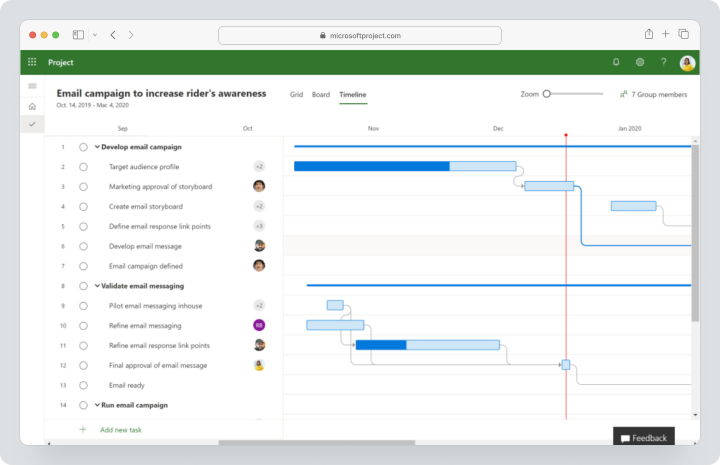
Desktop versions Project Standard 2024 and Project Professional 2024 continue to be sold separately.
Price: Project Standard 2024 costs $679.99 for a single perpetual license for one PC. Project Professional 2024 is $1,129.99 and adds advanced resource management, timesheets, and connection to Project Server Subscription Edition. Project Server is licensed through partners.
| Fact | Value |
|---|---|
| Free plan / trial period | Depends on Microsoft 365 product |
| Model | One-time desktop license or enterprise licensing |
| Main Scenario | Classic schedules and resources |
Key Features
- Gantt, Network Diagram, and Task Sheet;
- baselines, milestones, and critical path;
- resource leveling;
- master projects;
- Project Server for portfolios and resources.
Main Difference from FlexiProject
Microsoft Project is deeper in traditional schedule management and familiar to many PMs, but collaborative cloud work depends on Planner, Microsoft 365, and server framework.
Advantages
- mature planning;
- strong dependencies and resources;
- compatibility with the Microsoft ecosystem.
Limitations
- desktop license tied to one user and PC;
- collaboration is more complex than in modern SaaS;
- enterprise framework requires infrastructure and partners.
Who It’s Suitable For
PMO and organizations with a mature Microsoft infrastructure.
Smartsheet
Smartsheet is a work management platform with spreadsheet logic, Gantt chart, forms, reports, dashboards, and automations.
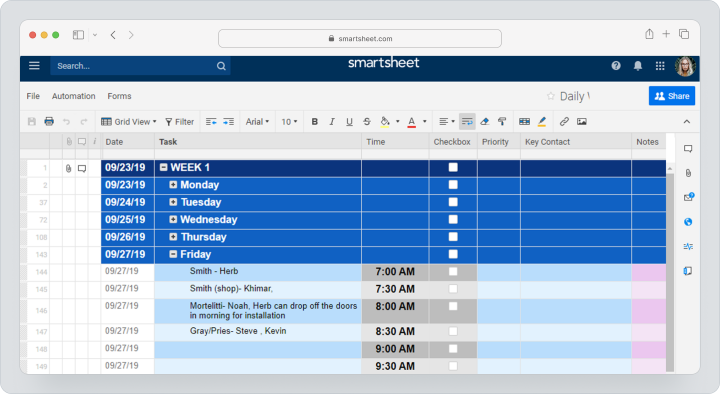
It’s convenient when users are accustomed to spreadsheets but need centralized data and portfolio visibility.
Price: for monthly payment, Pro costs $12 per participant per month, Business — $24. Enterprise and Advanced Work Management are priced individually.
| Fact | Value |
|---|---|
| Free plan / trial period | Trial period |
| Model | Per Member; participants and guests are counted by plan rules |
| Main Scenario | Spreadsheet processes and programs |
Key Features
- Grid, Gantt, Board, Calendar, and Table;
- forms, reports, and dashboards;
- automation;
- uploading to Business;
- portfolios and Control Center on upper solutions.
Main Difference from FlexiProject
Smartsheet is easier to adapt to spreadsheet processes and mass data collection, but a strict project model needs to be designed independently.
Advantages
- familiar table;
- strong forms and reports;
- advanced portfolio add-ons.
Limitations
- Advanced Work Management — individual pricing;
- complex solutions require an administrator;
- time tracking is not a central feature.
Who It’s Suitable For
Operational teams, PMO, and programs with a large volume of reporting data.
Wrike
Wrike — a corporate project management platform with customizable workflows, request forms, resources, and advanced reporting.
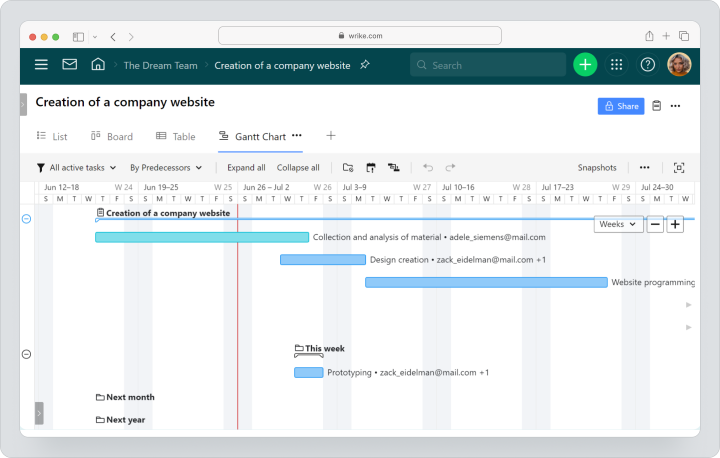
Price: Free available without payment. Team costs $10, Business — $25 per user per month. Pinnacle and Apex — upon request. The trial period lasts 14 days.
Subscriptions are sold in seat groups, and Business and higher are available only with annual payment.
| Fact | Value |
|---|---|
| Free plan / trial period | Free and 14-day trial |
| Model | Per user, in seat groups |
| Main scenario | Corporate processes and resources |
Key features
- tasks, projects, and customizable item types;
- interactive Gantt;
- request forms and automation;
- resource availability and access;
- budgeting and advanced BI on Pinnacle.
Main difference from FlexiProject
Wrike is stronger in cross-functional workflows and corporate work management, while FlexiProject excels in formal project structure, budgets, and risks.
Advantages
- flexible workflows;
- developed resources;
- corporate security.
Limitations
- subscriptions are sold in seat groups;
- budgeting and advanced resource planning are available on higher plans;
- implementation may be challenging for a small team.
Who it’s suitable for
Medium and large organizations with multiple departments.
monday.com
monday.com — a visual platform for projects and processes. Teams can create boards, submissions, reporting dashboards, and automations tailored to their model of work.
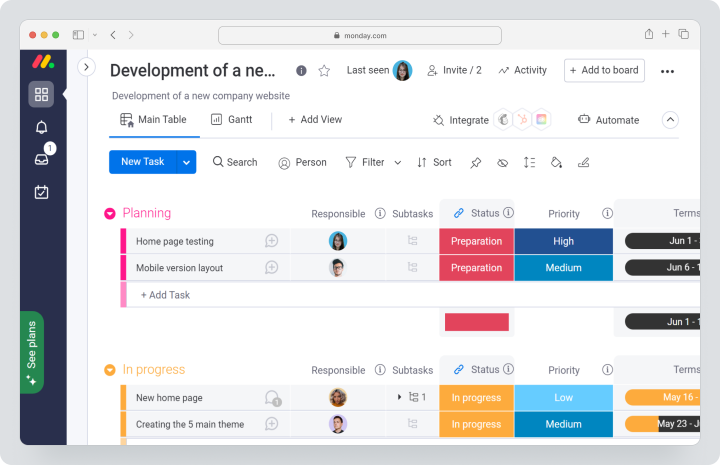
Price: monthly payment available for monday.com. Basic — $12, Standard — $14, Pro — $24 per user. Enterprise — individual pricing.
| Fact | Value |
|---|---|
| Free plan / trial period | Free for up to 2 seats and trial period |
| Model | Seat packages |
| Main scenario | Visual customizable processes |
Key features
- boards and customizable columns;
- Timeline and Gantt on Standard;
- reporting dashboards and automations;
- guest access;
- time tracking on Pro.
Main difference from FlexiProject
monday.com is easier to adapt to non-standard processes, but PPM, budgets, and formal management require higher plans and additional configuration.
Advantages
- visual interface;
- strong automation;
- many templates.
Limitations
- price depends on seat packages;
- deep hierarchy is not available in all products;
- management rules need to be projected.
Who it’s suitable for
Marketing, operations, and product teams.
ClickUp
ClickUp — a unified workspace with tasks, Docs, Chat, Whiteboards, Gantt chart, time tracking, and automations.
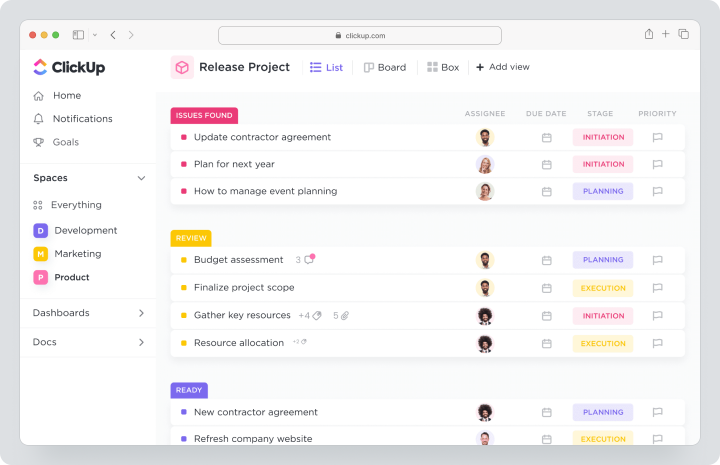
It is suitable for hybrid teams looking to gather various ways of working in one space.
Price: Free Forever available without payment. Under monthly payment, Unlimited costs $10, Business — $19 per user per month. Enterprise — upon request. AI plans and additional credits are billed separately.
| Fact | Value |
|---|---|
| Free plan / trial period | Free Forever |
| Model | Per user, AI separately |
| Main scenario | Flexible work management |
Key features
- hierarchy, tasks, and subtasks;
- Gantt chart, timeline, load tracking, and calendar;
- time tracking;
- Docs, Chat, and Whiteboards;
- reporting dashboards, forms, and automation.
Main difference from FlexiProject
ClickUp is more customizable and supports flexible processes, but formal portfolios, risks, approvals, and budgets from FlexiProject are not automatically reproduced.
Advantages
- wide range of features;
- multiple views;
- strong customization.
Limitations
- the interface can be overloaded;
- management rules are needed;
- AI increases the cost.
Who it’s for
IT, product, and operations teams with various workflows.
GanttPRO
GanttPRO is an online planning system with a strong focus on Gantt charts, dependencies, automated scheduling, workload, and portfolios.
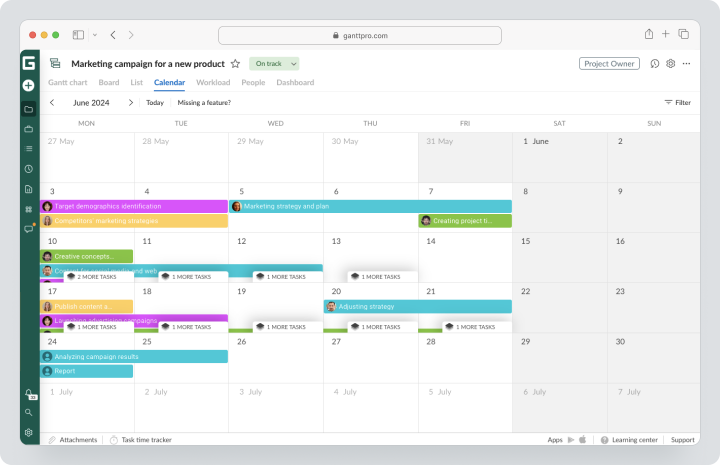
Cost: GanttPRO supports monthly and annual payments. The cost depends on the selected plan and is calculated per user per month: Core costs $9, Advanced — $15, and Business — $24 per user per month. The exact total amount is displayed in the calculator based on team size. The trial period lasts 14 days.
| Fact | Value |
|---|---|
| Free plan / trial period | 14-day trial period |
| Model | Per user, discount depends on team size |
| Main scenario | Online Gantt chart and planning |
Key features
- Gantt chart and dependencies;
- automated scheduling;
- project calendar;
- workload and portfolios on Business;
- time tracking and budget planning on Business.
Main difference from FlexiProject
GanttPRO is simpler and faster for building schedules, but weaker in risks, approvals, and extensive PPM management.
Advantages
- clear Gantt chart;
- quick setup;
- transparent feature levels.
Limitations
- no permanent Free;
- time tracking and portfolios available on Business;
- fewer corporate processes.
Who it’s for
Project managers for whom the schedule is more important than a complex corporate platform.
Planview
Planview ProjectPlace is a publicly described product from Planview for collaborative project management.
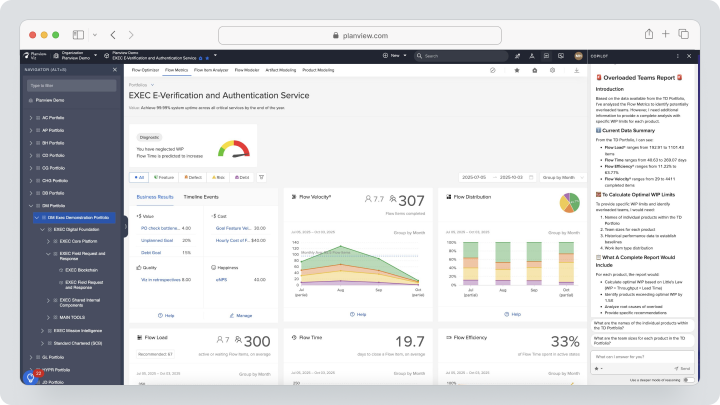
For deeper PPM, Planview offers Portfolios and AdaptiveWork with customized conditions.
Cost: ProjectPlace offers one feature-rich plan at a customized price and a fully functional 30-day trial period. The page states unlimited projects, Kanban boards, Gantt charts, and roadmaps.
Planview’s corporate PPM products are invoiced through the sales department and often require separate implementation.
| Fact | Value |
|---|---|
| Free plan / trial period | 30-day trial period |
| Model | Individual quote |
| Main scenario | Collaborative project management and corporate PPM |
Key features
- Gantt chart, Kanban, and roadmaps;
- workload and time tracking;
- portfolio reporting dashboards;
- SSO and role-based access;
- API and integrations.
Main difference from FlexiProject
Planview scales wider to strategic portfolio management, resources, and corporate control. FlexiProject may be simpler for organizations that do not need the full class of Planview.
Advantages
- developed PPM product line;
- corporate security;
- portfolios and resources.
Limitations
- price only on request;
- selection of specific products requires consultation;
- implementation is more complex than with SMB services.
Who it’s for
Large PMOs, large companies, and organizations with complex portfolios.
Jira
Jira is a work management system for development teams featuring a backlog, Scrum and Kanban boards, workflows, releases, and integrations for development.
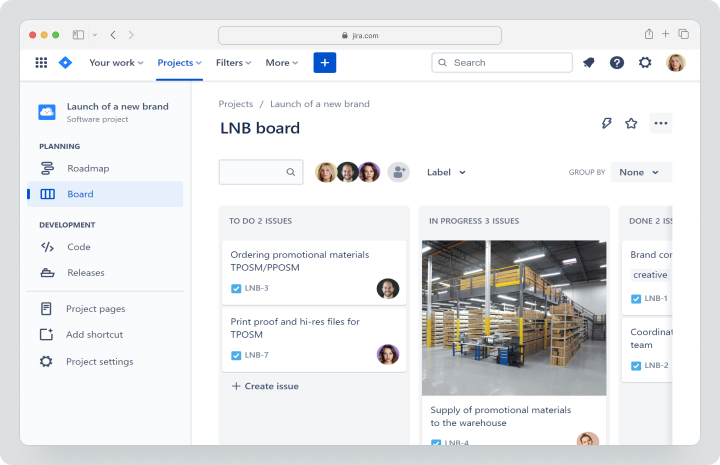
For the classic Gantt chart, use Timeline, Plans, or applications from the Marketplace depending on the scenario.
Cost: Free for up to 10 users. Jira pricing depends on the number of users and is calculated in the official calculator: Standard costs from $9.05, and Premium starts at $18.30 per user per month. The Enterprise plan is customized and billed annually.
The price varies depending on the team size.
| Fact | Value |
|---|---|
| Free Plan / Trial Period | Free for up to 10 users |
| Model | Per user, tiered pricing based on the number of users |
| Main Scenario | Agile and Software Development |
Key Features
- backlog, Scrum, and Kanban;
- customizable workflows;
- releases and task and bug tracking;
- automation;
- Atlassian Marketplace and developer integrations.
Main Difference from FlexiProject
Jira is deeper in agile development and task and bug tracking, while FlexiProject excels in classic schedules, budgets, risks, and portfolios.
Advantages
- mature ecosystem for developers;
- flexible workflows;
- strong integrations with DevOps.
Limitations
- The Gantt chart and portfolio planning depend on the plan and applications;
- the interface requires customization;
- financial contours are limited.
Best For
Software teams working with Scrum, Kanban, or a hybrid model.
Zoho Projects
Zoho Projects is a PM system within the Zoho ecosystem featuring tasks, Gantt charts, time tracking, budgets, reports, and integrations with CRM, Books, People, and Analytics.
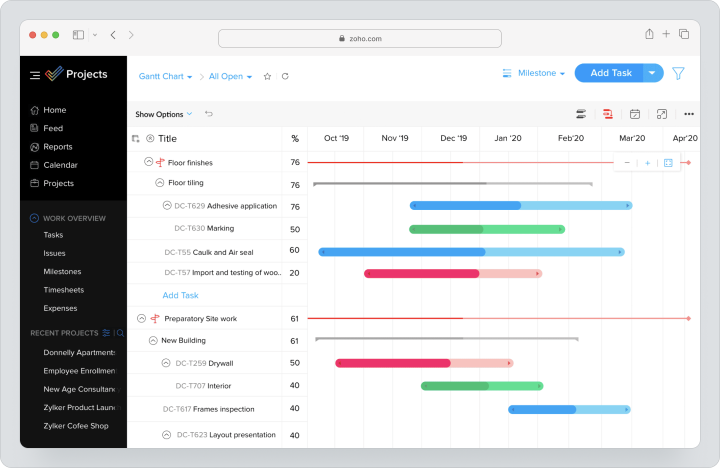
Cost: The pricing of the plans depends on the region and selected plan: Premium costs €5, Enterprise — €10, and Ultimate — €15 per user per month for monthly billing. The Free plan supports up to 5 users and 3 projects, plus a 15-day trial period without credit card required.
The currency and total amount are displayed on the local page.
| Fact | Value |
|---|---|
| Free Plan / Trial Period | Free and 15-day trial period |
| Model | Per user, regional pricing |
| Main Scenario | PM in the Zoho ecosystem |
Key Features
- tasks, subtasks, and dependencies;
- Gantt chart and critical path;
- time logging and timesheets;
- budgets and EVM;
- Zoho integrations, API, and webhooks.
Main Difference from FlexiProject
Zoho Projects is easier to integrate with Zoho CRM and financial applications, but deep portfolios, risks, and approvals in FlexiProject may be stronger in a corporate scenario.
Advantages
- available Free;
- time tracking and budgets;
- wide ecosystem.
Limitations
- the price depends on the region;
- some features are only available on Enterprise and Ultimate;
- the interface may seem cluttered.
Best For
Teams already using Zoho CRM, Books, or People.
Comparison Table of FlexiProject Alternatives
The table shows where the feature is available directly and where it depends on the plan, product, or settings.
| Service | Best Scenario | Tasks and Subtasks | Gantt / Timeline | Time Tracking | Reports | Guest Access | Pricing Model |
|---|---|---|---|---|---|---|---|
| Worksection | Project Execution | Strong | Business | Business | Plan/Actual | Business | Per Seat |
| Microsoft Project | Classic Gantt Charts | Strong | Very Strong | Professional / Server | Strong | Through Ecosystem | One-time / Corporate |
| Smartsheet | Spreadsheet Applications | Strong | Pro | Through Add-ons or Integrations | Very Strong | Business | Per Participant |
| Wrike | Enterprise Processes | Strong | Team | Senior Plans | Very Strong | Review / Participant | Group Seats |
| monday.com | Visual Processes | Strong | Standard | Pro | Reporting Dashboards | Standard+ | Seat Packages |
| ClickUp | Flexible Workspace | Very Strong | Unlimited | Unlimited | Reporting Dashboards | Yes | Per User |
| GanttPRO | Gantt | Strong | Main Feature | Business | Business | Depending on the Plan | Per User, price dependent on team size |
| Planview ProjectPlace / Planview PPM | Enterprise PPM | Strong | Strong | Yes | Portfolio | Yes | Custom |
| Jira | Agile Development | Strong | Timeline / Plans / Apps | Built-in Logs | Agile Reports | Depending on the Plan | Tiered Pricing per User |
| Zoho Projects | Zoho Ecosystem | Strong | Yes | Premium | Strong | Depending on the Plan | Regional Pricing per User |
Which Service to Choose for Different Scenarios?
For Managed Execution
Worksection is sensible if the team needs tasks, deadlines, Gantt charts, time tracking, and reports without complex PPM.
ClickUp is suitable for deep customization, Zoho Projects if you are using the Zoho ecosystem.
For Classic Planning
Microsoft Project is suitable for experienced PMs who need basic plans, critical path, and resource leveling.
GanttPRO is simpler for collaborative online work with schedules.
For PMO and Enterprise
Planview should be considered for strategic portfolios, resource planning, and investment planning.
Wrike is suitable for cross-functional workflows, resources, and corporate reporting. Smartsheet is convenient when processes and reporting are built around spreadsheets.
For Agile and Development
Jira better addresses backlog, sprints, releases, and the development ecosystem.
ClickUp and monday.com are suitable for mixed teams needing views for flexible processes alongside marketing and operational processes.
For Limited Budget
Worksection Free, ClickUp Free, Jira Free, and Zoho Projects Free allow for pilot launches.
Comparison should not only consider user count but also Gantt chart, time tracking, storage, automation, and guests.
How to Switch to a New Platform Without Losing Data?
- Compile a list of projects, WBS, users, roles, files, and integrations.
- Separate active projects from the archive.
- Export tasks, milestones, dates, dependencies, budgets, and time records.
- Save baseline plans, risks, approvals, and portfolio structure as separate files.
- Check the formats of the new system and API limitations.
- Create mapping of fields, statuses, and types of dependencies.
- Migrate one project with a complex schedule.
- Verify critical path, durations, calendar, and resources.
- Set up roles, templates, and notifications.
- Train PMs and executors on various scenarios.
- Run a parallel period.
- Only turn off FlexiProject after acceptance and backup creation.
How to organize work in Worksection?
- Create a project for a result, client, or internal initiative.
- Break the work down into tasks, subtasks, and checklists.
- Assign responsible persons, deadlines, priorities, and dependencies.
- Invite the client or contractor via guest access.
- Monitor the schedule on the Gantt chart and in the calendar.
- Log time and expenses for tasks.
- Compare the plan with the actual results.
- Use reports on load, expenses, and progress.
- Check the Worksection pricing before launching.
FAQ
What is the best alternative to FlexiProject in 2026?
The best choice depends on the depth of planning. Worksection is suitable for managed execution, Microsoft Project for classic scheduling, Planview for corporate PPM, Jira for Agile development, and GanttPRO for online Gantt charts.
First, determine whether portfolios, risks, and budgets are needed, or if the team only requires tasks, dependencies, time, and reports.
Are there free alternatives to FlexiProject?
Yes. Worksection offers Free for up to five users and two projects, ClickUp — Free Forever, Jira — Free for up to ten users, Zoho Projects — Free for up to five users and three projects.
FlexiProject also has free licenses for limited task management. A free alternative to FlexiProject should be evaluated based on Gantt charts, dependencies, time, and reports, not just the number of participants.
What alternative to FlexiProject is suitable for small businesses?
Small businesses typically find Worksection, ClickUp, GanttPRO, or Zoho Projects suitable.
Worksection is simpler for client projects and time tracking, GanttPRO for schedules, ClickUp for customizable workflows, and Zoho Projects for CRM and Books integration. Corporate PPM may be excessive if the company does not manage portfolios and resources at the departmental level.
What replacement for FlexiProject is better for teams?
Project service teams should compare Worksection and Zoho Projects. Cross-functional teams — Wrike, monday.com, or ClickUp. Development teams — Jira. PMO with complex resources — Planview or Microsoft Project Server.
Run a pilot with a PM, administrator, and executors, as convenience for one role does not guarantee convenience for the entire team.
How does Worksection differ from FlexiProject?
FlexiProject works more deeply with formal plans, budgets, risks, approvals, and portfolios.
Worksection focuses on daily execution: tasks, deadlines, dependencies, time, costs, and reports. Worksection is easier to implement in an agency or service company but does not replace corporate PPM if strategic investment portfolios and complex resource workload planning are needed.
Can data be transferred from FlexiProject?
Yes, but the export of schedules, dependencies, budgets, risks, files, and portfolio hierarchy needs to be checked separately.
Basic tasks and dates are usually transferred via CSV, Excel, or API. Basic plans, customizable calendars, and dependency types may require manual mapping. First, transfer one complex project and compare the critical path, resources, and reports before mass migration.
How to compare service prices?
Calculate the cost for different roles: PM, executors, viewers, guests, and administrators.
FlexiProject combines Free, Standard, and Full, Wrike sells seats in groups, monday.com in packages, Microsoft — desktop and corporate licenses, Planview — at individual pricing. Add implementation, training, integrations, and support to get the overall annual cost of ownership.
How to choose between a specialized and a universal platform?
A specialized product is better when one critical feature is essential: GanttPRO for charts, Jira for Agile, Microsoft Project for classic schedule planning.
A universal platform is useful if different teams need to work in one space. The broader the product, the higher the need for management rules. Choose a system that reduces manual work in your process, rather than one with more items in its catalog.
Which functions to check before migration?
Check WBS, dependencies, calendars, baseline plans, key milestones, risks, budgets, time entries, resource allocation, roles, attachments, API, and export.
Individually test the import from Microsoft Project or Excel if used. Acceptance criteria should include date accuracy, critical path, user access, reports, and the ability to restore the original data.
Conclusion
Alternatives to FlexiProject fall into several categories. Microsoft Project and GanttPRO excel in scheduling, Planview and Wrike in enterprise management, Jira in development, Smartsheet in spreadsheet applications, ClickUp and monday.com in flexible workflows, and Zoho Projects in the Zoho ecosystem.
Worksection is suitable when FlexiProject for teams proves to be more in-depth than necessary, and the focus shifts to tasks, deadlines, responsibilities, labor costs, and reporting.
The system does not replace strategic PPM but provides transparent daily execution. More details about the capabilities can be read in the Worksection overview.