Solutions
worksection
beta
help
How can you use the statuses of tasks?
With the status of tasks, you can organize the whole process of working on tasks (workflow), adjusting them according to the specifics of your work and the stages that take place in your company's tasks. Statuses are visible both to the executive and the project manager and show who and what should be done on a task at the moment.
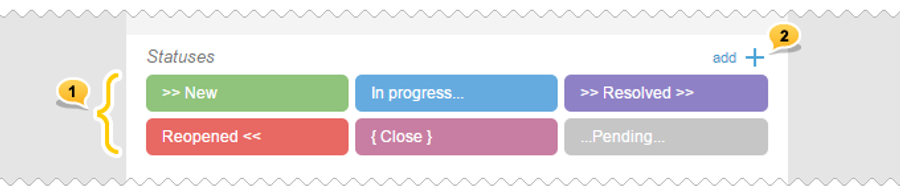
All accounts have 6 preset statuses1. However, if necessary, you can create your own statuses that you will use in your company.2
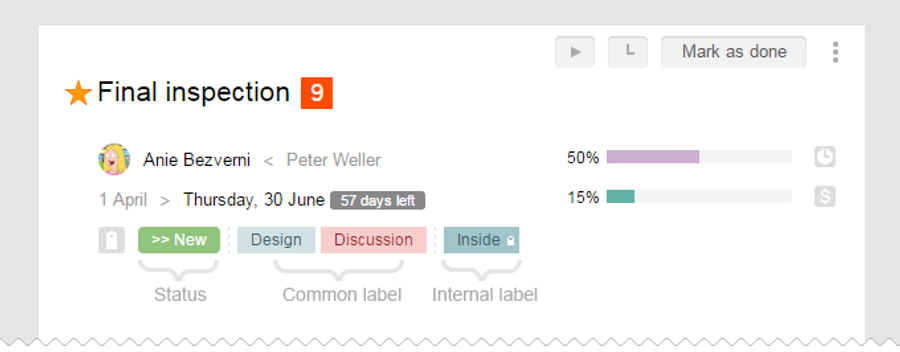
Statuses are seen first when assigning and separated from the other labels in the subsequent display.
Besides, statuses have certain qualities activated by default.
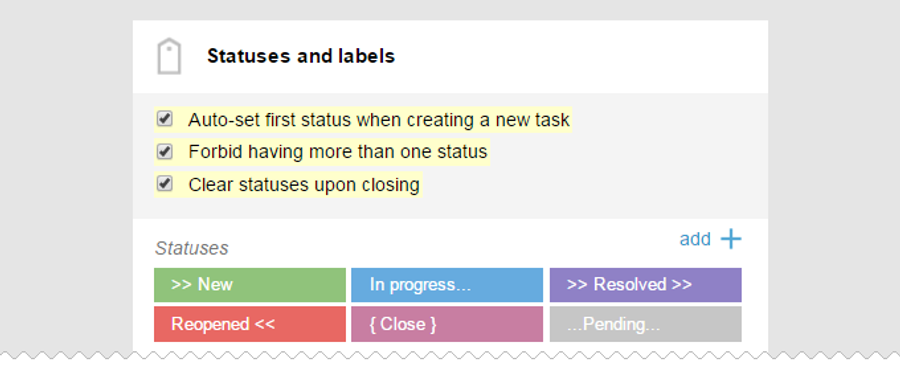
- Automatically insert the first status from the list when creating tasks and subtasks.
- Disallow the existence of more than one status at each specific task. When inserting the next status, the previous one turns off automatically.
- Disable all statuses after complete closure of tasks and subtasks.
Leave your review
Did this article help you?
Glad we could help! What was helpful?
Sorry this didn't help. What went wrong?

