Solutions
worksection
beta
help
How to reassign tasks between the project participants?
For this, go to the Tasks and comments in the By people tab.
Grab the line with the name of the task and drag it to the card of another participant of the project — this way you reassign the task1.
There are two "technical cards" on a page — Anyone and Executive
It allows assigning executives to the task that have not yet been set, or vice versa,
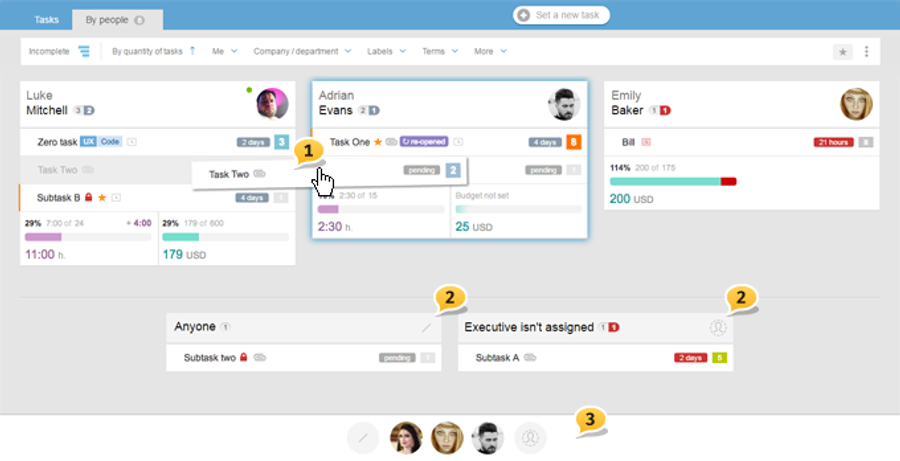
When there are many tasks and participants, the entire page will take up several screens, which won't be convenient when using the dragging function; therefore, when you grabbed a task, there will appear a "dock" with employees' avatars where you can assign tasks3.
Please note: if you grabbed a "hidden" task, then you will see only faces (avatars) of those people who can see it, and, therefore, only one of them can be assigned as an executive.
If you do not like dragging, you can always select several tasks at once, and as earlier, perform bulk operations, which are not limited to reassigning.
Important! Only open tasks can be dragged. All the changes to the executives made by dragging have to be Saved!
On the pages with 1000 and more tasks, dragging is automatically deactivated.
Leave your review
Did this article help you?
Glad we could help! What was helpful?
Sorry this didn't help. What went wrong?

