Solutions
worksection
beta
help
How to configure automatic deadline changes when a task status changes?
Automatic deadline changes on the Kanban board help update a task's deadline each time it moves to a specific status. This is convenient when each stage of work requires its own deadline.
Permission to configure automation belongs to:
- Account owner
- Account administrator with the "Allow admin to manage projects" permission
- Project lead
- Project author (team/department administrator who created the project)
How to configure automatic deadline changes when a task status changes?
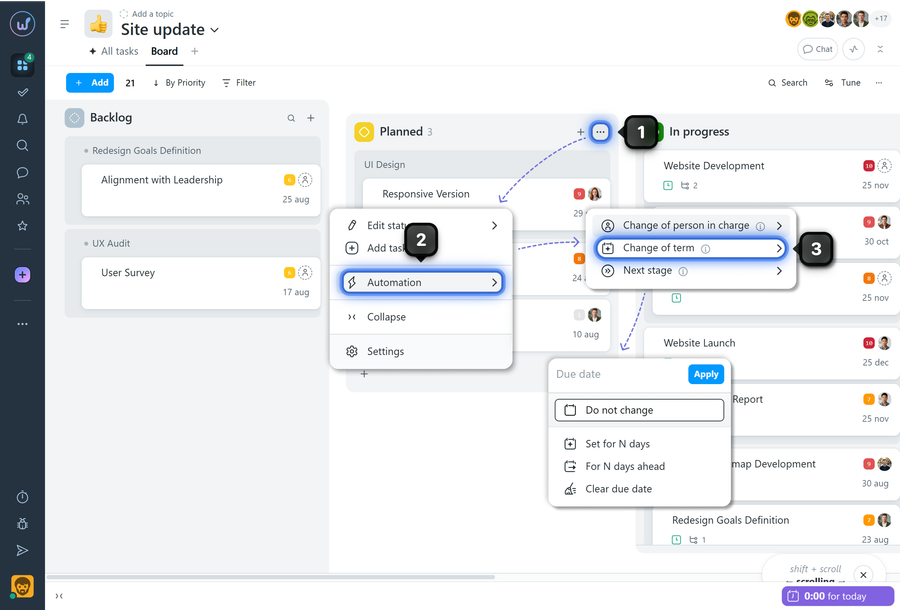
Open the Kanban board within the required project. Hover over the column of the required status and click the three-dot menu1. In the menu, select "Automation"2, then "Change of term"3. Then select the required option and save the settings.
How does it work?
When a task moves to a status with automation configured, the system automatically changes its deadline according to the selected rule:
- set the deadline to a specific number of days
- shift the current deadline forward by N days
- clear the deadline
Please note! Automatic deadline changes can be combined with automatic assignee assignment and the next status configuration.
Leave your review
Did this article help you?
Glad we could help! What was helpful?
Sorry this didn't help. What went wrong?

