Solutions
worksection
beta
help
How to configure the next stage automation on a Kanban board?
The "Next stage" automation on the Kanban board allows you to pass a task along to the next stage of the process instead of completing it immediately. This is convenient when a task needs to progress sequentially through several statuses.
Permission to configure automation belongs to:
- Account owner
- Account administrator with the "Allow admin to manage projects" permission
- Project lead
- Project author (team/department administrator who created the project)
How to set the next task status on the Kanban board?
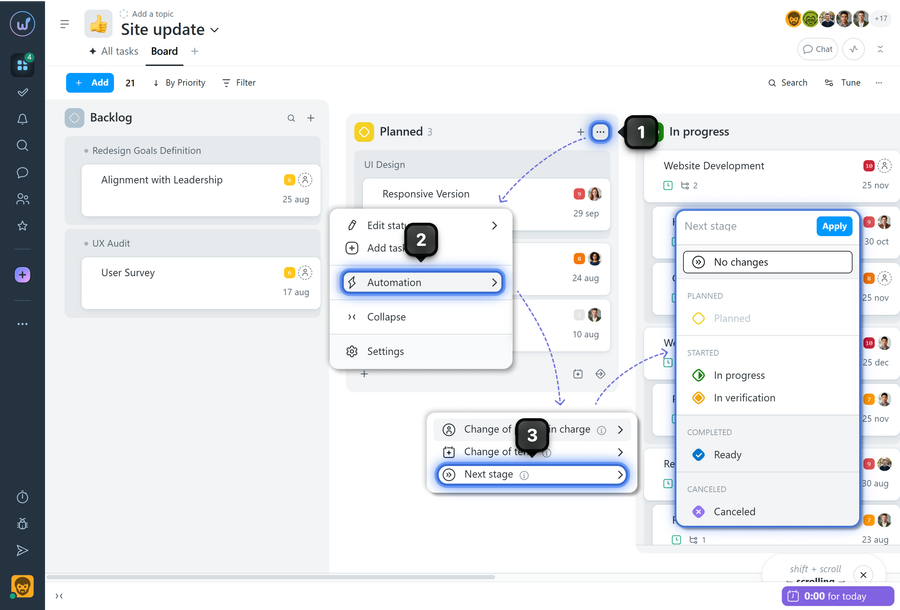
Open the Kanban board within the required project. Hover over the column of the required status and click the three-dot menu1. In the menu, select "Automation"2, then "Next stage"3. Then select the required status and click "Apply".
How does it work?
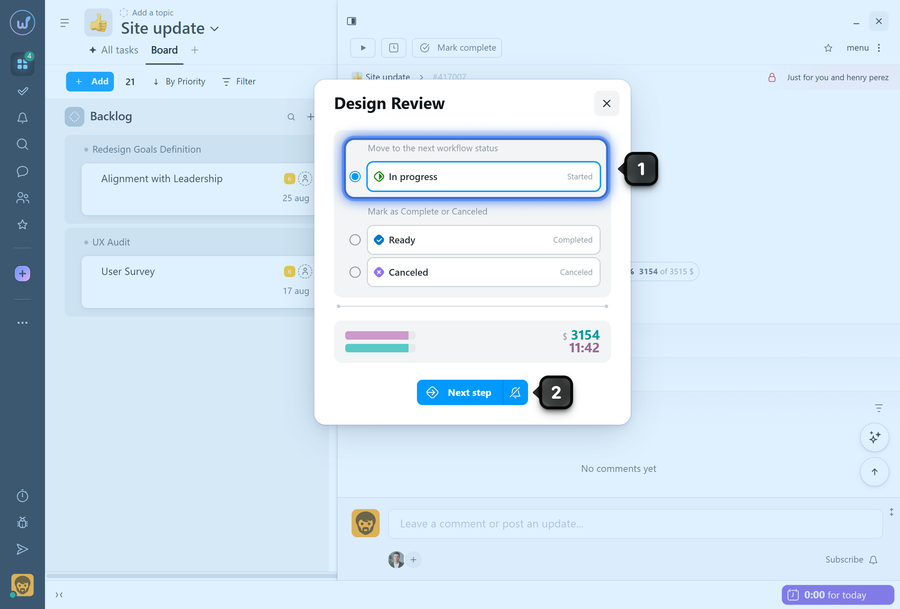
When completing a task with in status that has automation configured, the system will offer to move it to the next status. In the task completing window, "Move to the next workflow status"1 will be selected. To confirm the action, click "Next step"2.
Please note!
- Automation can only be configured within each individual project.
- The "Next stage" automation can be combined with other status automations.
Leave your review
Did this article help you?
Glad we could help! What was helpful?
Sorry this didn't help. What went wrong?

