In 18 years, Worksection has become a working tool for over 1,600 teams. Every day, it helps manage tasks and projects, keep track of time, and achieve business goals.
However, over time we faced a challenge. As the team grows and processes multiply, it becomes harder to quickly find what you need, switch between tasks, and maintain focus on what matters.
That’s why we created Worksection 2.0 — a faster, more flexible, and modern version of our online service.
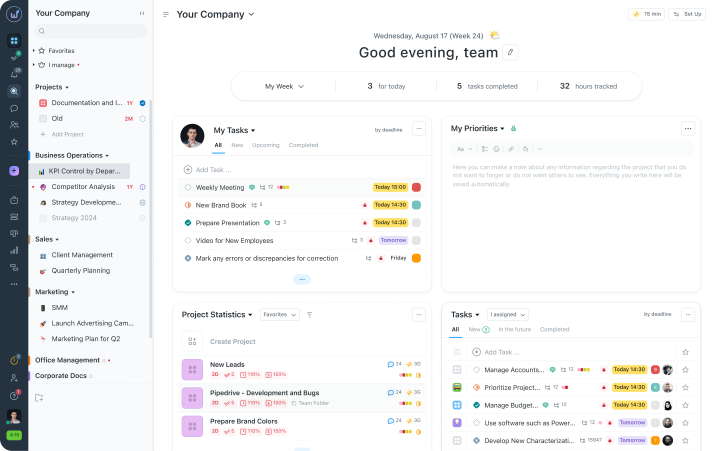
What’s new in Worksection 2.0:
- New interface — clean design, less visual noise, more space for tasks.
- More flexible structure — it’s easier to tailor the system for different types of teams and processes.
- Unified interface logic — consistent elements and behavior across different sections, so you don’t have to get used to it each time.
- Built-in messenger — private, group, and project chats right where the work happens.
We provide more details about the main changes and how they help in daily work.
Main changes in Worksection 2.0
In Worksection 2.0 we gathered everything that teams most frequently requested. As a result, the interface has become simpler, access to what’s needed is faster, and the system itself is more flexible and personalized. Now, every user can customize Worksection for their daily tasks.
 New interface and design system
The Worksection 2.0 interface has become simpler and cleaner. We aligned styles and navigation to make it easier to navigate and quickly find what you need.
- Sidebar
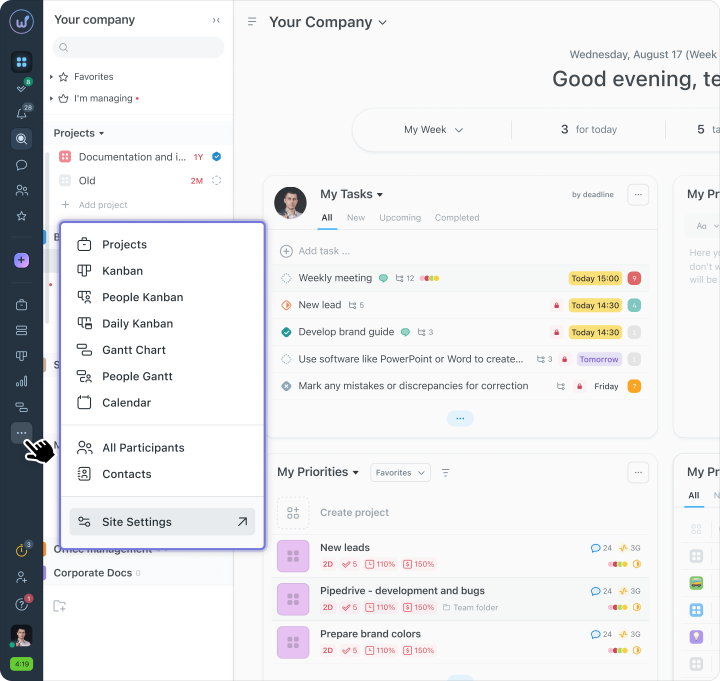
The main menu is now fixed on the left and accessible from any page. You can now switch between projects, tasks, or reports with one click. The sidebar can also be customized to fit your needs: keeping only the necessary sections and arranging them in a convenient order.
- Quick task creation
The “+” button on the sidebar is available on all pages of the system. Create tasks from anywhere: from comments, calendar, Task board, or using hotkeys Alt+N (Mac: Option+N).
- Unified styles
- Clear workspace structure
We separated primary and secondary actions. What you use daily is always at hand.
What is needed less frequently doesn’t interfere with the process.
 Chats inside Worksection
One of the most anticipated updates that we were constantly asked for is the ability to communicate within Worksection. Because in practice it happened that tasks were in the system, while quick questions, clarifications, and files were in Telegram or Slack. Because of this, important details could get lost.In Worksection 2.0, in addition to comments on tasks, there is a built-in messenger for quick dialogs, team discussions, and file sharing. Now, you can resolve work issues in one environment without switching to external messengers.
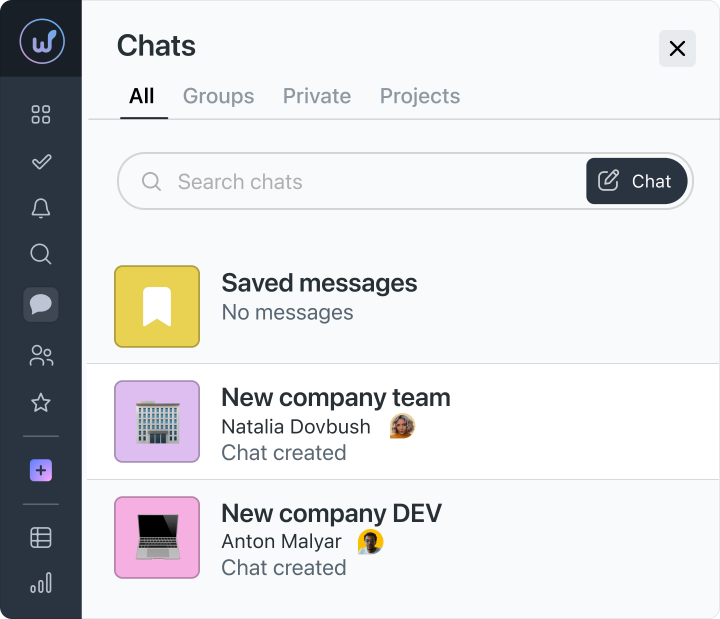
Chats can be of different types:
- Private chats — for one-on-one conversations.
- Group chats — for working groups and teams.
- Project chats — automatically gather all project participants into a single communication channel.
Integration with the workflow
From the chat, you can mention colleagues and tasks, minimize chats to the bottom panel for instant return, view the latest messages, and instantly search for the needed conversation.Smart notifications
Messages can be sent without notifications, scheduled for sending at the right time or sent instantly using hotkeys. This way, the team sees only what’s important and is not distracted by unnecessary noise.
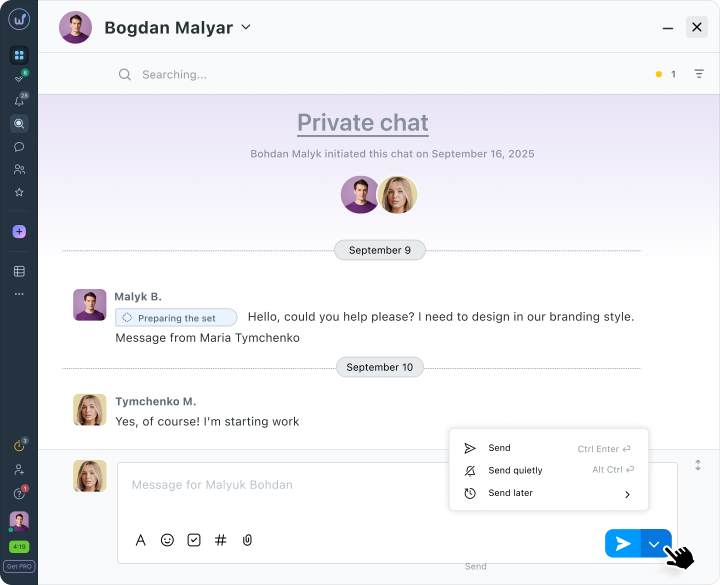
The Worksection comment feed is perfect for discussing tasks, while chats are for quick dialogs and urgent clarifications. They allow for file exchanges, discussing work issues in real time, and keeping comments focused only on task context.
 Updated detailed task card
We completely updated the detailed task card. Previously, it contained only basic fields, and to make changes you had to switch to edit mode. In Worksection 2.0, everything can be edited directly in the task window: open the card — and immediately enter the required data. Changes are saved automatically. Quick opening of tasks
Tasks open directly from the list without switching to a separate page. This speeds up work when you need to quickly open and make changes to several tasks in a row.
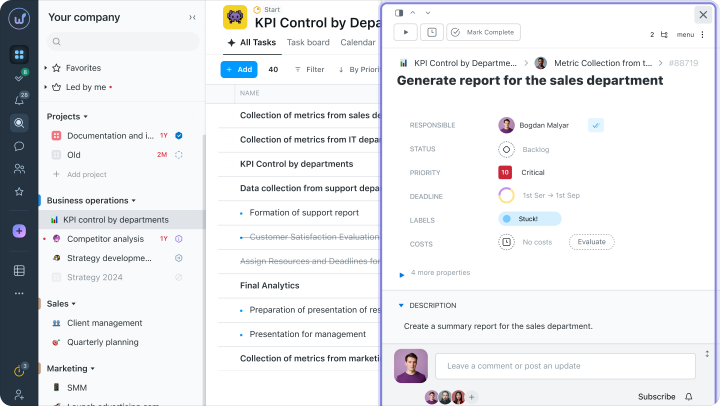
Inline editing
No more need to switch to edit mode: deadlines, responsible persons, priorities, or statuses change directly in the task card. All changes are saved instantly and are immediately visible to the entire team.
Personalization of fields
Every user can customize their order of displaying task properties. Unwanted fields can be minimized or hidden altogether to focus only on what’s important.
New task properties
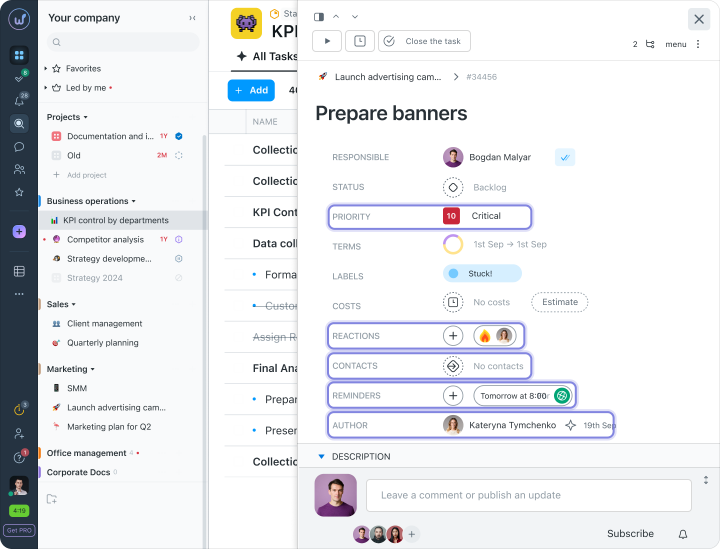
In addition to the basic fields (responsible, deadlines, status, priority, tags, costs), the following were added:
- Dependencies — blockers and other dependencies for transparent planning.
- Reminders — automatic notifications to avoid missing deadlines.
Also, the task card offers emoji reactions for quick feedback and information about the task’s author. The task’s priority is now displayed as a number and a name, allowing for immediate understanding of its importance.
New comment feed
We updated the task comment feed in Worksection 2.0. Now messages can be edited and formatted, tasks can be created directly from the discussion, and unnecessary or outdated messages can be hidden.
Status history
Changes to the task’s status are now displayed in a separate window, rather than mixed with comments and other events. In the status history, you can view how the task progressed and who changed it and when.
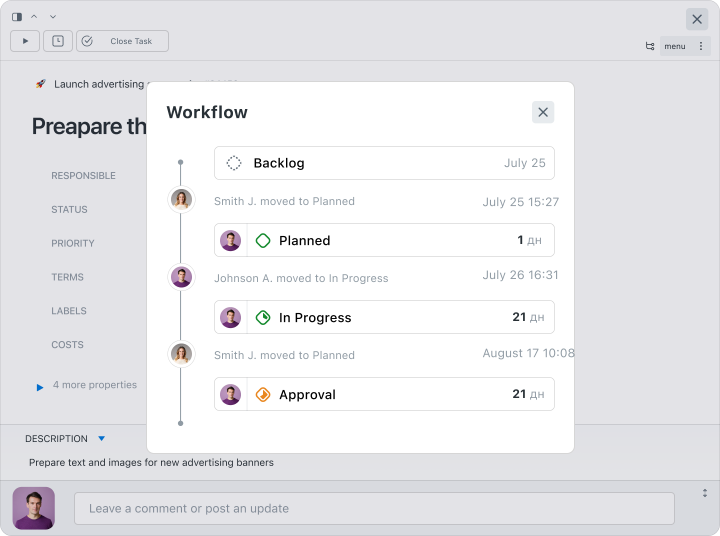
The new detailed task card in Worksection 2.0 simplifies daily work with tasks. You can immediately edit the necessary data, customize the fields to your liking, and see only what’s really important.
 Table view of tasks
In Worksection 2.0, a new task list view has appeared — the table view. You can customize the table columns to fit your needs, change their order, filter and sort tasks.
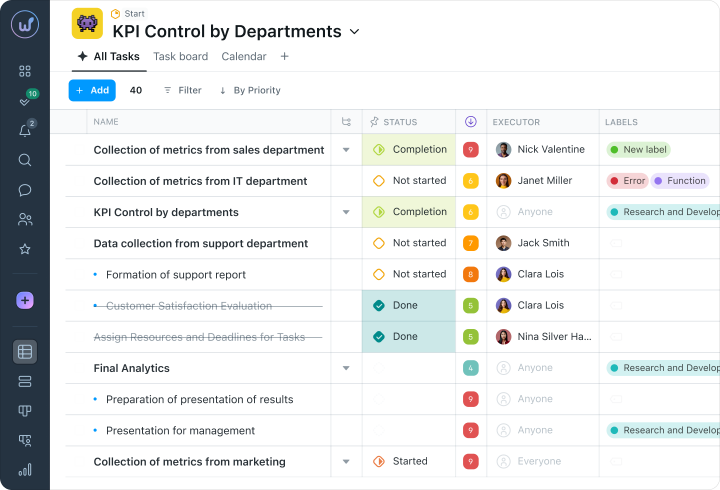
- Drag&Drop — drag columns and arrange their order to suit your workflow.
- Show and hide fields — keep only the fields that are currently needed on screen, and hide unnecessary ones.
- Inline editing — change executors, deadlines, and priorities directly in the table, without opening each task.
- Sorting and filters — group tasks by deadlines, executors, statuses, etc.
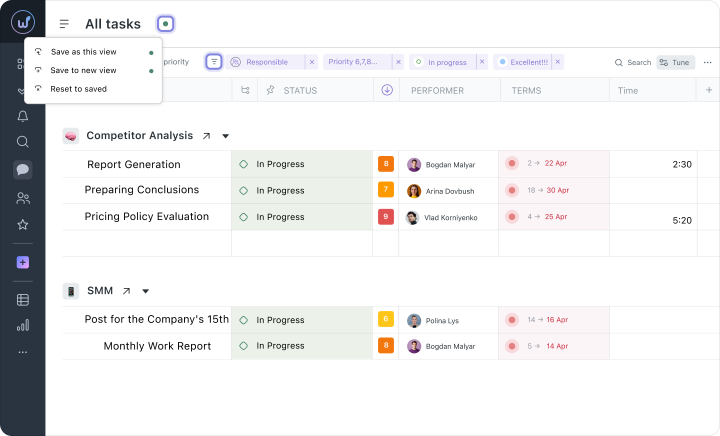
 Saved display modes
In Worksection 2.0, it is possible to save the task table settings and share it with the team if needed.
For example, “My tasks for today”, “Overdue by department”, “Critical bugs”, “Ready for testing”, etc. They save filters, sorting, column set and order, grouping of tasks, etc. This provides quick access to necessary information with one click.
 Day plan
This is one of the new features that teams waited for the most. A convenient tool to see how tasks are distributed throughout the day — and now it’s here. 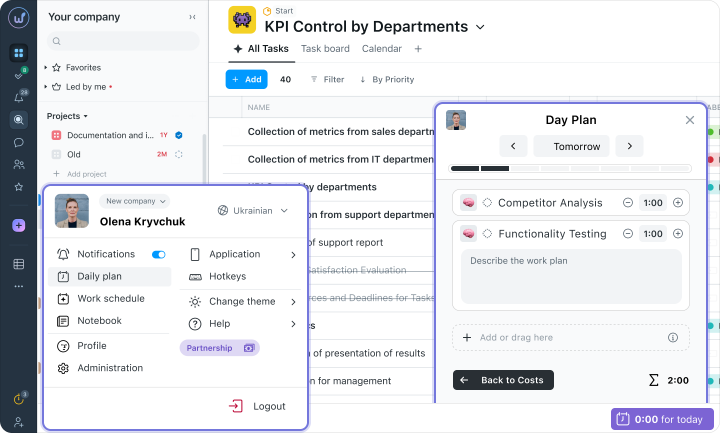
The day plan in Worksection 2.0 is a personal planner with tasks for each user. It allows you to:
- see all your tasks for the day on one screen with time estimates for each;
- easily reschedule tasks using Drag&Drop;
- track activity with a visual load scale;
- swiftly rebuild the day if a task is delayed;
- view the load of others and coordinate the workflow.
 Open tabs
In Worksection 2.0, there is a bottom panel for open tabs to keep everything important handy. It is fixed at the bottom of the screen and provides quick access to active tasks, chats, and drafts. 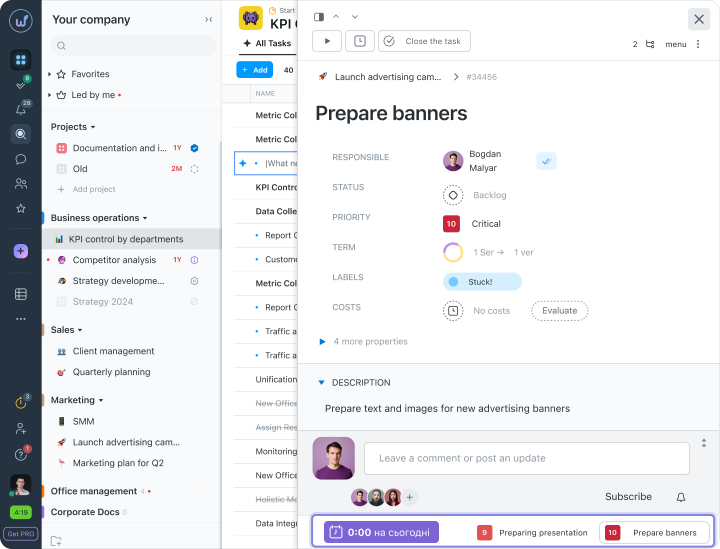
Quick access to tasks
Open tabs contain minimized tasks, chats, and drafts. Keep everything that needs your attention handy.
Instant switching
The tab panel always remains on the screen, and switching between tasks, chats, or drafts happens with one click. This is especially convenient when you are involved in several discussions or working on several tasks simultaneously.
Less chaos at work
Open tabs help avoid clutter in the browser. You see your priorities, quickly return to the necessary information, and maintain order in your workflow.
 Updated Task Board (Kanban)
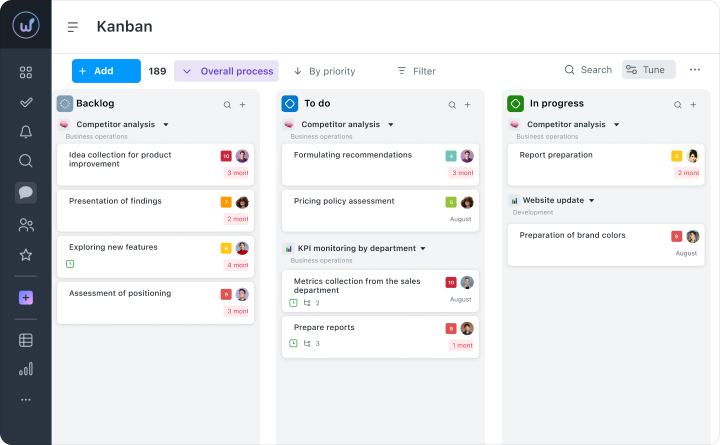
In Worksection 2.0, working with large projects on Task boards has become simpler and more convenient:
- The interface is not overloaded — thanks to hierarchy and grouping, it is easy to navigate even with a large number of tasks.
- Mass operations with tasks — highlight cards with one click, move them between columns, copy, move, or delete as needed.
- Quick editing — change executors, deadlines, and priorities directly on the board, without opening each task separately. The board updates instantly and does not require reloading.
- Adjustable columns — customize the width according to the team’s needs.
- Quick search through the backlog — instantly finds the right problems by their title.
- Task hierarchy — all subtasks are displayed under the main task and can be collapsed, expanded, and dragged along with the group.
- Clear structure — the team can easily navigate the statuses, and the manager gets a complete picture of the work without distractions.
 Updated Gantt chart
We updated the design of the Gantt chart in Worksection 2.0 to make it more convenient for daily planning. Tasks and deadlines can be dragged directly on the timeline, switch between different scales (days, weeks, months), and see how tasks are related. Changes update instantly — even for large projects.
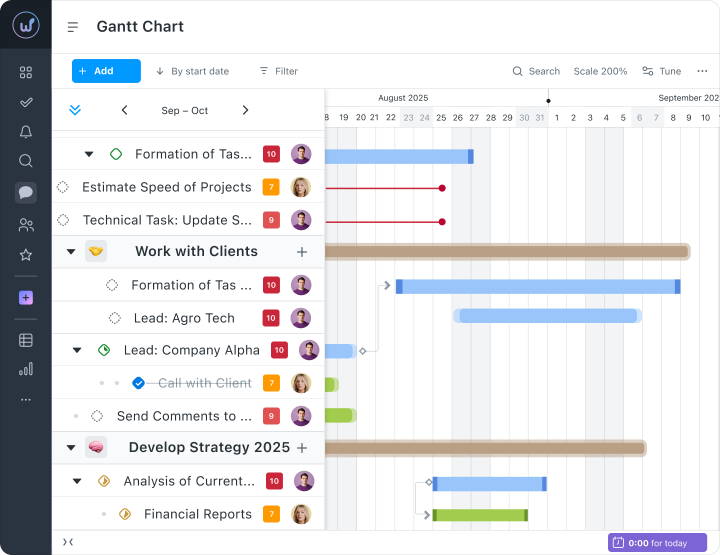
- Modern design — with a clear structure, color markers, and scaling.
- Edit tasks directly on the chart — change project and task deadlines, executors, and priorities without unnecessary windows.
- Instant updates — all changes immediately reflect on the chart without refreshing the page, ensuring the plan is always up to date.
- Connections and dependencies between tasks — the system shows how changes in one task affect others.
 Custom Dashboard
In Worksection 2.0, the main page acts as your personal dashboard that can be customized to your needs. It consists of widgets — modular blocks that can be added, resized, and rearranged. All data on the dashboard updates in real time.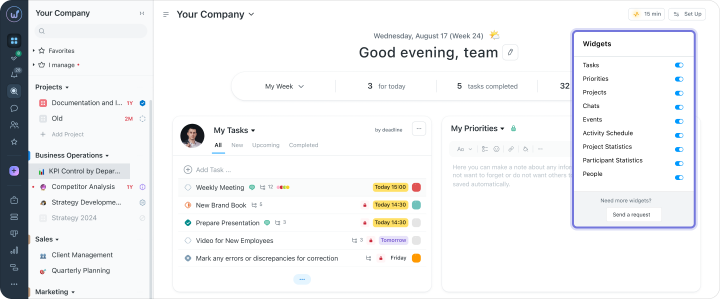
Available widgets:
- Tasks — all tasks in one list: you can filter, sort, and quickly find the needed ones by deadlines, projects, or executors.
- Priorities — shows the most important tasks from all projects, to keep focus on what matters.
- Projects — a list of all projects with filters (favorites, yours, all). Allows for quickly finding and managing necessary projects.
- Chats — active discussions in teams and projects.
- Events — all changes in tasks in one place. You can filter and leave only what concerns you.
- Activity chart — shows team load and deadlines, helps understand the work rhythm and plan ahead.
- Project and participant statistics — key metrics of projects and participant performance: progress, completed tasks, time spent.
- People — a list of the team with roles and load, to quickly find responsible persons and assign tasks.
Try Worksection 2.0 for free for 14 days using this link 
AI tools in Worksection 2.0
In Worksection 2.0, built-in AI tools have been introduced — semantic search, automatic summaries of discussions, and AI assistant in task descriptions. But this is just the beginning — we continue to work on making AI help teams work even faster at every stage of project management.
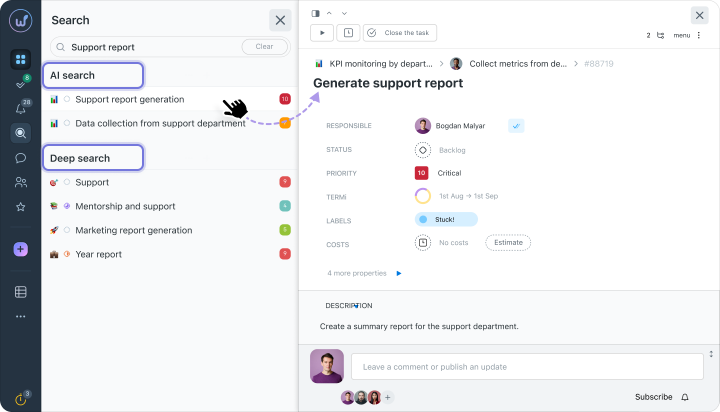
AI search
When you enter a query of three or more words, the system automatically launches semantic search across task descriptions and comments. Unlike regular word-matching search, AI search finds results based on context.
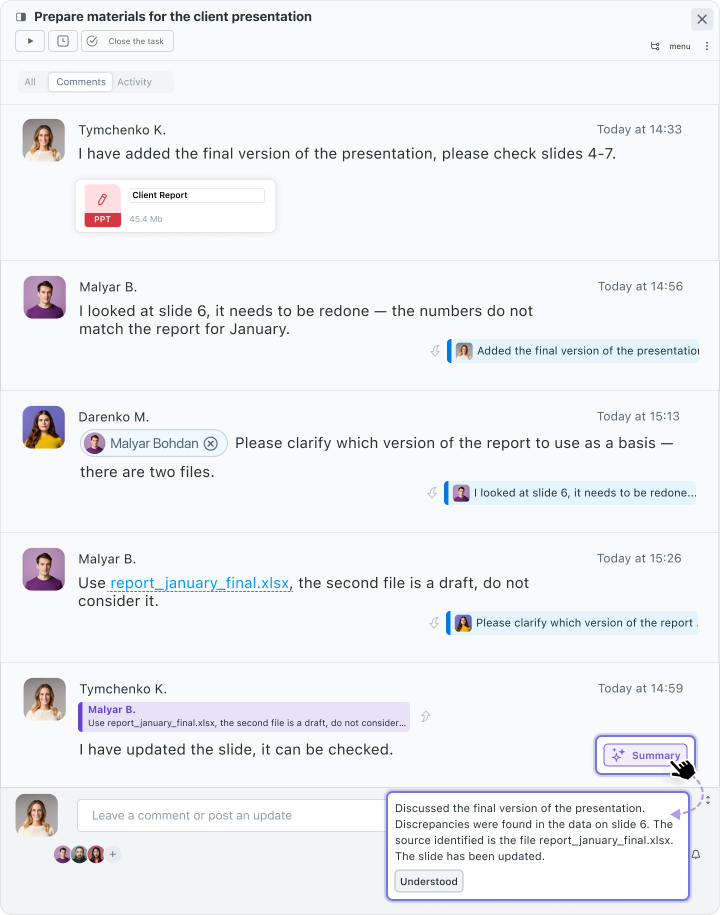
AI summary
When there are many unread comments in a task, a “Summary” button automatically appears. One click on it — and you get a concise AI summary of the discussion instead of having to read through all messages. This is convenient when you return to a task after a break or join a project at a later stage.
AI assistant in the text editor
We have added the ability to edit text with AI in the task description field. You can correct errors, rewrite text, change tone, create a to-do list, or translate into another language.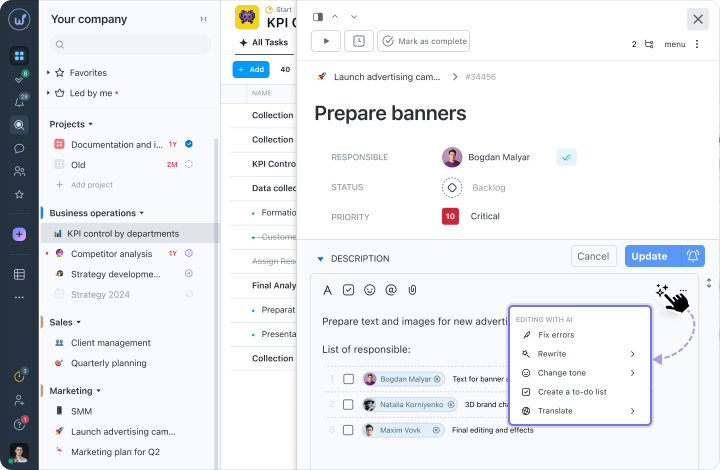
Mobile app Worksection 2.0
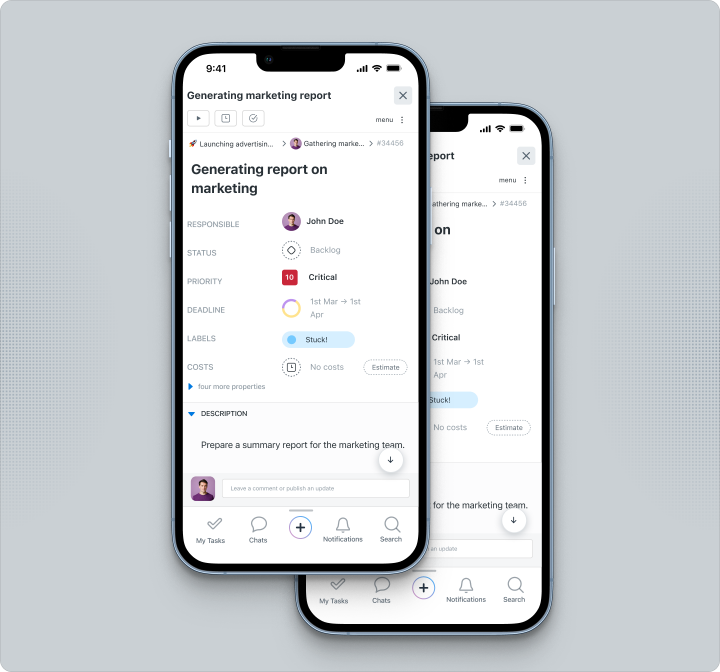
We have completely updated the Worksection 2.0 mobile app for Android and iOS. It now has a modern interface, adapted for any screen size, and allows you to stay connected with your team from anywhere.
Key features:
- Mobile-first design — the interface adapts to screen size, intuitive navigation, swipes, touches, and scaling for comfortable work.
- Most tools from the desktop version — create and edit tasks, track progress, and communicate with your team.
- Push notifications — instant reminders about important events and changes in your projects.
Easy start in Worksection 2.0
The transition to Worksection 2.0 is a significant update, but we made sure you won’t need to get used to the system all over again. We preserved the familiar logic and made it more convenient — so you can immediately continue working with less stress.
Familiar logic of projects, tasks, and roles
The structure of projects, accesses, and task management remain unchanged. No need to learn again — you can start working right away.
Personalization from day one
Customize filters, task views, and widgets to your liking — just as is convenient for you.
Quick transition to the new version
All projects, tasks, and settings are transferred without loss. You can continue working from where you left off or import tasks from Excel or CSV.
Why switch to Worksection 2.0 today?
We built Worksection 2.0 based on real problems faced by teams. When tasks get lost, and switching between tools becomes constant, understanding the overall picture becomes difficult. In the new version, we simplified this.
- Speed and efficiency — less routine, more time for important tasks.
- Less visual noise — the interface doesn’t overload and helps quickly find what’s needed.
- Flexible planning and control — more opportunities to manage tasks and the team’s workload.
- Convenience for newcomers — quick start and the ability to work without long onboarding.
- Transparency of processes — a complete picture of what’s happening in projects and at what stage tasks are.