Today, a lion’s share of working hours goes into just coping with notifications in messengers. You sit down in the morning to work on an important task, but within ten minutes you catch yourself endlessly scrolling through chats, replying to emails, and trying to remember what you were even starting with.
According to the Microsoft Work Trend Index 2025, employees receive an average of 275 notifications per day. This means we are interrupted approximately every two minutes. Because of this pace, more than half of teams describe their work as chaotic, and 80% of people admit that by the end of the day they simply lack the energy for the main tasks.The result is clear – the team communicates a lot, but ineffectively. Discussions are detached from necessary tasks, important context is lost, and responsible parties are never assigned.
In Worksection 2.0, we decided to build communication differently. It stays right where the work happens, that is, directly in tasks and projects. The built-in messenger, updated comment feed with an AI summary, smart notifications, and the bottom panel of open tabs help consolidate conversations into a single structure that summarizes what’s important.
Main problems in team communication
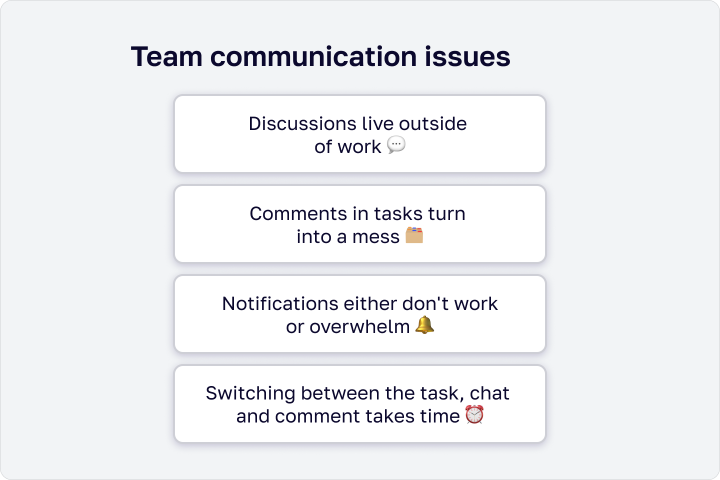
Agreements remain in messengers, not in tasks – when questions are resolved in Telegram, Slack, or Viber, they are not tied to the task manager. You exchanged messages in a chat, agreed on something, but did not record it in the task itself. A week later, no one remembers the details.
It’s hard to discern the main point in comments – even when communication is strictly to the point, a long chain of messages complicates work. The important final thesis is lost among dozens of intermediate thoughts, and someone from the team will inevitably miss a necessary update.
Notifications either distract or are ignored – it’s hard to find balance because when there are many chats, you either get distracted by new messages every minute or turn off notifications entirely and risk missing something truly critical.
Constantly switching between windows eats away focus – you read the task description, then switch to chat to clarify a detail, come back and try to remember where you left off.
How Worksection 2.0 builds communication in the context of work?
The main secret of calm teamwork is not to run between different programs for simple discussions about a task. Communication should happen where the work is done.
In Worksection 2.0, we made it so that discussions, files, and final decisions are always tied to specific tasks. Nothing gets lost in the general flow of messages, and you no longer have to repeatedly recount context to colleagues.
Built-in messenger
As usually happens… You search for the task description in the task manager, switch to the messenger to discuss a detail with a colleague, send a file, and return back. You constantly jump between windows, lose focus, and after a month, finding the end of some agreement or the necessary link becomes very complicated.
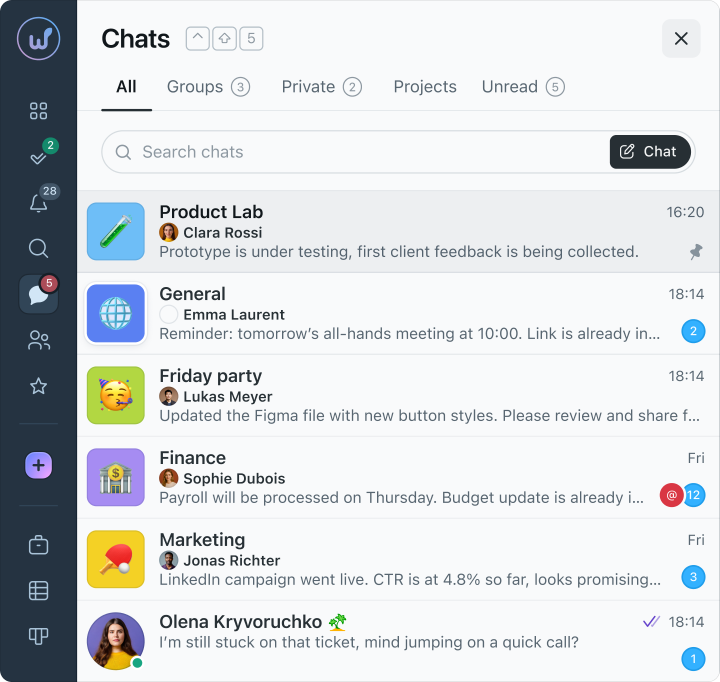
To stop this tab-hopping, in Worksection 2.0 we simply embedded the messenger directly into the system. Now tasks, discussions, and documents are all gathered in one place. Any dialogue or sent file automatically stays where the work is happening, so scrolling through old chat history in third-party programs is no longer necessary.
For different situations, there are specific formats here:
- You can quickly message a colleague in a private chat
- Gather the team in a group chat
- Resolve questions in the project-specific chat
All communications remain within the work process, rather than spreading across different services.
Updated comment feed
When a task accumulates around 50 comments, finding anything relevant can be tricky, if not extremely stressful. Work discussions usually get mixed up with automatic system notifications, deadline changes, attached files, and ordinary emojis. To find the needed quote, you often have to scroll up the screen for a long time.
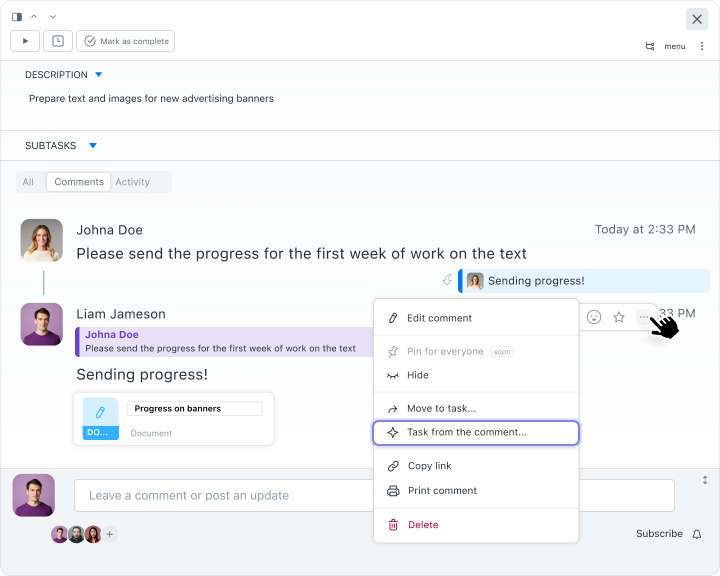
In Worksection 2.0, we divided the comment feed into convenient tabs so you can filter out what you don’t need. Now you can view only clean conversations from colleagues, or conversely, open only the history of actions and changes in the task, to check who and when changed the deadline or status. This helps navigate the situation without having to read through the entire chain of messages.
We also added a few handy features that simplify daily routines. For instance, instead of written responses, you can simply use a quick reaction emoji. Any comment can now be easily edited, and if a great new idea arises during the discussion – it can be converted into a separate task directly from the comment feed.
AI for those who don’t want to read through hundreds of messages
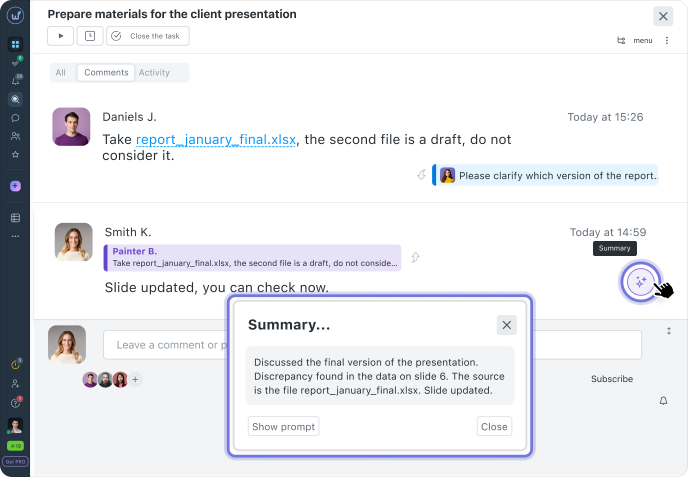
You got distracted by another task or returned from vacation, and dozens of new comments have piled up in the work task. How do you get back up to speed? Read through this long read just to understand what your colleagues agreed on? No – that’s long and tedious.
In Worksection 2.0, we added artificial intelligence that takes care of this routine. If a task has accumulated a lot of messages, the system can provide a brief summary of the most important points.
And when you need to find an old solution or some past agreement, there’s no need to remember the exact phrases. You can simply phrase your query in your own words, like in a regular conversation. The AI searches everything by meaning, so it will quickly find the necessary task or comment, even if you forgot the specific terms.
Smart notifications
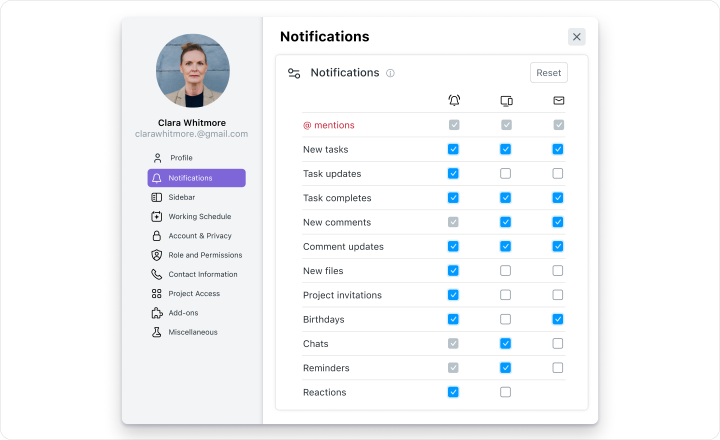
And further contradictions. If you turn on everything at once – your phone will blow up with every comment from colleagues, and you simply won’t be able to focus on your tasks. If you turn off the sound completely – there’s a big risk of missing an urgent message from a client or an update on a project.
We found a convenient solution here too, making the notification system flexible so you can fully customize it to your needs.
You can set it to see only what directly affects your work, such as status changes in your tasks, approaching deadlines, or comments where you were specifically mentioned.
At the same time, you also choose the format for yourself. It can be quick push notifications on your phone, an email digest in the morning, or just internal notifications in the application itself. You stay informed about main events while keeping focus on current tasks.
Bottom tab panel
Internet memes about a hundred open tabs in a browser didn’t just appear. For many, this is a harsh working reality…
How does it usually happen when there are a bunch of “hot” tasks around?
You open one task to write a text. Then you switch to chat to ask for details. While waiting for a response, you remember another task, go there, change something. After five minutes, you finally receive a reply – you return back, but you no longer remember what sentence you stopped at in the first task.
As a result, the browser fills up with tabs, and you simply waste a lot of energy just trying to remember something.
How does it work in Worksection?
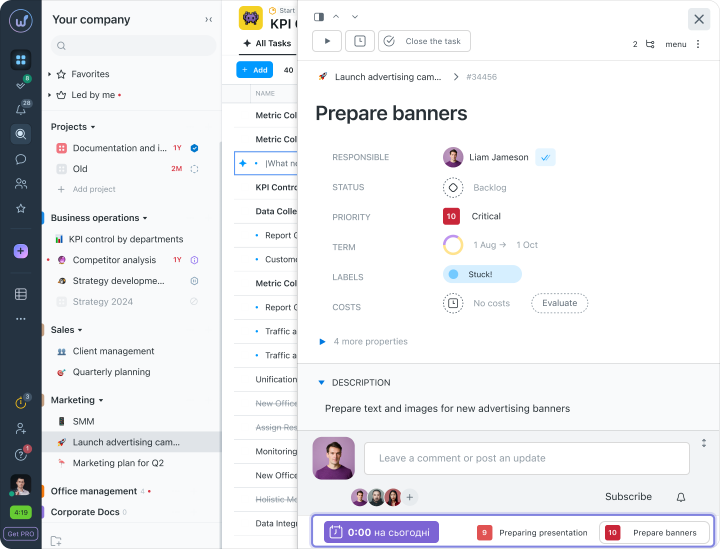
We thought that work should not turn into a game of tabs, so we brought all important elements to the bottom panel. Now, the tasks you are handling today can be easily viewed at the bottom of the screen, like apps on your phone or icons on your computer.
Writing a task description – the chat blinks at the bottom – you click, send a file or respond – you return exactly to where you were writing the task description.
Communication should help, not hinder
Stop separating work and discussions about it – it’s the simplest way to exhale and regain your concentration. There’s no point in creating chats in third-party messengers if you can discuss a layout or task description right in the task card, react with an emoji, and make a new task from a great idea in the comments.
We added these functions in Worksection 2.0 precisely to free you from excess and make your thoughts a bit clearer. Because when everything is gathered in one context, work moves several times faster.
Try Worksection 2.0 and see for yourself!