On Monday, it seems like the week is planned out well. By Wednesday, one urgent task breaks the entire schedule. By Friday, it becomes clear that the deadline, which was supposed to be next week, is actually tomorrow. And it starts…
According to the Wellingtone State of Project Management Report 2025, only 38% of organizations complete projects on time. And most often, the reason is not mistakes or negligence. Deadlines are mostly pushed back gradually due to the way work on tasks and timelines is organized.Yes, we’ve seen it many times, where tasks are scattered across projects, priorities change, and plans remain outdated. Deadlines might be known, but keeping everything in sight at once is nearly impossible.
That’s why in Worksection 2.0, we show what’s happening with deadlines right now and allow changes before they start shifting.
Why are deadlines missed and how can it affect the business?
Deadline problems usually don’t appear suddenly. They accumulate during the work process until all focus is lost. And then, the difficulties can become overwhelming.
But where are all the deadlines?
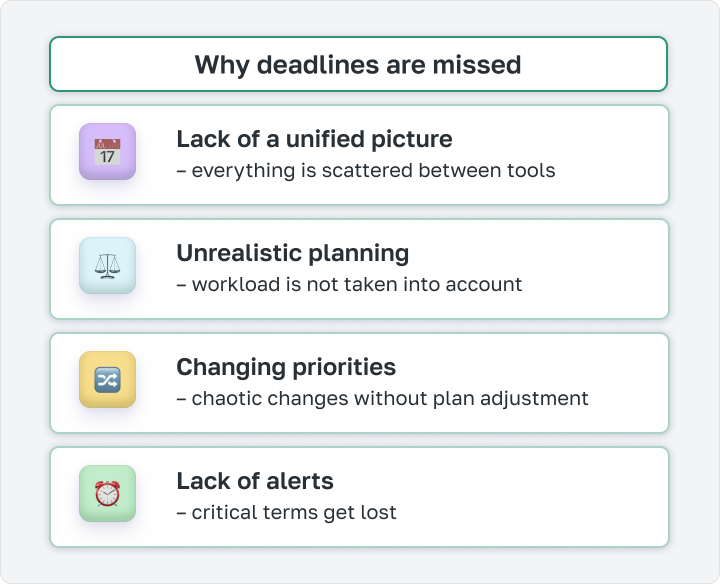
If the team is working on several projects, deadlines are scattered in different places. There could be a table here, a sheet there, something in the chat. The manager doesn’t see the big picture, the performer gets confused about what to do first, and the client task gets lost among internal ones. The problem is only discovered when the deadline has passed.
Why is everything urgent for me, and calm for my colleague?
Deadlines are set without understanding how much time people actually have. As a result, one person gets three urgent tasks for today, while another is almost free. Initially, this goes unnoticed until the day comes when everything needs to be submitted at once.
This is urgent, but the old tasks haven’t gone anywhere
A new urgent task appears, and it just gets added to the list, while old deadlines go unchecked. The team ends up working in a mode of trying to get everything done, losing focus and failing to understand what’s actually most important right now.
Was the deadline for tomorrow?
It’s there, everyone knows about it, but in the flow of other tasks, it just gets forgotten. The overdue task surfaces only after the fact when the manager reacts to the event, not the risk.
As a result, the team is constantly catching up with deadlines, and everyone suffers, with additional trust from clients decreasing.
Goodbye, overdue tasks!
Knowing that a deadline exists is one thing. Seeing what’s happening with it right now is entirely different. The first only gives a date on the calendar. The second provides the time to change something before it’s too late.
We’ve made Worksection 2.0 just that “different.” All so you can notice changes earlier while there’s still time to fix them.
Daily plan
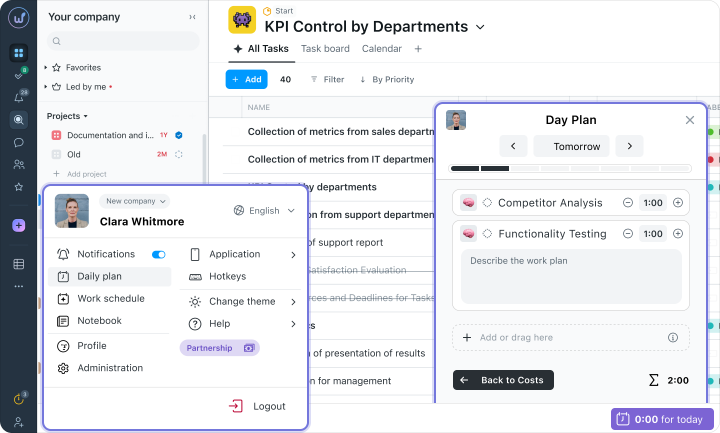
You prepare a plan in the morning, and it seems like everything is realistic. But by 3 PM, you suddenly realize: there are tasks left for another working day, but time for just two hours. And you shouldn’t blame yourself for poor planning. As always, on paper, everything looks a bit different than when everything is laid out by the hour.
In the daily plan, tasks immediately fit onto a timeline, and it’s clear whether the day is realistic before it even starts. If there’s too much to do, priorities can be adjusted right away, instead of at 3 PM. And when a new urgent task arises, it’s clear whom it can be added to without harming others.
Managers no longer need to assign work by “gut feeling,” as the actual team workload is immediately apparent. And performers start the day not with a list of forty items, but with a concrete plan.
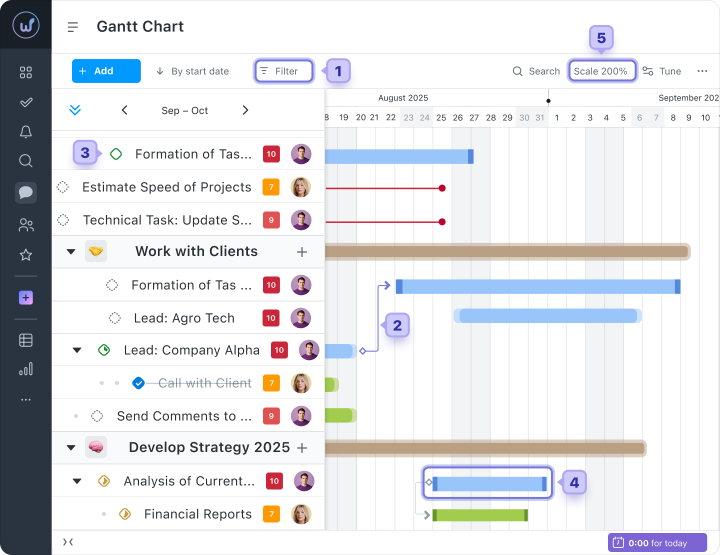
Updated Gantt chart
You move one deadline, and two days later, a message appears, “why is this task so urgent now?” Because it depended on the one that was moved, but no one saw that immediately.
On the Gantt chart, such dependencies are visible directly. You open the timeline and see what the project looks like. You can check what is already falling behind, what is about to approach the deadline, and where there are potential risks. The solution is simple – change the deadline and see what it affects.
And overdue tasks will no longer be surprising – everything is visible right away, so you can calmly adjust your plan.
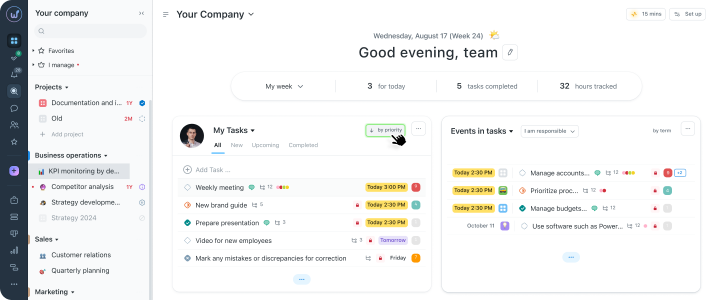
Priorities widget
Sometimes you open the task list and find those dreadful thirty items. And annoyingly – all are important, all are urgent, at least, that’s how it seems at first. The first bit of time will be spent not on work, but on attempts to figure out where to even start.
The priorities widget in Worksection solves this for you. More precisely, it shows what is already in the system but was previously invisible. You open the dashboard and see the tasks with the nearest deadlines or those that require attention right now.
Reminders
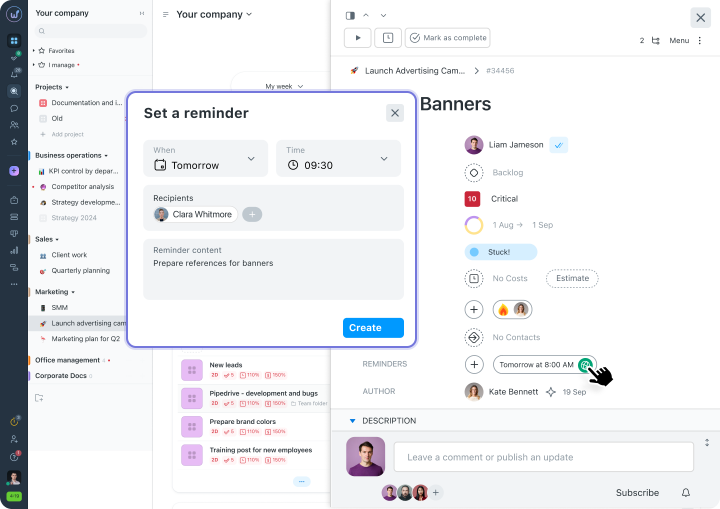
The deadline was in your head, but then among other tasks, it somehow got lost, or the time was spent on something else. Forgetting something is okay, because we’re all human. So this can be automated, and you don’t have to worry about additional information.
Reminders in Worksection take care of this function. You set when you need a signal, and the system will automatically notify you when the deadline approaches.
You can set several reminders for important tasks, so the manager no longer has to remind manually. This way, unpredictability is lost, and the work gets done well.
Tables and bulk deadline changes
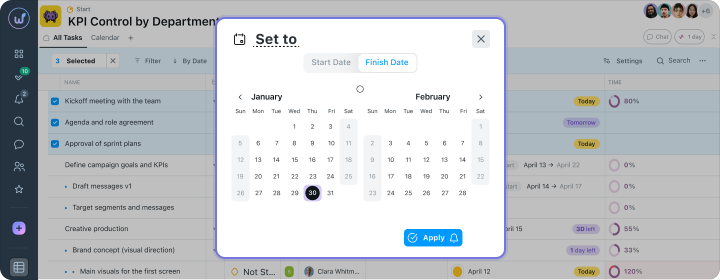
A client wrote that they are changing deadlines by a week. And it seems straightforward until you realize that you need to open each task and change the date for each one, then go back again.
In table view, the entire list of tasks is before your eyes, and dates can be changed directly without navigating between screens. Previously, this could take almost an hour, but now, in just a few minutes, you can adjust the plan to new priorities.
Deadline compliance forecast
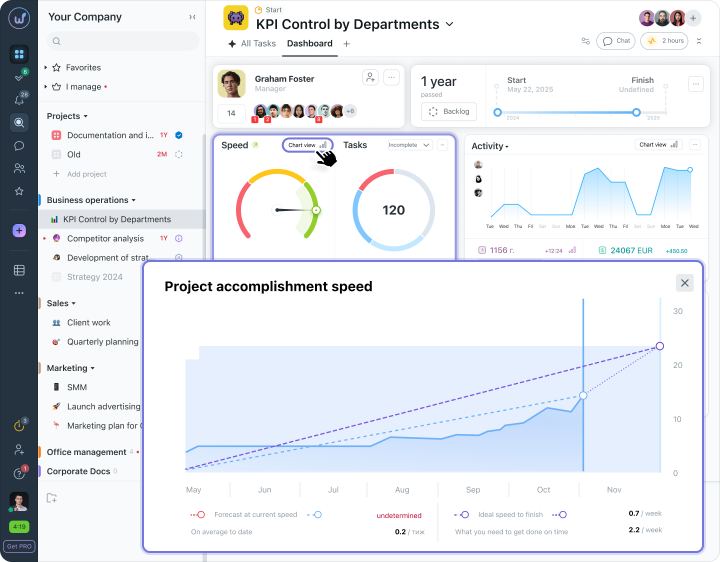
Next, it seems the project is moving along, tasks are closing, and everything appears fine. But is everyone completing their tasks on time? The difference is hard to notice immediately and is usually visible only at the closing deadline.
The project speed chart shows this difference right away. Here you can see how everything is progressing and how it should proceed according to the plan. If there are delays, they are visible from the earliest deadlines, allowing you to conveniently make changes.
Who to choose for managing deadlines?
The choice of tool often depends on the details, and the details are best seen side by side. Each tool solves the deadline issue differently. So let’s compare?
In Asana, you can gather the big picture of deadlines, but it won’t be quick due to filters and separate views. There is no personal daily plan there. The timeline exists but without deep control of dependencies, and reminders work only in limited cases. And there is no way to see in advance if the team is on track. It all costs from $10.99.
In Monday, everything depends on how the boards are structured, and if the structure isn’t clear, the picture will also be incomplete. There is no daily plan at all. The Gantt chart exists but not on all plans, and reminders need to be set up manually for each task. There is also no project completion forecast. And it costs from $12.
In Worksection 2.0, all deadlines will be together. There is a daily plan with time slots, a Gantt chart with dependencies, reminders, and a schedule that shows whether the team is still on track before it gets too late. And all this starts from $5, with discounts to $3.75 for annual payments.
Deadlines can be met without drama
A few minor problems cause one major one. That’s how deadlines get missed. Why? Because there are no signals about risks, load control, and prioritization of tasks.
Worksection 2.0 allows you to see small problems sooner, while everything can still be changed.
As a result, the team doesn’t chase tasks but works calmly, sees risks in advance, and adjusts its plan and rhythm to the final task. So it becomes even cooler to work when we have Worksection by our side!