Creative agencies work at their own pace of deadlines and tasks. And they can often lose sight of the main goal. Launching a large-scale advertising campaign can suddenly come to a halt simply because a designer delivered a super draft, but the old version was launched because the client sent the final revision directly to the manager in Telegram, and the manager got distracted and didn’t transfer it into the task.
When processes rely on a pile of links in Google Docs and a million chats, work will proceed, to put it mildly, not very well.
We agree that the creative process is hard to squeeze into rigid frameworks because ideas and revisions come in various ways. But no one says to create those frameworks. Structure is necessary; otherwise, deadlines will start burning one after another, but everything can be done simply.
That’s why in Worksection 2.0 we emphasized balance: the system takes over the routine, calculations, and technical details while leaving the team full flexibility for creativity.
In this article, we will explain how Worksection 2.0 helps creative teams work faster, more efficiently, and maintain inspiration even under deadline pressure.
The interface won’t keep you waiting
The creative process is a flow. And each delay can break it. A designer loses the concept while waiting for a file to load. A copywriter forgets the idea for a headline while the system updates. A manager spends extra minutes switching between client tasks.
We restructured the system to work without reloading and delays. Everything updates in real-time. The team works quickly without losing focus.
How it works in Worksection 2.0:
- Instant updates without reloads – all changes synchronize in real-time, and the team always sees the current state of projects without needing to refresh.
- Instant task opening – all details, comments, and files appear instantly.
- Editing on a single screen – change status, deadline, or assignee directly in the list without additional windows.
- Local caching – even with 100,000+ tasks, the system remains fast and stable.
When an agency is juggling a dozen different clients simultaneously, every second waiting for a page to load starts to annoy. When everything opens instantly, the team can calmly do their work without getting distracted by page loads and losing focus when switching between tasks.
Built-in messenger
When the workday starts with checking five different apps, focus is broken before the first coffee. A lot of energy is spent just remembering where the information was sent.
Typical communication in an agency looks like this:
- Task discussions in comments in the task manager;
- Quick questions in Telegram;
- Group discussions in Slack;
- Files in Google Drive;
- Email for client communication.
As a result, context is lost, the necessary information is scattered, and discussions of ideas, revisions, and files easily disappear in messengers.
And with Worksection 2.0, it can look like this:
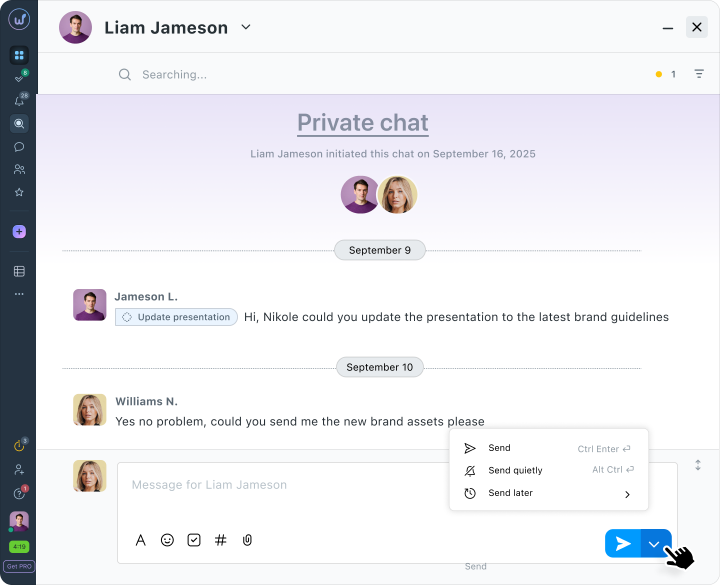
- Private chats – for quick questions with a colleague one-on-one.
- Group chats – for discussing ideas and daily updates within the team.
- Project chats – a single space for all communication.
- Creating tasks from messages – notice important feedback from a colleague in a chat, click on it – turn it into a task.
- Files in context – a file uploaded in the conversation is reliably attached to the discussion.
- Mentioning via @ – quickly engages the right person.
So you don’t have to juggle between applications, we in Worksection gathered all work correspondence and files within the system, tying chats to specific projects and tasks.
Support for hourly work
The manager asks: “How many hours have we spent on this client?” – and no one can answer accurately. In Worksection 2.0, you log the time of each task and see how much the project costs.
How hourly work functions in Worksection 2.0:
- Start/Stop timer – starts with one click right in the task card when the specialist begins work and stops when switching to another task.
- Hourly rates for employees – the system automatically calculates the cost of the time spent based on individual rates.
- Individual rates – you can set each employee a separate hourly rate, and the system will automatically calculate the cost.
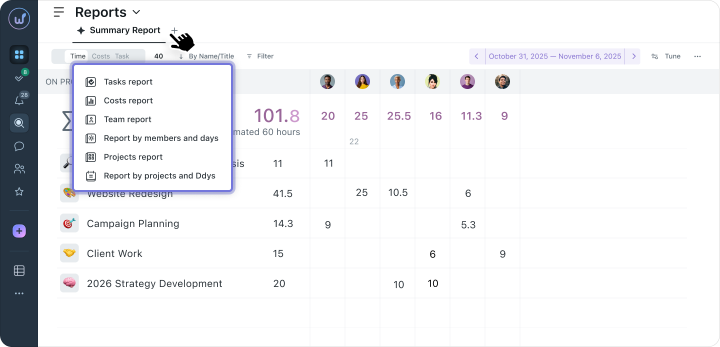
- Reports on time and financial expenses – show actual time and money spent on each project (plan vs. fact). You can immediately see if the agency fits into the client’s budget.
- Quick reports for clients – exportable as PDF or Excel. The client sees who, how many hours, and what exactly they worked on.
- Planning future projects – by analyzing actual time spent on past tasks, you will be able to plan deadlines more accurately and reasonably adjust prices.
- Benefits – time and financial tracking is already included in the Business plan, so there’s no need to pay extra for time tracking specifically.
Flexible structure for creative processes
It is said that a marketing campaign plan lasts exactly until the first feedback from the client. Creative projects rarely ever follow a linear path, as revisions often arrive unexpectedly, ideas change on the go, and yesterday’s priority can become irrelevant today.
Task managers break down under such conditions, and the manager spends more time shifting deadlines in the system than on actual work.
But we have managed to adjust to such realities, so in the updated Worksection 2.0, you can manage projects the way that is convenient right now.
For example, control the daily flow of revisions and drafts using Kanban boards, and for large-scale campaign planning and tracking global deadlines, switch to a Gantt chart.
The system allows you to change stages on the fly and instantly adjust plans so that the whole team sees the current picture without additional calls.
Kanban Worksection 2.0
To find out what stage a task is at, you no longer have to open each card or ping colleagues. The updated Kanban Worksection 2.0 visually organizes the agency’s processes, allowing you to manage the entire workflow on one screen.
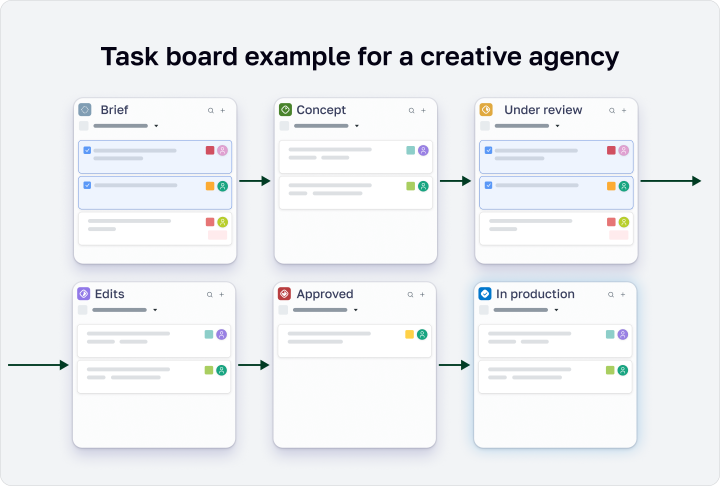
- Smooth task dragging – statuses and work stages change quickly, simply by dragging to the side
- Mass operations – you can tick off five or ten tasks at once and move them, for example, from the “Awaiting Approval” stage to “Approved”.
- Hierarchical grouping on the board – change the assignee, deadline, or priority directly on the task card without going inside. All changes are saved automatically.
- Flexible filters – the board can be formatted for a specific employee or a specific client to remove everything unnecessary and see only what is urgent now.
- View settings – task cards can be made compact to see the entire picture at a glance, or expanded if you need to read the first lines of the description.
How does this make life easier for the agency?
On an ordinary workday, while managing several brands simultaneously, something is always happening with each of them. Instead of pinging the team in chats, the manager simply opens the board, which looks like this: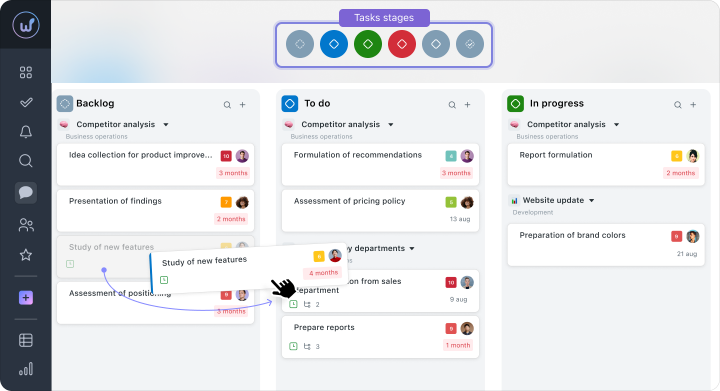
When a client returns a draft with feedback, the project manager drags the task into the column with revisions. The designer, who has this same screen open, immediately sees that the task has changed status and takes it up right away.
Thus, the movement of the task across the board itself becomes a signal to act.
Gantt Chart Worksection 2.0
If Kanban helps control daily tasks, the Gantt chart is your control panel that complements Kanban. It is indispensable for planning large launches, where processes are interdependent, and the team cannot move forward until the previous phase is completed.
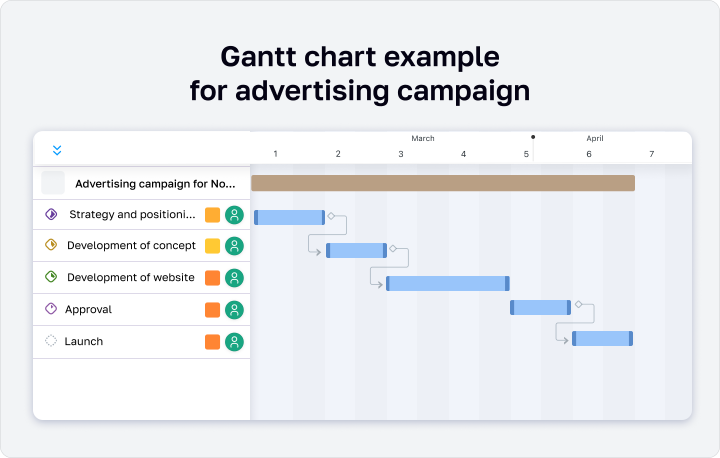
If approvals are delayed by at least a few days, the system automatically understands the links between tasks and shifts the deadlines for all subsequent phases. The team sees the updated timeline and calmly adjusts their plans.
How this is implemented in Worksection 2.0:
- Manual deadline changes – just drag the deadline of the task to a new date, and the deadline will change automatically
- Automatic dependency adjustment – if the stage “Approval of Concept” is delayed, the system will automatically move the deadline for “Development of Drafts” and other dependent tasks.
- Visual stage control – you see the entire project path from the first brief to the final launch without needing to switch between lists.
- Color hints – the system highlights the task state itself: red indicates overdue tasks, yellow warns of an approaching deadline, and green confirms that everything is on track.
- View by assignees – the viewing mode by assignees allows you to clearly see who on the team is overwhelmed with work a week in advance, and who has free time for new tasks.
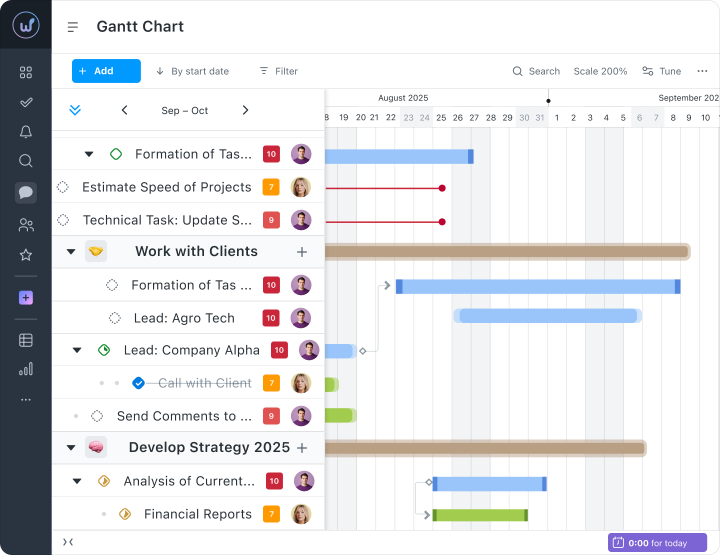
Thanks to the updated Kanban and flexible Gantt chart in Worksection 2.0, creative teams have complete control over processes.
You clearly see the entire project path, automatically manage deadlines, and can quickly respond to any changes.
Project hierarchy: how to streamline work with large clients.
When an agency works with a large client, ordinary task lists become powerless. For one retailer, you can manage:
- SMM for 3 brands
- 5 advertising campaigns a year
- Content marketing for the blog
- Event marketing
- Email newsletters
To unload yourself, in Worksection 2.0 you can build a project hierarchy
Now all work can be neatly organized: Client → Specific brand → Advertising campaign → Specific task.
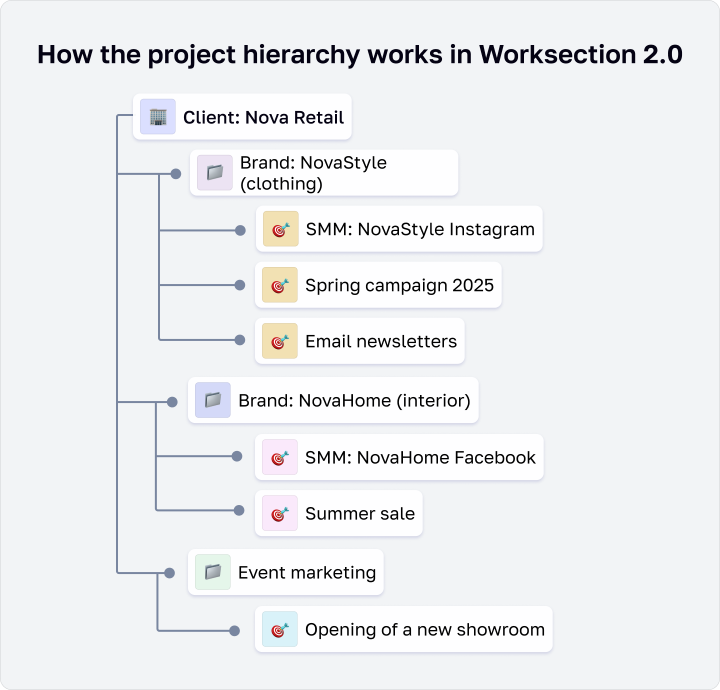
For the agency, such a structure means full control:
You no longer have to manually create the same tags or statuses for each new subproject. It’s enough to add the “Urgent” label once, and it will automatically appear at all lower levels of the system.
You can open to the client only the amount of information they truly need. For example, a line brand manager will only see tasks of their domain, while the marketing director (CMO) will see the broad picture for the company as a whole.
You don’t need to compile spreadsheets to calculate expenses. The system automatically pulls data from the bottom up: you can see at any moment how many hours and budget were spent on a particular banner, a separate campaign, or the entire brand for the month.
Table view of tasks
When the number of tasks becomes too large, cards on boards start taking up too much space on the screen. Many managers at this point mentally return to the good old tables, but there’s no need to rush.
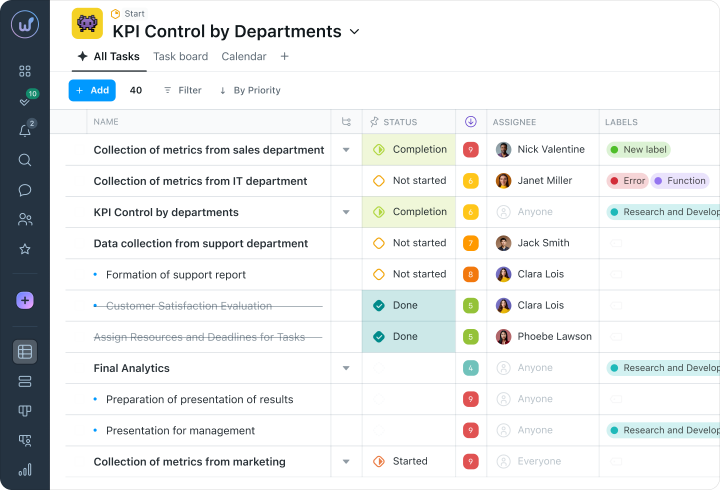
The table view in Worksection 2.0 helps to work with a large number of tasks simultaneously:
- Drag & Drop columns – allows every manager to rearrange columns and highlight the most important data
- Personal settings – help the team stay focused on what’s necessary. An account manager can show finance and status columns, while an executor can only keep task descriptions, checklists, and priorities.
- Instant editing – helps change assignee, deadline, status, or tags without opening the task card.
- 15+ types of columns – give a complete picture of the project. In addition to basic dates and statuses, the table can display time estimation, progress of subtasks, checklists, and team reactions
- Smart sorting and filtering – quickly helps to find the needed tasks.
- Saved display modes – eliminate the need to set up the screen anew every time. You can set up a table view for yourself once, save it in bookmarks, and then open it later.
How does this help creative teams?
The table view allows each team member to work in their format, see only the necessary data, quickly edit tasks, and save their own settings. This helps to focus on results without wasting time searching or manually updating information.
Dashboards for different roles
In creative agencies, different roles require different information. The creative director looks at the overall picture of projects, the account manager focuses on clients, and executors focus on their own tasks. In most systems, the screen is set up the same for everyone, resulting in a constant influx of unnecessary information.
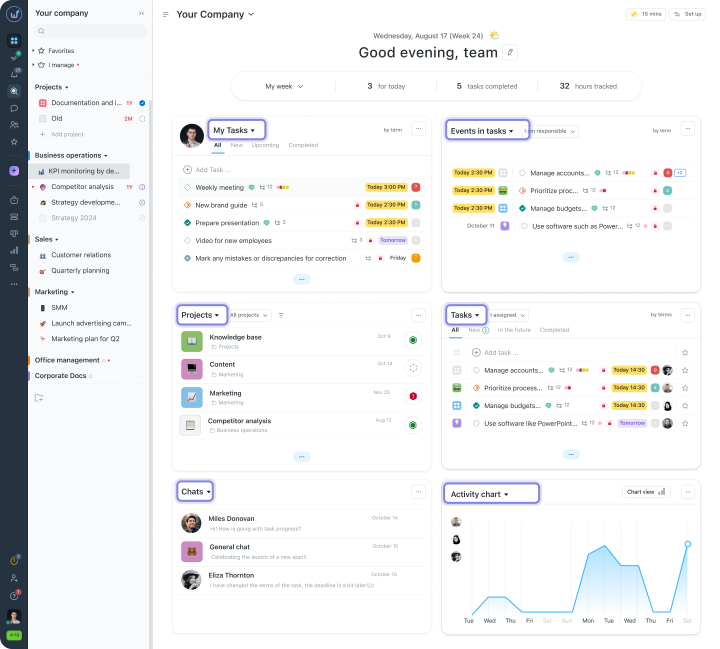
In Worksection 2.0, everyone can customize the homepage to see only what is important for their specific role. This is possible thanks to personal dashboards with a widget system – blocks that display the necessary information.
- Task widget – your current tasks.
- Priority widget – critical and urgent tasks.
- Team activity chart – who is working on what.
- Projects widget – the state of all projects.
- Chats widget – messages in the built-in messenger.
The agency’s creative director opens Worksection at 9:00 and immediately sees 3 overdue tasks for the client NovaRetail, 2 critical revisions from CleverBrand, and that designer Maria has 8 open tasks, the most in the team. Within a few minutes, the director assesses the situation and reallocates Maria’s task to Oleg. Without the dashboard, this would take 10 – 15 minutes of scrolling through projects, or even more.
This approach completely saves the team from constant monitoring and unnecessary calls, where everyone simply reports their statuses. When all the key numbers and deadlines are gathered in one place, decisions are made much faster because no one needs to spend hours searching for the needed data in chats or folders.
Everyone in the team sees on the screen only what pertains to their work and clearly knows their plan for the day. As a result, managers stop pinging colleagues every hour with questions, while specialists can quietly do their work.
Only transparent collaboration with clients
Often, client communication turns into a pile of similar messages in all messengers at once: “Where are we with the draft?”, “When will the concept be ready?”, “What revisions have you made?”, “Where to find the files?” etc.
As a result, agencies spend hours responding in Telegram, Viber, Email, lose context and versions of files, and clients start getting anxious because they don’t know what is happening.
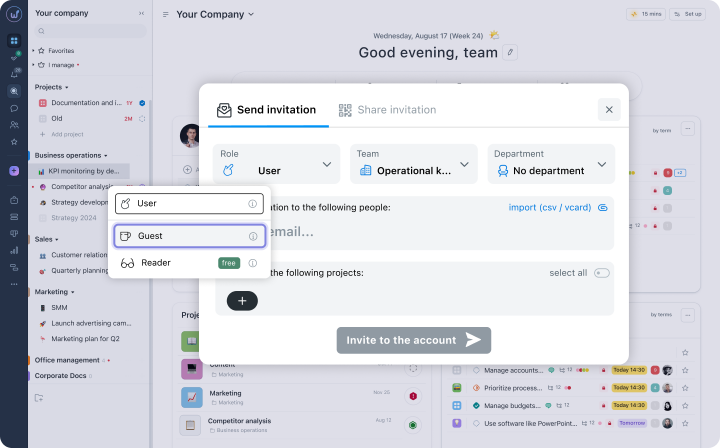
We know well how exhausting this is, so in Worksection 2.0, we added a simple solution – the “Guest” role. You can connect the client directly to their project (the function is available in the Business plan), and this will completely change the approach.
Here’s what this offers both sides in practice:
Data security and team peace
For the agency: You gain full confidentiality. The client sees only those tasks, files, and comments that you manually open for them.
What the team gains: Employees can discuss drafts, argue, and verify ideas peacefully within the task. All work and mishaps remain invisible to the client.
Process transparency and manager time savings
For the agency: The client sees the current statuses, deadlines, and real progress on the brand. This automatically builds trust, as the client understands what they are paying for.
What the team gains: Account managers can finally breathe easy. The client logs in and checks the task status themselves, so the flow of “So, what’s the update?” in messengers stops, and managers don’t spend hours copy-pasting links.
Quick approvals and everything together
For the agency: All communication is structured and tied to specific tasks. Any changes or fresh files are synchronized, so the client always sees the final version.
What the team gains: Fewer mistakes and faster mishaps. The client sees the draft directly in the task and writes revisions there. Nothing gets lost in chats, discussion history is always at hand, and drafts get approved much faster.
With such simple conditions, the agency gains the image of an organized and modern partner, while the team has the opportunity to work calmly.
Plan of the day
When there are many tasks, it’s easy to lose control over the workday. Without planning the workday, teams operate in “firefighting” mode, losing productivity and focus on important tasks.
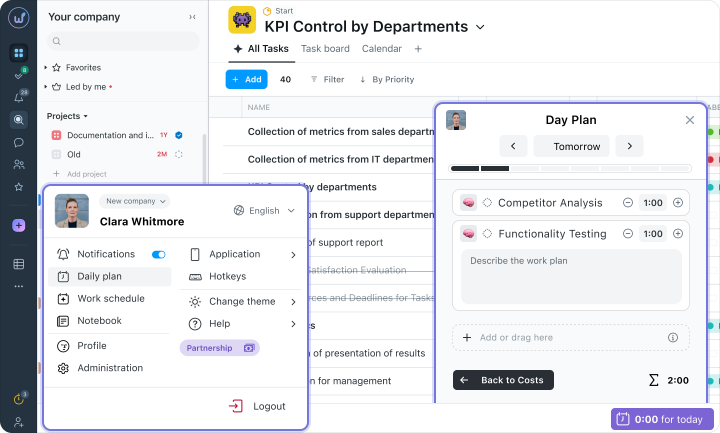
In Worksection 2.0, a personal day planner has appeared – a hourly planner where you can:
- Plan your own workday – see all tasks for the day with time estimates and priorities.
- Drag tasks to the Day Plan from the “My Tasks” panel via Drag & Drop.
- View colleagues’ plans – the manager sees who has a freer day and who’s already busy.
Open tabs panel
However, creative teams rarely work linearly, and thus designers can simultaneously work on a logo, discuss revisions in chat, and monitor deadlines for other tasks. What to do so as not to get lost?
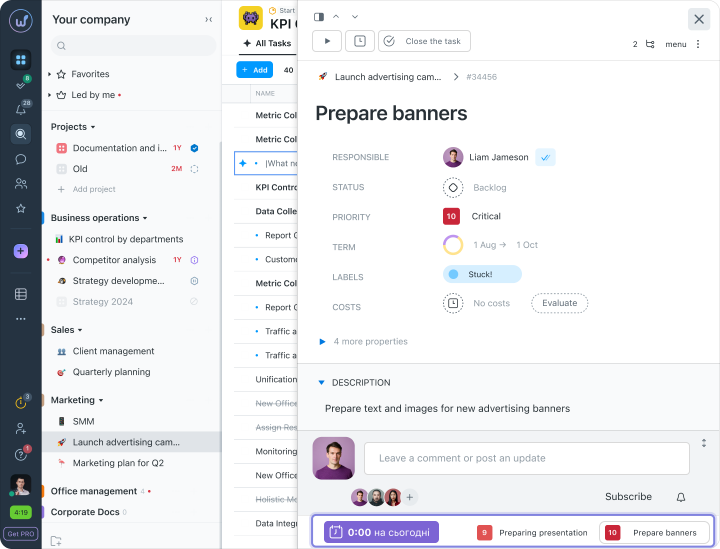
In Worksection, we couldn’t forget about this either, so the open tabs panel transforms multitasking into a truly convenient and manageable process.
Now, thanks to the updated panel, you can:
- Collapse active tasks down the screen – this works just like the usual tabs in a browser.
- Keep chats and discussions handy – they are stored on the same panel, so you can switch between work and chatting with colleagues instantly.
- Switch from project to project without losing context – switch to the required tab, and all task details with all files, revisions, and comments open before you.
- Control the essentials from any page – even if you’ve delved deep into reports or settings, the panel doesn’t disappear, so important matters are always in sight.
How much time does Worksection 2.0 actually save?
All these updates were made for one simple purpose – to remove the small routine that quietly eats up the workday. If you think about it and calculate the daily actions for a team of 10 people, the numbers can be surprising.
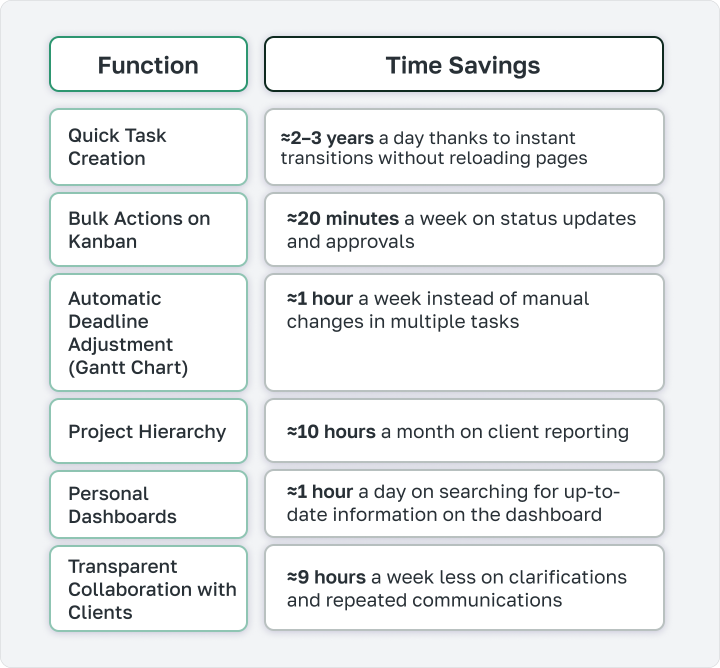
That’s all the time that previously just burnt away on small routine tasks and constant calls.
Now, when Worksection takes all this control and coordination upon itself, the team can focus without getting distracted by trivial details. You simply open the system, see a clean picture, and calmly engage in creativity, cool ideas, and client development.