Solutions
worksection
beta
help
How do I enable or disable the display of archived projects in the project panel?
When you need to quickly view or hide archived projects in the lists, use the toggle in the "Settings" menu of the Project Sidebar. This helps you focus on active projects or, conversely, find the archived project you need.
Permissions Available to:
- Owner
- Administrators with the "Allow creating projects" permission
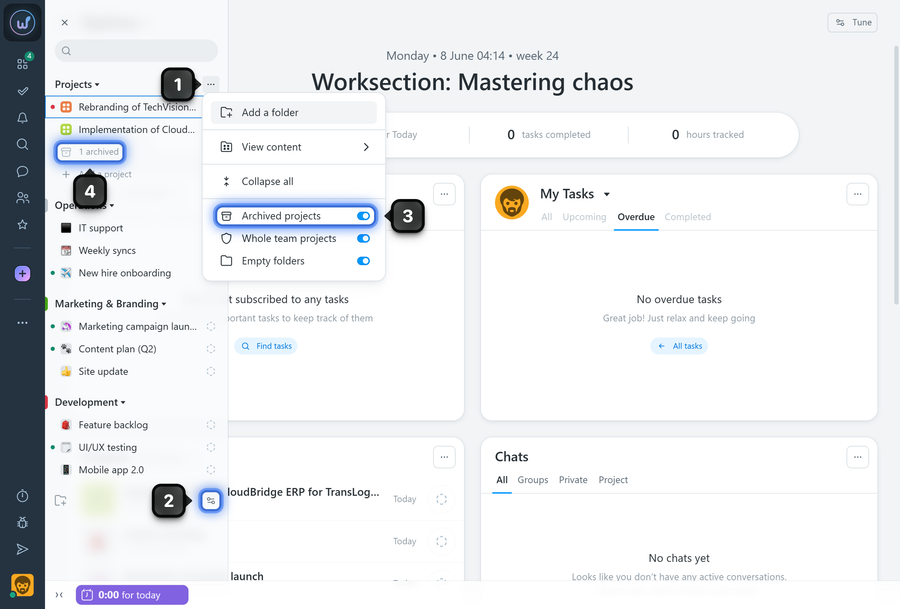
To enable or disable the display of archived projects, open the "Project panel", click the "Three dots" button1 on the default "Projects" folder, or scroll to the bottom of the list and click "Settings"2. In the menu, enable or disable the "Archived projects" option3. If the option is enabled, the number of archived projects4 will be displayed at the end of each folder that contains archived projects. Click it to open the list of archived projects.
Note!
- This option is personal and affects the display of archived projects only in your account.
- You will only see archived projects in which you participate. The account owner and administrators with the "Can see all account projects" permission will also see projects in which they are not participants.
Leave your review
Did this article help you?
Glad we could help! What was helpful?
Sorry this didn't help. What went wrong?

