Solutions
worksection
beta
help
How to make Worksection open on my domain?
This feature is available on the Business and Premium plans.
Step 1. Add a CNAME record to your domain's DNS
- Create a DNS record of type CNAME for the subdomain where Worksection will open (e.g., work.yoursite.com).
- Set the value pointing to your account domain, for example: youraccount.worksection.com.
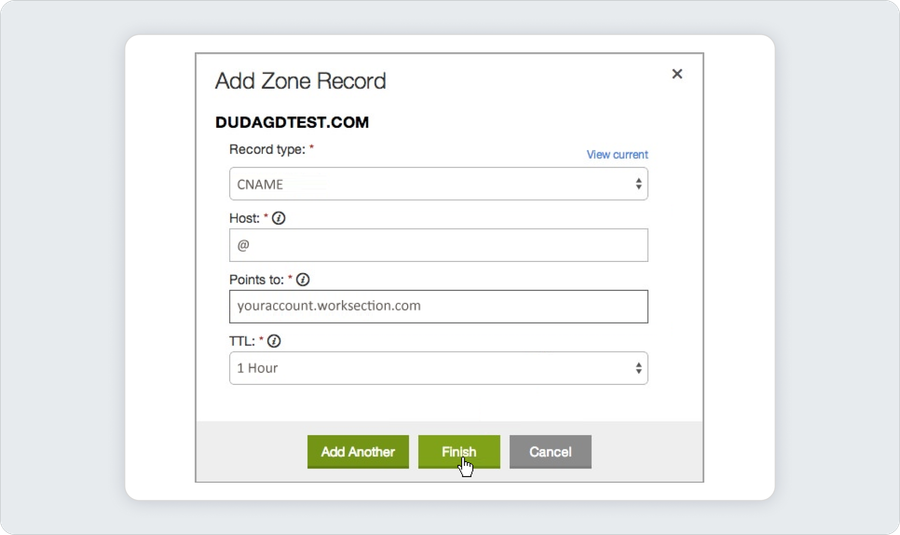
This can be done through your registrar account or through the hosting control panel (if the domain is managed there).
Please note If you use Cloudflare, select the "bypass Cloudflare" option in the record settings.
Step 2. Enter the domain in Worksection settings
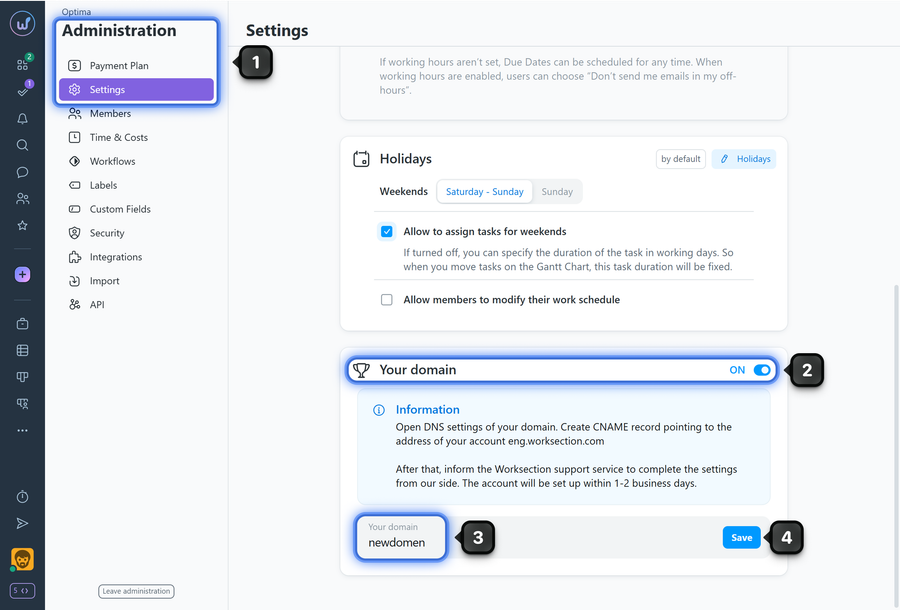
- Go to Administration > Settings.
- Enable the custom domain option.
- Enter the desired domain (subdomain) where the system should open.
- Click "Save".
Step 3. Notify support
After making DNS changes and saving the settings, notify Worksection support. Within 1–2 business days we will switch your account to the new address.
All links to the previous account address will automatically redirect to the new domain.
Leave your review
Did this article help you?
Glad we could help! What was helpful?
Sorry this didn't help. What went wrong?

