Solutions
worksection
beta
help
How to change the account domain?
Permissions
- Owner
- Account Administrator with the "Access to account settings" permission.
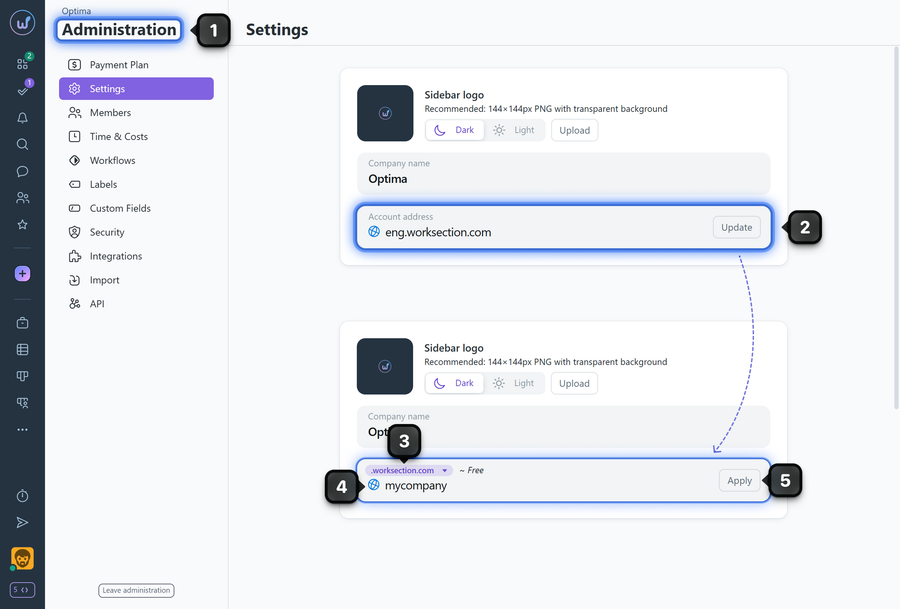
The account address can be changed in "Administration" → "Settings" in the "Account address" block.
Steps to change the address
- Go to "Administration" → "Settings".
- In the "Account address" block, click "Update".
- If needed, select a different domain zone from the dropdown list (.org, .net, .com, .ua).
- Enter a new account name.
- Click "Apply".
What happens next
- If the address is available — the system will log you out and redirect you to the login page at the new address.
- If the address is taken — you will see an error message and can try a different option.
Please note!
Notify your colleagues about the address change in advance. For example:
- create a task "on hold, without an assignee" in a project where all members are present;
- or send a mailing with the new login address.
Leave your review
Did this article help you?
Glad we could help! What was helpful?
Sorry this didn't help. What went wrong?

