Solutions
worksection
beta
help
How do I access account administration?
Permissions. This section is available to
- Owner
- Account Administrator with the "Access to account settings" permission.
The "Account Administration" section contains the main subsections for account settings and management, including:
- Payment plan
- Settings
- Labels
- Members
- Time & Costs
- Workflows
- Custom fields
- Security
- Integrations
- Import
- API
How to open Administration
Method 1: via the avatar in the lower-left corner
- Click on your avatar in the lower-left corner of the interface.
- In the menu that appears, select "Administration".
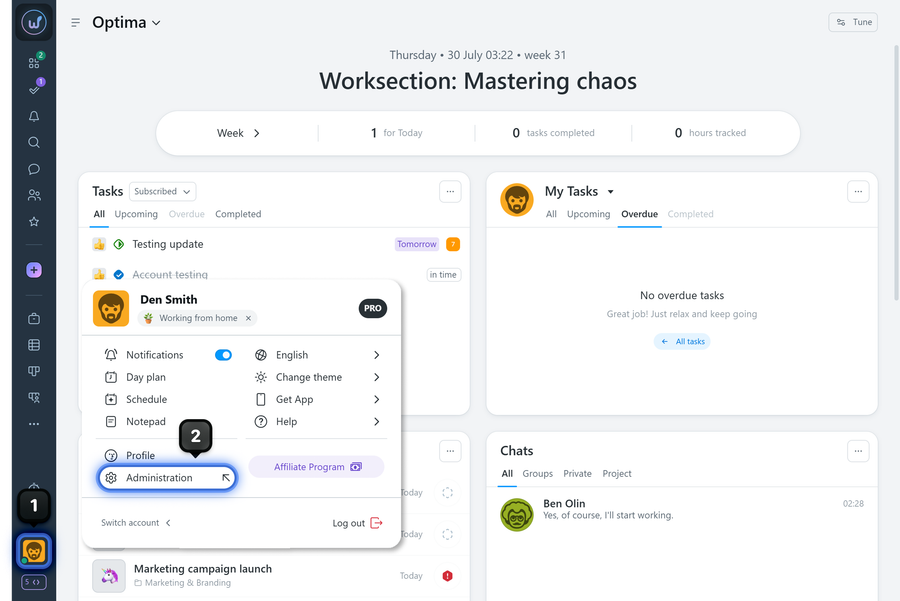
After navigating, the "Payment plan" subsection page (on the "Current plan" tab) opens by default.
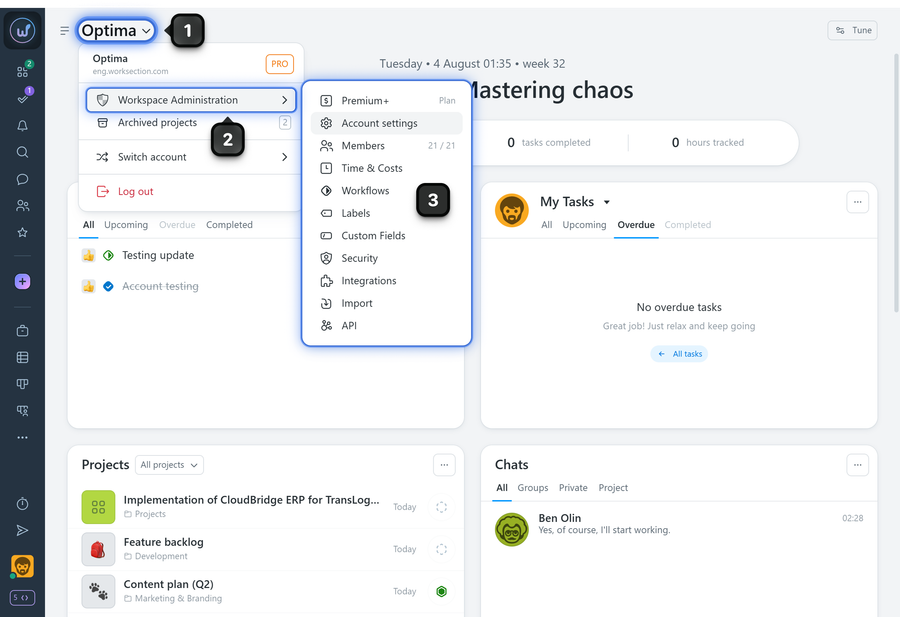
Method 2: via the company name menu
- Click on the company name.
- Select "Workspace Administration".
- Click on the desired subsection.
Tips
- If you don't see the "Administration" option, check that your role has been granted the "Access to account settings" permission.
- If the "Payment plan" subsection is missing after opening the page, check that your role has been granted the "Access to account billing" permission.
Leave your review
Did this article help you?
Glad we could help! What was helpful?
Sorry this didn't help. What went wrong?

