Solutions
worksection
beta
help
How to configure who receives financial notifications?
Permission is available to:
- Account owner
- Account administrator with the "Access to account payment" permission
To configure, go to Administration → Payment plan
Open the "Contact details" tab1. In the "Financial notification recipients" block, click "Add account member"2 and select the required account member from the dropdown to send financial notifications to.
You can also add a recipient outside the account by entering their email in field3.
If needed, you can remove4 unnecessary recipients from the list.
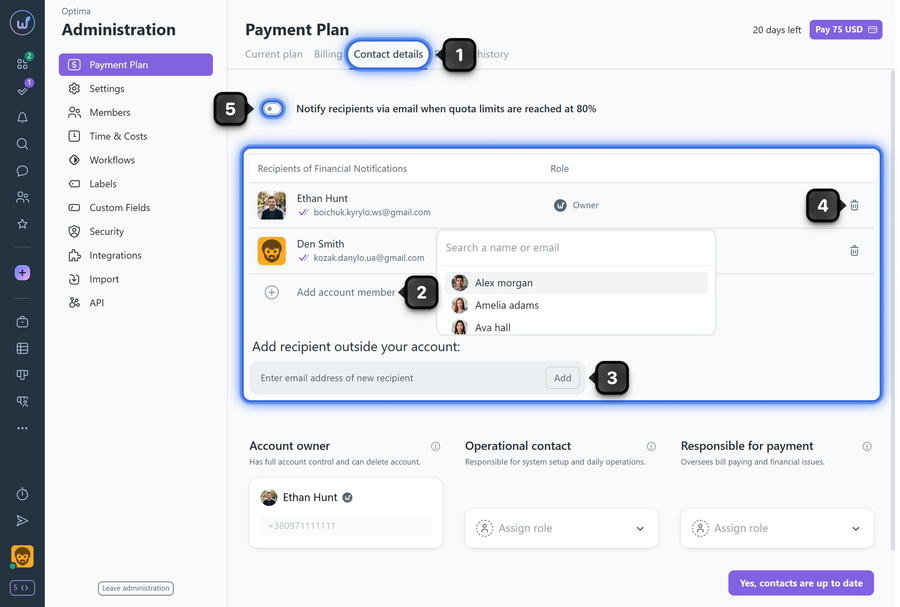
Additionally, enable the option "Notify recipients via email when quota limits are reached at 80%"5 to receive advance warnings.
- For example, if the user limit is 100 and 80+ members are registered, the recipients on the list will receive a warning email.
All listed recipients receive financial notifications (payment reminders, quota warnings, etc.).
Please note! By default, the "Financial notification recipients" list includes the account owner and account administrators with the "Access to account payment" permission. They cannot be removed from the list.
Leave your review
Did this article help you?
Glad we could help! What was helpful?
Sorry this didn't help. What went wrong?

