Solutions
worksection
beta
help
What does the "Make my teams visible to each other" option change?
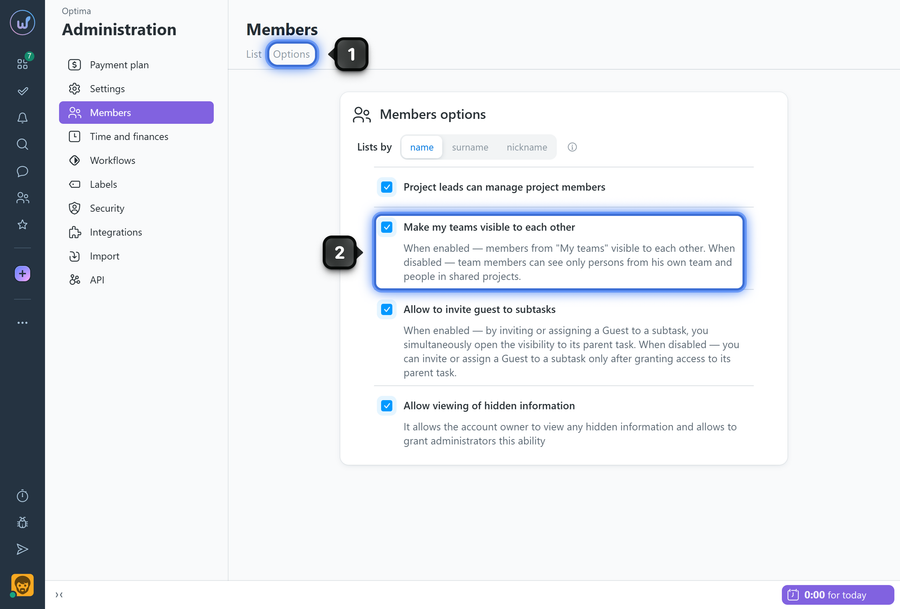
This option controls internal visibility between members of your internal teams ("My team"). When enabled, members from different internal teams can see each other in the system (profiles, selection lists, search), making collaboration easier.
Permissions available to
- Account Owner
- Account Administrator with the "Access to account settings" permission
To enable/disable the option, open the "Members" page and go to the "Options" tab1. Enable the "Make my teams visible to each other" option2.
How it works
- Members of internal "My team" type teams become mutually visible to each other, including in search, widgets, the project member invite window, etc.
- The option does not change access rights to projects or tasks — only user visibility.
- Client teams remain isolated: their visibility is not exposed to others.
- If the option is disabled, members will only see people they share projects with.
Leave your review
Did this article help you?
Glad we could help! What was helpful?
Sorry this didn't help. What went wrong?

