Solutions
worksection
beta
help
How do I create a custom field for projects?
Permissions Custom fields can be created by:
- Account owner
- Account administrator with the "Access account settings" permission
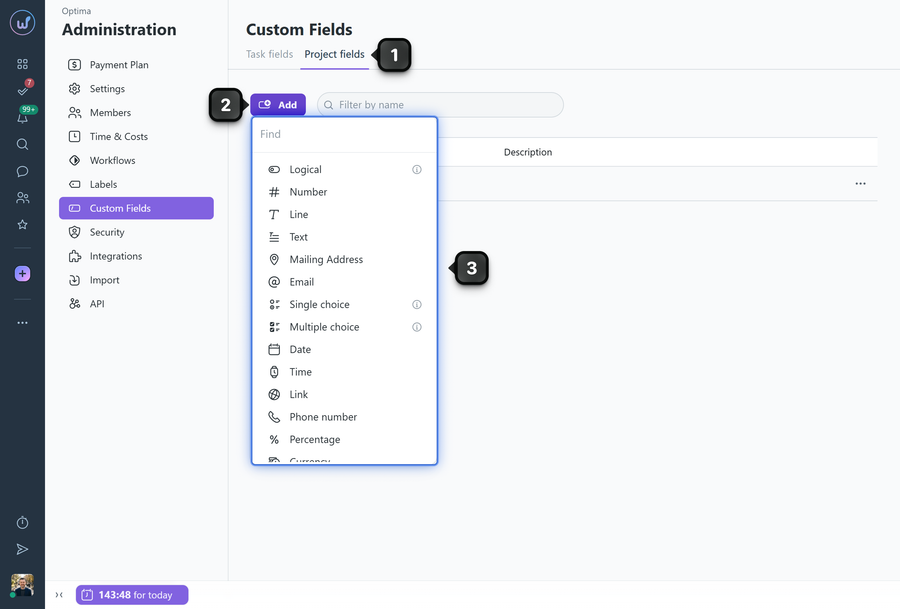
To create a custom field for projects, go to Administration → "Custom fields". Select the "Project fields" tab1. Click the "Add" button2 and select the required field type from the list3.
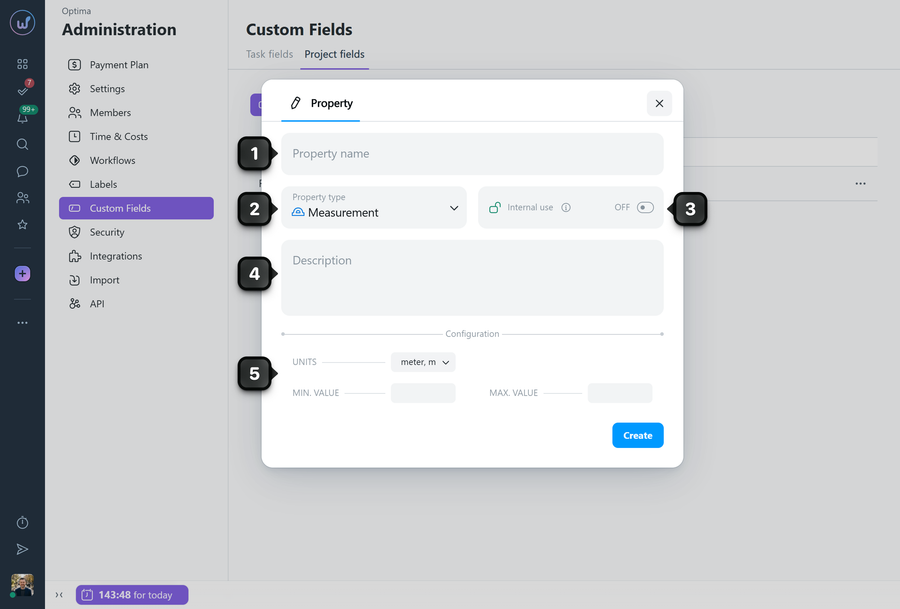
In the window that opens, configure the field parameters:
1 Property name - required field;
2 Property type - can be changed if you selected the wrong type;
3 Internal use - when enabled, the field will only be visible to participants of the "My team" type. The field will be hidden from client teams;
4 Description - additional information about the purpose of the field. It will be displayed in Administration and as a tooltip on the Table view page;
5 Configuration - settings that depend on the field type.
Click "Create" - the field will be added.
Note! Project custom fields are automatically applied to all existing and new projects in the account. It is not possible to choose which projects the field should or should not apply to.
Leave your review
Did this article help you?
Glad we could help! What was helpful?
Sorry this didn't help. What went wrong?

