Solutions
worksection
beta
help
How can I make the bot start sending all project events to Slack?
To set up relaying of project events to Slack, open the project window and go to the “Members” tab1. Click “Add members”2.
Select the checkbox next to your bot3 and click “Add to project”4.
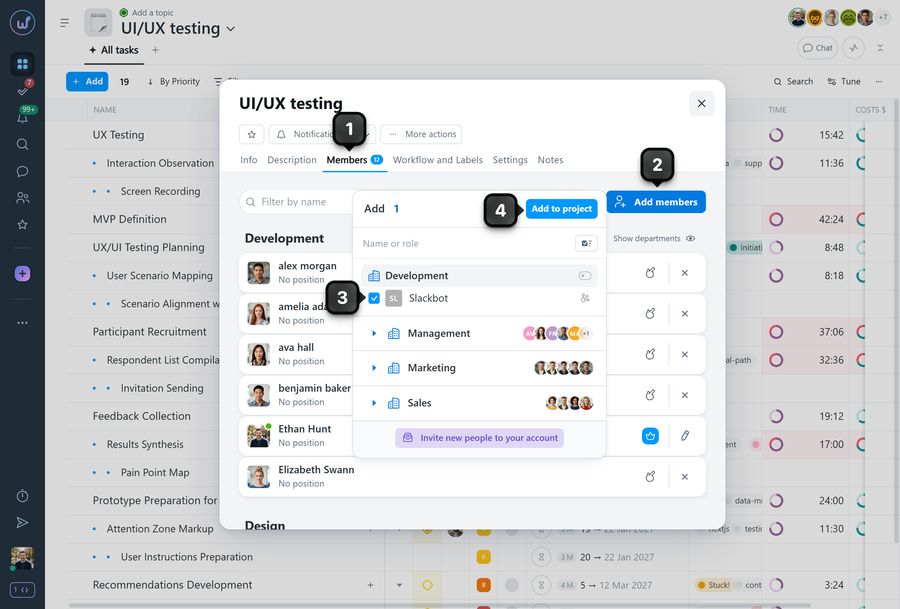
Your Slack bot is now a member of the selected project.
The next step is to subscribe it to the tasks you need. You can subscribe the bot to the tasks of a project in bulk — see How to bulk change subscribers in project tasks?
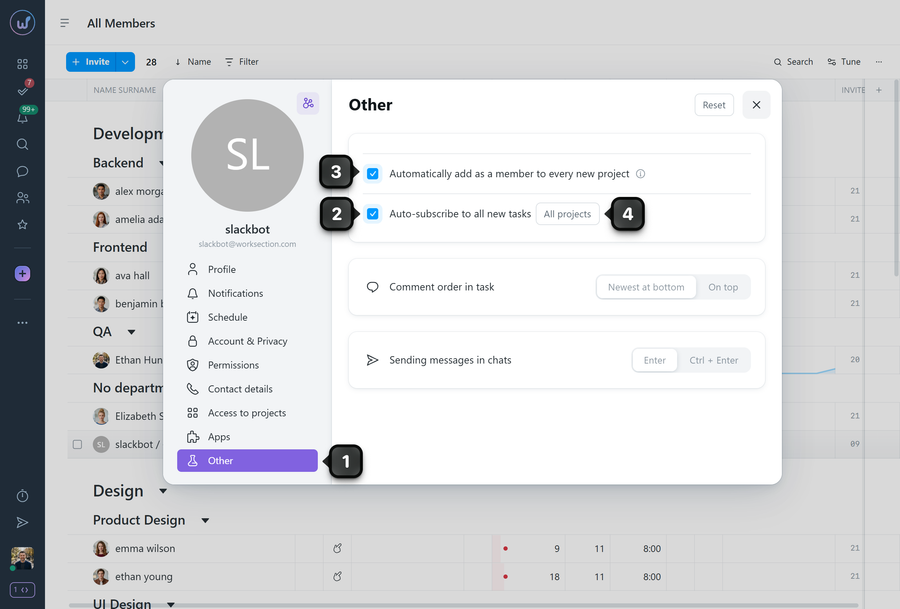
You can also set up auto-subscription of the bot to new tasks and projects — to do this, open the bot’s profile, go to the “Other” tab1, and select the “Auto-subscribe to all new tasks” option2.
If you wish, you can automatically add the created Slack bot to every new project3.
The “All projects” button4 next to the auto-subscribe option lets you choose the projects in which the bot automatically becomes a subscriber of new tasks.
Leave your review
Did this article help you?
Glad we could help! What was helpful?
Sorry this didn't help. What went wrong?

