Solutions
worksection
beta
help
What is the project panel and how do I use it?
The project panel is a slide-out side navigation panel that gives you a quick overview of your projects and their structure. It helps you navigate between projects while maintaining order and work context.
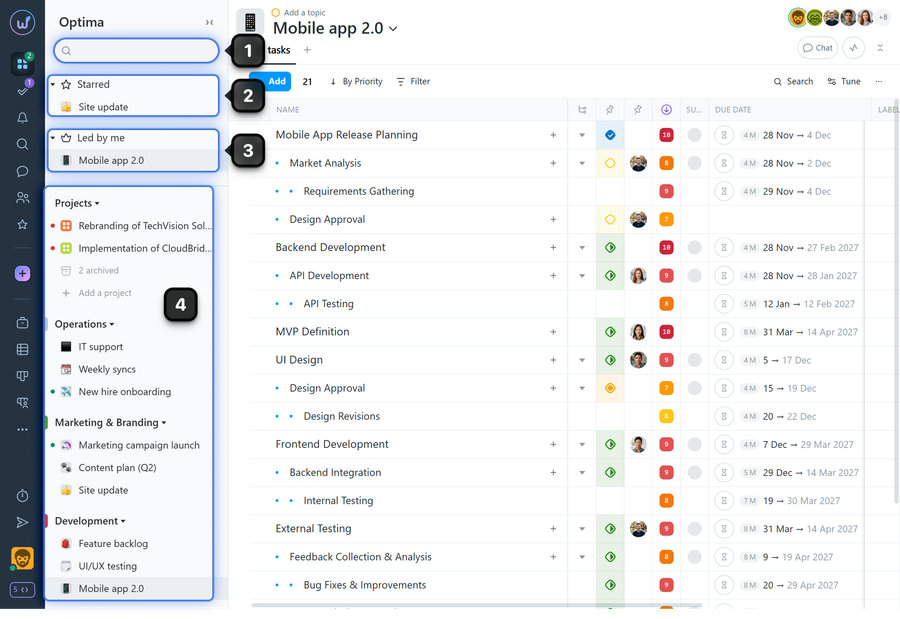
Panel structure:
- Search field — lets you quickly find a project by name
- "Starred" — contains a list of projects added to favorites
- "Led by me" — contains a list of projects where you have the Project Lead role
- Project folders — contain lists of projects you are a member of
Note Administrators who are not members of projects can, with the appropriate permissions, see the projects that members of their team/department belong to.
Please note!
- The availability of individual elements in the project panel and the actions available depend on your role and permissions in the account
- Administrators have access to extended project management capabilities and project structure
Leave your review
Did this article help you?
Glad we could help! What was helpful?
Sorry this didn't help. What went wrong?

