Solutions
worksection
beta
help
What keyboard shortcuts are available?
Keyboard shortcuts let you quickly perform key actions in Worksection without using a mouse. They are available on all pages of the system and significantly speed up work with the interface.
How to open the keyboard shortcuts window
- Click on the avatar in the lower-left corner
- Click the "Help" button
- Select "Keyboard Shortcuts"
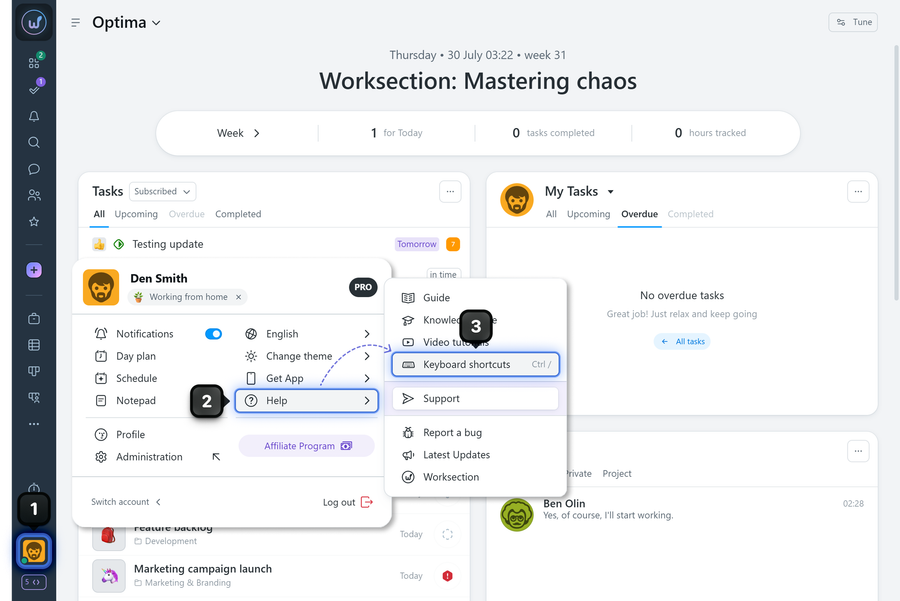
To instantly open the keyboard shortcuts window, press:
- Ctrl + / (Windows/Linux)
- ⌘ + / (Mac)
Tips
- Use Ctrl K to quickly open the command menu
- Keyboard shortcuts work on all pages of the system
Disabling keyboard shortcuts
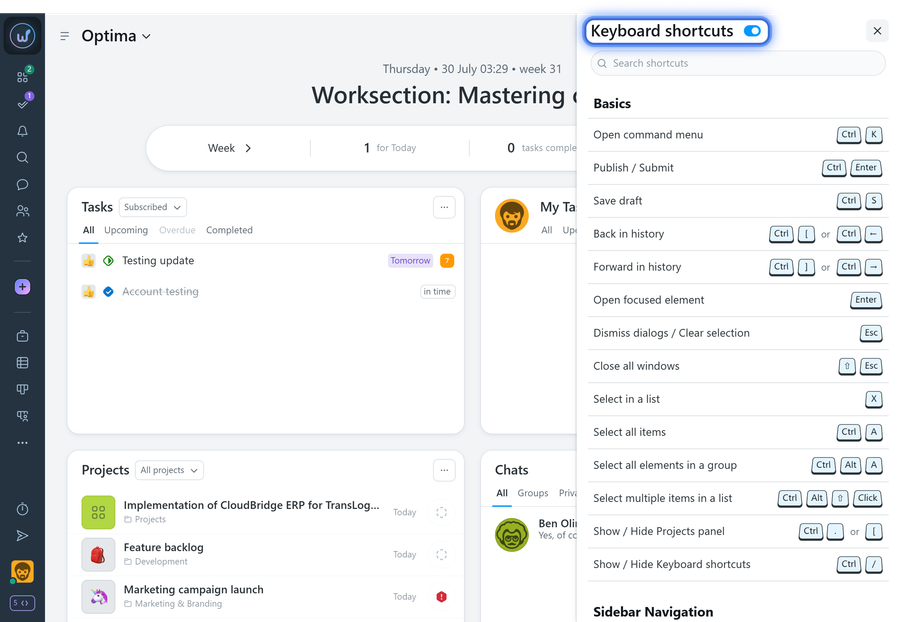
If keyboard shortcuts interfere with your work, they can be disabled:
- Open the keyboard shortcuts window (Ctrl + / or ⌘ + /)
- Turn off the keyboard shortcut group toggle
Notes
- After disabling, keyboard shortcuts can be re-enabled at any time
- Settings are saved to your account
- Some keyboard shortcuts may conflict with browser settings
Leave your review
Did this article help you?
Glad we could help! What was helpful?
Sorry this didn't help. What went wrong?

