Solutions
worksection
beta
help
Timer
Permissions The following have access to timer settings:
- Owner
- Account Administrator with the "Access to account settings" permission
The "Timer" feature allows members to track actual working time on tasks using a timer. If the option is disabled, users will not be able to start the timer in tasks.
To enable the timer functionality, go to "Administration" → "Time & Costs" and enable the "Timer" option.
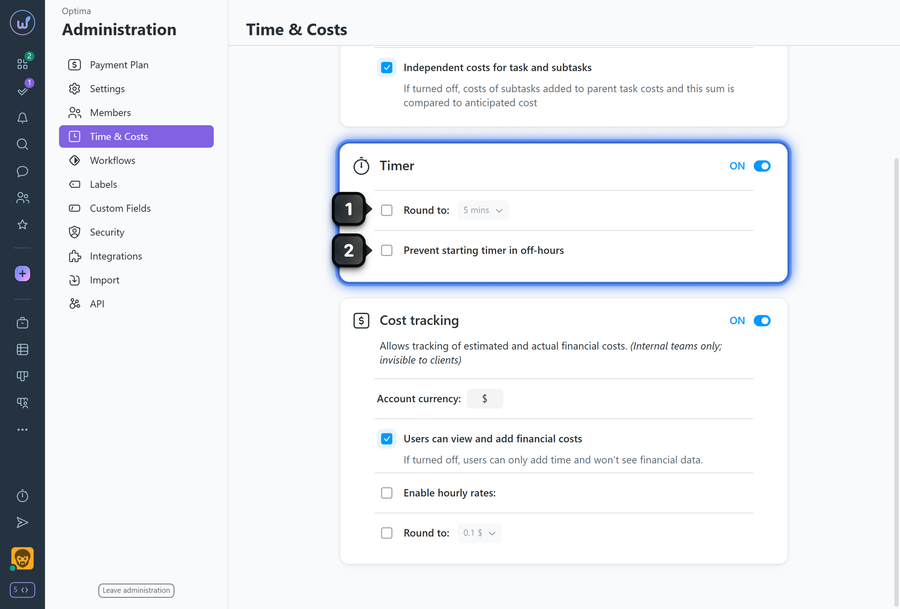
1 Round to — set rounding to 5, 10, or 15 minutes. For example, a 3-minute entry will be rounded to the selected value.
2 Prevent starting timer in off-hours — restrict timer usage to company working hours only. If enabled, all employee timers are automatically stopped after working hours end, even if someone forgot to stop them manually. Working hours are set in "Administration" → "Settings" → "Set working hours".
Leave your review
Did this article help you?
Glad we could help! What was helpful?
Sorry this didn't help. What went wrong?
Previous
Cost tracking

