Solutions
worksection
beta
help
Time tracking
Permissions The following have access to settings:
- Owner
- Account Administrator with the "Access to account settings" permission
What time tracking provides
The "Time tracking" feature allows tracking estimated and actual time costs within tasks or projects. If the option is disabled, time tracking will not be displayed in reports, and estimated and actual time cost tracking will be unavailable.
Where to enable/disable
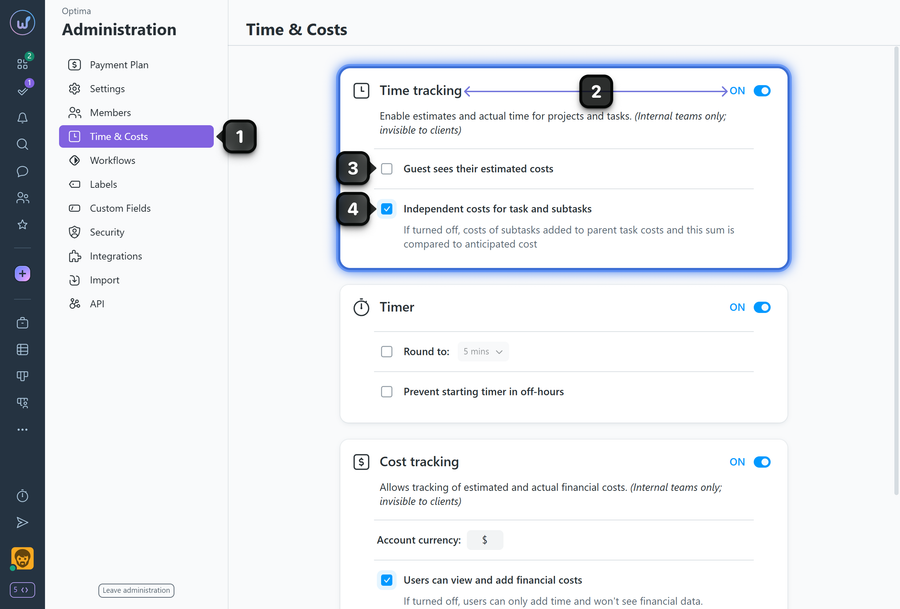
1 Go to "Administration" → "Time & Costs"
2 Enable or disable the "Time tracking" option
3 Guest sees their estimated costs — enable so that guests can see planned time costs.
4 Independent costs for tasks and subtasks — if disabled, subtask costs are summed into the parent task; if enabled — tracking is done separately.
Please note! When the "Time tracking" option is disabled, the timer will also not work.
Leave your review
Did this article help you?
Glad we could help! What was helpful?
Sorry this didn't help. What went wrong?

