Solutions
worksection
beta
help
Cost tracking
Permissions
- Owner
- Account Administrator with the "Access to account settings" permission
The "Cost tracking" feature allows tracking planned and actual financial costs within a task or project. If the option is disabled, planned and actual costs will not be displayed in the system.
To enable cost tracking, go to "Administration" → "Time & Costs" and enable the "Cost tracking" option.
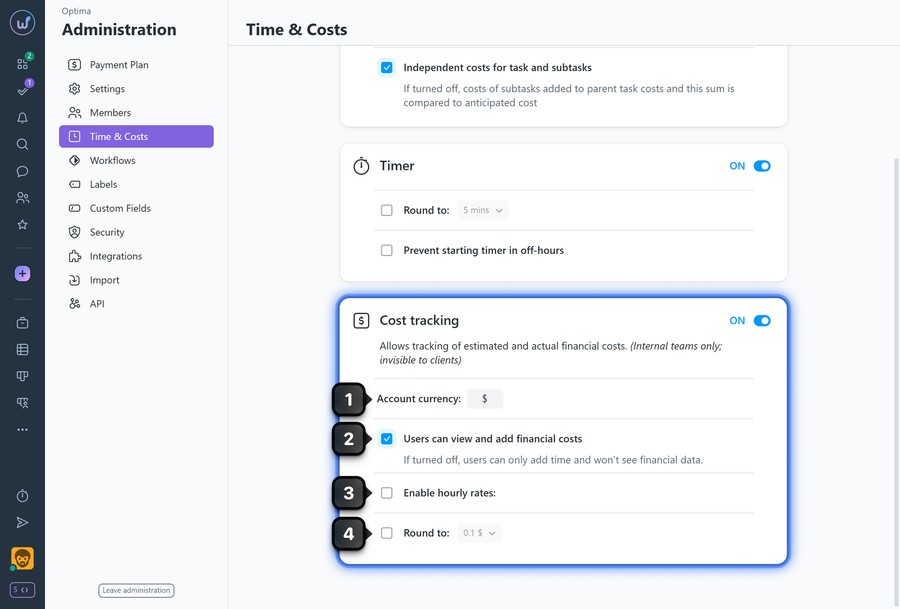
1 Account currency — change the currency symbol as needed.
2 Users can view and add financial costs — disable to prevent members with the "User" role from seeing financial costs; they will only be able to enter time costs. Administrators will continue to see both financial and time costs.
3 Enable hourly rates — set default hourly rates for new employees; their time costs will be calculated according to this rate.
4 Round to— round costs entered by users to 0.1; 1; 10, or 100.
Leave your review
Did this article help you?
Glad we could help! What was helpful?
Sorry this didn't help. What went wrong?
Previous
How to access Time & Costs settings?
Next
Timer

