Solutions
worksection
beta
help
How do I set up task dependencies on the Gantt chart, and what are the limitations?
Task dependencies show how pieces of work depend on each other: if one task’s dates change, the linked tasks shift automatically.
What types of dependencies are there?
Start-to-Start: task B starts right away or N days after task A starts. If A’s start date changes, B shifts accordingly.
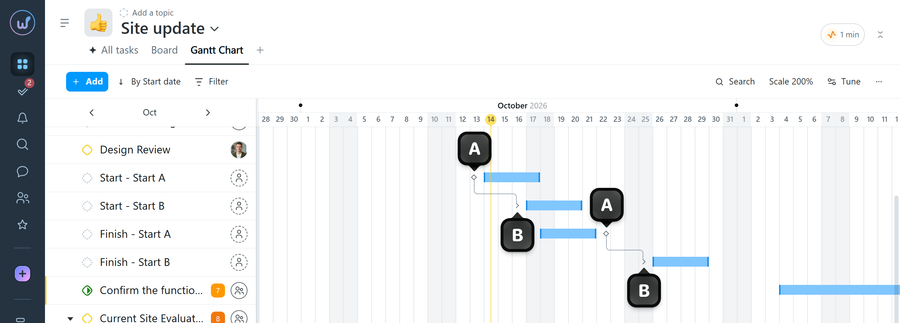
Finish-to-Start: task B starts right away or N days after task A finishes. If A is delayed, B’s start date is pushed back too.
Please note! A parent task and its subtasks are linked automatically: when you move the parent task on the chart, its subtasks follow it.
How do I set up a dependency on the chart?
Click the “♦” symbol1 next to task A, then the “>” symbol2 next to task B. The system automatically remembers the number of days between the tasks and the dependency type.
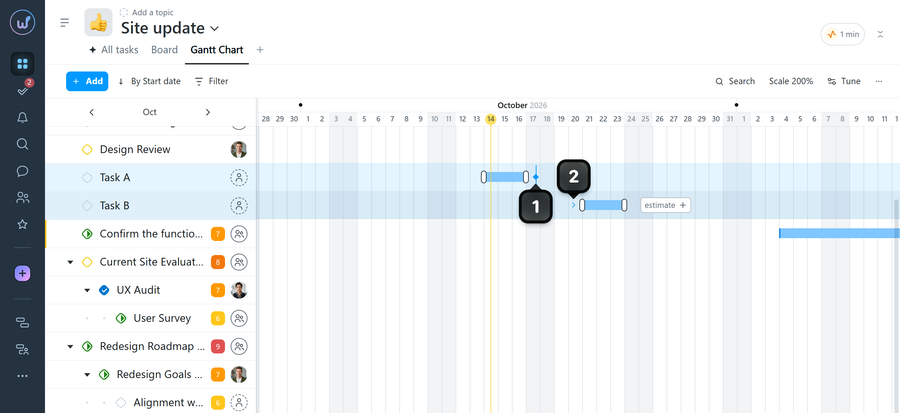
Once the dependency is set, the system remembers the number of days between the task dates. Any change to task A’s dates automatically affects task B. If you change task B’s dates manually, the system simply remembers the new number of days between the tasks.
You can link tasks from different projects to align deadlines across teams.
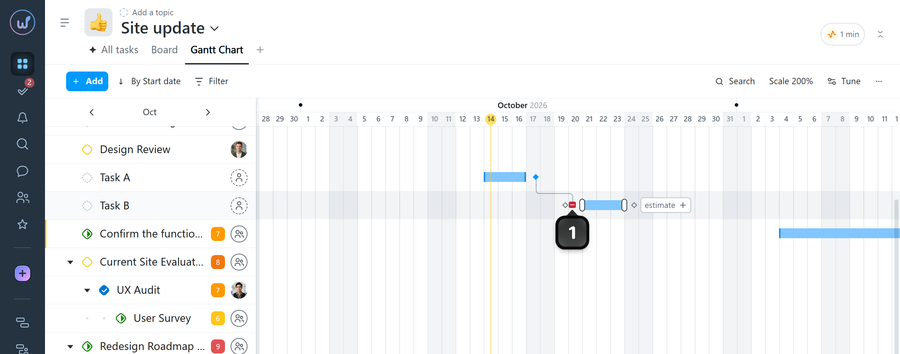
How do I remove a dependency?
Click the end of the dependency line1 between the tasks.
What are the limitations?
- Each task can depend on only one other task. Any number of tasks and subtasks can depend on it.
- You can’t create circular dependencies: if A depends on B, B can’t depend on A.
- The start date of a dependent task can’t be set earlier than the dependency type allows — neither on the chart nor when editing manually.
- For tasks with dependencies, you can’t drag dates on the calendar or change dates through bulk actions.
Leave your review
Did this article help you?
Glad we could help! What was helpful?
Sorry this didn't help. What went wrong?

