Solutions
worksection
beta
help
Can I synchronize Worksection calendar with my personal calendar?
Yes, you can! If your personal calendar supports the iCalendar format, then it is quite simple to sync. On the calendar page, click on «Sync» link at the bottom.

The synchronization window will open. Copy the link from the «Link to calendar» and give it to your personal calendar
iCalendar format is supported by Google Calendar, Microsoft Outlook 2007, Apple iCal, Mozilla Calendar…
If your calendar does not accept links that look like «webcal://», then change it to «webcal://» на «http://» and try again.
As an example, let's take a look at synchronization with Google Calendar.
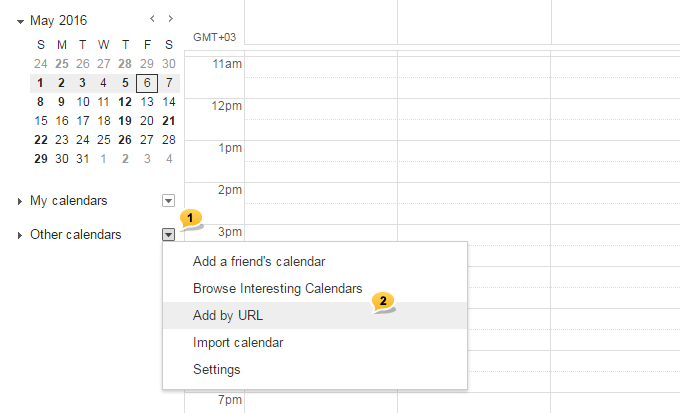
While in your Gmail, jump to «Calendar» link in the top menu. Then, on the left, choose «Other calendars» in the menu1. After that, in the pop-up window, choose «Add by URL»2.
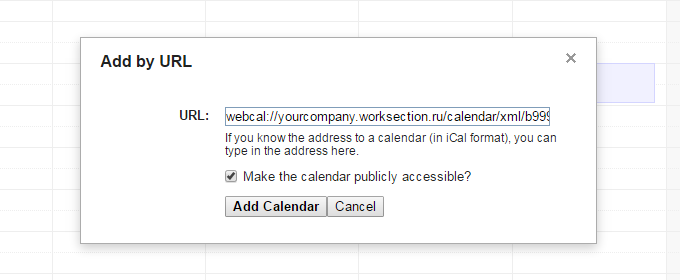
In the pop-up window «Add by URL», enter the Worksection calendar link in the «URL» field and click on the «Add calendar» button. The calendar will be added.
Leave your review
Did this article help you?
Glad we could help! What was helpful?
Sorry this didn't help. What went wrong?

