Solutions
worksection
beta
help
What do the colors on the calendar mean?
Color coding key can be found on any calendar page, right below the calendar grid at the bottom left.
Projects are in yellow color, tasks are in blue, and subtasks are in lime green (when they are not closed and currently active and not expired).
Grey color is for timely closed projects/ tasks/ subtasks. The red color shows the delay in completion of open projects/ tasks/ subtasks. After closing the overdue projects/ tasks/ subtasks, red color changes to purple.
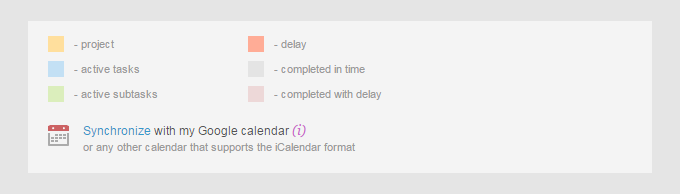
When you hover your mouse over a color, it becomes brighter the same way as the colors on the calendar.
Leave your review
Did this article help you?
Glad we could help! What was helpful?
Sorry this didn't help. What went wrong?

