Solutions
worksection
beta
help
3. Partner account
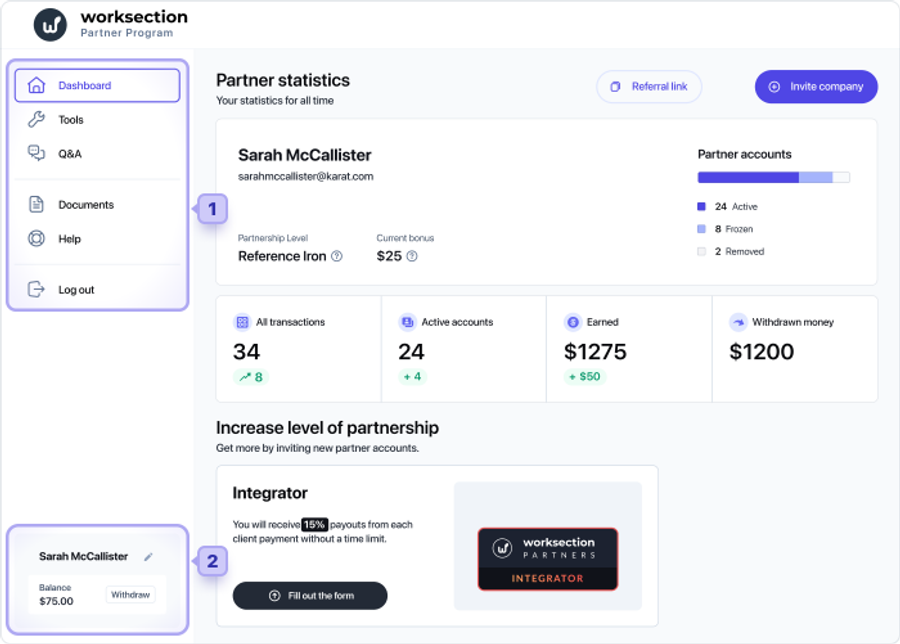
The Partner account consists of two sections - the Menu of the Partner account1 and the section for withdrawing funds2.
3.1 Main page (Dashboard)
The main page of the menu allows you to view the Partner's statistics on engaged customers, get a Referral link, invite a new company and change the level of the Partnership Program.
3.2 Tools
The Tools page (similar to the “Invite a company” on the main page) allows you to invite one or more companies by sending an email invitation1 to the responsible employees.
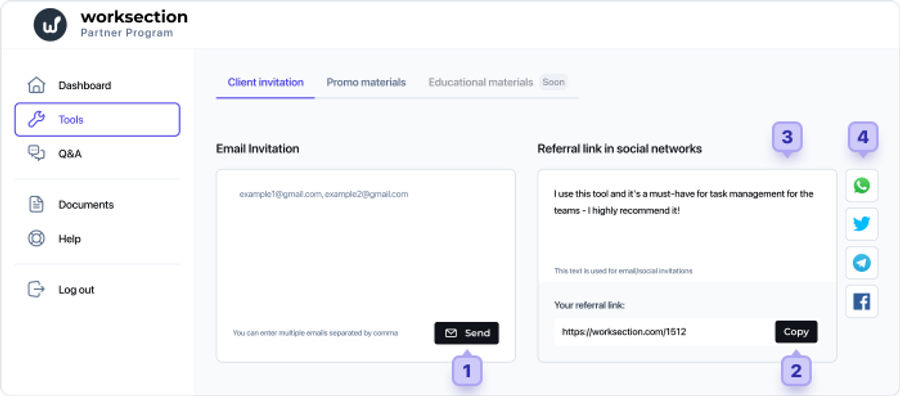
Your referral link2 is also available on this page, which you can copy or add the necessary text3 and share in social networks (Facebook, Twitter, WhatsApp, Telegram)4.
3.3 Q&A
A section with reference information and frequently asked questions about the Partnership Program.
3.4 Documents
A section with necessary documents. The set of documents in this section may vary depending on the Partner level. We recommend you to read our Handbook on Partnership Program, where we have all necessary information.
3.5 Help
Allows you to send a quick request to our technical support service. We will be happy to help you with any issues related to the Partnership Program.
3.6 Log out
For logging out from your Partner account.
Leave your review
Did this article help you?
Glad we could help! What was helpful?
Sorry this didn't help. What went wrong?
Previous
2. Partner levels

