Solutions
worksection
beta
help
How to set a member rate within a project?
You can set an individual hourly rate for a member within a specific project. This rate will take priority over the member's general rate from their profile and will only be used for cost calculations within this project.
This feature is available on the Premium plan.
Who can configure project rates?
Permissions project member rates can be set by:
- Owner
- Aministrator of entire account with the rights "allow admin to manage people" and "allow admin to manage the projects"
How to set a member rate within a project?
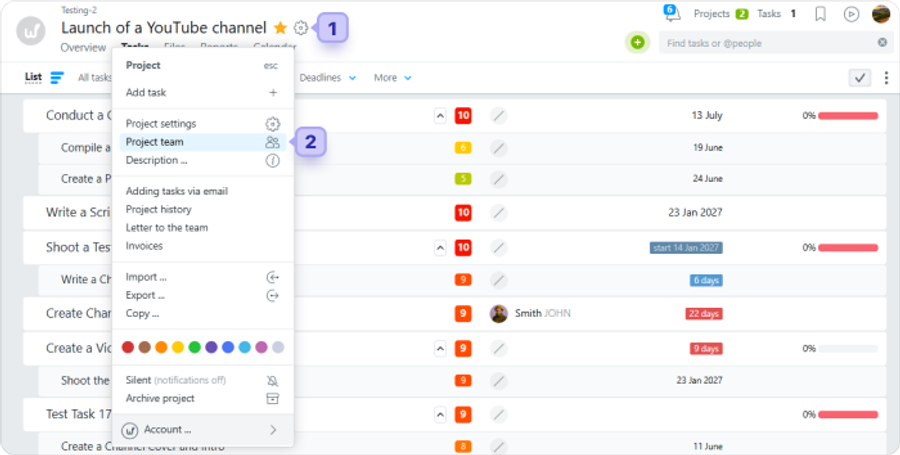
Open the required project, click the gear button1 and select "Project team"2.
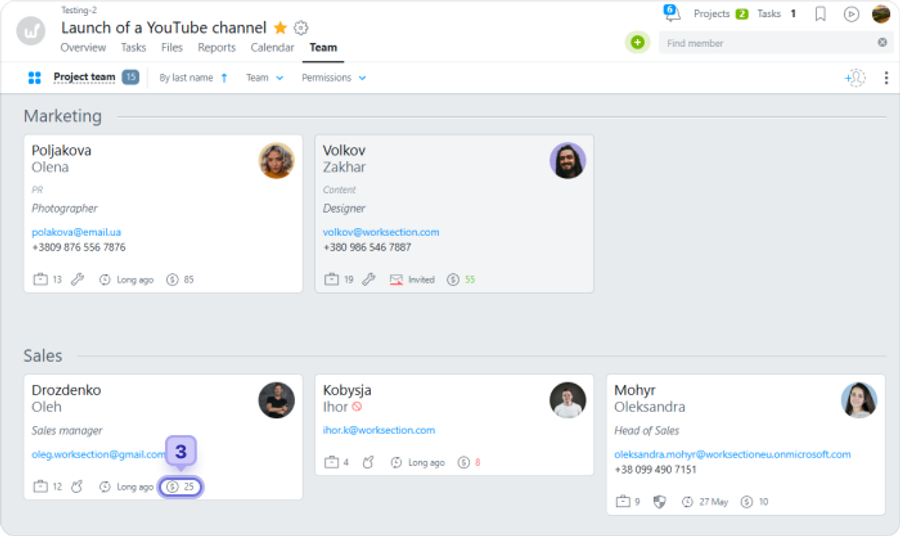
On the team page, hover over the required member's card, click the rate field3, enter the value and click outside the card to save.
What do the rate colors mean?
The color of the number in the rate field shows how the project rate compares to the member's profile rate.
- Red — the project rate is lower than the profile rate;
- Green — the project rate is higher than the profile rate;
- Grey — the project rate matches the profile rate.
How to revert to the profile rate?
To revert to the profile rate, open the member's profile, check their current rate and enter that value in the project rate field manually.
Leave your review
Did this article help you?
Glad we could help! What was helpful?
Sorry this didn't help. What went wrong?

