My tasks/ Where do I see the list of all the tasks assigned to me?
My tasks/ Where do I see the list of all the tasks assigned to me?
With this item, you can quickly access the list of all the tasks and subtasks assigned to you among all active projects.
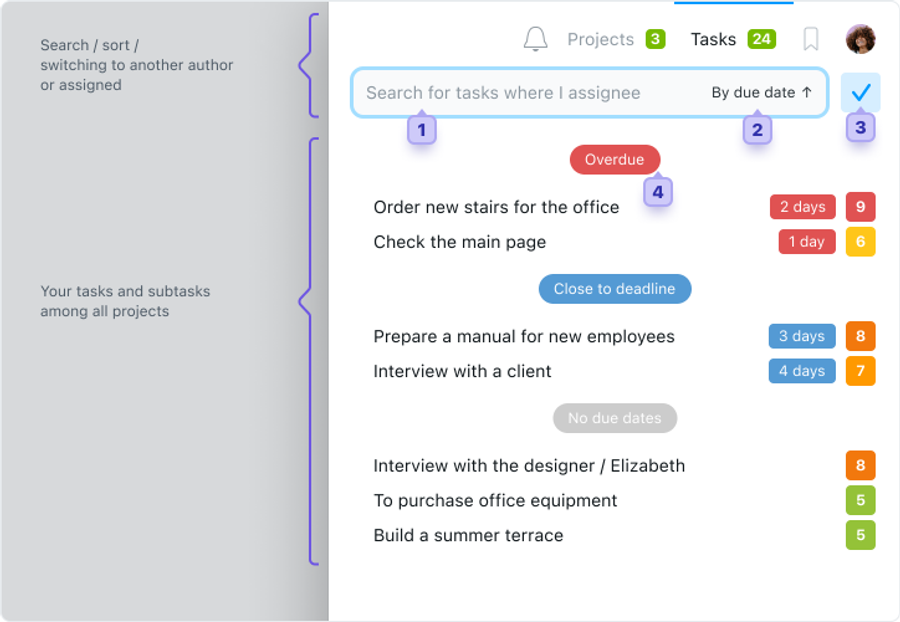
This is how the My tasks drop-down menu approximately looks like:
1 — A quick search of the desired task in the list.
2 — Selection of convenient types of task sorting (by priority, by due date, and by title).
3 — A switch that allows you to view the tasks where you are the author or the executive.
4 — A list of all your tasks, sorted by due date.2
5 — An option of viewing this same list on pages that allow obtaining the most complete and diversified information on this set of tasks.
6 — Panel with an option of opening the list of elements (preview in the window or jump directly to the detailed and complete task page).
How to take a task off from this list?
In order for a task or sub-task to be "gone" from the list of My tasks, it needs to be closed, or responsibility for it needs to be transferred to another person.