Solutions
worksection
beta
help
My projects / Quick access to active projects
With the help of this item, you can access all the active projects that you are a part of, and it can be done from any of your account pages. It helps to quickly switch between projects without the need to return to the Main page.
My projects drop-down list looks approximately like this:
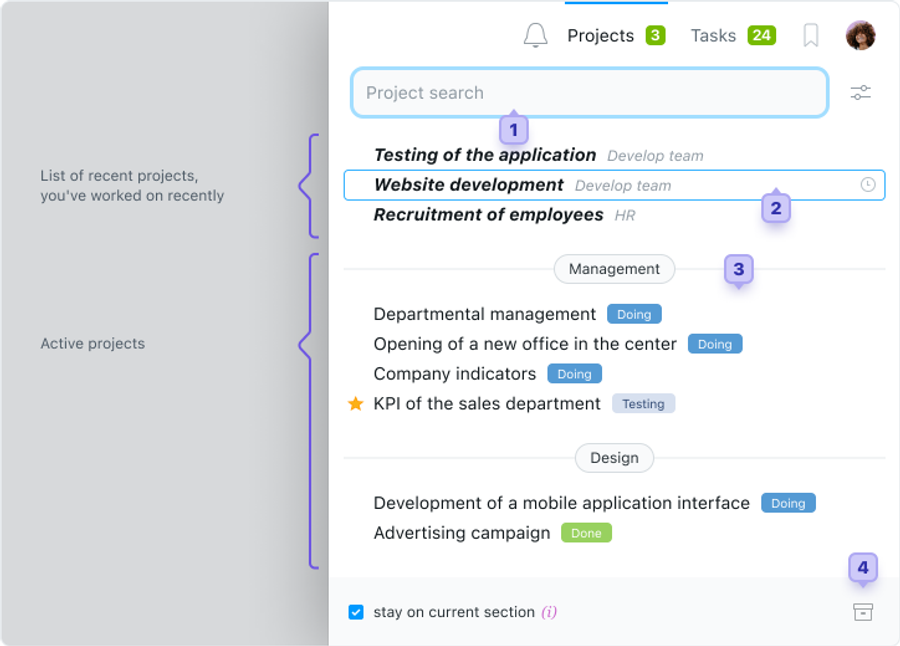
1 - Form of a Quick Search (relevant when there are many projects).
2 - List of recent projects, with which you have worked (maximum of five)
3 - Total active projects list (groups are formed from the main companies).
4 - Jump to the archive (if you cannot find your project in the list, check archive).
Please, note! Projects that are particularly important for you can be marked with a star, which will facilitate their visual search and speed up the switch.
Leave your review
Did this article help you?
Glad we could help! What was helpful?
Sorry this didn't help. What went wrong?

