Solutions
worksection
beta
help
How do I enable the Telegram integration?
Any member can enable the Telegram integration.
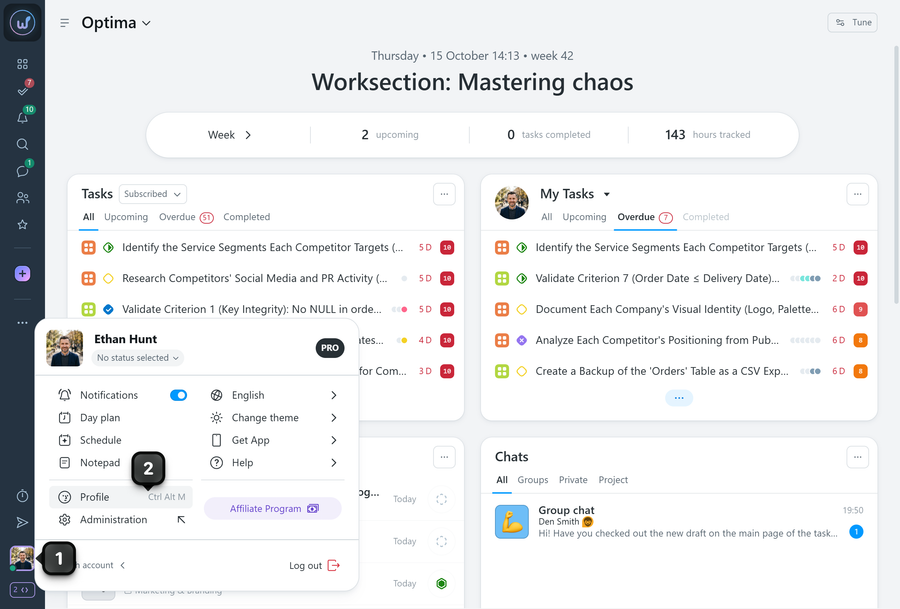
To do this, click your “avatar”1 in the bottom-left corner and go to “Profile”2:
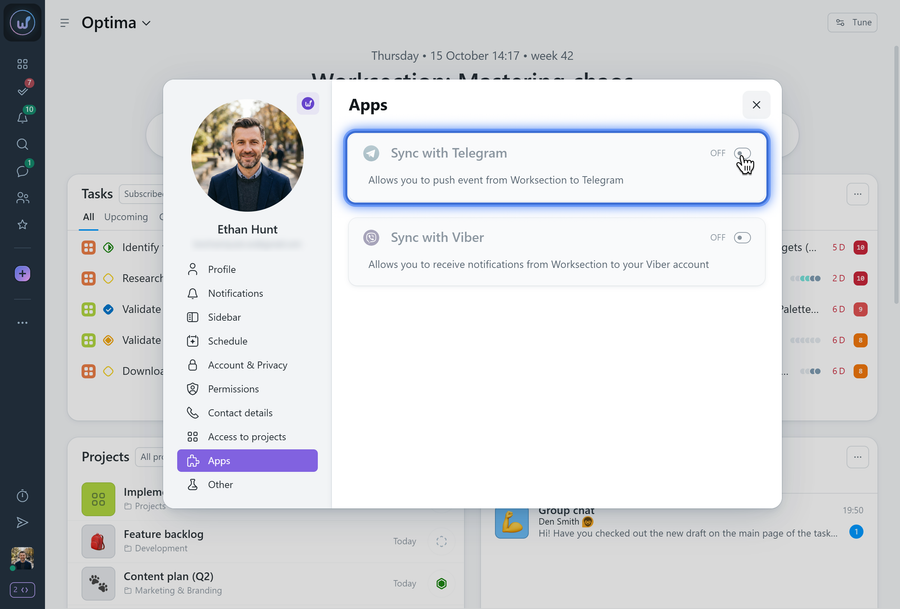
In your profile settings, in the “Apps” section, turn on the toggle in the “Sync with Telegram” field:
Scan the QR code with your phone’s camera and follow the link. The Telegram app must be installed on your smartphone.
The Telegram window will open — click “Start” there.
Note You can also enable the Telegram integration in the Worksection app on your smartphone or from a mobile browser. The connection works the same way, but you don’t need to scan the QR code.
The bot allows you to:
- receive notifications;
- reply to comments.
Bot commands allow you to view lists of projects, tasks, and members, and to create new tasks via Telegram.
For more details about the Telegram bot, see our Blog.
Leave your review
Did this article help you?
Glad we could help! What was helpful?
Sorry this didn't help. What went wrong?
Next
Telegram commands

