Solutions
worksection
beta
help
How to enter additional information about the company and upload its logo?
In order to add information about a company, jump to People1 section.
You will see a list of all the companies, departments, and users of the system. Find a company in which you want to add the new data and click on its name2.

Under the title, a form will open that will allow you to enter the data about the company where you will be able to upload a logo1 and add information about the company (address, phone, website, email)2. In the same form, you can set the time zone of the company and choose the language of the interface.
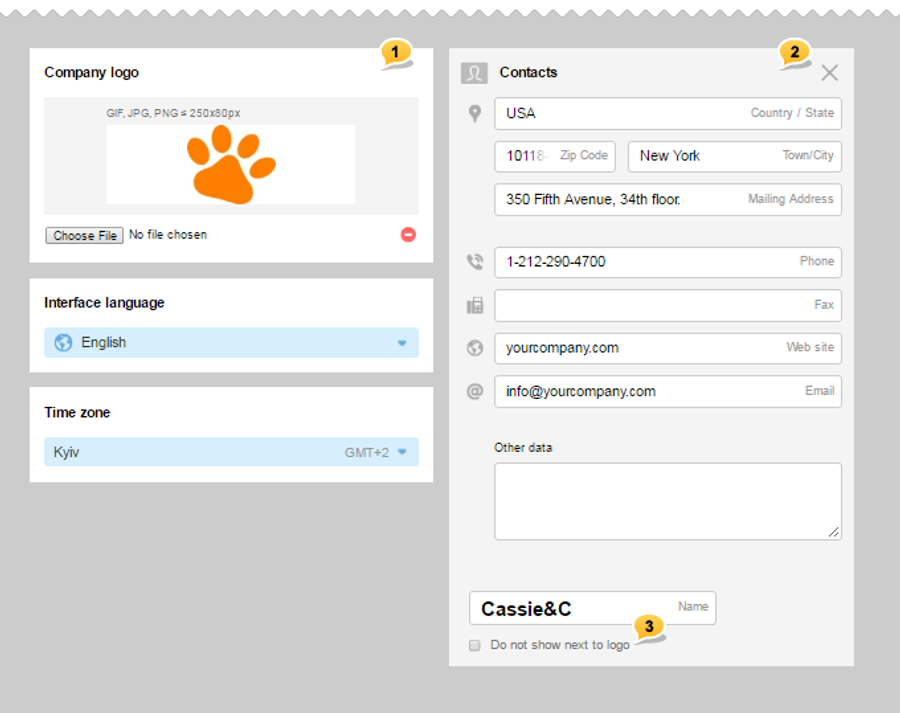
If you do not wish to display the name of the company along with the logo (for example, the name is already in the logo) — choose the corresponding option3.
Please, note! Save button appears only once you change something.
Leave your review
Did this article help you?
Glad we could help! What was helpful?
Sorry this didn't help. What went wrong?

