Solutions
worksection
beta
help
How to invite a client to an account?
To limit the client's access to «behind the scenes» of the company (for example, hide time and monetary costs of tasks), it is best to create a separate client group and invite your client there.
You can do this at the stage of creating a new project as well as when sending an invitation to the client to an existing project.
In order to invite a client at the stage of creating a new project, in the «Project Participants» section, choose «Add company»1. Specify the type of company to be added (in this case — Client) 2, enter the name3 and click «ОК». In the field of the client's company name, click «Add company» icon, enter your information and click «Invite user (s) to the project».
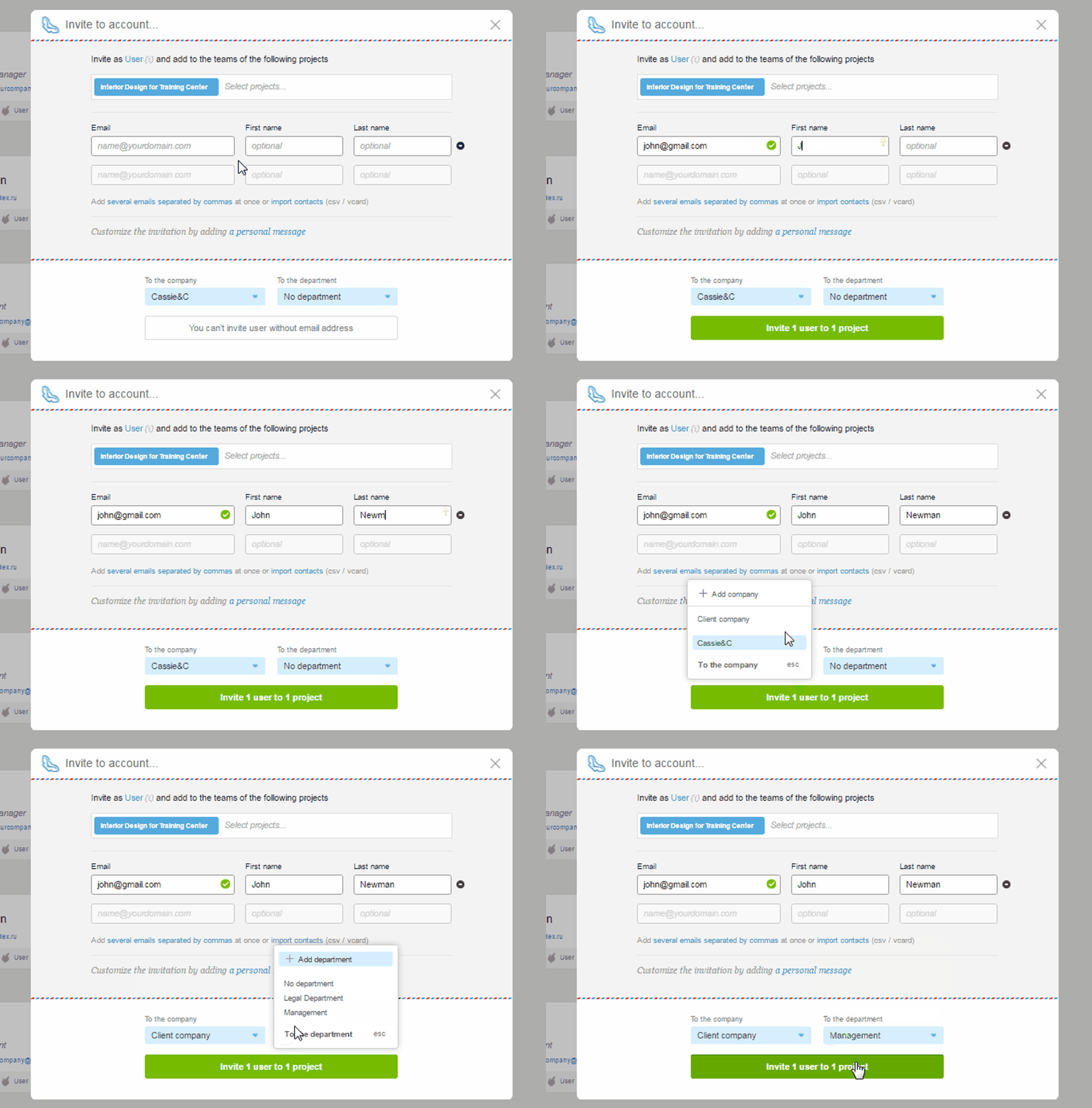
To invite a client to an existing project, jump to People and then click «Invite».
Fill out the required fields and select the project into which you want to invite a client, enter your company, department (optional), and click «Invite to the project».
Leave your review
Did this article help you?
Glad we could help! What was helpful?
Sorry this didn't help. What went wrong?

