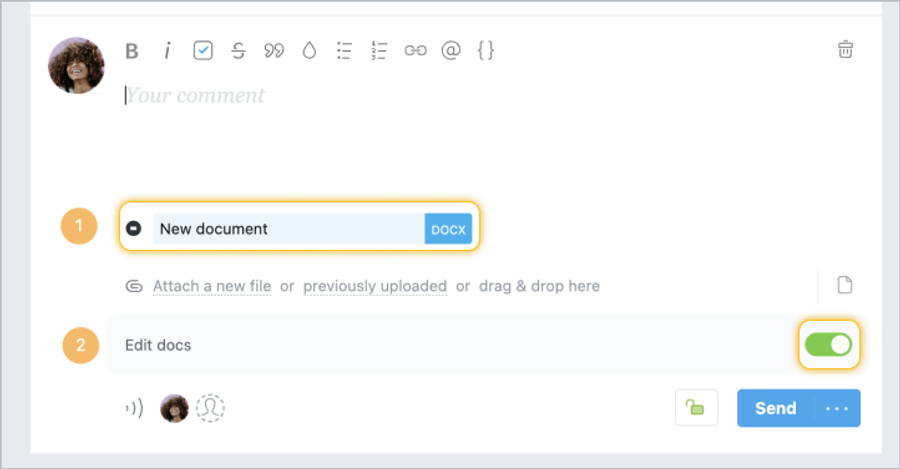
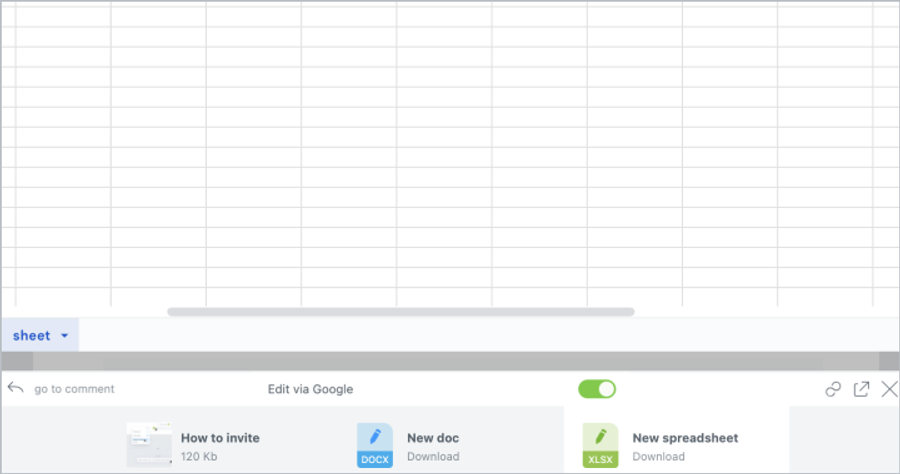
When you create a document1, presentation, or spreadsheet, as well as when you upload such documents, you can enable/disable their online editing using a special switch2.
Please note! The editing option is enabled by default.
You can enable or disable editing of a document at any time. To do this, simply turn the editing option on or off in the view mode. This can be done by the document author, project manager, and account administrators.
Editing will be available to all employees who have access to a particular file (task or subtask with a file). In addition, they will all be able to edit the document at the same time and see the history of changes. When you are done editing the document, simply close the page (the document is saved automatically).
If you have a Google account, you can view the history of changes to your documents. To do this, open the document in full screen mode (click on the document icon in the file list with ctrl/⌘ pressed or on the icon in document view). And then in the File menu, select See revision history (or press ⌘ + Alt + Shift + G).
Important! When you disable collaborative editing, the final version of the document is uploaded to your Worksection account and the entire revision history is lost.